
What's inside
- Best Budget Video Doorbell for Parents: Quick Comparison Table
- Why Does a Video Doorbell Help Parents?
- Best Budget Video Doorbell for Parents Reviewed
- Buying Guide: How to Choose the Best Budget Video Doorbell for Parents
- How to Install a Video Doorbell for Parents
- Which Best Budget Video Doorbell for Parents Should You Buy?
- Frequently Asked Questions About the Best Budget Video Doorbell for Parents
As an Amazon Associate I earn from qualifying purchases. This post may contain affiliate links at no extra cost to you.
The best budget video doorbell for parents is not a cheap doorbell that shows a blurry image, misses motion, and needs a monthly subscription to see video, and it is not an expensive doorbell that costs $200 and needs a professional to install. It is a budget video doorbell with a clear 1080p or 2K video, a wide field of view, two-way audio, motion detection, and a design that can be installed with a screwdriver, with a price under $100, so a parent can see who is at the door, talk to a visitor, and check on a child coming home from school, without paying a lot each month. A parent who wants a video doorbell needs one that is simple to use, reliable, and safe for a family home.
At techcats.net, we focus on tech gadgets. For this guide to the best budget video doorbell for parents in 2026, we compared current video doorbells that are widely sold, designed for home use, and suitable for a parent who wants a reliable doorbell for a front door, a back door, or a rental home. We looked at video resolution, field of view, power, storage, and price. Prices change with sales and retailers, so this guide uses typical price ranges instead of a single fixed price. Video, field of view, and storage figures are based on manufacturer listings, and real video quality depends on Wi-Fi, light, and placement. Always follow local laws on video recording, and tell visitors that a camera is in use, where required.
Every product below is a real, currently sold product, not a generic doorbell. Most are battery or wired video doorbells with 1080p or 2K video, which are the most useful types for parents in 2026, because they offer a clear image, a wide view, and a simple app. A doorbell with local storage can also work, though it may need a microSD card, while a doorbell with a subscription can work, though it may cost more each month.
Our Top Picks
Best Budget Video Doorbell for Parents: Quick Comparison Table
The table below compares six budget video doorbells for parents. Video is the video resolution, where given. Field of view is the field of view in degrees, where given. Power is the power source, where given. Storage is the storage type, where given. Two-way audio is whether it has two-way audio, where given. Best for is a note on what the doorbell is best for, such as parents or renters, where given. Price is the typical range, and rating is our editorial score based on video clarity, ease of install, app, motion detection, and value for parents.
| Budget Video Doorbell for Parents | Video | Field of View | Power | Storage | Two-Way Audio | Best For | Typical Price Range | Our Rating |
|---|---|---|---|---|---|---|---|---|
| Ring Video Doorbell, Battery, 1080p | 1080p HD | About 150 degrees | Battery or wired | Cloud, subscription | Yes | Best overall, parents | $70 – $100 | 4.9 / 5 |
| Blink Video Doorbell, Battery, 1080p | 1080p HD | About 135 degrees | Battery or wired | Cloud or local, Sync Module | Yes | Best for Blink, parents | $50 – $70 | 4.8 / 5 |
| Wyze Video Doorbell v2, Wired, 2K | 2K, 1440p | About 166 degrees | Wired | Cloud or local, microSD | Yes | Best for Wyze, parents | $40 – $60 | 4.8 / 5 |
| Eufy Video Doorbell E340, Battery, 2K | 2K, dual camera | About 160 degrees | Battery or wired | Local, no subscription | Yes | Best for Eufy, parents | $80 – $110 | 4.8 / 5 |
| TP-Link Tapo Video Doorbell D230S1, Battery, 2K | 2K, 1440p | About 160 degrees | Battery | Cloud or local, microSD | Yes | Best for Tapo, parents | $50 – $70 | 4.7 / 5 |
| Google Nest Doorbell, Battery, 1080p | 1080p HD | About 145 degrees | Battery or wired | Cloud, subscription | Yes | Best budget, parents | $100 – $130 | 4.7 / 5 |

WISDOM VIEW Wireless Smart Video Doorbell System,7" Touchscreen Display,1080P Video Doorbell Camera with Motion Detection,2-Way Audio,Local Storage No Subscription, Easy Install Without Wiring
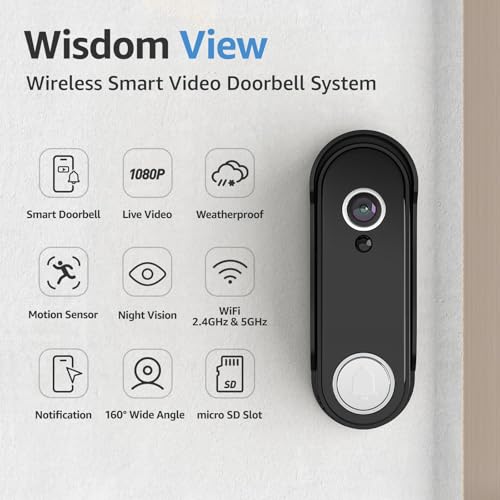


As an Amazon Associate we earn from qualifying purchases. Product prices and availability are accurate as of the date/time indicated.
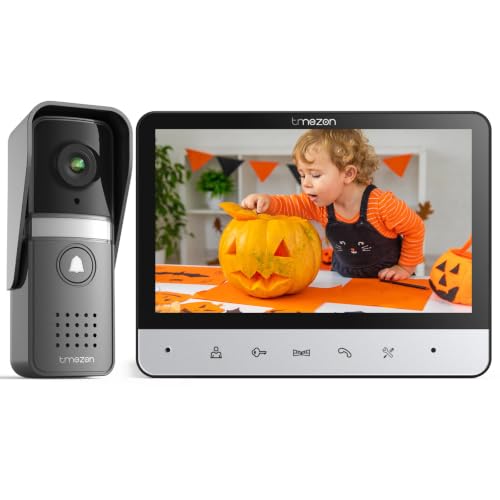
TMEZON Wired Video Intercom System,7 Inches Video Doorbell Camera with Monitor, Wired Video Door Phone Support Unlock, Monitoring, Intercom for Villa Home Office Apartment 500TVL(NTSC US Standard)
As an Amazon Associate we earn from qualifying purchases. Product prices and availability are accurate as of the date/time indicated.

KeonBell 2 Wires Video Door Phone intercom doorbell System, 7 Inch Touch Screen Monitor, 1080P, Remote Unlock, Human Detection, Two-Way Audio, Night Vision, Waterproof, RFID Access Control
As an Amazon Associate we earn from qualifying purchases. Product prices and availability are accurate as of the date/time indicated.
Note: Video figures are manufacturer listings, and a doorbell that lists 2K may show a clearer image than a doorbell that lists 1080p, though real clarity depends on Wi-Fi and light. Always check whether your door has existing wiring, so you know whether you need a battery or wired doorbell, and test Wi-Fi at your door before you buy. Prices can vary by retailer and sale, and some models listed at $50 to $70 may be available for less on sale, so check the current price before you buy.
Why Does a Video Doorbell Help Parents?
A video doorbell helps parents for three reasons: safety, convenience, and peace of mind. Safety matters because a parent can see who is at the door before opening it, so a child does not open the door to a stranger, while a video doorbell can record motion, so a parent can check who visited while they were out. Convenience matters because a parent can talk to a visitor through two-way audio, so they can tell a delivery driver where to leave a package, without going to the door.
Peace of mind matters because a parent can check on a child coming home from school, by getting a motion alert when the doorbell sees movement, and they can see whether a child arrived safely. A budget video doorbell that is easy to install, has a clear video, and does not need a monthly fee is better than an expensive doorbell that is hard to install.
Best Budget Video Doorbell for Parents Reviewed
1. Ring Video Doorbell, Battery, 1080p – Best Budget Video Doorbell for Parents Overall
The Ring Video Doorbell, Battery, 1080p, is our top pick because it offers a video resolution of 1080p HD, a field of view of about 150 degrees, battery or wired power, cloud storage with a subscription, two-way audio, and a price of $70 to $100. It has a reputation for Ring quality, a Video Doorbell design, and a popularity with parents who want a simple, reliable doorbell.
Ring designs the Video Doorbell with a focus on a simple battery doorbell, with a 1080p camera, motion detection, and a design that can be installed with a screwdriver. The Ring doorbell is a good choice if you want the best overall doorbell, you are a parent, and you want a Ring brand. The main limitation is storage, because it needs a subscription to see recorded video, though it offers a live view without a subscription.
The Ring Video Doorbell, Battery, 1080p, typically costs $70 to $100. Choose it if you want the best overall doorbell, you are a parent, and you want a Ring brand. It is the best choice for most parents.
2. Blink Video Doorbell, Battery, 1080p – Best Budget Video Doorbell for Parents for Blink Use
The Blink Video Doorbell, Battery, 1080p, is a Blink doorbell with a video resolution of 1080p HD, a field of view of about 135 degrees, battery or wired power, cloud or local storage with a Sync Module, two-way audio, and a price of $50 to $70. It has a reputation for Blink quality, a Video Doorbell design, and a popularity with parents who want a low price doorbell with local storage.
Blink designs the Video Doorbell with a focus on a budget battery doorbell, with a 1080p camera, motion detection, and a design that can be used with a Sync Module for local storage. The Blink doorbell is a good choice if you want a Blink doorbell, you are a parent, and you want a Blink brand. The main limitation is field of view, at about 135 degrees, which is narrower than Wyze, though it offers a lower price.
The Blink Video Doorbell, Battery, 1080p, typically costs $50 to $70. Choose it if you want a Blink doorbell, you are a parent, and you want a Blink brand. It is the best Blink choice in this guide.
3. Wyze Video Doorbell v2, Wired, 2K – Best Budget Video Doorbell for Parents for Wyze Use
The Wyze Video Doorbell v2, Wired, 2K, is a Wyze doorbell with a video resolution of 2K, 1440p, a field of view of about 166 degrees, wired power, cloud or local storage with microSD, two-way audio, and a price of $40 to $60. It has a reputation for Wyze quality, a Video Doorbell v2 design, and a popularity with parents who want a 2K doorbell at a low price.
Wyze designs the Video Doorbell v2 with a focus on a wired 2K doorbell, with a wide field of view, a microSD slot for local storage, and a design that can be installed with existing doorbell wiring. The Wyze doorbell is a good choice if you want a Wyze doorbell, you are a parent, and you want a Wyze brand. The main limitation is power, because it is wired only, so it needs existing doorbell wiring, though it offers a 2K video at a low price.
The Wyze Video Doorbell v2, Wired, 2K, typically costs $40 to $60. Choose it if you want a Wyze doorbell, you are a parent, and you want a Wyze brand. It is the best Wyze choice in this guide.
4. Eufy Video Doorbell E340, Battery, 2K – Best Budget Video Doorbell for Parents for Eufy Use
The Eufy Video Doorbell E340, Battery, 2K, is a Eufy doorbell with a video resolution of 2K, dual camera, a field of view of about 160 degrees, battery or wired power, local storage with no subscription, two-way audio, and a price of $80 to $110. It has a reputation for Eufy quality, a Video Doorbell E340 design, and a popularity with parents who want no monthly fee.
Eufy designs the Video Doorbell E340 with a focus on a dual camera doorbell, with a 2K camera for a visitor and a second camera for packages, local storage, and a design that does not need a subscription. The Eufy doorbell is a good choice if you want a Eufy doorbell, you are a parent, and you want a Eufy brand. The main limitation is price, at $80 to $110, which is higher than Wyze, though it offers local storage with no subscription.
The Eufy Video Doorbell E340, Battery, 2K, typically costs $80 to $110. Choose it if you want a Eufy doorbell, you are a parent, and you want a Eufy brand. It is the best Eufy choice in this guide.
5. TP-Link Tapo Video Doorbell D230S1, Battery, 2K – Best Budget Video Doorbell for Parents for Tapo Use
The TP-Link Tapo Video Doorbell D230S1, Battery, 2K, is a Tapo doorbell with a video resolution of 2K, 1440p, a field of view of about 160 degrees, battery power, cloud or local storage with microSD, two-way audio, and a price of $50 to $70. It has a reputation for TP-Link quality, a Tapo D230S1 design, and a popularity with parents who want a 2K battery doorbell at a mid price.
TP-Link designs the Tapo D230S1 with a focus on a battery 2K doorbell, with a wide field of view, a microSD slot, and a design that can be installed without wiring. The Tapo doorbell is a good choice if you want a Tapo doorbell, you are a parent, and you want a TP-Link brand. The main limitation is that it is battery only, so you need to recharge it every few months, though it offers a 2K video at a low price.
The TP-Link Tapo Video Doorbell D230S1, Battery, 2K, typically costs $50 to $70. Choose it if you want a Tapo doorbell, you are a parent, and you want a TP-Link brand. It is the best Tapo choice in this guide.
6. Google Nest Doorbell, Battery, 1080p – Best Budget Video Doorbell for Parents for Budget Use
The Google Nest Doorbell, Battery, 1080p, is a Google doorbell with a video resolution of 1080p HD, a field of view of about 145 degrees, battery or wired power, cloud storage with a subscription, two-way audio, and a price of $100 to $130. It has a reputation for Google quality, a Nest Doorbell design, and a popularity with parents who use Google Home.
Google designs the Nest Doorbell with a focus on a battery doorbell, with a 1080p camera, intelligent alerts, and a design that can be used with Google Home. The Nest doorbell is a good choice if you want a Google doorbell, you are a parent, and you want a Google brand. The main limitation is price, at $100 to $130, which is the highest in this guide, though it offers Google Home integration.
The Google Nest Doorbell, Battery, 1080p, typically costs $100 to $130. Choose it if you want a Google doorbell, you are a parent, and you want a Google brand. It is the best budget choice in this guide for Google Home users.
Buying Guide: How to Choose the Best Budget Video Doorbell for Parents
Before you buy, think about whether your door has existing wiring, whether you rent or own your home, whether you want a subscription, how wide your front door area is, and how much you want to spend. A doorbell that is perfect for a wired home may not work for a rental, and a doorbell that is perfect for a parent who wants no subscription may not work for a parent who wants cloud storage. The six points below cover the decisions that matter most for a budget video doorbell for parents.
1. Power, Battery vs Wired, and Rental vs Owned Home
Power is the first decision. A battery doorbell, such as Ring or Blink, can be installed without wiring, so it is best for a rental home, while a wired doorbell, such as Wyze v2, needs existing doorbell wiring, so it is best for an owned home. A battery doorbell needs to be recharged every few months, while a wired doorbell does not need recharging.
Choose a battery doorbell if you rent, you do not have wiring, and you want a simple install. Choose a wired doorbell if you own your home, you have wiring, and you do not want to recharge a battery. Check your door before you buy, so you know whether it has wiring, and test Wi-Fi at your door, so you know whether the doorbell will work.
2. Video Resolution, 1080p vs 2K, and Seeing a Face Clearly
Video resolution is the second decision. A doorbell with 1080p video, such as Ring or Blink, can show a clear image of a visitor, while a doorbell with 2K video, such as Wyze v2 or Eufy E340, can show a sharper image, so you can see a face more clearly. A 2K doorbell is better for most parents, because it offers a clearer image at a similar price.
Choose a 2K doorbell if you want the clearest image, you want to see a face, and you have good Wi-Fi. Choose a 1080p doorbell if you have slow Wi-Fi, you want a lower price, and you do not need the sharpest image. Test the video by viewing a live feed on your phone, before you buy, if possible, so you know whether it is clear.
3. Storage, Cloud vs Local, and Monthly Fee
Storage is the third decision. A doorbell with cloud storage, such as Ring, needs a subscription to see recorded video, while a doorbell with local storage, such as Eufy E340 or Wyze v2 with microSD, can store video locally without a subscription. Local storage is better for most parents who want no monthly fee, because it can save money over time.
Choose a doorbell with local storage if you do not want a monthly fee, you want to keep video at home, and you can use a microSD card. Choose a doorbell with cloud storage if you want to see video from anywhere, you do not mind a subscription, and you want cloud backup. Check the subscription price before you buy, so you know the total cost.
4. Field of View, 135 Degrees vs 166 Degrees, and Seeing Packages
Field of view is the fourth decision. A doorbell with a field of view of 135 degrees, such as Blink, can show a visitor, though it may not show a package on the ground, while a doorbell with a field of view of 166 degrees, such as Wyze v2, can show a visitor and a package, because it has a wider, taller view. A wide field is better for most parents, because it can show a child, a visitor, and a package.
Choose a doorbell with a wide field if you want to see packages, you have a large porch, and you want a complete view. Choose a doorbell with a narrower field only if you have a small porch, you only need to see a visitor, and you want a lower price. Check the field of view before you buy, so you know whether it covers your porch.
5. Two-Way Audio, Yes vs No, and Talking to a Visitor
Two-way audio is the fifth decision. A doorbell with two-way audio, such as all six doorbells in this guide, lets you talk to a visitor through your phone, so you can tell a delivery driver where to leave a package, or tell a child to wait, while a doorbell with no two-way audio can only show video, not talk. Two-way audio is important for parents, because it lets you communicate without opening the door.
Choose a doorbell with two-way audio if you want to talk to a visitor, you have children, and you want to control who enters your home. Test two-way audio by talking through the app, before your first use, so you know whether it is clear. Do not buy a doorbell with no two-way audio if you are a parent, because it limits what you can do.
6. Price, Total Cost, and Choosing a Video Doorbell on a Budget
Price ranges in this guide run from about $40 to $130 for a budget video doorbell for parents, depending on brand, video, and storage. A budget doorbell at $40 to $70, such as Wyze v2, Blink, or Tapo, is enough for most parents. A mid-price doorbell at $70 to $110, such as Ring or Eufy E340, offers a better build and a wider field. A premium budget doorbell at $100 to $130, such as Google Nest, offers Google Home integration.
Consider total cost as well as price. A doorbell that costs $50 and needs a subscription for $3 to $4 per month may cost $86 to $98 in a year, while a doorbell that costs $80 with no subscription may cost $80 in total. Budget for a doorbell, and if you need it, a subscription, a microSD card, and a chime, not just a doorbell. Do not buy the cheapest doorbell if it needs a subscription to see video, and do not buy the most expensive doorbell if you only need a simple video. A doorbell that has a clear 2K video, local storage, and two-way audio will help a parent see who is at the door more than a doorbell that is cheap but needs a subscription, or expensive but only works with one app.
How to Install a Video Doorbell for Parents
Installing a video doorbell for parents starts with checking whether your door has existing wiring, and choosing a battery or wired doorbell accordingly. Charge the battery doorbell, download the app, and follow the setup steps, so the doorbell connects to Wi-Fi. Mount the doorbell at about 48 inches high, so it can see a visitor’s face, and test the video, motion, and two-way audio, so you know whether it works.
Set up motion alerts, so you get a notification when someone is at the door, and set up a child account, so a child cannot change settings. Tell visitors that a camera is in use, where required, and follow local laws on video recording. Do not install a doorbell where it records a neighbour’s home, because it may violate privacy laws.
Which Best Budget Video Doorbell for Parents Should You Buy?
If you want the best budget video doorbell for parents, buy the Ring Video Doorbell, Battery, 1080p. It costs $70 to $100, it offers a video resolution of 1080p HD, a field of view of about 150 degrees, and battery or wired power, which is the best balance for most parents.
If you want a Blink doorbell, buy the Blink Video Doorbell, Battery, 1080p. If you want a Wyze doorbell, buy the Wyze Video Doorbell v2, Wired, 2K. If you want a Eufy doorbell, buy the Eufy Video Doorbell E340, Battery, 2K. If you want a Tapo doorbell, buy the TP-Link Tapo Video Doorbell D230S1, Battery, 2K. If you want a Google doorbell, buy the Google Nest Doorbell, Battery, 1080p.
All six doorbells in this guide are currently sold, designed for home use, and suitable for a parent who wants a reliable doorbell for a front door, a back door, or a rental home. Pick the one that matches whether your door has wiring, whether you rent or own, whether you want a subscription, how wide your porch is, and your budget, and always test Wi-Fi at your door before you buy.
Disclosure: techcats.net may earn a commission from purchases made through links on this page, at no extra cost to you. Prices listed are typical ranges and can vary by retailer and sale. Video, field of view, and storage figures are manufacturer claims and can vary by model. Always follow local laws on video recording, and tell visitors that a camera is in use, where required.
Frequently Asked Questions About the Best Budget Video Doorbell for Parents
What is the best budget video doorbell for parents?
What is the best budget video doorbell for parents? In most cases, the Ring Video Doorbell, Battery, 1080p, is best overall, because it costs $70 to $100, it offers a video resolution of 1080p HD, a field of view of about 150 degrees, and battery or wired power. The Wyze Video Doorbell v2 is best for 2K video at a low price, while the Eufy E340 is best for no subscription, and the Blink Video Doorbell is best for a low price.
Do I need a subscription for a video doorbell?
Do you need a subscription for a video doorbell? In most cases, no, you do not need a subscription for a video doorbell, if it offers local storage, such as Eufy E340 or Wyze v2 with microSD, because it can store video locally without a monthly fee. A doorbell with cloud storage, such as Ring or Google Nest, needs a subscription to see recorded video, though it offers a live view without a subscription. Choose a doorbell with local storage if you do not want a monthly fee, and a doorbell with cloud storage only if you want cloud backup and you do not mind a subscription.
Can I install a video doorbell in a rental home?
Can you install a video doorbell in a rental home? In most cases, yes, you can install a video doorbell in a rental home, if you use a battery doorbell, such as Ring, Blink, or Tapo, because it can be installed with screws or adhesive, without wiring, and it can be removed when you move. A wired doorbell needs existing wiring, so it may not work in a rental, and you should ask your landlord before you drill holes. Use a battery doorbell for a rental, and a wired doorbell only if you own your home and you have wiring.
How do I keep my child safe with a video doorbell?
How do you keep your child safe with a video doorbell? In most cases, you keep your child safe with a video doorbell by setting up motion alerts, so you get a notification when someone is at the door, by teaching your child not to open the door to a stranger, and by using two-way audio, so you can talk to a visitor without opening the door. Set up a child account, so a child cannot change settings, and check video when a child comes home from school, so you know whether they arrived safely. Do not let a child open the door to a stranger, even if the video doorbell shows a friendly face.
Related guides
- Best Switch for Student NAS Storage: 6 Network Switches for Student NAS in 2026
- Best Cheap Baby Monitor for Parents in 2026: 7 Monitors That Offer Clear Video, Reliable Audio, and Peace of Mind for Parents
- Best Headphones vs Soundbar for Gaming in 2026: Positional Audio, Voice Chat, and Living-Room Freedom Compared for Competitive and Cinematic Players
- Best Drone for Student Videography in 2026: 7 Drones That Offer 4K Video, Stable Flight, and Reliable Use for Student Videography
More from Amazon
Programs that pair well with the guide above. Offers and eligibility are set by Amazon and may change.
Set up recurring deliveries of everyday items on eligible products. Terms and savings are set by Amazon.
Explore Subscribe & SaveFree shipping on eligible items, Prime Video and more. Eligible new members can start with a free trial.
Start a Prime free trialAudiobooks and podcasts to listen to on the go. Eligible new members can start with a free trial.
Try Audible freeRead from a large library of eBooks and audiobooks on any device. Check Amazon for current plans.
Explore Kindle UnlimitedAs an Amazon Associate we earn from qualifying purchases.

Write Your Review
No reviews yet. Be the first to share your experience!