
What's inside
- Best Microphone for Student Vlogging by Setup
- Quick Comparison: Best Microphone for Student Vlogging Models
- Detailed Reviews: Best Microphone for Student Vlogging Picks
- Buying Guide: Choosing the Best Microphone for Student Vlogging
- Frequently Asked Questions About the Best Microphone for Student Vlogging
As an Amazon Associate I earn from qualifying purchases. This post may contain affiliate links at no extra cost to you.
The best microphone for student vlogging is the one that fixes the problem your viewers actually hear. Watch any first student vlog back on headphones and the picture is usually fine — a modern phone handles that — while the sound is a distant voice swimming in room echo, air conditioning, corridor noise, and the clatter of a shared kitchen. Viewers forgive a soft image in a way they never forgive hard-to-follow audio, because they can look away from a video and keep listening, but they cannot listen away from a bad recording. The good news for a student budget is that the fix is mostly distance, not money. A microphone near your mouth, even an inexpensive one, will beat an expensive microphone on top of a camera across the room almost every time, because closeness is what raises your voice above the room.
That is why this guide is led by small wireless clip-on systems — DJI’s Mic Mini and Mic 2 classes, Rode’s Wireless ME, and Hollyland’s Lark M2 class — ahead of traditional camera microphones. A wireless transmitter clips to a shirt, records your voice at a consistent distance whether you are at a desk, walking a campus path, or filming a friend across a table, and sends it to a receiver on your phone or camera. The shotgun-style models here, Rode’s VideoMicro II class and Shure’s MV88+ approach, still earn their place for a specific kind of vlogging: one person, at a desk or on a tripod, in a reasonably controlled room, where simplicity and never charging anything matter more than freedom to move. Prices are typical ranges rather than exact figures because these products are sold in several kit configurations — one transmitter or two, phone receiver or camera receiver, charging case included or not — and the configuration, as the buying guide explains, is where student budgets are won or wasted.
Two non-audio rules belong at the top of a student guide. First, consent and place: record only where you are allowed to, follow your school or university’s current rules on filming in classes, libraries, residences, and other people’s spaces, and ask before you record anyone closely enough for their voice to be the content — a roommate, a lecturer, and a stranger in a dining hall are three different permissions, and a microphone that picks up a whole room picks up people who never agreed to be in your video. Second, privacy in your own material: a dorm vlog records addresses, timetables, ID cards, screens, and other students in the background, so review footage before posting as a habit, not as damage control. A good microphone makes voices clearer, including the ones you should not publish.
Our Top Picks
Best Microphone for Student Vlogging by Setup
Phone vlogging and walking around campus: a wireless clip-on system
If you film on your phone and you move — dorm tours, day-in-the-life videos, interviews, society and sports content — start with the DJI Mic Mini, Rode Wireless ME, or Hollyland Lark M2 classes. Buy the configuration that matches your phone’s port and your real format: a single transmitter if you are almost always solo, a two-transmitter kit if you interview or film with a friend regularly, because retrofitting a second transmitter later is usually the expensive way to arrive at the kit you needed. Check, in the maker’s current documents, exactly which receivers and cables are in the box for your phone, because this category’s packaging variations are where most student returns are born.
Desk vlogging, study content, and streaming from one chair: simple, wired, always ready
For a fixed desk setup — study-with-me videos, commentary, application and revision advice, a small streaming channel — a compact shotgun or phone microphone such as the Rode VideoMicro II or the Shure MV88+ class can be the smarter purchase. It lives on the camera or phone mount, needs no charging routine, and in a small, soft-furnished room its directionality helps reject some of what is behind the camera. Add a small tripod and film in the softest corner of your room, with curtains, bedding, and clothes doing quiet acoustic work that no microphone setting can imitate.
Two people, interviews, and society content: budget for the second transmitter now
Student channels grow sideways into other people: flatmates, teammates, interviewees, a friend who becomes a co-host. If that is even a likely direction, the two-transmitter versions of the DJI and Hollyland systems, or a Rode system bought in its multi-transmitter configuration where the maker offers it, are cheaper bought once than assembled later. A second voice recorded on the camera’s built-in microphone while yours is crisp on a clip-on sounds worse than both voices recorded modestly, because the contrast advertises the problem in every exchange.
Quick Comparison: Best Microphone for Student Vlogging Models
| Model | Key Specs | Best For | Typical Price Range | Rating |
|---|---|---|---|---|
| DJI Mic Mini | Wireless clip-on system class, phone and camera receiver configurations, charging case classes, battery and range specs per maker documents | Best microphone for student vlogging overall | $90 – $170 by kit class | 4.6 / 5 |
| Rode Wireless ME | Wireless clip-on system class, receiver with built-in microphone feature class per maker, phone and camera configurations per maker | Best for interviews | $120 – $200 by kit class | 4.5 / 5 |
| Hollyland Lark M2 | Wireless clip-on system class, very small transmitter design class, charging case class, phone and camera versions per maker | Best small and discreet system | $110 – $180 by kit class | 4.5 / 5 |
| DJI Mic 2 | Wireless system class with internal recording feature class per maker, charging case class, receiver configurations per maker | Best step-up system | $200 – $350 by kit class | 4.4 / 5 |
| Rode VideoMicro II | Compact shotgun microphone class, camera and device connection classes per maker, no battery required design class | Best simple desk and camera mic | $70 – $100 | 4.4 / 5 |
| Shure MV88+ | Phone microphone and video kit class, app control classes per maker, tripod and mount inclusions by kit per maker | Best phone video kit | $200 – $280 by kit class | 4.3 / 5 |

MAYBESTA Wireless Mini Microphone for iPhone, Android Phone - Lavalier Lapel Mic for Audio Video Recording - Clip on Content Creator Microphones for YouTube Tiktok Podcast Vlogging
As an Amazon Associate we earn from qualifying purchases. Product prices and availability are accurate as of the date/time indicated.

wedaniya Wireless Mini Microphone for iPhone, Android, 2 Pack Clip on Mini Mic with USB-C & Lightning, 2-in-1 Noise Reduction Lavalier Lapel Mic for Video Recording, Podcast, Vlogging, YouTube
As an Amazon Associate we earn from qualifying purchases. Product prices and availability are accurate as of the date/time indicated.
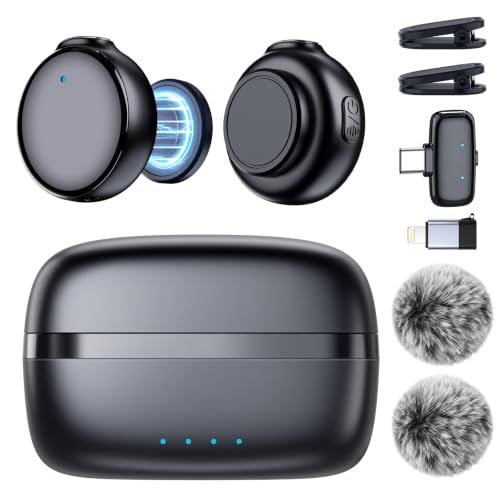
Vktmuhd Wireless Lavalier Mic for iPhone Android,3 Noise Modes,Mini Mics | 30H Charging Case,130ft, Clip on & Magnetic, Lapel Microphone for Vlogging,Content Creators,YouTube,Video Recording,TikTok
As an Amazon Associate we earn from qualifying purchases. Product prices and availability are accurate as of the date/time indicated.
Connection type, included receivers and cables, transmitter count, battery life, wireless range, and internal recording are each maker’s specification for the current exact kit and should be confirmed in that maker’s current documents and box contents before purchase, because kits with the same product name can be packaged for different phones and cameras. Prices are typical street ranges by kit configuration as described. A tripod or phone mount, a small wind muff for outdoor use where the maker offers one, and headphones for monitoring are separate parts of a vlogging setup.
Detailed Reviews: Best Microphone for Student Vlogging Picks
1. DJI Mic Mini – Best Overall
The Mic Mini leads a student table because it aims at the whole student problem: a small, light transmitter that does not drag a shirt collar down, a charging case habit borrowed from earbuds that suits a life lived out of a backpack, and kit versions aimed at phones as well as cameras. Its sound, used close as a clip-on should be, is the largest single upgrade most phone vloggers will ever make.
Choose the kit by your phone’s port and your format’s transmitter count, from DJI’s current box contents, not from a listing’s headline. Charge the case as part of your Sunday routine, keep the transmitters in it, and this system will simply be ready, which for a student schedule is a feature as real as any specification.
2. Rode Wireless ME – Best for Interviews
Rode’s Wireless ME earns its place on a thoughtful feature: its receiver class includes a built-in microphone in the maker’s design, which gives an interviewer a way to record their own voice while a transmitter sits on the guest. For student interviews, society content, and vox pops where the questions matter as much as the answers, that solves a problem other budget systems leave to post-production.
Confirm the exact kit’s transmitters, receivers, and cables in Rode’s current documents, and practise the two-voice setup once at home, checking levels for both speakers. An interview system rehearsed for five minutes sounds professional; one assembled in front of a waiting guest sounds like a tutorial in progress.
3. Hollyland Lark M2 – Best Small and Discreet
The Lark M2 class competes on size and simplicity: very small transmitters that can be clipped or worn with the maker’s accessories, a charging case, and versions packaged for phones and for cameras. On camera, discretion matters — a transmitter that does not pull at a neckline or dominate the frame is one a guest forgets, and a guest who forgets the microphone talks like a person.
Its small size makes loss the main ownership risk, so build the habit this guide recommends for every wireless row: transmitters live in the case, the case lives in one pocket of one bag. Buy the version made for your devices, in Hollyland’s current packaging, rather than adapting the wrong receiver with a chain of cables.
4. DJI Mic 2 – Best Step-Up
The Mic 2 class steps up with features such as internal recording in the transmitters, in the maker’s stated design — a safety copy recorded on the transmitter itself if a wireless link drops or a level is set badly. For a student filming events, performances, or one-chance interviews, that insurance can save material that cannot be reshot.
It costs step-up money, and a solo desk vlogger will use little of what the extra buys. Choose it when your format genuinely includes unrepeatable recording, and learn its internal recording and file handling from DJI’s documents before an important shoot, not during one.
5. Rode VideoMicro II – Best Simple Desk and Camera Mic
The VideoMicro II is the argument for simplicity: a compact shotgun microphone that needs no charging, mounts on a camera or, with the right cable in the maker’s system, serves a phone or desk setup, and improves any fixed-position recording over a built-in microphone. For a study channel filmed from one chair, it may be all the microphone the format ever needs.
Its directionality is not magic — it favours what it points at, in a room that still sounds like itself — so pair it with the softest filming corner you have and a distance of well under a metre where the format allows. Confirm the cable for your exact device in Rode’s documents, because compact shotgun microphones are cable-sensitive in a way wireless systems are not.
6. Shure MV88+ – Best Phone Video Kit
Shure’s MV88+ approach packages a phone microphone with a video kit class — mount and tripod elements in the maker’s kit — and app-based control of the microphone’s pattern and settings. For a student whose whole studio is a phone and whose content includes music, performance, or spoken word at a desk, that adjustability and the completeness of the kit are its appeal.
It is a desk and tripod tool, not a walk-around one, and its price overlaps the wireless systems above it. Buy it when your format is fixed-position and phone-based, and use its app, per Shure’s documents, to set a pattern for one voice at a desk rather than leaving every control at its default.
Buying Guide: Choosing the Best Microphone for Student Vlogging
Buy the configuration, not the product name: transmitters, receiver, and cables
Write down your exact setup before ordering: the phone or camera model, its port, whether you film solo or with a second person, and whether you also record on a computer. Then match a kit to that list using the maker’s current box contents — how many transmitters, which receiver, which cables, whether a charging case is included — because in this category the same product name covers several materially different kits, and the cheapest listing is often the one missing the receiver your phone needs. If interviews are likely within the life of the purchase, buy the two-transmitter kit now. If you film on both a phone and a camera, confirm the kit serves both or price the additional receiver before deciding, and keep every cable and adapter together in one labelled pouch in your filming bag from the first day.
Record a test the way you will actually film, and listen on headphones
Before a real video, record a one-minute test in each of your real locations: your room with its door in its usual position, the corridor or kitchen you film in, and an outdoor spot with ordinary wind and traffic. Speak at your normal volume, move as you will move, and handle the objects you will handle. Listen back on headphones and judge three things: whether your voice is clearly above the room, whether the level is steady when you turn your head or walk, and whether clothing, hair, or jewellery is rubbing the transmitter — the most common wireless fault, fixed by repositioning the clip, using the maker’s wind muff outdoors, and routing a lavalier cable as the maker directs if your system uses one. Set recording levels so your loudest laugh or emphasis does not distort, using the level guidance in the maker’s documents and your camera or phone app, and keep a short test recording at the start of every real shoot as a habit.
Build the smallest complete kit, and keep it charged, together, and legal to use
Price the whole working kit: the microphone system, a phone tripod or mount that holds your filming position, the wind protection your outdoor filming needs in the maker’s range, headphones you already own for checking, and a small pouch that keeps it together. Then keep it together — one bag, one pouch, transmitters in their case, a charging routine tied to an existing habit — because a student channel is usually killed by friction, not by sound quality: the video that does not happen because the microphone is in another building, uncharged, missing a cable. Finally, keep the permissions habit with the equipment habit: check your institution’s current filming rules for each new location, ask people before recording them at conversational distance, keep other students’ documents, screens, and addresses out of frame, and review footage before posting. The best microphone for student vlogging is finally a small system of respect and readiness: a voice recorded close, a kit that is always together, and a channel its subjects are glad to appear in — and any microphone in this table, bought in the right configuration and used with those habits, will make a student vlog sound like it was made by someone who intends to keep making them.
Frequently Asked Questions About the Best Microphone for Student Vlogging
What is the best microphone for student vlogging?
The DJI Mic Mini class leads this table overall for its size, charging case system, and phone-friendly kits. The Rode Wireless ME is the interview pick, the Hollyland Lark M2 class is the discreet small-system pick, the DJI Mic 2 class is the step-up with internal recording features, the Rode VideoMicro II is the simple desk and camera choice, and the Shure MV88+ class is the phone video kit option. The best microphone for you is the one bought in the configuration your exact phone or camera needs — transmitter count, receiver, and cables confirmed in the maker’s current box contents — and used close to your mouth, tested on headphones in your real rooms, because closeness and configuration matter more to a student vlog than any difference between these brands.
Do I need a wireless microphone, or is a cheap wired or shotgun microphone enough?
It depends on how you film, and your format should decide before your budget does. If you move, walk, tour spaces, interview, or film another person, a wireless clip-on keeps your voice at a constant close distance and is worth prioritising even at the budget end of this table. If you film seated, in one position, in a reasonably quiet and soft-furnished room, a compact shotgun such as the VideoMicro II class, or a phone microphone kit, placed well under a metre from you, can sound excellent for less money and with no charging at all. What is not enough, for either format, is the built-in microphone across a room: if money is genuinely tight, spend it first on getting any microphone close — even repositioning your phone and filming nearer will teach you how much of this purchase is distance.
How do I stop my vlog sounding echoey in a dorm room?
Get the microphone close, soften the room, and turn off competing noise, in that order. A clip-on transmitter at your chest, or a shotgun microphone well under a metre away, raises your voice so far above the room’s reflections that most dorm echo stops being the story. Then use the room itself: film facing into the softest arrangement you have — curtains drawn, bedding and clothes in the space, door closed — and avoid filming in a bare kitchen or bathroom corner where every surface is hard. Turn off fans, air conditioning, and a room’s television while recording where you can, close windows against traffic for the minutes a take needs, and record a few seconds of the room’s silence to hear what your microphone is actually hearing. If echo remains, it is usually distance returning through the back door: move closer before you buy anything else.
Can I record lectures, classes, or other students for my vlog?
Only where the rules and the people involved allow it, and you should establish both before you press record. Institutions commonly have their own current policies on recording lectures and filming in classes, libraries, laboratories, and residences, and lecturers and other students have their own rights and reasonable expectations about being recorded and published — a policy, a person’s consent, and a platform’s rules are three separate questions and a yes to one is not a yes to the others. Ask the lecturer before recording a class in any form, ask anyone whose voice or face will feature, keep other students’ work, screens, and personal details out of your footage, and be ready to delete material if someone who appears in it objects. This guide is not legal advice, and rules differ by institution and country, so read your own institution’s current policy from its official source. A student channel built on consent will outlast one built on apologies, and it will sound better too, because people who agreed to be recorded speak like it.
Related guides
- Best Switch for Student NAS Storage: 6 Network Switches for Student NAS in 2026
- Best Cheap Baby Monitor for Parents in 2026: 7 Monitors That Offer Clear Video, Reliable Audio, and Peace of Mind for Parents
- Best Headphones vs Soundbar for Gaming in 2026: Positional Audio, Voice Chat, and Living-Room Freedom Compared for Competitive and Cinematic Players
- Best Drone for Student Videography in 2026: 7 Drones That Offer 4K Video, Stable Flight, and Reliable Use for Student Videography
More from Amazon
Programs that pair well with the guide above. Offers and eligibility are set by Amazon and may change.
Set up recurring deliveries of everyday items on eligible products. Terms and savings are set by Amazon.
Explore Subscribe & SaveFree shipping on eligible items, Prime Video and more. Eligible new members can start with a free trial.
Start a Prime free trialAudiobooks and podcasts to listen to on the go. Eligible new members can start with a free trial.
Try Audible freeRead from a large library of eBooks and audiobooks on any device. Check Amazon for current plans.
Explore Kindle UnlimitedAs an Amazon Associate we earn from qualifying purchases.

Write Your Review
No reviews yet. Be the first to share your experience!