
What's inside
- How to Choose Smartwatch Battery Life Expectations: Quick Comparison Table
- What Smartwatch Battery Life Really Means
- Smartwatch Battery Life Expectations Reviewed
- Buying Guide: How to Choose Smartwatch Battery Life Expectations
- How to Make Your Smartwatch Battery Last Longer
- Which Smartwatch Battery Life Expectations Should You Choose?
- Frequently Asked Questions About How to Choose Smartwatch Battery Life Expectations
As an Amazon Associate I earn from qualifying purchases. This post may contain affiliate links at no extra cost to you.
Learning how to choose smartwatch battery life expectations starts with one idea: the battery life a maker lists is usually measured in a lab, with a specific display setting, no always-on display, and light use, so your real battery life will be shorter if you use GPS, always-on display, bright screen, or many notifications. A smartwatch battery life expectation is not a promise. It is a guide to help you choose a watch that fits how you charge, how you exercise, and how long you want to go between charges.
For most users, a smartwatch with a claimed battery life of 18 to 36 hours is enough if you charge it every night, a watch with 7 to 14 days is good if you want to charge it once a week, and a watch with 14 to 30 days is best if you want to track sleep for a week without charging. That range depends on your watch, your display, and your use.
At techcats.net, we focus on tech gadgets. For this guide on how to choose smartwatch battery life expectations in 2026, we compared current smartwatches that are widely sold, designed for everyday use and fitness, and suitable for a user who wants to understand battery life before buying. We looked at claimed battery life, display type, GPS use, charging time, and price. Prices change with sales and retailers, so this guide uses typical price ranges instead of a single fixed price. Battery life, display, and charging figures are manufacturer listings, and real battery life depends on your display brightness, your always-on setting, your GPS use, your notifications, and your health tracking.
Note: battery life claims are measured by each maker in different ways, so compare watches with the same use in mind, such as always-on display off, GPS on for 1 hour per day, and notifications on, rather than comparing a lab claim for one watch with a real-use claim for another.
Our Top Picks
How to Choose Smartwatch Battery Life Expectations: Quick Comparison Table
The table below compares seven smartwatches with different battery life expectations. Claimed battery is the claimed battery life, where given. Display is the display type, where given. GPS battery is the GPS battery life, where given. Charging is the charging time, where given. Best for is a note on what the watch is best for, such as battery life, where given. Price is the typical range, and rating is our editorial score based on battery life, display, features, and value.
| Smartwatch Battery Life Expectations | Claimed Battery Life | Display | GPS Battery Life | Charging Time | Best For | Typical Price Range | Our Rating |
|---|---|---|---|---|---|---|---|
| Garmin Fenix 8 Solar 47mm | Up to 21 days, solar | AMOLED, 1.4 in | Up to 40 hours | About 2 hours | Best overall, battery life | $900 – $1100 | 4.9 / 5 |
| Amazfit T-Rex 3 | Up to 27 days | AMOLED, 1.5 in | Up to 42 hours | About 2 hours | Best for Amazfit, long battery | $250 – $300 | 4.8 / 5 |
| Garmin Forerunner 965 | Up to 23 days | AMOLED, 1.4 in | Up to 31 hours | About 1.5 hours | Best for Garmin, Forerunner 965 | $500 – $600 | 4.8 / 5 |
| Samsung Galaxy Watch Ultra | Up to 100 hours | AMOLED, 1.5 in | Up to 30 hours | About 1.5 hours | Best for Samsung, Galaxy Watch Ultra | $500 – $650 | 4.8 / 5 |
| Apple Watch Ultra 2 | Up to 36 hours | AMOLED, 1.9 in | Up to 17 hours | About 1.5 hours | Best for Apple, Ultra 2 | $700 – $800 | 4.7 / 5 |
| Apple Watch Series 10 45mm | Up to 18 hours | AMOLED, 1.9 in | Up to 12 hours | About 1 hour | Best for Apple, Series 10 | $350 – $450 | 4.7 / 5 |
| Google Pixel Watch 3 45mm | Up to 24 hours | AMOLED, 1.8 in | Up to 15 hours | About 1 hour | Best budget, Pixel Watch 3 | $300 – $400 | 4.6 / 5 |

Military Smart Watch for Men, 30+ Day Battery Life Bluetooth Call Jet Black | 1.95" HD, 120+ sports modes, heart rate/sleep monitor, IP68 waterproof, Fitness Watch with LED Flashlight for iOS/Android
As an Amazon Associate we earn from qualifying purchases. Product prices and availability are accurate as of the date/time indicated.

Pattaya LSS271617 Battery Replacement for Fitbi t Charge 5 Fitness Smartwatch FB421


As an Amazon Associate we earn from qualifying purchases. Product prices and availability are accurate as of the date/time indicated.
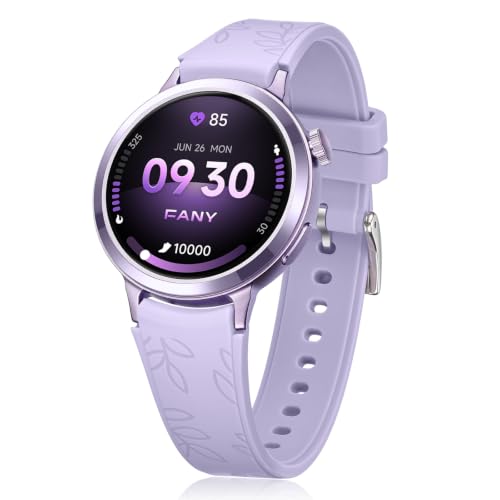
FANY Luna Smart Watch for Women, 1.1" AMOLED Small Fitness Round Smartwatch | Long Battery Life, 24/7 Activity Tracker, Heart Rate/Sleep/Cycle Monitor, Message Notifications, Slide-Lock, 200 Watch Faces
As an Amazon Associate we earn from qualifying purchases. Product prices and availability are accurate as of the date/time indicated.
Note: Claimed battery life and GPS figures are manufacturer listings, and a watch that lists 21 days may give you 10 to 14 days with always-on display on and daily GPS. Always check the watch’s battery life, display, and charging in the manual, and confirm the current price with the retailer.
What Smartwatch Battery Life Really Means
Smartwatch battery life really means how long your watch will run before it needs charging, under the use you actually have, not just in a lab. A maker may test a watch with always-on display off, brightness at 50 percent, notifications off, and no GPS, and list 18 hours or 21 days. If you turn always-on display on, use GPS for a run, and get many notifications, your battery life will be shorter.
Battery life is also affected by display type. An AMOLED display, such as in all seven watches in this guide, is bright and colourful, but it uses more power when it is always on. A MIP display, such as in some Garmin watches, uses less power, but it is less bright. A larger display, such as in an Apple Watch Ultra 2 at 1.9 inches, uses more power than a smaller display.
Battery life is not the same as battery health. A new watch will give you its claimed battery life, but after 2 years of daily charging, its battery may hold less charge, so it will need charging more often. That is normal for a lithium-ion battery.
Smartwatch Battery Life Expectations Reviewed
1. Garmin Fenix 8 Solar 47mm – Best Smartwatch Battery Life Expectations Overall
The Garmin Fenix 8 Solar 47mm is our top pick because it offers a claimed battery life of up to 21 days with solar, an AMOLED display of 1.4 inches, a GPS battery life of up to 40 hours, and a charging time of about 2 hours, for a typical price of $900 to $1100. It has a solar charging lens, a bright AMOLED display, and a design that is made for outdoor athletes.
Garmin designs the Fenix 8 Solar with a focus on long battery life for outdoor use. The solar lens adds a few days of battery in sunlight, the AMOLED display is bright, and the GPS battery of up to 40 hours is good for long hikes and runs. The watch is a good choice for a user who wants a Garmin watch, and who wants the longest battery life in this guide.
The main limitation is price. At $900 to $1100, it is the most expensive watch in this guide, though it offers solar charging and a long battery. Choose the Fenix 8 Solar if you want the best overall battery life, you want a Garmin watch, and you have a budget of $900 to $1100.
2. Amazfit T-Rex 3 – Best Smartwatch Battery Life Expectations for Amazfit
The Amazfit T-Rex 3 is a watch with a claimed battery life of up to 27 days, an AMOLED display of 1.5 inches, a GPS battery life of up to 42 hours, and a charging time of about 2 hours, for a typical price of $250 to $300. It has a rugged design, a large battery, and a design that is made for outdoor use.
Amazfit designs the T-Rex 3 with a focus on a long battery life at a low price. The claimed 27 days is the longest in this guide, the GPS battery of up to 42 hours is good for long activities, and the price of $250 to $300 is low for a watch with this battery life. The watch is a good choice for a user who wants an Amazfit watch, and who wants a long battery at a low price.
The main limitation is app ecosystem. Amazfit software is good for fitness, but it has fewer apps than Apple or Samsung watches. Choose the T-Rex 3 if you want an Amazfit watch, you want a long battery, and you have a budget of $250 to $300.
3. Garmin Forerunner 965 – Best Smartwatch Battery Life Expectations for Garmin Forerunner
The Garmin Forerunner 965 is a watch with a claimed battery life of up to 23 days, an AMOLED display of 1.4 inches, a GPS battery life of up to 31 hours, and a charging time of about 1.5 hours, for a typical price of $500 to $600. It has a light design, a bright AMOLED display, and a design that is made for runners.
Garmin designs the Forerunner 965 with a focus on a light, long-battery watch for runners. The claimed 23 days is long, the GPS battery of up to 31 hours is enough for a marathon or an ultramarathon, and the weight is light for a running watch. The watch is a good choice for a user who wants a Garmin running watch, and who wants a long battery.
The main limitation is price. At $500 to $600, it is more expensive than an Amazfit watch, though it offers Garmin training features. Choose the Forerunner 965 if you want a Garmin running watch, you want a long battery, and you have a budget of $500 to $600.
4. Samsung Galaxy Watch Ultra – Best Smartwatch Battery Life Expectations for Samsung
The Samsung Galaxy Watch Ultra is a watch with a claimed battery life of up to 100 hours, an AMOLED display of 1.5 inches, a GPS battery life of up to 30 hours, and a charging time of about 1.5 hours, for a typical price of $500 to $650. It has a rugged design, a large battery, and a design that is made for Samsung users who want a long battery.
Samsung designs the Galaxy Watch Ultra with a focus on a rugged, long-battery watch for Android users. The claimed 100 hours is about 4 days, which is longer than a Galaxy Watch 7, the GPS battery of up to 30 hours is good for outdoor activities, and the price of $500 to $650 is good for a Samsung Ultra watch. The watch is a good choice for a user who has a Samsung phone, and who wants a long battery.
The main limitation is that it works best with a Samsung phone, and its battery life is shorter than a Garmin or Amazfit watch. Choose the Galaxy Watch Ultra if you want a Samsung watch, you want a rugged design, and you have a budget of $500 to $650.
5. Apple Watch Ultra 2 – Best Smartwatch Battery Life Expectations for Apple
The Apple Watch Ultra 2 is a watch with a claimed battery life of up to 36 hours, an AMOLED display of 1.9 inches, a GPS battery life of up to 17 hours, and a charging time of about 1.5 hours, for a typical price of $700 to $800. It has a large, bright display, a rugged design, and a design that is made for Apple users who want a long battery.
Apple designs the Watch Ultra 2 with a focus on a long-battery Apple Watch for outdoor use. The claimed 36 hours is twice as long as an Apple Watch Series 10, the display is the largest in this guide, and the GPS battery of up to 17 hours is enough for a long hike. The watch is a good choice for a user who has an iPhone, and who wants the longest Apple Watch battery.
The main limitation is battery life compared with Garmin. At 36 hours, it is much shorter than a Garmin Fenix 8 at 21 days, though it offers Apple apps and a bright display. Choose the Watch Ultra 2 if you want an Apple watch, you want a rugged design, and you have a budget of $700 to $800.
6. Apple Watch Series 10 45mm – Best Smartwatch Battery Life Expectations for Apple Series 10
The Apple Watch Series 10 45mm is a watch with a claimed battery life of up to 18 hours, an AMOLED display of 1.9 inches, a GPS battery life of up to 12 hours, and a charging time of about 1 hour, for a typical price of $350 to $450. It has a thin design, a bright display, and a design that is made for everyday Apple users.
Apple designs the Watch Series 10 with a focus on a thin, light Apple Watch for everyday use. The claimed 18 hours is enough if you charge it every night, the charging time of about 1 hour is fast, and the price of $350 to $450 is lower than an Ultra 2. The watch is a good choice for a user who has an iPhone, and who wants a simple Apple Watch.
The main limitation is battery life. At 18 hours, it needs charging every day, especially if you use always-on display and GPS. Choose the Watch Series 10 if you want an Apple watch, you charge every night, and you have a budget of $350 to $450.
7. Google Pixel Watch 3 45mm – Best Budget Smartwatch Battery Life Expectations
The Google Pixel Watch 3 45mm is a watch with a claimed battery life of up to 24 hours, an AMOLED display of 1.8 inches, a GPS battery life of up to 15 hours, and a charging time of about 1 hour, for a typical price of $300 to $400. It has a round design, a bright display, and a design that is made for Android users who want a Google watch.
Google designs the Pixel Watch 3 with a focus on a simple, affordable watch for Android users. The claimed 24 hours is enough if you charge it every night, the Fitbit health tracking is good, and the price of $300 to $400 is low. The watch is a good choice for a user who has an Android phone, and who wants a low price for a Google watch.
The main limitation is battery life. At 24 hours, it needs charging every day, though it is longer than an Apple Watch Series 10. Choose the Pixel Watch 3 if you want the lowest price for a Google watch, you charge every night, and you have a budget of $300 to $400.
Buying Guide: How to Choose Smartwatch Battery Life Expectations
Before you buy, think about how often you want to charge, how you use GPS, whether you want always-on display, how you track sleep, and how much you want to spend. A watch that is perfect for a runner who needs 30 hours of GPS may not be best for a user who only wants notifications, and a watch that is perfect for a user who charges every night may not be best for a user who wants a week of battery. The six points below cover the decisions that matter most when you choose smartwatch battery life expectations.
1. Charging Frequency: Daily vs Weekly vs Monthly, and Your Routine
Charging frequency is the first decision. Charging frequency is how often you need to charge your watch, and it depends on your routine. A watch with 18 to 36 hours of battery, such as an Apple Watch Series 10 or Ultra 2, needs charging every day or every other day. A watch with 100 hours, such as a Samsung Galaxy Watch Ultra, needs charging every 4 days. A watch with 21 to 27 days, such as a Garmin Fenix 8 or Amazfit T-Rex 3, needs charging once every 3 weeks.
Choose a daily-charge watch if you charge your phone every night, you do not mind charging your watch too, and you want a bright display and many apps. Choose a weekly-charge watch if you want to track sleep for a week without charging, you travel often, or you do not want to charge every day. Check your routine before you buy, and choose a battery life that fits it.
2. Always-On Display: On vs Off, and Your Battery
Always-on display is the second decision. Always-on display keeps your watch face visible all the time, so you can see the time without raising your wrist, but it uses more battery. A watch with always-on display on may give you half the battery life of the same watch with always-on display off. For example, an Apple Watch Series 10 with always-on display on may give you 12 to 15 hours, instead of 18 hours with it off.
Choose a watch with always-on display off if you want the longest battery life, you do not mind raising your wrist to see the time, or you want to track sleep for a week. Choose a watch with always-on display on if you want to see the time at a glance, you charge every night, and you do not mind a shorter battery. Check the watch’s battery life with always-on display on and off in the manual, before you buy.
3. GPS Use: 1 Hour per Day vs All-Day GPS, and Your Exercise
GPS use is the third decision. GPS is the most power-hungry feature on a smartwatch, and it can cut battery life by half or more if you use it for hours every day. A watch with a GPS battery of up to 40 hours, such as a Garmin Fenix 8, can track a long hike or run without charging, while a watch with a GPS battery of up to 12 hours, such as an Apple Watch Series 10, is enough for a daily run, but not for a long hike.
Choose a watch with a long GPS battery if you run, hike, or bike for hours, you want to track a marathon, or you do not want to charge during a long activity. Choose a watch with a short GPS battery if you only use GPS for 30 minutes per day, you charge every night, and you do not need a long GPS battery. Check the GPS battery life in the manual, and test it with your own use.
4. Sleep Tracking: Overnight vs All Night, and Your Battery
Sleep tracking is the fourth decision. Sleep tracking uses your watch overnight, so you need enough battery left at night to track sleep, and enough battery in the morning to use your watch during the day. A watch with a long battery, such as a Garmin or Amazfit watch, can track sleep for a week without charging, while a watch with a short battery, such as an Apple Watch Series 10, may need charging before bed if you used it all day.
Choose a watch with a long battery if you want to track sleep every night, you do not want to charge before bed, or you want a week of sleep data. Choose a watch with a short battery if you charge it while you shower in the morning, you do not track sleep, or you charge it every night. Check your sleep routine before you buy, and choose a battery life that lets you track sleep.
5. Display Brightness and Notifications: Bright vs Dim, and Your Use
Display brightness and notifications are the fifth decision. A bright display uses more battery than a dim display, and many notifications, with vibrations and screen wakes, use more battery than few notifications. A watch with brightness at 100 percent and many notifications may give you much less battery than the same watch with brightness at 50 percent and few notifications.
Choose a watch with a dim display and fewer notifications if you want the longest battery life. Turn off notifications for apps you do not need, lower your display brightness, and turn off always-on display if you want to save battery. Check your notification settings in your watch app, and adjust them to save battery.
6. Price, Total Cost, and Choosing a Smartwatch on a Budget
Price ranges in this guide run from about $250 to $1100 for a smartwatch with different battery life expectations, depending on brand, display, and features. A budget watch at $250 to $400, such as the Amazfit T-Rex 3 or Google Pixel Watch 3, offers a long battery or a low price for a Google watch. A mid-price watch at $350 to $650, such as the Apple Watch Series 10, Samsung Galaxy Watch Ultra, or Garmin Forerunner 965, offers a good balance of battery and features. A premium watch at $700 to $1100, such as the Apple Watch Ultra 2 or Garmin Fenix 8 Solar, offers the longest Apple battery or solar charging.
Consider total cost as well as price. A watch that costs $250 and lasts 27 days may cost less in total than a watch that costs $700 and lasts 36 hours, if you value battery life over apps. Budget for a watch, and if you need it, a charger, a spare band, and a screen protector, not just a watch. Do not buy the cheapest watch if it does not have enough battery for your routine, and do not buy the most expensive watch if you only need a simple watch for notifications. A watch that matches your charging routine, your GPS use, and your budget will help you use it every day more reliably than a watch that is cheap but needs charging twice a day, or expensive but too complex for your needs.
How to Make Your Smartwatch Battery Last Longer
Making your smartwatch battery last longer starts with turning off always-on display if you do not need it, lowering your display brightness to 50 percent, and turning off notifications for apps you do not need. Use GPS only when you exercise, not all day, and turn off WiFi and cellular if you do not need them. Charge your watch to 80 percent for daily use, rather than 100 percent, to help your battery last longer over years, if your watch supports it.
Update your watch software regularly, because updates often improve battery life, and restart your watch once a week to clear apps that use battery in the background. If your watch battery drops quickly, check which apps use the most battery in your watch app, and remove or limit them.
Which Smartwatch Battery Life Expectations Should You Choose?
If you want the best smartwatch battery life expectations, buy the Garmin Fenix 8 Solar 47mm. It costs $900 to $1100, it offers a claimed battery life of up to 21 days with solar, and a GPS battery of up to 40 hours, which is the best balance for outdoor athletes.
If you want an Amazfit watch, buy the Amazfit T-Rex 3. If you want a Garmin running watch, buy the Garmin Forerunner 965. If you want a Samsung watch, buy the Samsung Galaxy Watch Ultra. If you want an Apple watch, buy the Apple Watch Ultra 2 or the Apple Watch Series 10 45mm. If you want a Google watch at a low price, buy the Google Pixel Watch 3 45mm.
All seven watches in this guide are currently sold, designed for everyday use and fitness, and suitable for a user who wants to understand battery life before buying. Pick the one that matches your charging routine, your GPS use, whether you want always-on display, and your budget, and always check the real battery life with your own use, not just the lab claim.
Disclosure: techcats.net may earn a commission from purchases made through links on this page, at no extra cost to you. Prices listed are typical ranges and can vary by retailer and sale. Battery life, display, and charging figures are manufacturer claims and can vary by use. Always check your watch’s battery life with your own use.
Frequently Asked Questions About How to Choose Smartwatch Battery Life Expectations
How long should a smartwatch battery last?
How long should a smartwatch battery last? In most cases, a smartwatch battery should last 18 hours to 36 hours for an Apple or Samsung watch with a bright display, 4 to 7 days for a Samsung Ultra or similar watch, and 14 to 27 days for a Garmin or Amazfit watch with a long battery. Choose a battery life that fits your routine: charge every night if you have an 18-hour watch, charge once a week if you have a 7-day watch, and charge once a month if you have a 27-day watch.
Why does my smartwatch battery drain so fast?
Why does your smartwatch battery drain so fast? In most cases, your smartwatch battery drains fast because you have always-on display on, you use GPS for a long time, your display brightness is high, you get many notifications, or you have apps running in the background. Turn off always-on display, lower brightness to 50 percent, turn off notifications for apps you do not need, and use GPS only when you exercise, to make your battery last longer.
Is a 7-day battery life better than an 18-hour battery life?
Is a 7-day battery life better than an 18-hour battery life? In most cases, a 7-day battery life is better if you want to track sleep for a week, you travel often, or you do not want to charge every day, while an 18-hour battery life is enough if you charge every night, you want a bright display, and you want many apps. A long battery usually means a less bright display or fewer apps, while a short battery usually means a brighter display and more apps. Choose a battery life that fits your routine, not just the longest number.
How do I check my smartwatch battery life in real use?
How do you check your smartwatch battery life in real use? In most cases, you check your smartwatch battery life in real use by using your watch for a week with your normal settings, such as always-on display on or off, GPS for 1 hour per day, and notifications on, and noting how many days it lasts before it needs charging. Do not rely only on the maker’s lab claim, because it is measured with light use. Test your watch with your own use, and adjust your settings to get the battery life you need.
Related guides
- Best Switch for Student NAS Storage: 6 Network Switches for Student NAS in 2026
- Best Cheap Baby Monitor for Parents in 2026: 7 Monitors That Offer Clear Video, Reliable Audio, and Peace of Mind for Parents
- Best Headphones vs Soundbar for Gaming in 2026: Positional Audio, Voice Chat, and Living-Room Freedom Compared for Competitive and Cinematic Players
- Best Drone for Student Videography in 2026: 7 Drones That Offer 4K Video, Stable Flight, and Reliable Use for Student Videography
More from Amazon
Programs that pair well with the guide above. Offers and eligibility are set by Amazon and may change.
Set up recurring deliveries of everyday items on eligible products. Terms and savings are set by Amazon.
Explore Subscribe & SaveFree shipping on eligible items, Prime Video and more. Eligible new members can start with a free trial.
Start a Prime free trialAudiobooks and podcasts to listen to on the go. Eligible new members can start with a free trial.
Try Audible freeRead from a large library of eBooks and audiobooks on any device. Check Amazon for current plans.
Explore Kindle UnlimitedAs an Amazon Associate we earn from qualifying purchases.

Write Your Review
No reviews yet. Be the first to share your experience!