
What's inside
- Best Premium Security Camera for Apartment by Renter
- Quick Comparison: Best Premium Security Camera for Apartment Models
- Detailed Reviews: Best Premium Security Camera for Apartment Picks
- Buying Guide: Choosing the Best Premium Security Camera for Apartment
- Frequently Asked Questions About the Best Premium Security Camera for Apartment
As an Amazon Associate I earn from qualifying purchases. This post may contain affiliate links at no extra cost to you.
The best premium security camera for apartment is chosen inside a constraint no homeowner ever meets: everything it does must be reversible. The renter cannot drill the door frame, cannot wire through the wall, cannot point a lens at the shared hallway without meeting the building’s rules and the law’s, and must be able to leave on the last day of the lease with the deposit intact and the camera in a moving box. Premium, in this parish, therefore means something more specific than resolution: it means a camera that installs with adhesive, a stand, or a battery in its maker’s stated design; that stores its footage locally or in a cloud plan whose stated terms the renter has actually read; that draws its intelligence — the person detected, the package announced, the pet distinguished from the intruder — from the stated features of its model and its subscription where one applies; and that respects the apartment’s other citizens, because a camera in a shared home is a household policy before it is a product. This guide compares the real, currently sold premium cameras the renting parish chooses between — Arlo’s Pro class and its indoor class, Google’s Nest Cam classes, Eufy’s dual-lens Indoor Cam S350, Aqara’s G3 hub-camera, and Ring’s classes — and it teaches the renter’s whole discipline: the lease and the building’s rules read before the box is opened, the placement that guards your door without surveilling your neighbours’, the privacy settings configured as a household agreement, and the account security — the strong password, the two-factor sign-in in the makers’ stated arrangements — that keeps the camera’s eye the owner’s alone.
The comparison fields the renting parish’s proven cameras across their stations. Arlo’s classes are the wire-free reference — battery cameras in its maker’s stated design that mount with a screw the lease may allow or stand where it does not, with stated detection and subscription arrangements in its documents. Google’s Nest Cam classes bring its stated intelligence and its household ecosystem in its maker’s terms, in wired and battery designs in its documents for the shelf and the entry. Eufy’s S350 class is the local-storage parish’s flagship — a dual-lens indoor camera in its stated design whose stated local processing and storage arrangements are its thesis: the footage kept in the home, in its stated terms, without a subscription’s toll. Aqara’s G3 class is the camera as a smart-home hub in its stated design, for the renter whose lights and sensors want a capital. Ring’s classes are the doorbell parish’s extension indoors, in its stated designs and plans. Resolution and field of view, power arrangement, storage and subscription terms, detection features, and mounting design are each maker’s specification for the current exact model and must be confirmed in that maker’s current documents before purchase — the subscription’s stated terms read with particular care, because several premium features in this table live behind the makers’ plans, and the camera’s price is the plan’s annuity added to it. Prices are typical ranges rather than exact figures, per camera as described.
The renter’s legal and neighbourly frame precedes the table, because in an apartment the camera’s hardest problems are not technical. The lease and the building’s rules govern what may be attached, installed, and pointed where, and they are read — or the landlord is asked, in writing where the matter is worth a deposit — before the purchase, not after the complaint. The law of the place governs recording itself: the rules on audio recording, on cameras in shared spaces, and on filming beyond your own door vary by jurisdiction and are read from the governing sources, with the parish’s standing practice as the safe harbour — the camera guards your own interior and your own threshold, it does not keep a diary of the hallway, the neighbours’ doors, or the street’s private life, and audio is treated with the strictest reading the local law offers. Roommates and regular guests are told the camera exists and where it looks, as a matter of household law this guide does not negotiate: a secret camera in a shared home is not a security device but a betrayal with a lens, and no row in this table is sold for that parish. Within that frame, the premium apartment camera is a renter’s best friend — the package’s witness, the pet’s window, the door’s memory — and this guide’s purpose is to choose it well and place it honourably.
Our Top Picks
Best Premium Security Camera for Apartment by Renter
The door-and-living-room renter: Arlo and Nest battery classes
For the renter whose brief is the classic one — watch the entry, watch the main room, install nothing permanent — the battery classes are the parish: Arlo’s Pro class standing on the bookshelf or mounted with the minimal fixing its stated design allows, its stated detection features announcing the person at the door from the camera’s post inside it; Google’s Nest Cam battery class in its stated design doing the same office inside Google’s household, its stated intelligence distinguishing the parish’s citizens — the resident, the guest, the cat, the courier — in its documents’ terms. Both run for the weeks or months their makers state between charges at their stated settings, both leave with the tenant in a box, and both are configured, as the guide directs, to look at the renter’s own life and no one else’s.
The subscription-refuser: Eufy S350 and the local parish
Eufy’s S350 class serves the renter whose objection is the annuity: a premium indoor camera — dual lenses in its stated design for the wide view and the close one — whose stated local storage and processing arrangements keep the footage in the home and the features, in its documents’ terms, off the subscription’s meter. For the renter whose lease is long and whose principles or budget decline the monthly toll, it is the table’s most complete answer, and its pan-and-tilt classes in its stated design let one camera cover the room a fixed pair would divide. Its discipline is the local parish’s own: the stored footage is the home’s, kept on the device or its stated base, and the account and network security in the guide’s liturgy are the vault’s whole door.
The smart-home renter: Aqara G3 and the Ring household
Aqara’s G3 class is the camera for the renter building a smart home inside a lease: a camera in its stated design that is also a hub in its maker’s terms, gathering the sensors and lights of a no-wiring household under one capital, with stated local and ecosystem arrangements in its documents. Ring’s classes serve the renter already in that household — the doorbell’s sibling indoors, in its stated designs, sharing the plan in its stated terms the doorbell already pays. Both are bought as ecosystem decisions, because a camera’s app is a household’s constitution, and the renter who mixes parishes without a plan owns three apps, three plans, and no system — the guide’s buying section writes the constitution before the cameras are chosen.
Quick Comparison: Best Premium Security Camera for Apartment Models
| Model | Key Specs | Best For | Typical Price Range | Rating |
|---|---|---|---|---|
| Arlo Pro 5S / Pro Class | Stated resolution and detection classes, battery classes, plan classes per Arlo documents | Best premium security camera for apartment overall | $180 – $250 | 4.6 / 5 |
| Eufy Indoor Cam S350 | Dual-lens classes, stated local storage and pan-tilt classes per Eufy documents | Best without a subscription | $110 – $160 | 4.6 / 5 |
| Google Nest Cam (Battery) Class | Stated intelligence and battery classes, plan classes per Google documents for the exact model | Best for Google households | $160 – $200 | 4.5 / 5 |
| Aqara Camera Hub G3 | Stated hub and camera classes, stated ecosystem classes per Aqara documents | Best smart-home hub camera | $90 – $130 | 4.4 / 5 |
| Ring Stick Up Cam / Indoor Class | Stated battery and wired classes, plan classes per Ring documents for the exact model | Best for Ring households | $90 – $160 by model | 4.4 / 5 |
| Arlo Essential Indoor Class | Stated wired indoor classes, privacy shield classes per Arlo documents for the exact model | Best wired indoor value-premium | $70 – $110 | 4.3 / 5 |

AOQEE 5G Cameras for Home Security Indoor, Pet Monitor w/Phone APP G5 2Pcs | Dual-Band Wi-Fi Indoor Camera with 24/7 TF Card Storage, 360 PTZ Auto-Tracking Pet/Dog/Cat/Puppy/Nanny, Motion Alert, Plug-in
As an Amazon Associate we earn from qualifying purchases. Product prices and availability are accurate as of the date/time indicated.

Cinnado 2K Security Camera Indoor for Pet/Dog/Baby with Phone App, D1 1Pack | 360° 2.4Ghz Wi-Fi Cam for Elderly/Baby Monitor, 2-Way Audio, Night Vision, 24/7 SD Card/Cloud Storage
As an Amazon Associate we earn from qualifying purchases. Product prices and availability are accurate as of the date/time indicated.
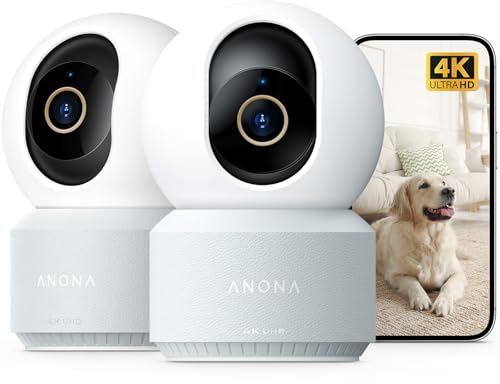
Anona 4K UHD Indoor Camera, Pet/Dog/Baby Security Camera with Phone App, 360°Pan-Tilt, 5G/2.4G Dual-Band Wi-Fi 6, Auto-Tracking, Person/Pet/Baby Crying Detection, Privacy Mode, Two-Way Audio, 2 Pack
As an Amazon Associate we earn from qualifying purchases. Product prices and availability are accurate as of the date/time indicated.
Resolution, field of view, power and stated battery life at stated settings, storage arrangement, subscription features and terms, detection classes, and mounting design are each maker’s specification for the current exact model and must be confirmed in that maker’s current documents before purchase. Prices are typical street ranges per camera as described; subscription plans, where chosen, are additional and are priced in the makers’ current terms. Leases, building rules, and local recording laws govern camera placement and audio and must be followed as they state.
Detailed Reviews: Best Premium Security Camera for Apartment Picks
1. Arlo Pro Class – Best Overall for Apartments
Arlo’s Pro class leads the apartment table because its design brief is the renter’s: a battery camera in its maker’s stated design that stands or mounts with the least the lease can object to, stated detection features in its documents that announce the person and the package in its plan’s terms, and a stated battery life at its stated settings measured in the season’s fractions rather than the week’s. Its night classes and its spotlight in its stated design serve the interior entry and the permitted threshold alike.
Read its plan’s stated terms before the purchase, as the guide directs for the whole table, because the Pro’s premium features live in the plan’s parish in Arlo’s documents. Subscribed knowingly and placed honourably — your door, your room, your life — it is the renter’s reference camera, and its moving-day weight is a sandwich bag’s.
2. Eufy Indoor Cam S350 – Best Without a Subscription
The S350 is the local parish’s flagship and its argument is architectural: two lenses in Eufy’s stated design — the room’s wide testimony and the subject’s close one, in its stated arrangement — on a pan-and-tilt body in its stated design, with the footage and the processing kept in the home in its documents’ stated terms, so the premium is paid once, at the till, and never again at the month’s turn. For the long-lease renter it is the table’s most economical premium across three years, and its stated detection classes cover the parish’s citizens without the cloud’s intermediation.
Its discipline is the vault’s: the home network’s password a real one, the account’s two-factor sign-in enabled in its stated arrangement, the stored footage’s retention set in its settings as the household’s policy directs. Kept so, the S350 is the camera for the renter who wants a witness with no landlord but themselves.
3. Google Nest Cam (Battery) Class – Best for Google Households
Nest’s battery class brings the household ecosystem’s intelligence to the renter’s shelf: stated detection in Google’s documents that sorts the parish’s traffic — the person, the animal, the parcel — with the plan’s stated tiers deciding how much of that intelligence is retained and for how long, in its terms. Its stated design is the parish’s most domestic object, a camera that looks like an appliance because it expects to live on a shelf among them, and its battery classes in its documents suit the door it can be carried to when the package season peaks.
Buy it as a household decision — the Google home’s other citizens, the plan’s terms read — and it will be the camera the household talks to. The renter in another ecosystem should read its row as a visa application rather than a review, which is the honest state of the whole premium parish.
4. Aqara Camera Hub G3 – Best Smart-Home Hub Camera
The G3’s thesis is consolidation: a camera in Aqara’s stated design that is also the hub in its maker’s terms for the sensor household — the door sensor on the renter’s door, fitted with adhesive as the lease requires; the motion sensor in the hall that is the renter’s own hall — gathered under one device with stated ecosystem arrangements in its documents. For the renter whose smart home must be built without a single screw into the landlord’s structure, it is the capital city in one box.
Its camera classes in its stated design serve the room it watches with the pan arrangement its documents describe. Bought as the hub first and the camera second, it is the table’s cleverest renter’s purchase; bought as a camera alone, its talents are underemployed, which its price forgives.
5. Ring Stick Up Cam / Indoor Class – Best for Ring Households
Ring’s classes extend the doorbell’s household indoors: battery and wired designs in its maker’s stated terms for the shelf and the entry, sharing the plan in its stated terms the doorbell already pays, with stated detection classes in its documents for the interior’s traffic. For the renter whose door already speaks Ring — where the building and the lease allow the doorbell itself — the indoor sibling is the system’s completion at the household’s existing toll.
Its placement discipline is this guide’s frame in full: the interior and the threshold, the neighbours’ privacy a boundary and not a suggestion, the audio treated by the strictest local reading. Inside that frame, it is the ecosystem’s loyal citizen, and its parish’s size is its support network.
6. Arlo Essential Indoor Class – Best Wired Indoor Value-Premium
Arlo’s indoor class brings the house’s detection parish to a wired shelf camera in its stated design — no battery to charge, a stated privacy shield arrangement in its documents that closes the lens physically when the household is home and the camera’s watch is stood down, which is the feature this guide wishes on the whole table. Its price is the premium parish’s friendliest, and its plan’s stated terms govern its features as with its sibling above.
The privacy shield is its sermon: a camera that can be seen to be blind is a camera a household can live with, and the renter’s guests will vote for it silently every visit. For the single-room watch with the household’s trust to keep, it is the table’s most diplomatic row.
Buying Guide: Choosing the Best Premium Security Camera for Apartment
Lease, law, and placement: the paperwork before the product
Read three documents before any camera in this table is ordered. The lease and the building’s rules first: what may be attached to walls and doors, what may be installed at the threshold, whether a doorbell camera is contemplated at all — and where the answer is unwritten and the deposit is real, the landlord’s written word is obtained, because a camera that costs a deposit is the most expensive model in this guide by a factor of ten. The local law second: the jurisdiction’s rules on recording — audio’s stricter parish in most places, shared spaces, the camera that looks beyond your own door — read from the governing sources, with the parish’s safe harbour as the default placement: your interior, your entry from inside, your own life as the subject. The household’s agreement third: roommates, partners, and regular guests told what watches and where, the camera’s privacy modes and schedules in the makers’ stated arrangements set as the household’s written policy — armed when the home is empty, shielded or off when it is full, in the settings the makers provide — because a security camera’s legitimacy in a shared home is a consent renewed daily, and the makers’ privacy features exist to make that consent mechanical rather than theatrical. Placement follows the paperwork: the entry covered from inside the renter’s own space, the lens’s field — read in the maker’s stated figures — composed to take in the door and the room’s approaches without taking in the neighbour’s door across the hall through your open one, and the camera’s height and angle tested in its app’s own view before the adhesive is committed.
Power, storage, and the subscription’s true price
Choose the power arrangement by the placement’s reality: the battery classes for the shelf that has no outlet and the lease that forbids the cable’s run, with their stated lives at their stated settings read against your traffic — a busy door spends a battery faster than the documents’ quiet one, in every maker’s parish — and the wired classes for the post beside an outlet, where the camera’s watch never sleeps for a charge. Storage is the second annuity decision: the cloud plans in the makers’ stated terms, priced across the lease’s years and read for what they actually buy — the retention days, the detection features, the number of cameras covered — against the local classes’ stated arrangements, where the footage stays in the home and the cost is the device and its card or base in the makers’ terms. Neither parish is morally prior; the sin is only the unread term, the plan discovered at the first incident to have expired, the local card discovered to have been full since spring. Set the retention, test the retrieval — watch a clip from last week, on the phone, from outside the home’s network, before any incident makes the test an examination — and record the plan’s renewal date in the household’s calendar with the lease’s own.
The account is the vault: security settings and the moving-day drill
Configure the camera’s account like the vault it is, on the day of installation: a unique, strong password for the camera’s account in the maker’s stated arrangement — not the household’s recycled one — the two-factor sign-in enabled where the maker offers it in its documents, the sharing settings audited so the feed’s audience is the household’s named members and no one the app added by enthusiasm, and the firmware’s updates accepted as the maker issues them, because a camera is a computer with an eye and its patches are part of its lock. The network beneath it gets the same respect: the router’s password a real one, the camera on the household’s proper network rather than a forgotten guest one, in the parish’s ordinary practice. And rehearse the moving-day drill that is the renter’s sacrament: the camera removed, its mounts’ traces made good as the lease directs, the account’s home address updated, the footage the household wishes to keep exported before the plan or the device changes hands — and the device, if it is ever sold or given away, reset to its factory state in the maker’s stated procedure and removed from the account, because a camera that remembers its old home is a diary in a stranger’s house. The best premium security camera for apartment is finally a lawful guest in a rented home: permitted by the lease, placed by the law and the household’s consent, powered and stored by terms that were read, and guarded by an account kept like a vault — and any camera in this table, so chosen, so placed, and so kept, will watch a renter’s door faithfully and leave with them, deposit intact, on the last day of the lease, which is the premium this parish actually pays for.
Frequently Asked Questions About the Best Premium Security Camera for Apartment
What is the best premium security camera for an apartment?
The Arlo Pro class leads this table overall, for its wire-free stated design and its detection parish, with Eufy’s S350 as the best camera without a subscription — its stated local storage keeping the footage and the features in the home — Google’s Nest Cam for the Google household, Aqara’s G3 for the smart-home renter, and Ring’s classes for the Ring household. The best one for you is chosen inside the renter’s constraints: it must install without the drilling your lease forbids, in its maker’s stated design; its storage and subscription terms, read in the maker’s current documents, must be a price you have agreed to across the lease’s years rather than discovered; and its placement must guard your own interior and threshold without surveilling your neighbours, under your local recording law. Read the lease and the building’s rules before the box is opened, configure the privacy settings as a household agreement, and secure the account with a strong password and two-factor sign-in — the camera is the easy part, and the paperwork is the product.
Can I install a security camera in a rented apartment?
Generally yes for a camera inside your own home that installs without altering the property — the stand, shelf, and adhesive classes in this table exist for exactly that lease — and conditionally for anything that attaches, wires, or watches beyond your door, where the lease, the building’s rules, and the local law each hold a pen. Read the lease first; where it is silent and the installation is more than a shelf, ask the landlord and keep the answer in writing, because the deposit is the argument’s stake. Doorbell cameras and anything viewing shared areas — hallways, the building’s entries, neighbours’ doors — are the restricted parish in most buildings and many jurisdictions, and audio recording is governed more strictly than video in much of the law’s map. The safe harbour this guide teaches is the interior camera, reversibly placed, watching your own space with your household’s knowledge. Inside it, renters lawfully and usefully keep cameras in every city this site serves; outside it, the documents — not the product page — decide.
Do premium apartment cameras need a subscription?
Some of their premium features do, and the honest answer is printed in each maker’s current terms rather than in this guide’s summary: the cloud retention, the richer detection classes, and the incident history in several parishes in this table are the plan’s citizens, and the camera without the plan is a live eye with a short memory. The exception that proves the parish is the local class — Eufy’s stated arrangements in this table, where storage and processing live in the home and the features are the device’s own. Price the decision across the lease: the camera’s figure plus the plan’s stated annuity for the years you will keep it, against the local model’s single figure, and read what the plan buys — the retention days, the cameras covered, the features unlocked — with the same care as the camera’s own specifications. Then set a calendar note for the renewal, test that you can actually retrieve a week-old clip, and treat the subscription as part of the rent: a known, budgeted line, never a surprise discovered at the first incident that mattered.
Where should I place a security camera in an apartment?
At the entry, from inside your own space, with the room’s approaches in its field — and with the composition audited in the camera’s own app before the mount is committed. The parish’s standard post is high in the entry’s corner or on the shelf opposite the door, the lens’s stated field of view taking in the door, the hall that is yours, and the main room’s threshold, at an angle that identifies a face at the door rather than the top of a head. Keep the field inside your own life: not through your open door at the neighbour’s, not at the bathroom or the bedroom doors where the household’s privacy lives, and not at a window whose view is another home’s interior — the law and the neighbours both read those compositions as the same offence in different courts. Arm the camera for the empty home and let its privacy modes, in the maker’s stated arrangements, stand it down when the home is full, on the schedule the household agreed. Placed so, one premium camera covers the apartment’s security honestly; the second, where the layout argues for it, covers the room the first cannot see, and no apartment this guide serves needs a third.
Related guides
- Best Wireless Earbuds for Watching Videos in 2026: Apple, Sony, Samsung, and Bose Buds With Low Latency, Lip Sync You Can Trust, and Dialogue You Can Hear
- Best Speaker for Garden Parties in 2026: Outdoor Speakers Loud Enough for the Lawn, Kind Enough for the Neighbours — Battery, Weatherproofing, and Coverage Graded
- Best Headphones vs Earbuds for Travel in 2026: Sony, Bose, Apple, and Sennheiser Picks for Flights, Trains, and the Journeys Between
- Best Drone for Student Indoor Flying in 2026: Safe, Small Drones for Learning to Fly Indoors
More from Amazon
Programs that pair well with the guide above. Offers and eligibility are set by Amazon and may change.
Set up recurring deliveries of everyday items on eligible products. Terms and savings are set by Amazon.
Explore Subscribe & SaveFree shipping on eligible items, Prime Video and more. Eligible new members can start with a free trial.
Start a Prime free trialAudiobooks and podcasts to listen to on the go. Eligible new members can start with a free trial.
Try Audible freeRead from a large library of eBooks and audiobooks on any device. Check Amazon for current plans.
Explore Kindle UnlimitedAs an Amazon Associate we earn from qualifying purchases.

Write Your Review
No reviews yet. Be the first to share your experience!