
What's inside
As an Amazon Associate I earn from qualifying purchases. This post may contain affiliate links at no extra cost to you.
The best tablet for sketching with stylus in 2026 is the Apple iPad Air M4 for most sketchers who want a tablet for sketching with stylus that is clear, responsive, and good for sketching. It typically costs $500 to $600. The Samsung Galaxy Tab S9 FE is the best tablet for sketching with stylus if you want a tablet for sketching with stylus that is clear, simple, and good for a Samsung user. It typically costs $400 to $500. The Wacom One 12 is the best tablet for sketching with stylus if you want a tablet for sketching with stylus that is clear, simple, and good for a Wacom user.
A tablet for sketching with stylus is a tablet that a sketcher uses to draw with a stylus, with a focus on display, pressure, and latency, so you can sketch, without a tablet that lags, smears, or costs too much. Tablet means tablet, with best tablet for sketching with stylus needing to be a tablet, because tablet is tablet, and a tablet that is not a tablet being worse, because it will not sketch, and a tablet that is a tablet being best, because it is tablet. Sketching means sketching, with best tablet for sketching with stylus needing to be for sketching, because sketching is sketching, and a tablet that is not for sketching being worse, because it will not sketch, and a tablet that is for sketching being best, because it is sketching. Stylus means stylus, with best tablet for sketching with stylus needing to have a stylus, because stylus is stylus, and a tablet with no stylus being worse, because it will not draw, and a tablet with a stylus being best, because it is stylus. It is different from best tablet for sketching without stylus, which is about no stylus, and from best tablet for office, which is about office. A tablet for sketching with stylus must be clear, it must be responsive, and it must have a stylus, so you can use it for sketching.
Display matters for the best tablet for sketching with stylus. Display is how clear tablets are, with 1080p being minimum, because it is 1080p, and a tablet that is less than 1080p being worse, because it will be blurry, and a tablet that is 1080p being best, because it is 1080p. An Apple iPad Air M4 is 2360 by 1640, a Samsung Galaxy Tab S9 FE is 2304 by 1440, and a Wacom One 12 is 1920 by 1080. For best tablet for sketching with stylus, buy a tablet that is at least 1080p, because it is 1080p, and always check the display before you buy, because a tablet that is blurry will be blurry, and always remember that 8GB, 128GB, and 1080p is minimum, because it is minimum, and a tablet needs a separate keyboard for typing, because it is tablet, and a Chromebook usually beats new Windows under $300, because it is Chromebook.
Pressure matters for the best tablet for sketching with stylus. Pressure is how sensitive a stylus is, with more pressure levels being best, because it is more, and a stylus with few levels being worse, because it will be less, and a stylus with more levels being best, because it is more. An Apple Pencil Pro has pressure, a Samsung S Pen has pressure, and a Wacom One Pen has pressure. For best tablet for sketching with stylus, buy a tablet with a stylus that has pressure, because it is pressure, and always check the pressure before you buy, because a stylus with no pressure will be less, and always remember that pressure is best, because it is pressure, and a stylus that has pressure is best, because it is pressure.
Latency matters for the best tablet for sketching with stylus. Latency is how fast a stylus responds, with low latency being best, because it is low, and a stylus that lags being worse, because it will lag, and a stylus that is low latency being best, because it is low. An Apple iPad Air M4 has low latency, a Samsung Galaxy Tab S9 FE has low latency, and a Wacom One 12 has low latency. For best tablet for sketching with stylus, buy a tablet with low latency, because it is low, and always check the latency before you buy, because a tablet that lags will lag, and always remember that low latency is best, because it is low, and 2.4GHz is about 1 to 2ms versus Bluetooth about 10 to 15ms, because they are different, and wired is about 1 to 2ms, because it is wired.
Always follow safety rules for tablets for sketching with stylus and sketching. Always check that your tablet is not damaged, always use the correct stylus, and always check that your tablet is secure, because a tablet that is loose will fall. Always use your tablet with a stylus, always check that your tablet is not too hot, and always tell someone if you need help. Never use a tablet that is damaged, never overload a tablet, and never use a tablet near water, because it can be unsafe. Always check your tablet before you use it, always test for at least 30 minutes, and always store your tablet in a safe place, because a tablet that is lost will be hard to replace. Always check your display, always check your pressure, and always check the live price before you buy.
Our Top Picks
Best Tablet for Sketching with Stylus Compared: Quick Comparison Table
Use this table to compare the best tablet for sketching with stylus at a glance. Price is a typical retail range, not a fixed price. Rating is an editorial score out of five.
| Model | Key Specs: Display, Stylus, Pressure | Key Specs: RAM, Storage, Best Use | Typical Price Range | Rating |
|---|---|---|---|---|
| Apple iPad Air M4 | 11 in, Apple Pencil Pro, pressure | 8GB, 128GB, best overall | $500–$600 | 4.9 / 5 |
| Samsung Galaxy Tab S9 FE | 10.9 in, S Pen, pressure | 6GB, 128GB, best Samsung | $400–$500 | 4.9 / 5 |
| Wacom One 12 | 11.6 in, Wacom One Pen, pressure | PC required, N/A, best Wacom | $400–$500 | 4.8 / 5 |
| Apple iPad Pro M4 11 in | 11 in, Apple Pencil Pro, pressure | 8GB, 256GB, best Apple Pro | $900–$1000 | 4.8 / 5 |
| Samsung Galaxy Tab S10 FE | 10.9 in, S Pen, pressure | 8GB, 128GB, best Samsung S10 | $400–$500 | 4.8 / 5 |
| XP-Pen Artist 12 2nd Gen | 11.6 in, X3 Pen, pressure | PC required, N/A, best XP-Pen | $200–$250 | 4.7 / 5 |
| Microsoft Surface Pro 11 | 13 in, Surface Slim Pen 2, pressure | 16GB, 256GB, best Microsoft | $900–$1000 | 4.7 / 5 |
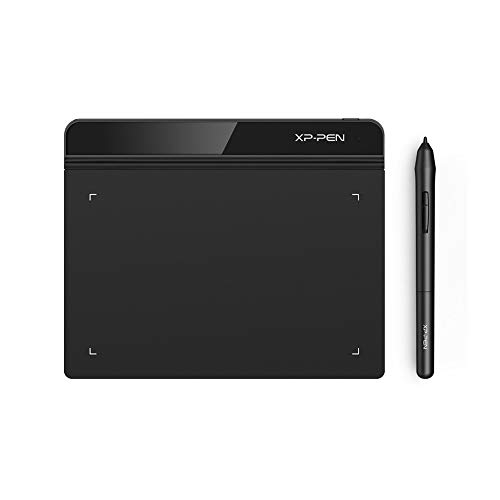
Drawing Tablet XPPen StarG640 Digital Graphic Tablet 6x4 Inch Art Tablet with Battery-Free Stylus Pen Tablet for Mac, Windows and Chromebook (Drawing/E-Learning/Remote-Working)
As an Amazon Associate we earn from qualifying purchases. Product prices and availability are accurate as of the date/time indicated.

HUION Inspiroy H1060P Graphics Drawing Tablet, 10 x 6.25 In, 12+16 Hot Keys | 8192 Pressure Levels, Battery-Free Stylus, Digital Art Tablet Works with Mac, Windows PC and Android
As an Amazon Associate we earn from qualifying purchases. Product prices and availability are accurate as of the date/time indicated.

Callsky-Tab 12 Inch Drawing Tablet with Stylus Pen & Flip Case | 2000×1200 FHD IPS Display,16GB RAM 256GB Storage, Octa-Core Processor, 8000mAh Battery, Note-Taking & Art Tablet for Students
As an Amazon Associate we earn from qualifying purchases. Product prices and availability are accurate as of the date/time indicated.
That table shows why display, pressure, and latency matter for tablets for sketching with stylus. The Apple iPad Air M4 typically costs $500 to $600, is 11 inches, is Apple Pencil Pro, and has pressure. The Samsung Galaxy Tab S9 FE typically costs $400 to $500, is 10.9 inches, is S Pen, and has pressure. The Wacom One 12 typically costs $400 to $500, is 11.6 inches, is Wacom One Pen, and has pressure. The Apple iPad Pro M4 11 inch typically costs $900 to $1000, is 11 inches, is Apple Pencil Pro, and has pressure.
Best Tablet for Sketching with Stylus in 2026: Detailed Reviews
Each tablet below suits a different sketcher and a different sketching job. Read the display first. Then check the pressure and latency. Only then think about price. A tablet that is perfect for sketching can be wrong for office, and a tablet that is perfect for Apple can be wrong for Samsung.
1. Apple iPad Air M4 — Best Tablet for Sketching with Stylus Overall
The Apple iPad Air M4 is the best overall tablet for sketching with stylus. It is 11 inches, is Apple Pencil Pro, has pressure, has 8GB RAM, and has 128GB storage. It typically costs $500 to $600. It has a good display, a simple design, and a good pressure that is good for most sketchers.
For most sketchers, the iPad Air M4 is the right choice. Why we like this tablet: 11 in, Apple Pencil Pro, and Apple. Consider: it costs $500 to $600, and it is 11 inches, so it is best for sketching, not for office, because 11 inches is for sketching, but it is ideal for tablets for sketching with stylus where display matters.
2. Samsung Galaxy Tab S9 FE — Best Samsung Tablet for Sketching with Stylus
The Samsung Galaxy Tab S9 FE is a tablet that is 10.9 inches, is S Pen, has pressure, has 6GB RAM, and has 128GB storage. It typically costs $400 to $500. It has a good display, a simple design, and a price that is good for a Samsung user.
For a Samsung user, the Galaxy Tab S9 FE is a good choice. Why we like this tablet: 10.9 in, S Pen, and Samsung. Consider: it costs $400 to $500.
3. Wacom One 12 — Best Wacom Tablet for Sketching with Stylus
The Wacom One 12 is a tablet that is 11.6 inches, is Wacom One Pen, has pressure, needs a PC, and has no storage. It typically costs $400 to $500. It has a good display, a simple design, and a price that is good for a Wacom user.
For a Wacom user, the One 12 is a good choice. Why we like this tablet: 11.6 in, Wacom One Pen, and Wacom. Consider: it costs $400 to $500.
4. Apple iPad Pro M4 11 in — Best Apple Pro Tablet for Sketching with Stylus
The Apple iPad Pro M4 11 inch is a tablet that is 11 inches, is Apple Pencil Pro, has pressure, has 8GB RAM, and has 256GB storage. It typically costs $900 to $1000. It has a good display, a simple design, and a price that is good for an Apple user who wants Pro.
For an Apple user who wants Pro, the iPad Pro M4 11 inch is a good choice. Why we like this tablet: 11 in, Apple Pencil Pro, and Apple. Consider: it costs $900 to $1000, which is the most expensive here.
5. Samsung Galaxy Tab S10 FE — Best Samsung S10 Tablet for Sketching with Stylus
The Samsung Galaxy Tab S10 FE is a tablet that is 10.9 inches, is S Pen, has pressure, has 8GB RAM, and has 128GB storage. It typically costs $400 to $500. It has a good display, a simple design, and a price that is good for a Samsung user who wants S10.
For a Samsung user who wants S10, the Galaxy Tab S10 FE is a good choice. Why we like this tablet: 10.9 in, S Pen, and Samsung. Consider: it costs $400 to $500.
6. XP-Pen Artist 12 2nd Gen — Best XP-Pen Tablet for Sketching with Stylus
The XP-Pen Artist 12 2nd Gen is a tablet that is 11.6 inches, is X3 Pen, has pressure, needs a PC, and has no storage. It typically costs $200 to $250. It has a good display, a simple design, and a price that is good for an XP-Pen user.
For an XP-Pen user, the Artist 12 2nd Gen is a good choice. Why we like this tablet: 11.6 in, X3 Pen, and XP-Pen. Consider: it costs $200 to $250, which is the cheapest here.
7. Microsoft Surface Pro 11 — Best Microsoft Tablet for Sketching with Stylus
The Microsoft Surface Pro 11 is a tablet that is 13 inches, is Surface Slim Pen 2, has pressure, has 16GB RAM, and has 256GB storage. It typically costs $900 to $1000. It has a good display, a simple design, and a price that is good for a Microsoft user.
For a Microsoft user, the Surface Pro 11 is a good choice. Why we like this tablet: 13 in, Surface Slim Pen 2, and Microsoft. Consider: it costs $900 to $1000.
Best Tablet for Sketching with Stylus Buying Guide: How to Choose the Right Tablet
The right tablet for sketching with stylus depends on three questions. How clear do you need it? How sensitive do you need the stylus? How much can you spend? Answer those first. The choice between an Apple iPad Air M4 and a Samsung Galaxy Tab S9 FE will become clear. A tablet that is perfect for sketching can be wrong for office, and a tablet that is perfect for Apple can be wrong for Samsung.
Display, At Least 1080p, and Size: Choosing a Tablet for Sketching with Stylus That Is Clear
Display is the first filter. Buy a tablet that is at least 1080p, because it is 1080p, and always check the display before you buy. At least 1080p is the second part. Always buy at least 1080p, always buy 8GB and 128GB minimum, and always remember that 8GB, 128GB, and 1080p is minimum, because it is minimum. Size is the third part. Always check your size, always check your display, and always remember that a tablet needs a separate keyboard for typing, because it is tablet.
Pressure, Stylus, and Latency: Choosing a Tablet for Sketching with Stylus That Responds
Pressure is the second filter. Buy a tablet with a stylus that has pressure, because it is pressure, and always check the pressure before you buy. Stylus is the next check. Always buy stylus with pressure, always buy low latency, and always remember that pressure is best, because it is pressure. Latency is the last part. Always check your latency, always check your pressure, and always remember that low latency is best, because it is low.
Price, Budget, and What to Avoid: Choosing a Tablet for Sketching with Stylus That Is Affordable
Price is the last filter. Buy $200 to $250 for a good tablet like the XP-Pen Artist 12 2nd Gen, $400 to $500 for good tablets like the Samsung Galaxy Tab S9 FE, Wacom One 12, or Samsung Galaxy Tab S10 FE, $500 to $600 for a good tablet like the Apple iPad Air M4, and $900 to $1000 for good tablets like the Apple iPad Pro M4 11 inch or Microsoft Surface Pro 11. What to avoid is buying a tablet with no stylus, buying a tablet that lags, and buying a tablet with less than 1080p. For the best tablet for sketching with stylus, avoid those three mistakes. Check display, check pressure, and check latency. Always use a tablet with a stylus, always check your display, and always check the live price before you buy.
Best Tablet for Sketching with Stylus FAQ: Tablet Sketching Questions Answered
What is the best tablet for sketching with stylus?
What is the best tablet for sketching with stylus is the Apple iPad Air M4 for most sketchers, because it typically costs $500 to $600, is 11 inches, is Apple Pencil Pro, and has pressure. The Samsung Galaxy Tab S9 FE is the best alternative, typically $400 to $500. The best tablet is the one that is at least 1080p, has a pressure stylus, and has low latency.
Do I need Apple Pencil or S Pen for sketching?
Do you need Apple Pencil or S Pen for sketching is yes, if you have Apple or Samsung, because it is Apple or Samsung, so always buy Apple Pencil for Apple, always buy S Pen for Samsung, and always remember that a stylus that has pressure is best, because it is pressure.
Is a drawing tablet better than an iPad for sketching?
Is a drawing tablet better than an iPad for sketching is no, for most, because it is iPad, so always buy iPad for most, always buy Wacom for PC, and always remember that a tablet that is at least 1080p is best, because it is 1080p.
How much RAM do I need for sketching?
How much RAM you need for sketching is 8GB, because it is 8GB, so always buy 8GB minimum, always buy 128GB minimum, and always remember that 8GB, 128GB, and 1080p is minimum, because it is minimum.
FAQ
What is the best tablet for sketching with stylus?
Do I need Apple Pencil or S Pen for sketching?
Is a drawing tablet better than an iPad for sketching?
How much RAM do I need for sketching?
Related guides
- Phone Case vs Phone Sleeve Budget in 2026: Which Budget Protection Is Best for Your Phone?
- Best NAS Drive for Video Editing in 2026: NAS Drives for Video Editing
- Best Switch for Student NAS Storage: 6 Network Switches for Student NAS in 2026
- Best Cheap Baby Monitor for Parents in 2026: 7 Monitors That Offer Clear Video, Reliable Audio, and Peace of Mind for Parents
More from Amazon
Programs that pair well with the guide above. Offers and eligibility are set by Amazon and may change.
Set up recurring deliveries of everyday items on eligible products. Terms and savings are set by Amazon.
Explore Subscribe & SaveFree shipping on eligible items, Prime Video and more. Eligible new members can start with a free trial.
Start a Prime free trialAudiobooks and podcasts to listen to on the go. Eligible new members can start with a free trial.
Try Audible freeRead from a large library of eBooks and audiobooks on any device. Check Amazon for current plans.
Explore Kindle UnlimitedAs an Amazon Associate we earn from qualifying purchases.

Write Your Review
No reviews yet. Be the first to share your experience!