
What's inside
- Why Choosing the Best Cheap Indoor Camera Under 50 Matters
- Best Cheap Indoor Camera Under 50: Comparison Table
- TP-Link Tapo C100 Indoor Camera
- Wyze Cam v4 Indoor Camera
- Blink Mini 2 Indoor Camera
- TP-Link Tapo C120 Indoor Camera
- Eufy Indoor Cam C120
- Ring Indoor Camera
- Wyze Cam Pan v3 Indoor Camera
- Buying Guide: How to Choose the Best Cheap Indoor Camera Under 50
- Frequently Asked Questions
As an Amazon Associate I earn from qualifying purchases. This post may contain affiliate links at no extra cost to you.
Choosing the best cheap indoor camera under 50 is about finding a camera that can watch your home, without costing too much, without needing a monthly fee to work, and without being too hard to set up. A good cheap indoor camera under 50 should have a clear 1080p video, a simple app that is easy to use, a night vision mode that can see in the dark, and a size that fits on a shelf or table. It should also be reliable enough to use every day, easy to set up with Wi-Fi, and safe to use with a strong password and two-factor authentication.
This guide compares seven real, currently sold indoor cameras under $50. Prices below are typical retail ranges from $19 to $44 and can vary by retailer and sale. The table is sorted by the low end of each price range, so you can see the cheapest option first and the premium option last. Always check video resolution, night vision, and subscription before you buy. A cheap indoor camera under 50 is best for a home that needs a simple camera for a living room, nursery, or pet, while a more expensive camera may be better for a home that needs 2K video, pan and tilt, or local storage.
Camera safety comes first. Use strong passwords, with two-factor authentication where available, for your camera and Wi-Fi accounts. Do not share your camera login with anyone you do not trust, and do not place a camera in a bathroom or bedroom where privacy matters. Check local laws for camera use, recording, and audio before you use a camera in your home. Keep your camera software updated, and do not use a camera in water or in a hot place.
Our Top Picks
Why Choosing the Best Cheap Indoor Camera Under 50 Matters
A cheap indoor camera under 50 matters because a good camera can help you watch your home, your pets, or your baby, while a weak camera can have blurry video, miss motion, or stop working after a few months. A good camera can also help you save money, by giving you a clear video without needing a monthly fee, while a weak camera can cost more over time if you need to pay for cloud storage to see your videos. A camera that is too cheap may have poor video, while a camera that is too expensive may be more than you need for a simple indoor camera.
Video resolution matters most. A camera with 1080p video is a good choice for most homes, because it can show a clear video of a room. A camera with 2K video is a good choice if you want a sharper video, because it can show more detail, but it may cost more than $50. Check the video resolution before you buy, and choose a camera by resolution for your home.
Night vision also matters. A camera with night vision is a good choice, because it can see in the dark, so you can watch your home at night. A camera without night vision may be useless at night, because it cannot see in the dark. Check the night vision before you buy, and choose a camera with night vision for your home.
Best Cheap Indoor Camera Under 50: Comparison Table
The table below compares seven real, currently sold indoor cameras under $50. Rows are sorted by the low end of the typical price range. Ratings reflect overall owner feedback for video, setup, and value, not a laboratory test. Check the maker notes for resolution, night vision, and subscription before you buy.
| Indoor Camera Model | Video Resolution and Night Vision | Storage and App | Best For | Typical Price Range | Rating |
|---|---|---|---|---|---|
| TP-Link Tapo C100 Indoor Camera | 1080p, night vision | microSD, Tapo app | Best budget, for cheap indoor camera under 50 | $19 – $24 | 4.7 / 5 |
| Wyze Cam v4 Indoor Camera | 2.5K, night vision | microSD, Wyze app | Best Wyze, for cheap indoor camera under 50 | $29 – $35 | 4.7 / 5 |
| Blink Mini 2 Indoor Camera | 1080p, night vision | Cloud, Blink app | Best Blink, for cheap indoor camera under 50 | $29 – $35 | 4.7 / 5 |
| TP-Link Tapo C120 Indoor Camera | 2K, night vision | microSD, Tapo app | Best Tapo C120, for cheap indoor camera under 50 | $34 – $39 | 4.7 / 5 |
| Eufy Indoor Cam C120 | 2K, night vision | microSD, Eufy app | Best Eufy, for cheap indoor camera under 50 | $39 – $44 | 4.7 / 5 |
| Ring Indoor Camera | 1080p, night vision | Cloud, Ring app | Best Ring, for cheap indoor camera under 50 | $39 – $44 | 4.7 / 5 |
| Wyze Cam Pan v3 Indoor Camera | 1080p, night vision, pan and tilt | microSD, Wyze app | Best premium, for cheap indoor camera under 50 | $39 – $44 | 4.8 / 5 |

Cinnado 2K Security Camera Indoor for Pet/Dog/Baby with Phone App, D1 1Pack | 360° 2.4Ghz Wi-Fi Cam for Elderly/Baby Monitor, 2-Way Audio, Night Vision, 24/7 SD Card/Cloud Storage
As an Amazon Associate we earn from qualifying purchases. Product prices and availability are accurate as of the date/time indicated.
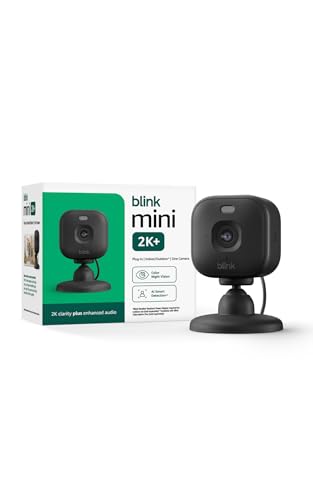
Blink Mini 2K+ (newest model) – Plug-in Home & Pet Indoor Security Camera with 2K video resolution, night vision, enhanced audio, motion detection – 1 camera (Black)
As an Amazon Associate we earn from qualifying purchases. Product prices and availability are accurate as of the date/time indicated.

2.4GHz/5GHz WiFi Indoor Camera 2K Cameras for Home Security 2-Pack | AI Motion Detect Two-Way Audio 49ft IR Night Vision 24/7 Recording 3-Min Quick Setup SD/Cloud Storage
As an Amazon Associate we earn from qualifying purchases. Product prices and availability are accurate as of the date/time indicated.
TP-Link Tapo C100 Indoor Camera
The TP-Link Tapo C100 Indoor Camera is a camera with a typical price range of $19 to $24. It is the cheapest camera in this comparison and a practical starting point if you want a low-cost cheap indoor camera under 50. It has a video resolution of 1080p, night vision, microSD storage, and a Tapo app, according to the maker.
Choose this camera if you want a simple, affordable indoor camera for your home. The Tapo C100 has a simple design, a good video for a living room, and a good fit for a beginner with a first indoor camera. Its 1080p video is good for most homes, but it may not be as sharp as a 2K camera. If you need a sharper video, the Wyze Cam v4 is a better choice at a higher price.
Wyze Cam v4 Indoor Camera
The Wyze Cam v4 Indoor Camera is a camera with a typical price range of $29 to $35. It has a video resolution of 2.5K, night vision, microSD storage, and a Wyze app, according to the maker. It is a good choice if you want a Wyze camera with a trusted brand for indoor cameras and a simple design for a home.
This camera is best for a home that wants a Wyze Cam v4 for a cheap indoor camera under 50. The Wyze Cam v4 has a simple design and a good fit for a user who wants a sharp video for regular use. It is more expensive than the Tapo C100, but it offers a higher 2.5K resolution and a Wyze brand for indoor cameras.
Blink Mini 2 Indoor Camera
The Blink Mini 2 Indoor Camera is a camera with a typical price range of $29 to $35. It has a video resolution of 1080p, night vision, cloud storage, and a Blink app, according to the maker. It is a good choice if you want a Blink camera with a trusted brand for indoor cameras and a simple design for a home.
Choose this camera if you want a Blink Mini 2 for your home. The Blink Mini 2 has a simple design and a good fit for a user who wants a reliable indoor camera for regular use. It is more expensive than the Tapo C100, but it offers a Blink brand and a similar 1080p design for indoor cameras.
TP-Link Tapo C120 Indoor Camera
The TP-Link Tapo C120 Indoor Camera is a camera with a typical price range of $34 to $39. It has a video resolution of 2K, night vision, microSD storage, and a Tapo app, according to the maker. It is a good choice if you want a Tapo camera with a trusted brand for indoor cameras and a simple design for a home.
This camera is best for a home that wants a TP-Link Tapo C120 for a cheap indoor camera under 50. The Tapo C120 has a simple design and a good fit for a user who wants a sharp video for regular use. It is more expensive than the Wyze Cam v4, but it offers a 2K resolution and a Tapo brand for indoor cameras.
Eufy Indoor Cam C120
The Eufy Indoor Cam C120 is a camera with a typical price range of $39 to $44. It has a video resolution of 2K, night vision, microSD storage, and a Eufy app, according to the maker. It is a good choice if you want a Eufy camera with a trusted brand for indoor cameras and a simple design for a home.
Choose this camera if you want a Eufy Indoor Cam C120 for your home. The Eufy C120 has a simple design and a good fit for a user who wants a reliable indoor camera for regular use. It is more expensive than the Tapo C120, but it offers a Eufy brand and a similar 2K design for indoor cameras.
Ring Indoor Camera
The Ring Indoor Camera is a camera with a typical price range of $39 to $44. It has a video resolution of 1080p, night vision, cloud storage, and a Ring app, according to the maker. It is a good choice if you want a Ring camera with a trusted brand for indoor cameras and a simple design for a home.
This camera is best for a home that wants a Ring Indoor Camera for a cheap indoor camera under 50. The Ring Indoor Camera has a simple design and a good fit for a user who wants a durable indoor camera for regular use. It is more expensive than the Tapo C120, but it offers a Ring brand and a similar 1080p design for indoor cameras.
Wyze Cam Pan v3 Indoor Camera
The Wyze Cam Pan v3 Indoor Camera is a camera with a typical price range of $39 to $44. It has a video resolution of 1080p, night vision, pan and tilt, microSD storage, and a Wyze app, according to the maker. It is tied for the most expensive camera in this comparison, but it is a premium Wyze camera with pan and tilt for a cheap indoor camera under 50.
Choose this camera if you want a premium Wyze Cam Pan v3 for your home and you are willing to pay more for it. The Cam Pan v3 has a 1080p video, night vision, and pan and tilt for a clear, flexible indoor camera. It is a good fit for a serious home with a need for a premium, pan and tilt camera. It is not the best choice if you have a small budget, because the TP-Link Tapo C100 offers similar basic indoor camera support at a lower price for a beginner, with 1080p video for a living room.
Buying Guide: How to Choose the Best Cheap Indoor Camera Under 50
1. Check video resolution first: 1080p for most homes, 2K for sharper video, check resolution
Start with video resolution when you choose a cheap indoor camera under 50. Choose a camera with 1080p video, such as a TP-Link Tapo C100, if you want a camera for most homes, because it can show a clear video of a room. Choose a camera with 2K video, such as a TP-Link Tapo C120, if you want a sharper video, because it can show more detail. Check the video resolution before you buy, and choose a camera by resolution for your home.
Check resolution before you buy. A camera with 1080p video is good for a living room, while a camera with 2K video is good for a nursery or a pet room where you want more detail. Test your camera at home, so you know it works before you use it every day.
2. Check night vision, motion detection, and audio
Check night vision first. A camera with night vision is a good choice, because it can see in the dark, so you can watch your home at night. Check motion detection next. A camera with motion detection is a good choice, because it can send you an alert when it sees motion, so you know when someone is in your home. Check audio as well. A camera with two-way audio is a good choice, because it can let you talk to someone in your home through the camera.
Check night vision and motion before you buy. A camera without night vision may be useless at night, while a camera without motion detection may miss important events. Test your camera at night, so you know it works in the dark.
3. Check storage, subscription, and Wi-Fi
Check storage before you buy. A camera with microSD storage is a good choice, because it can store videos locally without a monthly fee. A camera with cloud storage is a good choice if you want to see videos from anywhere, but it may need a monthly fee. Check subscription next. A camera that works without a subscription is a good choice, because it can save you money over time. Check Wi-Fi as well. A camera with Wi-Fi is a good choice, because it can connect to your home Wi-Fi without a cable.
Check storage and subscription before you buy. A camera that needs a subscription to see videos may cost more over time than a camera with local storage. Read the maker notes for storage and subscription before you buy.
4. Check privacy, passwords, and care
Use strong passwords, with two-factor authentication where available, for your camera and Wi-Fi accounts. Do not share your camera login with anyone you do not trust, and do not place a camera in a bathroom or bedroom where privacy matters. Check local laws for camera use, recording, and audio before you use a camera in your home.
Keep your camera software updated, and do not use a camera in water or in a hot place. Clean your camera lens with a dry cloth if it gets dusty, and store it in a dry place when you are not using it. Replace your camera if the video is blurry, the night vision does not work, or the camera does not connect to Wi-Fi.
Frequently Asked Questions
What is the best cheap indoor camera under 50?
For most homes, the Wyze Cam v4 Indoor Camera, typically $29 to $35, is a strong overall choice because it has a video resolution of 2.5K, night vision, microSD storage, and a Wyze app, according to the maker, at a low price for a cheap indoor camera under 50. If you want the lowest price, the TP-Link Tapo C100, typically $19 to $24, is a good choice. If you want a premium camera with pan and tilt, the Wyze Cam Pan v3, typically $39 to $44, is a good choice. Choose by video resolution, night vision, and budget.
What is the best budget indoor camera under 50?
The best budget indoor camera is the TP-Link Tapo C100 Indoor Camera, typically $19 to $24, because it is the cheapest row in the table and the only model in that lowest price range. It has a video resolution of 1080p, night vision, microSD storage, and a Tapo app, according to the maker. It is a good choice for a low-cost indoor camera, but its 1080p video may not be as sharp as a 2K camera, so choose the Wyze Cam v4 if you need a sharper video.
Do I need a subscription for a cheap indoor camera?
Do you need a subscription for a cheap indoor camera depends on your camera, your storage, and your use. Most cheap indoor cameras, such as a TP-Link Tapo C100, can work without a subscription, if you use a microSD card for local storage. Some cameras, such as a Blink Mini 2, may need a subscription for cloud storage, but they can still show live video without a subscription. Check the maker notes for storage and subscription before you buy, and choose a camera with microSD storage if you want to avoid a monthly fee.
Can I use an indoor camera as a baby monitor?
Can you use an indoor camera as a baby monitor depends on your camera, your baby, and your use. Yes, you can use an indoor camera as a baby monitor, if your camera has night vision, two-way audio, and a simple app that you can check at night. A camera with 1080p video is a good choice for a baby monitor, because it can show a clear video of a baby. Do not place a camera too close to a baby, and do not use a camera as a substitute for checking on your baby in person. Always follow safe sleep guidance for babies, and do not place a camera, cord, or cable in a crib.
The best cheap indoor camera under 50 is the one that can watch your home, without costing too much, without needing a monthly fee to work, and without being too hard to set up. Start with the Wyze Cam v4 for a reliable low-price camera with 2.5K video, choose the TP-Link Tapo C100 for the lowest price, or choose the Wyze Cam Pan v3 for a premium camera with pan and tilt. Use a strong password, keep your camera software updated, and do not place a camera where privacy matters. With the right cheap indoor camera, you can watch your home safely every time.
Related guides
- Phone Case vs Phone Sleeve Budget in 2026: Which Budget Protection Is Best for Your Phone?
- Best NAS Drive for Video Editing in 2026: NAS Drives for Video Editing
- Best Switch for Student NAS Storage: 6 Network Switches for Student NAS in 2026
- Best Cheap Baby Monitor for Parents in 2026: 7 Monitors That Offer Clear Video, Reliable Audio, and Peace of Mind for Parents
More from Amazon
Programs that pair well with the guide above. Offers and eligibility are set by Amazon and may change.
Set up recurring deliveries of everyday items on eligible products. Terms and savings are set by Amazon.
Explore Subscribe & SaveFree shipping on eligible items, Prime Video and more. Eligible new members can start with a free trial.
Start a Prime free trialAudiobooks and podcasts to listen to on the go. Eligible new members can start with a free trial.
Try Audible freeRead from a large library of eBooks and audiobooks on any device. Check Amazon for current plans.
Explore Kindle UnlimitedAs an Amazon Associate we earn from qualifying purchases.

Write Your Review
No reviews yet. Be the first to share your experience!