
What's inside
- Why the Best Battery for Student Wireless Mice Needs to Be Rechargeable
- Best Battery for Student Wireless Mice: AA, AAA and Capacity
- Best Battery for Student Wireless Mice Comparison Table
- Top Batteries for Student Wireless Mice Reviewed
- Buying Guide: How to Choose the Best Battery for Student Wireless Mice
- How to Use Rechargeable Batteries in a Wireless Mouse
- Frequently Asked Questions
As an Amazon Associate I earn from qualifying purchases. This post may contain affiliate links at no extra cost to you.
Finding the best battery for student wireless mice is about choosing a battery that lasts for weeks in a mouse, is cheap to recharge, and is easy to carry in a backpack, without leaking or dying during class. A good battery for student wireless mice should have a high capacity, a long shelf life, and a design that is safe for a dorm room or a library. It should also be affordable, with a low cost per use, and priced for a student who wants reliable power for a mouse without buying disposable batteries every week.
This guide explains what to look for in a battery for student wireless mice, how to compare AA, AAA, capacity, and cycle life, and which models work well in 2026. We focus on practical use for students who use a wireless mouse for studying, writing, and gaming, with a battery that is used for a Logitech, Microsoft, or HP mouse, and with a design that is suitable for a beginner and for an experienced student. Whether you use a mouse for 2 hours a day or 8 hours a day, the same principles apply: choose a rechargeable battery that is high capacity, low self-discharge, and easy to recharge.
Our Top Picks
Why the Best Battery for Student Wireless Mice Needs to Be Rechargeable
A battery for student wireless mice needs to be rechargeable because a rechargeable AA battery, such as a Panasonic eneloop, can be recharged 2,000 times, while a disposable AA battery can only be used once. A student who uses a wireless mouse every day will save money with rechargeable batteries, because they do not need to buy new batteries every week. A rechargeable battery also produces less waste, which is better for the environment.
A battery for student wireless mice also needs low self-discharge. A low self-discharge battery, such as eneloop, holds its charge for months when not in use, while a standard NiMH battery loses its charge in weeks. A battery with a high capacity, such as 2,000mAh for AA, lasts longer in a mouse than a battery with a low capacity, such as 1,000mAh.
Best Battery for Student Wireless Mice: AA, AAA and Capacity
Battery size matters for a wireless mouse, because most wireless mice use AA or AAA batteries. A Logitech M185 uses 1 AA battery, a Logitech M720 uses 1 AA battery, and a Microsoft Wireless Mouse 2000 uses 2 AA batteries. A small wireless mouse, such as a Logitech Pebble, uses 1 AA battery, while a compact mouse may use 1 AAA battery. Check your mouse’s battery compartment before you buy batteries.
Capacity also matters. A AA battery with 2,000mAh, such as a Panasonic eneloop, lasts longer in a mouse than a AA battery with 1,000mAh. A AAA battery with 800mAh, such as an eneloop AAA, lasts longer than a AAA battery with 500mAh. A battery with a high cycle life, such as 2,100 cycles, lasts longer than a battery with 500 cycles.
Best Battery for Student Wireless Mice Comparison Table
| Model | Size, Type | Capacity | Recharge Cycles | Low Self-Discharge | Typical Price Range | Rating |
|---|---|---|---|---|---|---|
| Panasonic eneloop AA Rechargeable Batteries, 4-Pack | AA, NiMH | 2,000 mAh | Up to 2,100 cycles | Yes, up to 10 years | $10-$15 | 4.8/5 |
| Panasonic eneloop Pro AA Rechargeable Batteries, 4-Pack | AA, NiMH | 2,550 mAh | Up to 500 cycles | Yes, up to 1 year | $15-$20 | 4.8/5 |
| Amazon Basics AA Rechargeable Batteries, 8-Pack | AA, NiMH | 2,000 mAh | Up to 1,000 cycles | Yes | $10-$15 | 4.7/5 |
| Energizer Recharge Power Plus AA Batteries, 4-Pack | AA, NiMH | 2,000 mAh | Up to 1,000 cycles | Yes | $10-$15 | 4.7/5 |
| Duracell Rechargeable AA Batteries, 4-Pack | AA, NiMH | 2,500 mAh | Up to 400 cycles | Yes | $10-$15 | 4.7/5 |
| EBL AA Rechargeable Batteries, 8-Pack, 2800mAh | AA, NiMH | 2,800 mAh | Up to 1,200 cycles | Yes | $15-$20 | 4.7/5 |

Vvuilsty Replacement Battery A1672 195mAh for Magic Mouse 2 Wireless Mouse


As an Amazon Associate we earn from qualifying purchases. Product prices and availability are accurate as of the date/time indicated.

wegear Bluetooth Mouse Silent Wireless Mice, Cordless Computer Mouse-Grey | Quiet Click, 6 Buttons, Sculpted Grip, Adjustable DPI for Laptop, PC, Mac, 18-Month Battery Life for Work Travel
As an Amazon Associate we earn from qualifying purchases. Product prices and availability are accurate as of the date/time indicated.
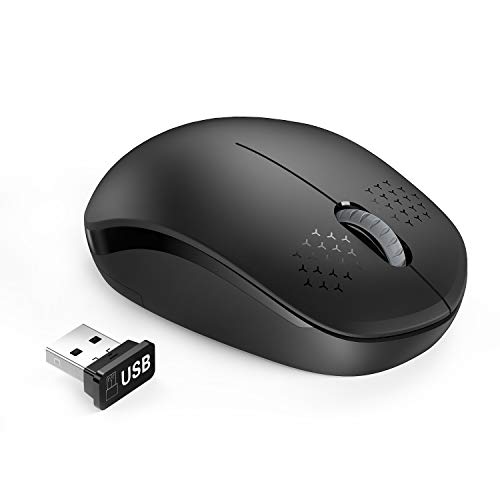
seenda Wireless Mouse for Laptop, 2.4G Noiseless Computer Mouse,Black | Small portable design,USB receiver, quiet clicks, smooth tracking, 24-month battery life Mice for laptop,Chromebook and PC.
As an Amazon Associate we earn from qualifying purchases. Product prices and availability are accurate as of the date/time indicated.
Top Batteries for Student Wireless Mice Reviewed
Panasonic eneloop AA Rechargeable Batteries, 4-Pack
The Panasonic eneloop AA Rechargeable Batteries, 4-Pack is a battery with an AA NiMH type, a capacity of 2,000mAh, up to 2,100 recharge cycles, low self-discharge up to 10 years, and a price of $10 to $15. It has a long life, a reliable design, and a good value. It is a good choice if you want the best battery for student wireless mice with a proven eneloop design.
Panasonic eneloop Pro AA Rechargeable Batteries, 4-Pack
The Panasonic eneloop Pro AA Rechargeable Batteries, 4-Pack is a battery with an AA NiMH type, a capacity of 2,550mAh, up to 500 recharge cycles, low self-discharge up to 1 year, and a price of $15 to $20. It has a higher capacity than the standard eneloop, a durable design, and a good value for heavy use. It is a good choice if you want a high-capacity battery for a wireless mouse that you use all day.
Amazon Basics AA Rechargeable Batteries, 8-Pack
The Amazon Basics AA Rechargeable Batteries, 8-Pack is a battery with an AA NiMH type, a capacity of 2,000mAh, up to 1,000 recharge cycles, low self-discharge, and a price of $10 to $15. It has a low price, a good capacity, and a large pack size. It is a good choice if you want an affordable 8-pack of batteries for a mouse and other devices.
Energizer Recharge Power Plus AA Batteries, 4-Pack
The Energizer Recharge Power Plus AA Batteries, 4-Pack is a battery with an AA NiMH type, a capacity of 2,000mAh, up to 1,000 recharge cycles, low self-discharge, and a price of $10 to $15. It has a reliable design, a good capacity, and a good value. It is a good choice if you want an Energizer battery for a wireless mouse.
Duracell Rechargeable AA Batteries, 4-Pack
The Duracell Rechargeable AA Batteries, 4-Pack is a battery with an AA NiMH type, a capacity of 2,500mAh, up to 400 recharge cycles, low self-discharge, and a price of $10 to $15. It has a high capacity, a durable design, and a good value. It is a good choice if you want a high-capacity Duracell battery for a wireless mouse.
EBL AA Rechargeable Batteries, 8-Pack, 2800mAh
The EBL AA Rechargeable Batteries, 8-Pack, 2800mAh is a battery with an AA NiMH type, a capacity of 2,800mAh, up to 1,200 recharge cycles, low self-discharge, and a price of $15 to $20. It has the highest capacity in this group, a large pack size, and a good value. It is a good choice if you want the highest capacity battery in this group for a wireless mouse.
Buying Guide: How to Choose the Best Battery for Student Wireless Mice
Start with your mouse, your use, and your budget. Check your mouse’s battery size: most wireless mice use 1 or 2 AA batteries, while some compact mice use 1 AAA battery. If your mouse uses AA, buy AA batteries, such as the Panasonic eneloop AA, and if it uses AAA, buy AAA batteries from the same brand. If you use your mouse for 2 hours a day, a standard eneloop with 2,000mAh is enough, while if you use it for 8 hours a day, a high-capacity battery, such as eneloop Pro with 2,550mAh, is better.
Next, check capacity, cycles, and charger. A battery with a higher capacity lasts longer in a mouse, but it may have fewer recharge cycles. A battery with 2,100 cycles, such as eneloop, lasts longer than a battery with 400 cycles, such as Duracell Rechargeable. A charger that charges 4 batteries at once, such as the Panasonic BQ-CC17, is convenient for a student, because you can charge a spare set while you use another set. A charger with USB is also convenient, because you can charge it from a laptop.
Check your dorm, your backpack, and your safety. A rechargeable battery is safer than a disposable battery if you store it correctly, with no loose batteries in a backpack with keys or coins, because a short circuit can cause heat. Store batteries in a case, and do not mix old and new batteries in a mouse. A battery with a low self-discharge is better for a student, because it holds its charge during a break.
Consider your budget, your use, and your future. Batteries for student wireless mice typically cost $10 to $20 for a 4-pack. A battery from $10 to $15, such as the Panasonic eneloop, Amazon Basics, Energizer, or Duracell, offers a good way to start. A battery from $15 to $20, such as the eneloop Pro or EBL, offers a higher capacity. A charger typically costs $10 to $20, and it is a good investment, because it pays for itself after a few months.
Finally, do not buy batteries based only on capacity or price. A battery with a high capacity but a low cycle life will need replacement sooner, while a battery with a low capacity will need recharging more often. Choose a rechargeable battery with a capacity of at least 2,000mAh for AA, a cycle life of at least 1,000 cycles, and low self-discharge. Buy a spare set, so you always have a charged battery ready for class.
How to Use Rechargeable Batteries in a Wireless Mouse
To use rechargeable batteries in a wireless mouse, first charge the batteries fully in a charger, and check that they are the correct size for your mouse. Insert the batteries into the mouse, with the positive and negative ends matching the markings, and turn on the mouse. Use the mouse normally, and when the battery is low, remove it and recharge it, and insert a spare charged battery. Do not mix rechargeable and disposable batteries in the same mouse, and do not charge disposable batteries. Store spare batteries in a case, in a cool, dry place.
Frequently Asked Questions
How long does a rechargeable AA battery last in a wireless mouse?
How long a rechargeable AA battery lasts in a wireless mouse depends on capacity and use. A AA battery with 2,000mAh, such as a Panasonic eneloop, lasts for about 2 to 3 months in a Logitech M185 mouse used for 2 hours a day, and for about 1 month if used for 8 hours a day. A battery with 2,550mAh, such as eneloop Pro, lasts longer. A mouse with a high DPI and a bright LED uses more power than a mouse with a low DPI. Check your mouse’s manual for battery life, and keep a spare set charged.
Are rechargeable batteries safe for wireless mice?
Are rechargeable batteries safe for wireless mice, yes, rechargeable NiMH batteries, such as eneloop, are safe for wireless mice, if you use the correct size and do not mix them with disposable batteries. A NiMH battery has a voltage of 1.2V, while a disposable alkaline battery has a voltage of 1.5V, but most wireless mice work well with NiMH batteries. Do not use a damaged battery, do not charge a disposable battery, and store batteries in a case, not loose in a backpack with metal objects.
Should I buy AA or AAA batteries for my mouse?
Should you buy AA or AAA batteries for your mouse, it depends on your mouse model. Most wireless mice use AA batteries, such as the Logitech M185, M720, and Microsoft Wireless Mouse 2000, while some compact mice use AAA batteries. Check your mouse’s battery compartment or manual before you buy batteries. A AA battery has a higher capacity than a AAA battery, so it lasts longer. A AAA battery is smaller and lighter, which is good for a compact mouse. Buy the size your mouse needs.
What is the best charger for student wireless mouse batteries?
What is the best charger for student wireless mouse batteries depends on your needs. A charger that charges 4 AA batteries at once, such as the Panasonic BQ-CC17 or an Amazon Basics charger, is a good choice for a student, because you can charge a spare set while you use another set. A charger with USB is convenient, because you can charge it from a laptop or a power bank. A charger with a smart charge, which stops charging when the battery is full, is safer than a charger without. Choose a charger that matches your battery size, AA or AAA.
Related guides
- Best Console Camera for Student Streamers in 2026: 7 Affordable Cameras That Make Your Console Streams Look Clear, Bright, and Professional
- Best Smart Switch for Living Room in 2026: Dimmers and Switches From Lutron, Leviton, and Kasa That Handle LED Bulbs, 3-Way Circuits, and Movie Night Without Flicker
- Best Budget Gaming Speaker with Lights for Gamers in 2026: 7 Speakers That Offer Clear Sound, RGB Lights, and Reliable Use for Gamers
- Best WiFi 6 Router for Students in 2026: Fast, Cheap Routers for Student Houses and Studios — and the Dorm Rule You Must Check Before You Buy Anything
More from Amazon
Programs that pair well with the guide above. Offers and eligibility are set by Amazon and may change.
Set up recurring deliveries of everyday items on eligible products. Terms and savings are set by Amazon.
Explore Subscribe & SaveFree shipping on eligible items, Prime Video and more. Eligible new members can start with a free trial.
Start a Prime free trialAudiobooks and podcasts to listen to on the go. Eligible new members can start with a free trial.
Try Audible freeRead from a large library of eBooks and audiobooks on any device. Check Amazon for current plans.
Explore Kindle UnlimitedAs an Amazon Associate we earn from qualifying purchases.

Write Your Review
No reviews yet. Be the first to share your experience!