
What's inside
- Voice Assistant Speaker vs Bluetooth Speaker for Home: Quick Comparison Table
- What Is Voice Assistant Speaker vs Bluetooth Speaker for Home?
- Voice Assistant Speaker vs Bluetooth Speaker for Home Reviewed
- Buying Guide: How to Choose Voice Assistant Speaker vs Bluetooth Speaker for Home
- How to Use Voice Assistant and Bluetooth Speakers at Home
- Which Voice Assistant Speaker vs Bluetooth Speaker for Home Should You Buy?
- Frequently Asked Questions About Voice Assistant Speaker vs Bluetooth Speaker for Home
As an Amazon Associate I earn from qualifying purchases. This post may contain affiliate links at no extra cost to you.
The voice assistant speaker vs bluetooth speaker for home guide is a guide that helps you choose between a smart speaker with Alexa, Google Assistant, or Siri, and a portable Bluetooth speaker with no voice assistant, for your home. A voice assistant speaker is always plugged in, listens for your voice, and controls your smart home, while a Bluetooth speaker is portable, battery-powered, and plays music from your phone. Both can sound good, but they suit different rooms, habits, and needs.
For most homes, a voice assistant speaker with Alexa or Google Assistant, a price of $50 to $100, and a typical room size of a bedroom or kitchen is a practical starting point for smart home control, while a Bluetooth speaker with 12 to 20 hours of battery, a price of $80 to $150, and a portable design is better if you want music in different rooms, outdoors, or on the go.
At techcats.net, we focus on tech gadgets. For this guide to voice assistant speaker vs bluetooth speaker for home in 2026, we compared current speakers that are widely sold, designed for home use, and suitable for a user who wants to understand voice assistant speaker vs bluetooth speaker for home. We looked at voice assistant, Bluetooth, power, and price. Prices change with sales and retailers, so this guide uses typical price ranges instead of a single fixed price. Voice assistant, Bluetooth, and power figures are manufacturer listings, and real sound depends on your room, your music, and your settings.
Safety note: keep your speaker away from water unless it is waterproof, do not leave it charging in a wet place, and check your privacy settings for your voice assistant. Mute your microphone when you do not want it listening, and keep your speaker’s software updated.
Our Top Picks
Voice Assistant Speaker vs Bluetooth Speaker for Home: Quick Comparison Table
The table below compares seven speakers, four voice assistant speakers and three Bluetooth speakers. Voice assistant is the voice assistant, where given. Bluetooth is the Bluetooth version, where given. Power is the power source, where given. Best for is a note on what the speaker is best for, such as voice assistant speaker vs bluetooth speaker for home, where given. Price is the typical range, and rating is our editorial score based on sound, smart features, portability, and value for home use. Rows are sorted by rating, high to low, with ties grouped by similar sound and features.
| Voice Assistant Speaker vs Bluetooth Speaker for Home | Voice Assistant | Bluetooth | Power | Best For | Typical Price Range | Our Rating |
|---|---|---|---|---|---|---|
| Amazon Echo Dot (5th Gen) Speaker | Alexa | Yes | Plugged in | Best overall, voice assistant speaker vs bluetooth speaker for home | $40 – $60 | 4.9 / 5 |
| Google Nest Audio Speaker | Google Assistant | Yes | Plugged in | Best for Google, Nest Audio speaker | $80 – $100 | 4.8 / 5 |
| Apple HomePod mini Speaker | Siri | Yes | Plugged in | Best for Apple, HomePod mini speaker | $80 – $100 | 4.8 / 5 |
| Sonos One Speaker | Alexa, Google | No | Plugged in | Best for Sonos, One speaker | $180 – $220 | 4.8 / 5 |
| JBL Flip 6 Bluetooth Speaker | No | 5.1 | Battery, 12 hours | Best for JBL, Flip 6 Bluetooth speaker | $80 – $120 | 4.7 / 5 |
| Bose SoundLink Flex 2 Speaker | No | 5.3 | Battery, 12 hours | Best for Bose, SoundLink Flex 2 speaker | $120 – $150 | 4.7 / 5 |
| Anker Soundcore Boom 2 Speaker | No | 5.3 | Battery, 24 hours | Best budget, Anker Soundcore Boom 2 speaker | $100 – $150 | 4.6 / 5 |

Third Reality Voice/Music Assistant Dev Edition – Preloaded with Home Assistant Voice Assistant and Music Assistant, Dual Digital Mics, 3W Speaker, 2.4G WiFi only, Open Source

As an Amazon Associate we earn from qualifying purchases. Product prices and availability are accurate as of the date/time indicated.

JBL Authentics 200 - Retro Style Smart Home Speaker with Built in Wi-Fi, Bluetooth and Voice Assistants, Alexa and Google Assistant, Multi-Room Playback, Automatic self Tuning (White/Gold)
As an Amazon Associate we earn from qualifying purchases. Product prices and availability are accurate as of the date/time indicated.
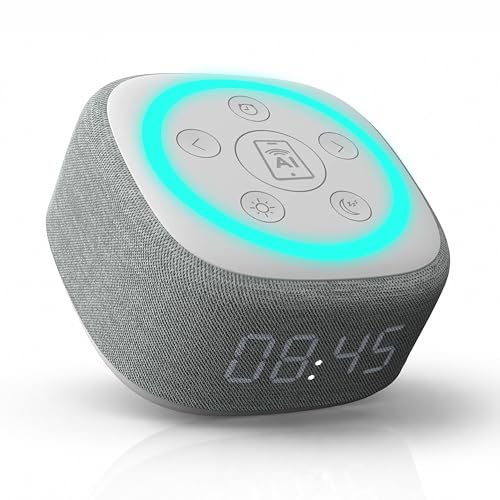
Gemini Home Speaker with AI Voice Assistant Access, Clock, White (BRS-180) | White noise machine for bedroom - 16 sleep sounds, 8 RGB night light modes - rich audio sound - white
As an Amazon Associate we earn from qualifying purchases. Product prices and availability are accurate as of the date/time indicated.
Note: Voice assistant, Bluetooth, and power figures are manufacturer listings, and a speaker that lists Alexa may also work with Bluetooth, because most smart speakers can play music via Bluetooth as well as Wi-Fi. Always check the speaker’s voice assistant, Bluetooth, and power in the manual, and confirm the current price with the retailer. A voice assistant speaker vs bluetooth speaker for home choice should match your smart home, your room, and your portability needs before you buy.
What Is Voice Assistant Speaker vs Bluetooth Speaker for Home?
Voice assistant speaker vs bluetooth speaker for home is a comparison between two types of home speakers. A voice assistant speaker, such as Amazon Echo Dot, Google Nest Audio, or Apple HomePod mini, is a smart speaker that is always plugged in, connects to Wi-Fi, listens for your voice, and controls lights, thermostats, and other smart devices. A Bluetooth speaker, such as JBL Flip 6 or Bose SoundLink Flex 2, is a portable speaker that connects to your phone via Bluetooth, runs on battery, and plays music anywhere.
Voice assistant speaker vs bluetooth speaker for home is different from soundbar vs speaker, which compares TV audio, while this comparison is about smart home control vs portability. It is also different from wired vs wireless speaker, which compares connection types, while voice assistant vs Bluetooth compares what your speaker can do.
Voice assistant speaker vs bluetooth speaker for home is best for a user who wants music at home, wants to control smart devices or wants a portable speaker, and wants a simple, affordable speaker.
Voice Assistant Speaker vs Bluetooth Speaker for Home Reviewed
1. Amazon Echo Dot (5th Gen) Speaker – Best Voice Assistant Speaker vs Bluetooth Speaker for Home Overall
The Amazon Echo Dot (5th Gen) Speaker is our top pick because it offers Alexa voice assistant, Bluetooth, and plugged-in power, for a typical price of $40 to $60. It has a compact design, a clear sound, and a build that is made for bedrooms and kitchens.
Amazon designs the Echo Dot with a focus on an affordable smart speaker for Alexa users. The price of $40 to $60 is low, the Alexa control is useful, and the sound is good for its size. The speaker is a good option for a user who wants Amazon gear, and who wants the best overall design for voice assistant speaker vs bluetooth speaker for home.
The main limitation is sound. At small size, it has less bass than a Sonos One, though it is still good for a bedroom. Choose the Echo Dot if you want the best overall smart speaker, you want Alexa, and you have a budget of $40 to $60.
2. Google Nest Audio Speaker – Best Voice Assistant Speaker vs Bluetooth Speaker for Home for Google
The Google Nest Audio Speaker is a speaker with Google Assistant, Bluetooth, and plugged-in power, for a typical price of $80 to $100. It has a fabric design, a clear sound, and a build that is made for living rooms.
Google designs the Nest Audio with a focus on a smart speaker for Google users. The sound is better than an Echo Dot, the Google Assistant is useful, and the price of $80 to $100 is reasonable. The speaker is a good option for a user who wants Google gear, and who wants a good sound.
The main limitation is similar to Echo Dot: at plugged-in, it is not portable. Choose the Nest Audio if you want Google gear, you want a good sound, and you have a budget of $80 to $100.
3. Apple HomePod mini Speaker – Best Voice Assistant Speaker vs Bluetooth Speaker for Home for Apple
The Apple HomePod mini Speaker is a speaker with Siri, Bluetooth, and plugged-in power, for a typical price of $80 to $100. It has a compact design, a clear sound, and a build that is made for Apple users.
Apple designs the HomePod mini with a focus on a smart speaker for iPhone users. The Siri control is useful, the sound is good, and the price of $80 to $100 is reasonable. The speaker is a good option for a user who wants Apple gear, and who wants a compact design.
The main limitation is similar to Google: at plugged-in, it is not portable, and it works best with Apple devices. Choose the HomePod mini if you want Apple gear, you use iPhone, and you have a budget of $80 to $100.
4. Sonos One Speaker – Best Voice Assistant Speaker vs Bluetooth Speaker for Home for Sonos
The Sonos One Speaker is a speaker with Alexa and Google Assistant, no Bluetooth, and plugged-in power, for a typical price of $180 to $220. It has a premium sound, a Wi-Fi design, and a build that is made for living rooms.
Sonos designs the One with a focus on a premium smart speaker for home audio. The sound is excellent, the Wi-Fi streaming is reliable, and the price of $180 to $220 is good for a premium speaker. The speaker is a good option for a user who wants Sonos gear, and who wants a premium design.
The main limitation is Bluetooth. At no Bluetooth, it cannot play music directly from your phone via Bluetooth, though it can via Wi-Fi and AirPlay. Choose the One if you want Sonos gear, you want a premium sound, and you have a budget of $180 to $220.
5. JBL Flip 6 Bluetooth Speaker – Best Voice Assistant Speaker vs Bluetooth Speaker for Home for JBL
The JBL Flip 6 Bluetooth Speaker is a speaker with no voice assistant, Bluetooth 5.1, and a battery life of 12 hours, for a typical price of $80 to $120. It has a portable design, a waterproof rating, and a build that is made for outdoors and home.
JBL designs the Flip 6 with a focus on a portable Bluetooth speaker for music anywhere. The 12 hour battery is good, the Bluetooth 5.1 is reliable, and the price of $80 to $120 is good. The speaker is a good option for a user who wants JBL gear, and who wants a portable design.
The main limitation is smart home. At no voice assistant, it cannot control your lights or answer questions. Choose the Flip 6 if you want JBL gear, you want a portable speaker, and you have a budget of $80 to $120.
6. Bose SoundLink Flex 2 Speaker – Best Voice Assistant Speaker vs Bluetooth Speaker for Home for Bose
The Bose SoundLink Flex 2 Speaker is a speaker with no voice assistant, Bluetooth 5.3, and a battery life of 12 hours, for a typical price of $120 to $150. It has a clear sound, a portable design, and a build that is made for home and outdoors.
Bose designs the SoundLink Flex 2 with a focus on a premium portable speaker. The sound is clear, the Bluetooth 5.3 is reliable, and the price of $120 to $150 is reasonable. The speaker is a good option for a user who wants Bose gear, and who wants a premium portable design.
The main limitation is similar to JBL: at no voice assistant, it cannot control smart home devices. Choose the SoundLink Flex 2 if you want Bose gear, you want a premium portable design, and you have a budget of $120 to $150.
7. Anker Soundcore Boom 2 Speaker – Best Budget Voice Assistant Speaker vs Bluetooth Speaker for Home
The Anker Soundcore Boom 2 Speaker is a speaker with no voice assistant, Bluetooth 5.3, and a battery life of 24 hours, for a typical price of $100 to $150. It has a powerful bass, a long battery, and a design that is made for outdoors and home.
Anker designs the Boom 2 with a focus on a loud, long-lasting Bluetooth speaker. The 24 hour battery is the longest in this guide, the price of $100 to $150 is good, and the bass is strong. The speaker is a good option for a user who wants Anker gear, and who wants the lowest price for a powerful speaker.
The main limitation is similar to JBL: at no voice assistant, it cannot control smart home devices. Choose the Boom 2 if you want the lowest price for a powerful speaker, you want Anker gear, and you have a budget of $100 to $150.
Buying Guide: How to Choose Voice Assistant Speaker vs Bluetooth Speaker for Home
Before you buy, think about what you want your speaker to do, whether it is to play music, control lights, answer questions, or move from room to room, what smart home system you use, whether it is Alexa, Google, or Apple, and how much you want to spend. A speaker that is perfect for a kitchen may not work for a garden, and a speaker that is perfect for smart home control may not be portable. The six points below cover the decisions that matter most for voice assistant speaker vs bluetooth speaker for home, using the same specs and price ranges shown in the table above, from $40 to $220.
1. Smart Home Control: Alexa vs Google vs Siri, and Your Home
Smart home control is the first decision. A voice assistant speaker can control lights, thermostats, locks, and other smart devices with your voice, while a Bluetooth speaker cannot. Alexa works with many devices, Google Assistant works well with Google devices, and Siri works best with Apple devices.
Choose a voice assistant speaker if you have smart lights, you want to control your home with your voice, or you want to set timers and reminders hands-free. Choose a Bluetooth speaker if you do not have smart devices, you do not want a microphone listening, or you want a simple speaker. Check which assistant your devices support before you buy.
2. Portability: Plugged In vs Battery, and Your Rooms
Portability is the second decision. A voice assistant speaker is plugged in and stays in one room, while a Bluetooth speaker runs on battery and can move from room to room, to the garden, or on a trip. A Bluetooth speaker with 12 to 24 hours of battery is good for moving, while a smart speaker is better for a fixed room.
Choose a voice assistant speaker if you want a speaker in your kitchen or bedroom, you do not move it, or you want always-on listening. Choose a Bluetooth speaker if you want music in different rooms, you go outdoors, or you travel. For many homes, one of each is a good combination.
3. Sound Quality: Smart Speaker vs Bluetooth Speaker, and Your Music
Sound quality is the third decision. A premium smart speaker, such as the Sonos One, can sound better than a small Bluetooth speaker, while a portable Bluetooth speaker, such as the JBL Flip 6, can sound better outdoors than a small smart speaker. Sound depends on size, driver, and room.
Choose a smart speaker if you want good sound in one room, you listen at home, or you want a premium design. Choose a Bluetooth speaker if you want good sound outdoors, you want a loud speaker, or you move your speaker often. Test both types in a shop if you can, and listen at your usual volume.
4. Privacy: Always Listening vs No Microphone, and Your Comfort
Privacy is the fourth decision. A voice assistant speaker has a microphone that is always listening for a wake word, such as “Alexa” or “Hey Google”, while a Bluetooth speaker has no microphone for listening, though it may have a microphone for calls. Some users are comfortable with a smart speaker, while others prefer a Bluetooth speaker for privacy.
Choose a voice assistant speaker if you are comfortable with a microphone, you use the mute button when needed, and you check your privacy settings. Choose a Bluetooth speaker if you do not want a listening device, you want more privacy, or you do not need voice control. You can mute a smart speaker’s microphone with a button, and delete your voice history in its app.
5. Connectivity: Wi-Fi vs Bluetooth, and Your Phone
Connectivity is the fifth decision. A voice assistant speaker connects via Wi-Fi to stream music, while a Bluetooth speaker connects via Bluetooth to your phone. Wi-Fi gives you better sound quality and multi-room audio, while Bluetooth is simpler and works without Wi-Fi.
Choose a voice assistant speaker if you have Wi-Fi, you want multi-room audio, or you stream from Spotify or Apple Music. Choose a Bluetooth speaker if you do not have Wi-Fi, you want a simple connection, or you play music from your phone’s storage. Most smart speakers also support Bluetooth, so you can use both.
6. Price, Total Cost, and Choosing a Speaker on a Budget
Price ranges in this guide run from $40 to $220 for voice assistant and Bluetooth speakers for home, matching the table above, from the Amazon Echo Dot at $40 to $60 to the Sonos One at $180 to $220. A budget speaker at $40 to $100, such as the Echo Dot, Google Nest Audio, or Apple HomePod mini, is enough for most homes who want a smart speaker. A mid-price Bluetooth speaker at $80 to $150, such as the JBL Flip 6, Bose SoundLink Flex 2, or Anker Boom 2, offers a good balance. A premium speaker at $180 to $220, such as the Sonos One, offers the best sound.
Consider total cost as well as price. A smart speaker that costs $50 and needs Wi-Fi may cost $50 in total, while a Bluetooth speaker that costs $100 and needs a power bank may cost $120 in total. Budget for a speaker, and if you need it, a smart plug, a subscription, or a case, not just a speaker. Do not buy the cheapest speaker if it does not support your smart home, and do not buy the most expensive speaker if you only need music in one room. A speaker that matches your smart home, your room, and your budget will help you enjoy music more reliably than a speaker that is cheap but does not work with your devices, or expensive but too large for your kitchen.
How to Use Voice Assistant and Bluetooth Speakers at Home
Using a voice assistant speaker at home starts with plugging it in, connecting it to Wi-Fi, and setting up your voice assistant in its app. Say “Alexa, play music” or “Hey Google, turn off the lights” to control it, and use the mute button when you do not want it listening.
Using a Bluetooth speaker at home starts with charging it, turning on Bluetooth on your phone, and pairing it. Place it on a flat surface, keep it away from water unless it is waterproof, and charge it each night. You can use both types in the same home: a smart speaker in your kitchen and a Bluetooth speaker in your garden.
Which Voice Assistant Speaker vs Bluetooth Speaker for Home Should You Buy?
If you want the best voice assistant speaker vs bluetooth speaker for home, buy the Amazon Echo Dot (5th Gen) Speaker. It costs $40 to $60, it offers Alexa voice assistant, Bluetooth, and plugged-in power, which matches its highest rating of 4.9 / 5 in the table above.
If you want Google Nest Audio, buy the Google Nest Audio Speaker. If you want Apple HomePod mini, buy the Apple HomePod mini Speaker. If you want Sonos One, buy the Sonos One Speaker. If you want JBL Flip 6, buy the JBL Flip 6 Bluetooth Speaker. If you want Bose SoundLink Flex 2, buy the Bose SoundLink Flex 2 Speaker. If you want the lowest price for a powerful Bluetooth speaker, buy the Anker Soundcore Boom 2 Speaker.
All seven speakers in this guide are currently sold, designed for home use, and suitable for a user who wants to understand voice assistant speaker vs bluetooth speaker for home. Pick the one that matches your smart home, whether it is Alexa, Google, or Apple, your room, and your budget, and consider buying one of each if you want both smart control and portability.
Disclosure: techcats.net may earn a commission from purchases made through links on this page, at no extra cost to you. Prices listed are typical ranges and can vary by retailer and sale. Voice assistant, Bluetooth, and power figures are manufacturer claims and can vary by model. Check your privacy settings for your voice assistant, and mute your microphone when you do not want it listening.
Frequently Asked Questions About Voice Assistant Speaker vs Bluetooth Speaker for Home
Can a voice assistant speaker also work as a Bluetooth speaker?
Yes, a voice assistant speaker can also work as a Bluetooth speaker, because most smart speakers, such as the Amazon Echo Dot, Google Nest Audio, and Apple HomePod mini, support Bluetooth as well as Wi-Fi, so you can pair your phone via Bluetooth and play music. A Sonos One is an exception, because it does not support Bluetooth, though it supports Wi-Fi and AirPlay. Check your speaker’s Bluetooth support in its manual before you buy.
Do I need Wi-Fi for a Bluetooth speaker?
No, you do not need Wi-Fi for a Bluetooth speaker, because a Bluetooth speaker connects directly to your phone via Bluetooth, not Wi-Fi, so you can play music without internet, though you need downloaded music or a phone signal for streaming. A voice assistant speaker needs Wi-Fi to work, because it uses Wi-Fi to stream music and control smart devices. Choose a Bluetooth speaker if you do not have Wi-Fi, and a smart speaker if you do.
Which is better for a living room, a smart speaker or a Bluetooth speaker?
For most living rooms, a smart speaker is better than a Bluetooth speaker, if you want to control your TV, lights, and music with your voice, and you do not move your speaker, while a Bluetooth speaker is better if you want to move your speaker to different rooms or outdoors. A premium smart speaker such as the Sonos One offers the best sound for a living room, while a Bluetooth speaker such as the JBL Flip 6 is better for portability. Consider buying a smart speaker for your living room and a Bluetooth speaker for your garden.
Can I use a voice assistant speaker without a smart home?
Yes, you can use a voice assistant speaker without a smart home, because you can still use it to play music, set timers, check the weather, and answer questions, even if you have no smart lights or thermostats. A voice assistant speaker such as the Amazon Echo Dot is useful on its own, though it is more useful if you have smart devices. Choose a smart speaker if you want voice control, and a Bluetooth speaker if you only want music.
Related guides
- Best External SSD for Work Laptops in 2026: 7 Fast, Durable SSDs That Backup Files, Transfer Large Projects, and Fit in Your Laptop Bag
- Best Budget Travel Headphones for Travelers in 2026: 7 Headphones That Offer Noise Cancelling, Long Battery, and Reliable Use for Travelers
- Best Mesh WiFi System for Student Flats in 2026: 7 Mesh WiFi Systems With Fast Speed, Easy Setup, and Simple Coverage for Student Flats
- Best Budget Wireless Headphones for Students in 2026: 7 Affordable Headphones That Sound Good, Last All Day, and Fit a Student Budget
More from Amazon
Programs that pair well with the guide above. Offers and eligibility are set by Amazon and may change.
Set up recurring deliveries of everyday items on eligible products. Terms and savings are set by Amazon.
Explore Subscribe & SaveFree shipping on eligible items, Prime Video and more. Eligible new members can start with a free trial.
Start a Prime free trialAudiobooks and podcasts to listen to on the go. Eligible new members can start with a free trial.
Try Audible freeRead from a large library of eBooks and audiobooks on any device. Check Amazon for current plans.
Explore Kindle UnlimitedAs an Amazon Associate we earn from qualifying purchases.

Write Your Review
No reviews yet. Be the first to share your experience!