
What's inside
- Best Microphone for Voice Chats While Gaming Compared: Quick Comparison Table
- Best Microphone for Voice Chats While Gaming in 2026: Detailed Reviews
- Best Microphone for Voice Chats While Gaming Buying Guide: How to Choose the Right Mic
- Best Microphone for Voice Chats While Gaming FAQ: Gaming Mic Questions Answered
As an Amazon Associate I earn from qualifying purchases. This post may contain affiliate links at no extra cost to you.
A microphone for voice chats while gaming is a mic that captures your voice clearly in Discord, in-game voice chat, and streaming, without picking up too much keyboard noise, fan noise, or room echo. It is useful for PC gamers because clear voice chat helps your team hear callouts, coordinate strategies, and enjoy the game without asking you to repeat yourself. The best microphone for voice chats while gaming is not the most expensive studio mic, and it is not the mic with the most features. It is the mic that has a cardioid pattern for voice, a USB connection that is easy to set up, and noise rejection that keeps your voice clear even in a noisy room.
For most gamers, the best overall choice in 2026 is the HyperX QuadCast S. It typically costs $130 to $160. It is a USB condenser microphone with a cardioid pattern, a built-in shock mount, a tap-to-mute sensor, and RGB lighting that matches a gaming setup. If you want a simpler, cheaper mic, the Blue Yeti USB Microphone is an excellent alternative, typically $80 to $100, with a cardioid pattern, a USB connection, and a well-known design for voice chats. For a compact mic that is easy to fit on a desk, the Razer Seiren Mini is a practical choice, typically $40 to $50, with a cardioid pattern and a small footprint.
This guide compares seven real, currently sold microphones for voice chats while gaming. It explains how to choose a mic based on pattern, connection, and noise rejection, why a cardioid USB mic is best for most gamers, and how to set up a mic for clear voice chat. A microphone is only useful if your teammates can hear you clearly, so this guide also covers how to reduce keyboard noise and background noise.
Our Top Picks
Best Microphone for Voice Chats While Gaming Compared: Quick Comparison Table
Use this table to compare the best microphone for voice chats while gaming at a glance. Prices are typical retail ranges, not fixed prices, and will vary by retailer. Ratings are editorial scores out of five based on voice clarity, noise rejection, ease of use, build quality, and value for gaming.
| Model | Key Specs | Best For | Typical Price Range | Rating |
|---|---|---|---|---|
| HyperX QuadCast S | USB, cardioid, shock mount, tap-to-mute, RGB | Best overall for gaming voice chats | $130–$160 | 4.9 / 5 |
| Blue Yeti USB Microphone | USB, cardioid, gain control, headphone jack | Best classic for gaming voice chats | $80–$100 | 4.8 / 5 |
| Razer Seiren Mini | USB, cardioid, compact, plug-and-play | Best compact for gaming voice chats | $40–$50 | 4.8 / 5 |
| Elgato Wave:3 | USB, cardioid, Wave Link software, clip guard | Best Elgato for gaming voice chats | $130–$150 | 4.8 / 5 |
| Rode NT-USB Mini | USB, cardioid, compact, headphone jack | Best Rode for gaming voice chats | $80–$100 | 4.7 / 5 |
| Audio-Technica AT2020USB-X | USB, cardioid, headphone jack, high-res | Best Audio-Technica for gaming voice chats | $120–$150 | 4.7 / 5 |
| Shure MV7+ Podcast Microphone | USB / XLR, cardioid, touch panel, USB-C | Best premium for gaming voice chats | $250–$280 | 4.7 / 5 |

Upgraded Mic Replacement fits for HyperX Cloud III Wired/Wireless Gaming Headphone, Detachable Noise Cancellation Backup Microphone for Crystal Gaming Voice Chat


As an Amazon Associate we earn from qualifying purchases. Product prices and availability are accurate as of the date/time indicated.

FIFINE AmpliGame AM8T XLR/USB Gaming Microphone Set, Dynamic PC Mic | Streaming RGB Mic Kit with Boom Arm Stand, Mute Button, Headphones Jack, for Podcasting Recording Vocal Voice-Over
As an Amazon Associate we earn from qualifying purchases. Product prices and availability are accurate as of the date/time indicated.
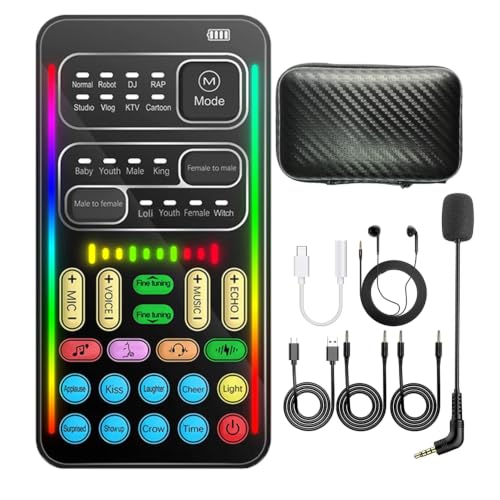
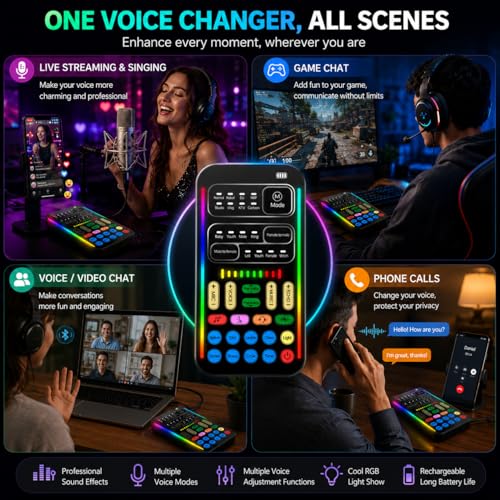
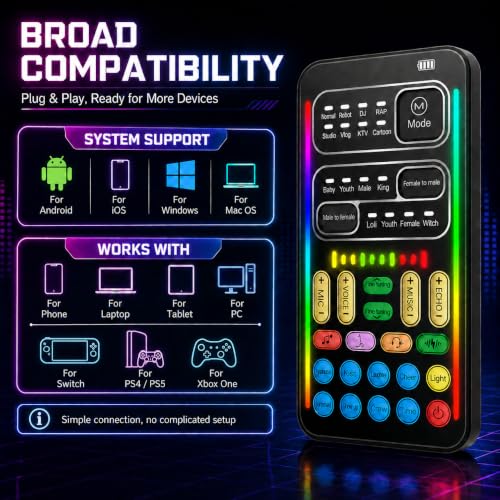
I9 Voice Changer Sound Card Kit with Mic for Gaming, Streaming & Voice Chat | Complete ready-to-use kit with 16 built-in effects, mini mic, earphones and USB-C adapter for PC, consoles and phones.





As an Amazon Associate we earn from qualifying purchases. Product prices and availability are accurate as of the date/time indicated.
Best Microphone for Voice Chats While Gaming in 2026: Detailed Reviews
Each microphone below suits a different gamer and a different desk setup. Some are best for a large desk with a boom arm, others are best for a small desk with a compact mic, and some are best for a gamer who wants a premium mic that can also be used for streaming and podcasting. Read the pattern and connection notes, because those two factors affect voice clarity more than any other spec.
1. HyperX QuadCast S — Best Microphone for Voice Chats While Gaming Overall
The HyperX QuadCast S is the best overall microphone for voice chats while gaming because it is designed for gamers, with a cardioid pattern that focuses on your voice and rejects sound from the sides and back, a built-in shock mount that reduces vibrations from your desk, and a tap-to-mute sensor that lets you mute quickly with a tap on the top of the mic. It is a USB condenser microphone, so you can plug it into your PC via USB and start using it in Discord or in-game chat without an audio interface.
It typically costs $130 to $160. For PC gamers, the QuadCast S is a good choice because it has clear voice quality, it is easy to set up, and it has RGB lighting that can be customised to match your gaming setup. It also has a headphone jack for monitoring your voice, and a gain control dial on the bottom for adjusting volume. It is a good option for a gamer who wants a mic that is made for gaming, not a studio mic that needs extra equipment.
Why we like this mic: cardioid, shock mount, tap-to-mute, and excellent for Discord. Consider: larger than a compact mic, so it needs desk space, and the RGB can be distracting if you prefer a simple setup.
2. Blue Yeti USB Microphone — Best Classic Microphone for Voice Chats While Gaming
The Blue Yeti USB Microphone is a classic USB microphone with a cardioid pattern, a gain control knob, a headphone jack for monitoring, and a sturdy stand. It typically costs $80 to $100. It has four polar patterns, including cardioid, which is best for voice chats, because it focuses on your voice and rejects background noise from the sides. It is a well-known mic for streaming, podcasting, and gaming voice chats.
For gamers who want a reliable, well-tested mic, the Blue Yeti is an excellent choice. It is easy to set up via USB, it has good voice clarity, and it is a good option for a beginner who wants a mic that works well for Discord and for streaming. It is larger than a compact mic, so it needs desk space, and it can pick up keyboard noise if it is placed too close to your keyboard, so place it on a boom arm or away from your keyboard.
Why we like this mic: reliable, clear voice, and good for Discord and streaming. Consider: larger and heavier than a compact mic, and it can pick up keyboard noise if placed too close.
3. Razer Seiren Mini — Best Compact Microphone for Voice Chats While Gaming
The Razer Seiren Mini is a compact USB microphone with a cardioid pattern, a small footprint, and a plug-and-play design. It typically costs $40 to $50, making it the most affordable mic in this list. It has a built-in shock mount, a small stand, and it is designed for gamers who have a small desk or who want a mic that does not take up much space.
For gamers on a budget, or for a first gaming mic, the Seiren Mini is a practical choice. It is easy to set up, it has clear voice quality for Discord, and it is small enough to fit on a crowded desk. It does not have a headphone jack or a gain control, so it is less flexible than the QuadCast S or Blue Yeti, but for voice chats, it is enough.
Why we like this mic: very compact, affordable, and clear for Discord. Consider: no headphone jack or gain control, and it is best for voice chats, not for professional streaming.
4. Elgato Wave:3 — Best Elgato Microphone for Voice Chats While Gaming
The Elgato Wave:3 is a USB condenser microphone with a cardioid pattern, a clip guard to reduce plosives, and Wave Link software that lets you mix your mic, game audio, and music for streaming. It typically costs $130 to $150. It has a tap-to-mute sensor, a headphone jack, and a design that is made for streaming and for gaming voice chats.
For gamers who also stream on Twitch or YouTube, the Wave:3 is an excellent choice, because the Wave Link software makes it easy to control audio levels for your stream and for your teammates. It has clear voice quality, it is easy to set up via USB, and it is a good option for a gamer who wants a mic that is made for both voice chats and streaming.
Why we like this mic: excellent for streaming, Wave Link software, and clear voice. Consider: higher price than Seiren Mini, and the software is best if you stream, not just for voice chats.
5. Rode NT-USB Mini — Best Rode Microphone for Voice Chats While Gaming
The Rode NT-USB Mini is a compact USB microphone with a cardioid pattern, a headphone jack, and a built-in pop filter. It typically costs $80 to $100. It has a small, sturdy design, a detachable magnetic stand, and it is made by Rode, a well-known audio brand.
For gamers who want a Rode mic, the NT-USB Mini is a good choice. It has clear voice quality, it is compact enough for a small desk, and it has a headphone jack for monitoring your voice. It is a good option for a gamer who wants a premium compact mic without paying for a large studio mic.
Why we like this mic: compact, clear voice, and Rode quality. Consider: smaller than Blue Yeti, so it is best for a small desk, and it does not have a gain control knob on the mic.
6. Audio-Technica AT2020USB-X — Best Audio-Technica Microphone for Voice Chats While Gaming
The Audio-Technica AT2020USB-X is a USB condenser microphone with a cardioid pattern, a headphone jack, and a high-resolution audio design. It typically costs $120 to $150. It has a clear, natural voice quality, a sturdy stand, and it is made by Audio-Technica, a well-known audio brand for headphones and microphones.
For gamers who want a mic with a natural voice sound, the AT2020USB-X is an excellent choice. It is good for Discord, for streaming, and for recording, and it has a headphone jack for monitoring. It is larger than a compact mic, so it needs desk space, and it is best used with a boom arm or a pop filter for best results.
Why we like this mic: natural voice, clear for Discord, and high-res audio. Consider: larger than a compact mic, and it benefits from a boom arm.
7. Shure MV7+ Podcast Microphone — Best Premium Microphone for Voice Chats While Gaming
The Shure MV7+ Podcast Microphone is a premium microphone with both USB and XLR connections, a cardioid pattern, a touch panel for mute and gain, and a USB-C connection. It typically costs $250 to $280. It has a built-in pop filter, a sturdy design, and it is made by Shure, a professional audio brand.
For gamers who want a premium mic that can also be used for podcasting and streaming, the MV7+ is a strong choice. The USB connection is easy for Discord, while the XLR connection lets you use it with a professional audio interface later if you upgrade. It has excellent noise rejection, clear voice quality, and it is a good option for a gamer who wants the best voice quality available.
Why we like this mic: premium voice, USB and XLR, and excellent noise rejection. Consider: premium price, and it is overkill if you only need Discord voice chats.
Best Microphone for Voice Chats While Gaming Buying Guide: How to Choose the Right Mic
Choosing a microphone for voice chats while gaming is not just about picking the most expensive mic. It is about matching polar pattern, connection, and noise rejection to your room, your desk, and the games you play. A mic that is perfect for a quiet room can be wrong for a noisy room with a mechanical keyboard, and a mic that is perfect for Discord can be wrong for streaming. Use the three questions below to narrow your choice before you look at price.
Polar Pattern, USB vs XLR, and Noise Rejection: Why Cardioid USB Is Best for Gaming Voice Chats
Polar pattern is the first filter. For voice chats while gaming, a cardioid pattern is best, because it picks up sound from the front, where your mouth is, and rejects sound from the sides and back, where your keyboard, fan, and room noise are. A cardioid mic will give you clearer voice in Discord than an omnidirectional mic, which picks up sound from all directions. All mics in this list are cardioid, which is why they are good for gaming voice chats.
Connection is the second filter. For most gamers, a USB mic is best, because you can plug it into your PC via USB and start using it in Discord without an audio interface, a mixer, or extra cables. An XLR mic, like the Shure MV7+ in XLR mode, needs an audio interface, which is more expensive and more complex, but it gives you better audio quality for professional streaming. For voice chats only, a USB mic is enough, and it is much easier to set up. Noise rejection also matters: a mic with a built-in shock mount, like the HyperX QuadCast S, reduces vibrations from your desk, and a mic with a pop filter reduces plosives, like the popping sound when you say “p” or “b”.
Desk Setup, Boom Arm, and Keyboard Noise: Setting Up a Mic for Clear Voice Chats
Desk setup is the second filter. Place your mic about 6 to 12 inches from your mouth, on a boom arm or on a stand, with the mic facing your mouth, not your keyboard. A boom arm is better than a desk stand for gaming, because it lets you position the mic close to your mouth without taking up desk space, and it reduces keyboard noise. A mic that is too far away will sound quiet and distant, while a mic that is too close will sound loud and distorted.
Keyboard noise is a common problem for gaming voice chats, especially with a mechanical keyboard. To reduce keyboard noise, place your mic away from your keyboard, use a cardioid pattern, and use noise suppression in Discord, like Discord Krisp noise suppression, which can reduce background noise. Test your mic in Discord before a game, by using Discord voice settings, and ask your teammates if they can hear you clearly and if they hear your keyboard. A headset mic can be good for voice chats because it is close to your mouth, but a desktop USB mic usually has better voice quality than a headset mic, and it is more comfortable for long gaming sessions.
Discord, Streaming, and Budget: Choosing a Mic for Voice Chats vs Streaming
Use case is the third filter. For voice chats only, a compact USB mic like the Razer Seiren Mini at $40 to $50 is enough, because it is clear for Discord and it is affordable. For voice chats plus streaming, a mic like the HyperX QuadCast S or Elgato Wave:3 is better, because it has better voice quality, a shock mount, and software for mixing audio. For podcasting plus gaming, a premium mic like the Shure MV7+ is best, because it has USB and XLR, and it is made for professional voice recording.
For budget, do not spend $250 on a mic if you only need Discord voice chats, because a $40 mic will be clear enough. For a gaming headset, a boom mic can be good for voice chats, but a desktop USB mic is usually better for voice quality. Always test your mic with your teammates, adjust gain so your voice is clear but not distorted, and use a pop filter or a foam windscreen if your mic picks up plosives. Safe volume matters too: do not listen to your voice at high volume in headphones for a long time, and take breaks during long gaming sessions.
Best Microphone for Voice Chats While Gaming FAQ: Gaming Mic Questions Answered
What is the best microphone for voice chats while gaming?
The best microphone for voice chats while gaming is the HyperX QuadCast S for most gamers, because it is a USB mic with a cardioid pattern, a built-in shock mount, a tap-to-mute sensor, and clear voice quality for Discord, typically $130 to $160. The Blue Yeti is the best classic alternative, while the Razer Seiren Mini is the best budget alternative.
Do I need a USB or XLR microphone for gaming voice chats?
For most gamers, a USB microphone is best for gaming voice chats, because you can plug it into your PC via USB and use it in Discord without an audio interface. An XLR microphone needs an audio interface, which is more expensive and more complex, but it gives you better audio quality for professional streaming. For Discord only, a USB mic is enough, while for streaming and podcasting, an XLR mic like the Shure MV7+ can be worth it.
How do I reduce keyboard noise on a gaming microphone?
To reduce keyboard noise on a gaming microphone, place your mic 6 to 12 inches from your mouth and away from your keyboard, use a cardioid pattern, use a boom arm to position the mic correctly, and turn on noise suppression in Discord, like Discord Krisp. A shock mount also helps reduce vibrations from your desk. Test your mic in Discord and ask your teammates if they hear your keyboard, then adjust position and settings until it is clear.
Is a headset mic or a desktop mic better for gaming voice chats?
A desktop USB microphone is usually better than a headset mic for gaming voice chats, because it has better voice quality, a larger capsule, and it is more comfortable for long gaming sessions, since it does not sit on your head. A headset mic is good if you need to move around or if you do not have desk space, and a gaming headset with a boom mic can be clear for Discord. For the best voice quality, a desktop USB mic like the HyperX QuadCast S is the better choice.
FAQ
What is the best microphone for voice chats while gaming?
Do I need a USB or XLR microphone for gaming voice chats?
How do I reduce keyboard noise on a gaming microphone?
Is a headset mic or a desktop mic better for gaming voice chats?
Related guides
- Best Smart Switch for Living Room in 2026: Dimmers and Switches From Lutron, Leviton, and Kasa That Handle LED Bulbs, 3-Way Circuits, and Movie Night Without Flicker
- Best Budget Gaming Speaker with Lights for Gamers in 2026: 7 Speakers That Offer Clear Sound, RGB Lights, and Reliable Use for Gamers
- Best WiFi 6 Router for Students in 2026: Fast, Cheap Routers for Student Houses and Studios — and the Dorm Rule You Must Check Before You Buy Anything
- Best Mesh WiFi System for Student Shared Houses: 6 Systems for Shared Student Homes in 2026
More from Amazon
Programs that pair well with the guide above. Offers and eligibility are set by Amazon and may change.
Set up recurring deliveries of everyday items on eligible products. Terms and savings are set by Amazon.
Explore Subscribe & SaveFree shipping on eligible items, Prime Video and more. Eligible new members can start with a free trial.
Start a Prime free trialAudiobooks and podcasts to listen to on the go. Eligible new members can start with a free trial.
Try Audible freeRead from a large library of eBooks and audiobooks on any device. Check Amazon for current plans.
Explore Kindle UnlimitedAs an Amazon Associate we earn from qualifying purchases.

Write Your Review
No reviews yet. Be the first to share your experience!