
What's inside
As an Amazon Associate I earn from qualifying purchases. This post may contain affiliate links at no extra cost to you.
The best USB C charger for students is the one that is fast enough to charge your laptop, compact enough to carry in a backpack, and affordable enough for a student budget, with enough ports to charge your phone and tablet at the same time. A USB-C charger is different from a regular charger. It uses USB-C Power Delivery to charge laptops, phones, and tablets quickly, with a single charger that can replace several chargers. For a student, a good charger should be small, reliable, and easy to use in a dorm room, a classroom, or a library.
For students, a charger should solve problems, not create them. It should charge your laptop quickly between classes, it should be small enough to fit in your backpack, and it should be safe to use with your devices. It should also have enough power for your laptop, usually 45W to 65W, and it should be compatible with your phone and tablet. This guide compares real, currently sold USB-C chargers that work well for students.
Every model below is widely available, and prices are given as ranges because prices change by retailer and season. We compare wattage, ports, best use, and price, then explain how to choose a charger based on your laptop, your devices, and how you study.
Disclosure: As an affiliate site, TechCats.net may earn a commission from qualifying purchases made through links on this page, at no extra cost to you. Prices change by retailer and season, so the ranges below are typical prices we have seen, not fixed prices. Wattage, ports, and specifications are based on manufacturer listings and vary by model, so check the exact listing before you buy. Always use a charger that is compatible with your device, and follow your device manufacturer’s recommendations.
Our Top Picks
Best USB C Charger for Students at a Glance: Comparison Table
Use this table to compare the leading USB-C chargers for students side by side. Wattage, ports, best use, and price matter most, so compare those first, then read the reviews below for the details that matter for student life.
| USB C Charger Model | Wattage | Ports | Best Charger Use | Typical Price Range | Rating |
|---|---|---|---|---|---|
| Anker Nano II 65W Charger | 65W | 1x USB-C | Best overall USB C charger for students | $35 – $45 | 4.8 / 5 |
| Anker 735 GaNPrime 65W Charger | 65W | 2x USB-C, 1x USB-A | Best USB C charger for students for multiple devices | $40 – $50 | 4.8 / 5 |
| UGREEN Nexode 65W Charger | 65W | 2x USB-C, 1x USB-A | Best USB C charger for students for value | $35 – $45 | 4.7 / 5 |
| Baseus 65W GaN Charger | 65W | 2x USB-C, 1x USB-A | Best USB C charger for students for a low price | $30 – $40 | 4.7 / 5 |
| Apple 67W USB-C Power Adapter | 67W | 1x USB-C | Best USB C charger for students for MacBook | $50 – $60 | 4.7 / 5 |
| Samsung 45W USB-C Charger | 45W | 1x USB-C | Best USB C charger for students for a phone and tablet | $30 – $40 | 4.7 / 5 |

2 Pack 60w Super Fast Usb C Charger, Type C Charger Fast Charging | PD 3.0 Charger Block & 6FT Type C Cord for Samsung Galaxy S26 Ultra / S26 / S25 / S24/S23 /iPhone 18/17/16/15, iPad, MacBook
As an Amazon Associate we earn from qualifying purchases. Product prices and availability are accurate as of the date/time indicated.
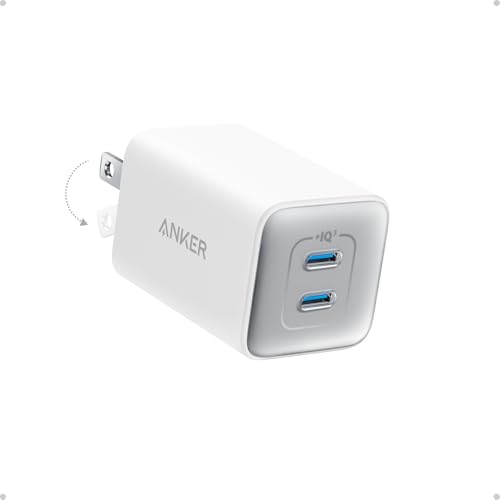
Anker Nano Phone Charger,47W Max 2-Port GaN Fast Charger USB C | Compact Foldable USB C Charger for iPhone 18 Pro/17/17 Pro Max, Galaxy, Pixel, and MagSafe Compatible Accessories
As an Amazon Associate we earn from qualifying purchases. Product prices and availability are accurate as of the date/time indicated.

65W USB C Laptop Charger, Universal Type C Power Adapter Compatible with HP Chromebook, Lenovo ThinkPad Yoga, Dell, Acer, ASUS, Samsung, Google Chromebook Laptops, 45W Fast Charging Power Supply


As an Amazon Associate we earn from qualifying purchases. Product prices and availability are accurate as of the date/time indicated.
Best USB C Charger for Students Reviewed for 2026
1. Anker Nano II 65W Charger – Best Overall USB C Charger for Students
The Anker Nano II 65W Charger is our top pick for most students because it is a 65W USB-C charger, it is small and compact, and it can charge a laptop, phone, or tablet quickly. It has one USB-C port in many listings, a GaN design that makes it smaller than a traditional charger, and a reputation for being reliable. It is a good choice if you want a charger that is fast, compact, and easy to carry.
For students, the Nano II 65W is practical because 65W is enough to charge most laptops, including a MacBook Air and many Windows laptops, and it is small enough to fit in a backpack. It is also a good choice if you want an Anker charger, you travel between classes, or you want a charger that is easy to use. The main trade-off is ports: it has only one USB-C port, so you can only charge one device at a time, but for a single laptop, it is a great choice.
At a typical price in the $35 to $45 range, it is a good value for a 65W GaN charger. It is worth it if you want one USB C charger for students that is fast, compact, and reliable.
2. Anker 735 GaNPrime 65W Charger – Best USB C Charger for Students for Multiple Devices
The Anker 735 GaNPrime 65W Charger is a charger with 65W total power, two USB-C ports, and one USB-A port in many listings, with a GaN design that is compact. It is a good choice if you want to charge multiple devices at once, you want an Anker charger, or you want a charger that is versatile.
For multiple devices, the 735 GaNPrime is useful because you can charge your laptop, phone, and tablet at the same time, without needing three chargers. It is also a good choice if you study in a dorm, you have a lot of devices, or you want an Anker product. The main trade-off is price: at $40 to $50, it is more expensive than the Nano II, but for multiple ports, it is worth it.
At a typical price in the $40 to $50 range, it is a good value for a multi-port charger. Choose it if you want multiple devices, you have a lot of gear, or you prefer Anker.
3. UGREEN Nexode 65W Charger – Best USB C Charger for Students for Value
The UGREEN Nexode 65W Charger is a charger with 65W total power, two USB-C ports, and one USB-A port in many listings, with a GaN design that is compact. It is a good choice if you want a charger at a good value, you want a UGREEN product, or you want a charger that is versatile.
For value, the Nexode 65W is practical because it is affordable, it has multiple ports, and it can charge a laptop and a phone at the same time. It is also a good choice if you are a student, you do not want to spend a lot, or you want a UGREEN product. The main trade-off is brand: UGREEN is less well-known than Anker, but for value, it is a great choice.
At a typical price in the $35 to $45 range, it is a good value for a multi-port charger. Choose it if you want value, you have multiple devices, or you prefer UGREEN.
4. Baseus 65W GaN Charger – Best USB C Charger for Students for a Low Price
The Baseus 65W GaN Charger is a charger with 65W total power, two USB-C ports, and one USB-A port in many listings, with a GaN design that is compact and a price that is affordable. It is a good choice if you want a charger at a low price, you want a Baseus product, or you want a charger that is versatile.
For a low price, the Baseus 65W is useful because it is cheap, it has multiple ports, and it can charge a laptop quickly. It is also a good choice if you are a student on a budget, you do not want to spend a lot, or you want a Baseus product. The main trade-off is that it is a budget brand, so it may not be as premium as Anker in some tests, but for a low price, it is a practical choice.
At a typical price in the $30 to $40 range, it is a good value for a 65W charger. Choose it if you want a low price, you are on a budget, or you prefer Baseus.
5. Apple 67W USB-C Power Adapter – Best USB C Charger for Students for MacBook
The Apple 67W USB-C Power Adapter is a charger with 67W power, one USB-C port, and a design that is made for MacBook in many listings. It is a good choice if you have a MacBook, you want an Apple charger, or you want a charger that is made for your laptop.
For MacBook, the Apple 67W is practical because it is made by Apple, it is compatible with MacBook Air and MacBook Pro in many listings, and it charges quickly. It is also a good choice if you want an original Apple charger, you have a MacBook, or you want a charger that is reliable. The main trade-off is price: at $50 to $60, it is more expensive than Anker or UGREEN, and it has only one port, but for MacBook, it is a safe choice.
At a typical price in the $50 to $60 range, it is a good value for an Apple charger. Choose it if you have a MacBook, you want Apple, or you want an original charger.
6. Samsung 45W USB-C Charger – Best USB C Charger for Students for a Phone and Tablet
The Samsung 45W USB-C Charger is a charger with 45W power, one USB-C port, and a design that is made for Samsung phones and tablets in many listings. It is a good choice if you have a Samsung phone, you want a Samsung charger, or you want a charger for a phone and tablet.
For a phone and tablet, the Samsung 45W is useful because 45W is enough to fast-charge a Samsung phone and tablet, it is compact, and it is easy to use. It is also a good choice if you do not have a laptop that needs 65W, you want a Samsung product, or you want a charger that is affordable. The main trade-off is wattage: 45W is not enough for most laptops, so use it for a phone and tablet only.
At a typical price in the $30 to $40 range, it is a good value for a 45W charger. Choose it if you have a Samsung phone, you want a phone charger, or you prefer Samsung.
Buying Guide: How to Choose the Best USB C Charger for Students
The best USB C charger for students for you depends on your laptop, your devices, and how you study. Start with wattage and ports, then compare size, GaN, and price. A charger that is fast enough for your laptop, compact enough for your backpack, and has enough ports for your devices is better than a charger with the most watts on paper.
Wattage: 45W vs 65W vs 67W for Students
Wattage matters most for a USB-C charger, because it determines whether your charger can charge your laptop. A 45W charger, like the Samsung 45W, is a good size for a phone and tablet, and for some small laptops, but it is not enough for most laptops. A 65W charger, like the Anker Nano II, Anker 735, UGREEN Nexode, and Baseus 65W, is a good size for most student laptops, including a MacBook Air and many Windows laptops. A 67W charger, like the Apple 67W, is a good size for a MacBook.
For most students, a 65W charger is the best balance, because it can charge a laptop, phone, and tablet, and it is not too expensive. Always check your laptop’s charger wattage before you buy, and choose a charger that matches or exceeds it. If your laptop needs 65W, do not buy a 45W charger, because it will charge slowly or not at all.
Ports: Single-Port vs Multi-Port for Students
Ports matter for a student charger, because they determine how many devices you can charge at once. A single-port charger, like the Anker Nano II, Apple 67W, and Samsung 45W, can only charge one device at a time, so it is a good choice if you only need to charge your laptop. A multi-port charger, like the Anker 735, UGREEN Nexode, and Baseus 65W, has two USB-C ports and one USB-A port, so you can charge your laptop, phone, and tablet at the same time.
For most students, a multi-port charger is a better choice, because it replaces several chargers with one. If you have a laptop, phone, and tablet, choose a multi-port charger. If you only have a laptop, a single-port charger is enough and it is smaller.
Size, GaN, and Portability for a Backpack
Size matters for a student charger, because you will carry it in your backpack every day. A GaN charger, like all the 65W chargers in this guide, is smaller and lighter than a traditional charger, because GaN technology lets the charger be more efficient. A GaN charger is a good choice for a student, because it is compact and it does not take up much space in your backpack.
Portability also matters. A charger that is small, with foldable prongs in many listings, is easier to pack than a charger with fixed prongs. Look for a charger that is compact, light, and has foldable prongs if possible. A charger that is easy to carry is more likely to be used every day.
Price, Safety, and What You Actually Need
Price depends on wattage and ports. A charger in the $30 to $45 range, like the Baseus 65W, Samsung 45W, Anker Nano II, and UGREEN Nexode, is a good starting point for most students. A charger in the $40 to $50 range, like the Anker 735, is a good balance if you want multiple ports. A charger in the $50 to $60 range, like the Apple 67W, is worth it if you want an original Apple charger for MacBook.
Safety also matters. Always buy a charger from a reputable brand, like Anker, UGREEN, Baseus, Apple, or Samsung, and avoid cheap, no-name chargers that may not be safe. Look for a charger with overcharge, overheat, and short-circuit protection in many listings. For most students, a 65W GaN charger with multiple ports is the best value. Do not buy a charger based on price alone. A charger that is safe, fast, and compact is worth the investment.
Best USB C Charger for Students: FAQ
What is the best USB C charger for students?
For most students, the Anker Nano II 65W Charger is the best overall USB C charger for students because it offers a 65W power, a compact GaN design, and a fast charge for most laptops at a typical price in the $35 to $45 range. If you want multiple devices, the Anker 735 GaNPrime 65W Charger is a good choice at $40 to $50. If you want value, the UGREEN Nexode 65W Charger is a practical option at $35 to $45. If you want a low price, the Baseus 65W GaN Charger is a strong option at $30 to $40. If you have a MacBook, the Apple 67W USB-C Power Adapter is a good fit at $50 to $60. If you want a phone and tablet charger, the Samsung 45W USB-C Charger is a good value at $30 to $40.
What wattage USB-C charger do I need for a student laptop?
What wattage USB-C charger you need for a student laptop depends on your laptop, but in general, most student laptops need a 45W to 65W charger in many guides. A MacBook Air usually needs a 30W to 67W charger, while many Windows laptops need a 45W to 65W charger. Check your laptop’s original charger wattage, and choose a USB-C charger that matches or exceeds it. For most students, a 65W charger is the best balance, because it can charge a laptop, phone, and tablet. If your laptop needs 65W, do not buy a 45W charger, because it will charge slowly.
Can I charge my laptop, phone, and tablet with one USB-C charger?
Yes, you can charge your laptop, phone, and tablet with one USB-C charger if it has multiple ports and enough total wattage, like the Anker 735 GaNPrime 65W, UGREEN Nexode 65W, and Baseus 65W chargers in this guide, which have two USB-C ports and one USB-A port. A multi-port charger lets you charge three devices at once, which is convenient for a student. A single-port charger, like the Anker Nano II, can only charge one device at a time. For most students, a multi-port 65W charger is a better choice than a single-port charger.
Are GaN chargers better for students?
Yes, GaN chargers are better for students than traditional chargers, because GaN technology lets the charger be smaller, lighter, and more efficient, which is important when you carry it in a backpack every day. A GaN charger, like the Anker Nano II, Anker 735, UGREEN Nexode, and Baseus 65W chargers in this guide, is compact, it charges quickly, and it does not get as hot as a traditional charger in many listings. For a student, a GaN charger is a good investment, because it is portable, reliable, and easy to use.
FAQ
What is the best USB C charger for students?
What wattage USB-C charger do I need for a student laptop?
Can I charge my laptop, phone, and tablet with one USB-C charger?
Are GaN chargers better for students?
Related guides
- Best Smart Switch for Living Room in 2026: Dimmers and Switches From Lutron, Leviton, and Kasa That Handle LED Bulbs, 3-Way Circuits, and Movie Night Without Flicker
- Best Budget Gaming Speaker with Lights for Gamers in 2026: 7 Speakers That Offer Clear Sound, RGB Lights, and Reliable Use for Gamers
- Best WiFi 6 Router for Students in 2026: Fast, Cheap Routers for Student Houses and Studios — and the Dorm Rule You Must Check Before You Buy Anything
- Best Mesh WiFi System for Student Shared Houses: 6 Systems for Shared Student Homes in 2026
More from Amazon
Programs that pair well with the guide above. Offers and eligibility are set by Amazon and may change.
Set up recurring deliveries of everyday items on eligible products. Terms and savings are set by Amazon.
Explore Subscribe & SaveFree shipping on eligible items, Prime Video and more. Eligible new members can start with a free trial.
Start a Prime free trialAudiobooks and podcasts to listen to on the go. Eligible new members can start with a free trial.
Try Audible freeRead from a large library of eBooks and audiobooks on any device. Check Amazon for current plans.
Explore Kindle UnlimitedAs an Amazon Associate we earn from qualifying purchases.

Write Your Review
No reviews yet. Be the first to share your experience!