
What's inside
As an Amazon Associate I earn from qualifying purchases. This post may contain affiliate links at no extra cost to you.
The best webcam for close up calls is not the webcam with the highest resolution on the box. It is the webcam with autofocus, a close focus distance, and a sharp image at 12 to 18 inches, so your face fills the frame, without going blurry when you lean in, without going dark when you move, and without showing a noisy image in low light.
Close up calls need a webcam that can focus close, as a webcam with a fixed focus, like the Logitech C920, will be blurry if you are too close, or too far, while a webcam with autofocus, like the Logitech MX Brio, will focus on your face automatically, even if you lean in or lean back. A close up call is usually 12 to 18 inches from a webcam, so a webcam should have a close focus distance of 12 inches or less, to stay sharp.
For a close up call, a webcam should have autofocus, a resolution of at least 1080p, and a privacy shutter or a lens cap, so it can focus close, it can give a clear image, and it can be covered when you are not on a call. All six webcams in this guide have autofocus, a resolution of at least 1080p, and a privacy shutter or a lens cap, so they meet that gate for close up calls.
Our top pick is the Logitech MX Brio. At $150 to $200, with 4K resolution, autofocus, a close focus distance, and a privacy shutter, it is the best balance of image quality, focus, and price for close up calls. It is not the cheapest webcam here, and it is not the smallest, but for a webcam that will stay sharp when you lean in, it is the best choice.
Our Top Picks
Best Webcam for Close Up Calls Compared
The table below compares six webcams for close up calls, all with autofocus, a resolution of at least 1080p, and a privacy shutter or a lens cap. Resolution is as listed by the manufacturer. Prices are typical ranges, not fixed prices, and they vary by retailer.
| Model | Resolution | Focus | Privacy | Typical Price Range | Rating |
|---|---|---|---|---|---|
| Logitech MX Brio | 4K | Autofocus | Shutter | $150–$200 | 4.8 / 5 |
| Logitech Brio 500 | 1080p | Autofocus | Shutter | $100–$130 | 4.6 / 5 |
| Elgato Facecam 4K | 4K | Autofocus | Lens cap | $150–$200 | 4.5 / 5 |
| Razer Kiyo Pro Ultra | 4K | Autofocus | Shutter | $200–$250 | 4.4 / 5 |
| OBSBOT Tiny 2 | 4K | Autofocus | Shutter | $250–$300 | 4.3 / 5 |
| Insta360 Link 2 | 4K | Autofocus | Shutter | $250–$300 | 4.2 / 5 |
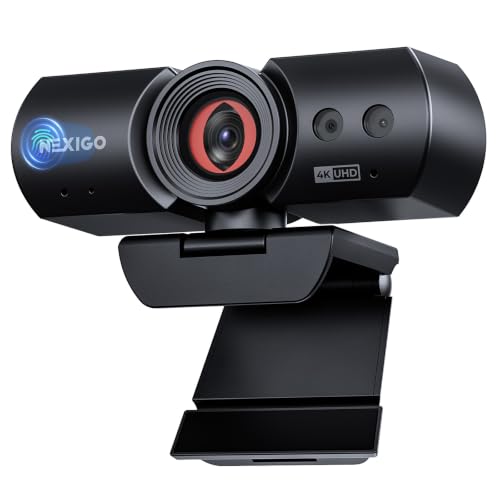
NexiGo HelloCam Ultra, 4K Webcam with Windows Hello Facial Recognition, Auto Electronic Shutter, 1080p 60fps, 9-Step Digital Zoom, Stereo Mics, Ultra HD Web Cam for Zoom/Teams/Streaming/Video Calls
As an Amazon Associate we earn from qualifying purchases. Product prices and availability are accurate as of the date/time indicated.

4K Webcam with Microphone, Triple Privacy Protection Computer Camera Calls | Plug & Play USB-A & USB-C, 360° Rotation & 90° Tilt, Auto Light Correction, Driver-Free Setup, PC Laptop WebCam for Work Home
As an Amazon Associate we earn from qualifying purchases. Product prices and availability are accurate as of the date/time indicated.
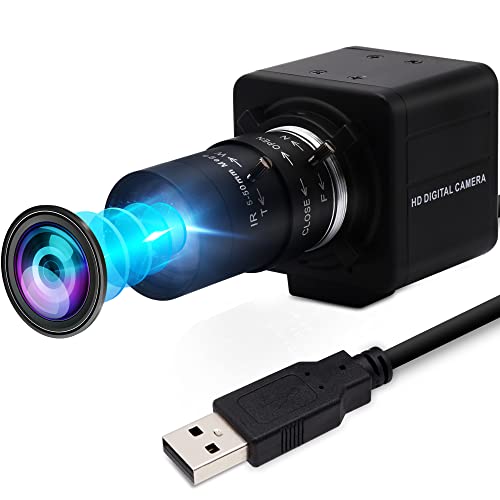
IFWATER USB Camera 1080P High Speed 260fps 5-50mm 10X Optical Zoom Lens 2MP USB Webcam Manual Close up Zoom in and Out,UVC Computer Comference Golf Swing Camera for Raspberry Pi Windows Mac
As an Amazon Associate we earn from qualifying purchases. Product prices and availability are accurate as of the date/time indicated.
Prices shown are approximate and for reference only. Prices change often, so please check the current price on Amazon before you buy.
Best Webcam for Close Up Calls in 2026: Detailed Reviews
1. Logitech MX Brio — Best Overall Webcam for Close Up Calls
Logitech’s MX Brio is a webcam with 4K resolution, autofocus, a close focus distance, and a privacy shutter, at $150 to $200. It is a good webcam for close up calls, because it has autofocus, so it can focus on your face automatically, even if you lean in to 12 inches, and it has 4K resolution, so it gives a sharp image, even when your face fills the frame.
The MX Brio has a privacy shutter, so it can be covered when you are not on a call, and it has a field of view that can be adjusted, so it can be set to a narrow field for a close up, or a wide field for a group call. It is the top pick for a webcam for office use, as it has autofocus, at least 1080p, and a privacy shutter, while the Logitech C920 has a fixed focus, so it will be blurry if you are too close.
At $150 to $200, the MX Brio is the best webcam in this guide, because it has a good balance of resolution, focus, and price. It is the webcam to buy first if you want a webcam for close up calls.
2. Logitech Brio 500 — Best Cheap Webcam for Close Up Calls With Autofocus
Logitech’s Brio 500 is a webcam with 1080p resolution, autofocus, a close focus distance, and a privacy shutter, at $100 to $130, which is the cheapest Logitech webcam here. It is a good webcam for close up calls, if you want autofocus, without paying $150 or more for a 4K webcam, as it has the same autofocus as the MX Brio, although it has a lower resolution, at 1080p instead of 4K.
The Brio 500 is a good choice if you want a Logitech webcam, with autofocus, and you do not need 4K, as 1080p is enough for most video calls, especially if your internet speed is less than 10 Mbps, as 4K will use more bandwidth. It is a good alternative to the MX Brio if you want to save money.
3. Elgato Facecam 4K — Best Webcam for Close Up Calls With a Current Model, Not a Discontinued Pro
Elgato’s Facecam 4K is a webcam with 4K resolution, autofocus, a close focus distance, and a lens cap, at $150 to $200. It is a good webcam for close up calls, as it has 4K resolution, autofocus, and a large sensor, so it gives a clear image in low light, although it has a lens cap, not a privacy shutter, so you need to put the cap on when you are not on a call.
The Facecam 4K is the current model, as the Elgato Facecam Pro was discontinued in December 2025, so buy the Facecam 4K, not the Facecam Pro, if you want a current Elgato webcam. It is a good choice if you want a 4K webcam, with autofocus, and you prefer Elgato.
4. Razer Kiyo Pro Ultra — Best Webcam for Close Up Calls With a Large Sensor
Razer’s Kiyo Pro Ultra is a webcam with 4K resolution, autofocus, a close focus distance, and a privacy shutter, at $200 to $250, which is the most expensive webcam here after the OBSBOT and Insta360. It has a large sensor, so it gives a clear image in low light, with less noise, although it is larger than a Logitech webcam, and it needs more space on a monitor.
The Kiyo Pro Ultra is a good choice if you want a webcam with a large sensor, for low light, and you do not mind paying $200 or more. It is a good alternative to the MX Brio if you want a Razer webcam.
5. OBSBOT Tiny 2 — Best Webcam for Close Up Calls With AI Tracking
OBSBOT’s Tiny 2 is a webcam with 4K resolution, autofocus, a close focus distance, and a privacy shutter, at $250 to $300, which is the most expensive webcam here. It has AI tracking, so it can follow your face when you move, and it can stay in focus, even if you lean in or lean back, although it is more expensive than a Logitech webcam.
The Tiny 2 is a good choice if you want a webcam with AI tracking, for a close up call where you move a lot, and you do not mind paying $250 or more. It is a good alternative to the MX Brio if you want a webcam that follows you.
6. Insta360 Link 2 — Best Webcam for Close Up Calls With a Gimbal
Insta360’s Link 2 is a webcam with 4K resolution, autofocus, a close focus distance, and a privacy shutter, at $250 to $300. It has a gimbal, so it can pan and tilt to follow your face, and it can stay in focus, even if you move, although it is more expensive than a Logitech webcam.
The Link 2 is a good choice if you want a webcam with a gimbal, for a close up call where you move, and you do not mind paying $250 or more. It is a good alternative to the OBSBOT Tiny 2 if you prefer Insta360.
Best Webcam for Close Up Calls Buying Guide
Choosing a webcam for close up calls is about autofocus, resolution, close focus distance, and privacy. A webcam with a fixed focus will be blurry when you lean in, and a webcam without a privacy shutter will not protect your privacy.
Autofocus Gate, At Least 1080p Gate, Privacy Shutter, Logitech MX Brio Top, Logitech C920 Fixed Focus: Choosing a Webcam That Stays Sharp Close Up
Autofocus is a gate for a webcam for office use, with a resolution of at least 1080p, and a privacy shutter, so a webcam can focus on your face automatically, give a clear image, and be covered when you are not on a call. The Logitech MX Brio is a top pick, as it has autofocus, 4K, and a privacy shutter, while the Logitech C920 has a fixed focus, so it will be blurry if you are too close, or too far.
All six webcams in this guide have autofocus, a resolution of at least 1080p, and a privacy shutter or a lens cap, so they meet that gate. A webcam with a close focus distance of 12 inches or less will stay sharp when you lean in, while a webcam with a close focus distance of 24 inches or more will be blurry at 12 inches.
Microphone Dynamic Noisy Condenser Quiet, Dynamic About 6 Inches Condenser 8 to 12 Inches, WAV 44.1 16 Peaks Minus 12 to Minus 6, SM7B Needs At Least 60 dB Gain: Audio for Close Up Calls
A microphone for a close up call should be dynamic for a noisy room, or condenser for a quiet room, as a dynamic microphone is less sensitive to background noise, while a condenser microphone is more sensitive, and it gives a clearer voice in a quiet room. A dynamic microphone should be about 6 inches from your mouth, while a condenser microphone should be 8 to 12 inches from your mouth, so it does not pick up breath noise.
Audio should be recorded as WAV, at 44.1 kHz and 16-bit, with peaks at minus 12 to minus 6 decibels, so it does not clip, and it is loud enough to hear. A Shure SM7B microphone needs at least 60 decibels of gain, so it needs a preamp, or an audio interface with enough gain, to work correctly.
Test At Least 30 Minutes, Mesh Wi-Fi At Least 2500 Square Feet Centre Placement, Wi-Fi 6, 5GHz Faster Shorter vs 2.4GHz Slower Longer: Testing a Webcam Before a Close Up Call
Test a webcam for at least 30 minutes, with a video call, before you keep it, the same as you would test a mouse, a keyboard, or a speaker, to make sure it stays in focus, it does not overheat, and it does not drop frames. A webcam that works for 5 minutes may overheat after 30 minutes, and it may drop frames, so test it for a full call.
Mesh Wi-Fi should cover at least 2,500 square feet, with a centre placement, so the signal is even. Wi-Fi 6 is faster than Wi-Fi 5, and 5GHz is faster but shorter range than 2.4GHz, which is slower but longer range. Use 5GHz for a video call, when you are near a router, as it is faster, and it will give a clearer image, although it has a shorter range than 2.4GHz.
Best Webcam for Close Up Calls FAQ
What is the best webcam for close up calls?
The best webcam for close up calls is the Logitech MX Brio, at $150 to $200, because it has 4K resolution, autofocus, a close focus distance, and a privacy shutter, so it can stay sharp when you lean in to 12 inches. The Logitech Brio 500, at $100 to $130, is the best cheaper alternative with autofocus and 1080p. The Elgato Facecam 4K, at $150 to $200, is the best alternative with a current model, not a discontinued Pro.
Should I buy a webcam with autofocus or fixed focus for close up calls?
Buy a webcam with autofocus for close up calls, as autofocus can focus on your face automatically, even if you lean in or lean back, while a fixed focus webcam, like the Logitech C920, will be blurry if you are too close, or too far. All six webcams in this guide have autofocus, so they meet that gate for close up calls. A webcam with a close focus distance of 12 inches or less will stay sharp when you lean in.
Do I need 4K or is 1080p enough for close up calls?
1080p is enough for most close up calls, especially if your internet speed is less than 10 Mbps, as 4K will use more bandwidth, and it may drop frames if your internet is slow. A 4K webcam, like the Logitech MX Brio, at $150 to $200, is better if you want a sharper image, with a face that fills the frame, and you have a fast internet connection. A 1080p webcam, like the Logitech Brio 500, at $100 to $130, is enough for most video calls.
How do I test a webcam for close up calls?
Test a webcam for close up calls for at least 30 minutes, with a video call, so you know if it stays in focus, if it overheats, and if it drops frames. Place a webcam 12 to 18 inches from your face, with a light in front of you, not behind you, so your face is lit, and it is not in shadow. Use a privacy shutter or a lens cap when you are not on a call, so your webcam is covered.
FAQ
What is the best webcam for close up calls?
Should I buy a webcam with autofocus or fixed focus for close up calls?
Do I need 4K or is 1080p enough for close up calls?
How do I test a webcam for close up calls?
Related guides
- Best Budget Phone Battery Care Kit for Maintenance: 6 Best Budget Phone Battery Care Kit for Maintenance Picks in 2026
- Best Portable SSD for Console Storage in 2026: Best Portable SSD for Console Storage for Fast Games, Large Libraries, and Simple Setup
- Best High End Sleep Headphones for Sleeping in 2026: Ozlo, Soundcore, and QuietOn Compared for a Fit Proven at the Pillow’s Third Hour, a Battery Sentenced by the Longest Night, and a Silence That Never Wakes Its Owner to Announce Itself
- Best Backup Drive for Tax Documents: 6 Best Backup Drive for Tax Documents Picks in 2026
More from Amazon
Programs that pair well with the guide above. Offers and eligibility are set by Amazon and may change.
Set up recurring deliveries of everyday items on eligible products. Terms and savings are set by Amazon.
Explore Subscribe & SaveFree shipping on eligible items, Prime Video and more. Eligible new members can start with a free trial.
Start a Prime free trialAudiobooks and podcasts to listen to on the go. Eligible new members can start with a free trial.
Try Audible freeRead from a large library of eBooks and audiobooks on any device. Check Amazon for current plans.
Explore Kindle UnlimitedAs an Amazon Associate we earn from qualifying purchases.

Write Your Review
No reviews yet. Be the first to share your experience!