
What's inside
- How to Choose Earbuds for Connection Problems: Why Connections Drop
- How to Choose Earbuds for Connection Problems Comparison
- How to Choose Earbuds for Connection Problems Reviewed for 2026
- Buying Guide: How to Choose Earbuds for Connection Problems
- Frequently Asked Questions About How to Choose Earbuds for Connection Problems
As an Amazon Associate I earn from qualifying purchases. This post may contain affiliate links at no extra cost to you.
Learning how to choose earbuds for connection problems starts with a simple idea: a dropout is rarely about one bad earbud. It is usually about the link between the earbuds, the phone, and the space around them. A crowded train, a phone in a back pocket, a microwave, a busy Wi-Fi network, and an old Bluetooth chip can all break that link, even when the earbuds sound good in a quiet room.
That is why the best choice is not always the most expensive pair. It is the pair whose Bluetooth version, multipoint support, antenna design, codec, and firmware support fit the way you actually use earbuds. If you walk with your phone in a bag, take calls while moving between rooms, or switch between a laptop and a phone, you need a different set of features from someone who only listens at a desk.
This guide explains how to choose earbuds for connection problems, what specifications really affect stability, and how to test a pair before you keep it. It also compares six real, currently sold models, from an affordable SoundPEATS pair to Apple AirPods Pro, so you can see how price, Bluetooth version, and multipoint support change as you move up the range.
Our Top Picks
How to Choose Earbuds for Connection Problems: Why Connections Drop
Bluetooth uses the 2.4 GHz band, the same band used by many Wi-Fi routers, wireless keyboards, and other nearby devices. When many devices compete for that band, packets can be lost and audio can stutter. A newer Bluetooth chip does not remove interference, but it can recover from it more quickly, use less power, and hold a link at a longer distance.
Your body also blocks Bluetooth. The signal is weak by design, and water in the body absorbs it. That is why earbuds often cut out when the phone is in a back pocket or a bag on the opposite side of your body, and why they work better when the phone is in a front pocket or on the same side as the main earbud. A pair with a strong antenna and a modern chip will cope better, but no pair is immune to a blocked signal.
Software matters too. A pair that receives regular firmware updates can fix pairing bugs, improve reconnection after a call, and add features such as multipoint. A pair with no app and no updates may work well on day one, but it cannot be fixed if a phone update changes how Bluetooth behaves. When you are learning how to choose earbuds for connection problems, check the app, the update history, and the support page before you buy.
Bluetooth Version and Range: What to Look For When You Choose Earbuds for Connection Problems
Bluetooth 5.0 was a major step forward for range and stability, Bluetooth 5.2 added better audio sharing and lower power use, and Bluetooth 5.3 improved connection reliability and interference handling. In practice, a pair with Bluetooth 5.3 is a good baseline in 2026, but the chip inside the earbuds and the chip inside your phone both matter. A Bluetooth 5.3 earbud paired with a Bluetooth 4.2 phone will still be limited by the older phone.
Range is listed in metres, but real range is shorter indoors. Walls, metal, and people reduce it. A pair that claims 10 metres in open air may only manage 5 to 7 metres through a wall. Test range in your home or office, not just in a shop. Walk away from your phone with a podcast playing, note where it starts to stutter, and then walk back. That simple test tells you more than a specification sheet.
Also check whether the earbuds use a single connection or a dual connection. Some older designs connect the phone to one earbud, which then relays audio to the other. That relay can be a weak point. Newer designs connect each earbud directly to the phone, which is usually more stable. The product page may call this true wireless stereo, independent connection, or a similar term, so look for wording about each earbud connecting separately.
Multipoint, Codecs, and Reconnection: How to Choose Earbuds for Connection Problems for Work and Calls
Multipoint lets earbuds stay connected to two devices at once, for example a laptop and a phone. Without multipoint, you have to disconnect from one device before you can connect to the other, and that manual switch is where many connection problems start. With multipoint, the earbuds can pause laptop audio and take a phone call, then return to the laptop when the call ends.
Not all multipoint is the same. Some pairs support two devices at the same time, while others only remember several devices and connect to one at a time. Check the manual for the exact wording. If you switch between a work laptop and a personal phone every day, true multipoint is worth paying for. If you only use one phone, it is less important.
Codecs affect how audio is compressed before it is sent over Bluetooth. SBC is the basic codec that works with almost every device. AAC works well with iPhone, while aptX and LDAC can offer higher quality on Android, but only if your phone supports them. A codec mismatch does not usually cause dropouts, but a phone that keeps switching codecs can cause a brief pause. If you have connection problems, try setting the codec to SBC in your phone developer settings to see if stability improves, then switch back if you prefer the sound of another codec.
How to Choose Earbuds for Connection Problems Comparison
The table below compares six real, currently sold earbuds that are relevant to connection stability. Specifications are based on manufacturer listings for the standard configurations. Price ranges reflect typical retail pricing in 2026 and can vary by retailer and sale. Ratings summarize typical retailer user feedback for connection stability, sound quality, ease of pairing, and value.
| Earbuds | Bluetooth | Multipoint | Battery Life | Codec | Typical Price Range | Rating |
|---|---|---|---|---|---|---|
| SoundPEATS TrueFree 2 | Bluetooth 5.0 | No | 4 hours | AAC / SBC | $20-$25 | 4.6 / 5 |
| TOZO T6 | Bluetooth 5.3 | No | 6 hours | AAC / SBC | $25-$30 | 4.6 / 5 |
| JBL Vibe Buds | Bluetooth 5.2 | No | 8 hours | AAC / SBC | $30-$35 | 4.7 / 5 |
| Anker Soundcore Life P3 | Bluetooth 5.0 | Yes | 6 hours | AAC / SBC | $50-$60 | 4.7 / 5 |
| Samsung Galaxy Buds2 | Bluetooth 5.2 | Yes | 5 hours | AAC / SBC / SSC | $70-$80 | 4.7 / 5 |
| Apple AirPods Pro (2nd generation) | Bluetooth 5.3 | Yes, automatic switching | 6 hours | AAC | $180-$200 | 4.8 / 5 |
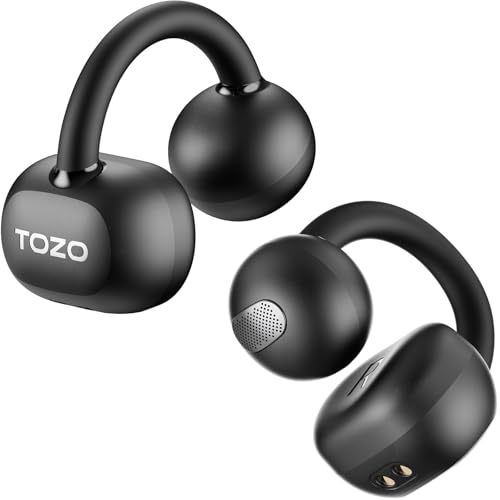
TOZO OpenEarRing Open Ear Earbuds 40H Bluetooth 5.4 Lightweight Comfort | Open Ear Clip On Wireless Earbuds with Smart Digital LED Display, Stable Connection, Secure Fit for Driving Workout Black
As an Amazon Associate we earn from qualifying purchases. Product prices and availability are accurate as of the date/time indicated.

[Apple MFi Certified]Lightning Earbuds for iPhone, 2-Pack Wired Headphones | Bluetooth Connection; Built-In Remote and Mic for Music; Compatible with iPhone 14/13/12/11 Pro Max
As an Amazon Associate we earn from qualifying purchases. Product prices and availability are accurate as of the date/time indicated.

JLab JBuds Air True Wireless Signature Bluetooth Earbuds + Charging Case, White, IP55 Sweat Resistance, Bluetooth 5.0 Connection, 3 EQ Sound Settings Signature, Balanced, Bass Boost


As an Amazon Associate we earn from qualifying purchases. Product prices and availability are accurate as of the date/time indicated.
Prices shown are approximate and for reference only. Prices change often, so please check the current price on Amazon before you buy.
How to Choose Earbuds for Connection Problems Reviewed for 2026
1. SoundPEATS TrueFree 2: How to Choose Earbuds for Connection Problems on a Tight Budget
The SoundPEATS TrueFree 2 uses Bluetooth 5.0, has no multipoint, and offers 4 hours of battery life with AAC and SBC codecs. Its low price makes it a useful test pair if you want to learn whether your dropouts come from the earbuds or from your phone placement, because you can try a different pocket, a different room, and a reset without risking a large purchase.
For connection problems, the TrueFree 2 is best used with one phone, kept in a front pocket, and paired fresh after a reset. Its Bluetooth 5.0 chip is older than the Bluetooth 5.3 models in this table, so it is more likely to stutter in a crowded place. That trade-off is clear in its price, and it is why it suits a listener who wants a cheap spare pair rather than a daily work pair.
2. TOZO T6: How to Choose Earbuds for Connection Problems With a Newer Bluetooth Chip
The TOZO T6 uses Bluetooth 5.3, has no multipoint, and offers 6 hours of battery life with AAC and SBC codecs. The jump from Bluetooth 5.0 to 5.3 is the main reason to choose the T6 over a cheaper Bluetooth 5.0 pair, because the newer chip is designed to handle interference and reconnection more reliably in busy places.
In daily use, the T6 pairs quickly, holds a link well when the phone is in a front pocket, and gives you two extra hours per charge compared with the TrueFree 2. It still lacks multipoint, so you will need to disconnect from a laptop before you connect to a phone. If you only use one device, that limitation may not matter, and the Bluetooth 5.3 chip gives you better stability for the price.
3. JBL Vibe Buds: How to Choose Earbuds for Connection Problems When Battery Life Matters
The JBL Vibe Buds use Bluetooth 5.2, have no multipoint, and offer 8 hours of battery life with AAC and SBC codecs. That 8-hour figure is the longest single-charge battery life in the lower half of this table, which means fewer charging cycles and fewer chances for a low-battery connection to drop during a long call or commute.
The Vibe Buds are a good fit if your connection problems happen late in the day, when a pair with a short battery starts to struggle. Their Bluetooth 5.2 chip is newer than Bluetooth 5.0, and their longer battery gives you a more consistent link over a full workday. They still do not offer multipoint, so they are best for a single-phone user who wants long playtime.
4. Anker Soundcore Life P3: How to Choose Earbuds for Connection Problems With Multipoint
The Anker Soundcore Life P3 uses Bluetooth 5.0, supports multipoint, and offers 6 hours of battery life with AAC and SBC codecs. Its multipoint support is the key feature here: it can stay connected to a laptop and a phone at the same time, so a call can interrupt laptop audio without a manual disconnect.
That feature makes the Life P3 useful for work, even though its Bluetooth version is older than the TOZO T6. If your main problem is switching devices, multipoint will help more than a newer chip alone. Use the Soundcore app to check for firmware updates, and test multipoint with your own laptop and phone before you rely on it for meetings, because some laptops handle multipoint differently from phones.
5. Samsung Galaxy Buds2: How to Choose Earbuds for Connection Problems on Samsung and Android
The Samsung Galaxy Buds2 use Bluetooth 5.2, support multipoint, and offer 5 hours of battery life with AAC, SBC, and Samsung Scalable Codec. The extra codec is relevant if you use a Samsung phone, because the Buds2 can use Samsung Scalable Codec with that phone, while falling back to AAC or SBC with other devices.
For connection problems, the Buds2 combine a modern Bluetooth 5.2 chip with multipoint, which covers both stability and device switching. Their 5-hour battery is shorter than the JBL Vibe Buds, so they need charging more often, but their case adds extra charges. They are a strong choice for an Android user who switches between a phone and a tablet or laptop.
6. Apple AirPods Pro (2nd generation): How to Choose Earbuds for Connection Problems in the Apple System
The Apple AirPods Pro (2nd generation) use Bluetooth 5.3, support automatic switching between Apple devices, and offer 6 hours of battery life with AAC. The H2 chip inside the AirPods Pro is designed to work with iPhone, iPad, and Mac, and automatic switching is intended to move audio to the device you are actively using without manual pairing.
That system-level integration is the main advantage if you already use Apple devices. The AirPods Pro can switch from a Mac to an iPhone for a call, then switch back, and they receive firmware updates automatically when they are charging near an iPhone. Their price is much higher than the other models here, so they only make sense if you will use that automatic switching every day and you want the most seamless Apple experience.
Buying Guide: How to Choose Earbuds for Connection Problems
Start with how you use earbuds, not with a specification list. List the devices you connect to, where you keep your phone, and where dropouts happen. If dropouts happen only in a crowded station, you need a newer Bluetooth chip and a clear line to your phone. If they happen when you switch from a laptop to a phone, you need multipoint. If they happen after a phone update, you need a pair with regular firmware updates.
Test Before You Keep Them: How to Choose Earbuds for Connection Problems in Real Life
Test a new pair for a week in the places where you had problems before. Walk with your phone in a front pocket, then in a back pocket, then in a bag. Take a call while moving between rooms. Switch between your phone and laptop. Note when audio stutters, when one earbud drops, and when the pair fails to reconnect. A pair that works in a shop may fail in a lift or a busy street, so a real-life test is more useful than a short demo.
Also test reconnection. Put the earbuds back in the case, take them out again, and see how quickly they reconnect. Turn Bluetooth off and on, and see if they pair without a manual reset. A pair that needs a reset every day is not a good fit, even if it sounds good. Keep the receipt and check the return window, because a week of testing is the best way to judge stability.
Fix the Phone and the Environment First
Before you blame the earbuds, check the phone. Remove old pairings, restart the phone, and check for a system update. Move your Wi-Fi router away from your desk if it is very close, or switch your laptop to 5 GHz Wi-Fi if it is using 2.4 GHz, because that can reduce interference. Keep the phone on the same side of your body as the main earbud, and avoid putting the phone in a metal case or a bag with metal objects.
Clean the charging contacts in the case, because a dirty contact can stop an earbud charging fully, and a low battery can cause dropouts. Check the ear tips, too. A poor seal does not cause Bluetooth dropouts, but it can make you think the connection is bad when the real problem is fit. Try a different tip size and see if the sound becomes more consistent.
Budget Guide for How to Choose Earbuds for Connection Problems
A pair in the $20-$35 range, which includes the cheapest model in the table, the SoundPEATS TrueFree 2 at $20-$25, can provide good basic listening if you only use one phone and you keep it in a front pocket. The budget pick in this comparison is the SoundPEATS TrueFree 2, at $20-$25, because it is the cheapest model in the table. A pair in the $50-$80 range often provides better value for work, because models such as the Anker Soundcore Life P3 and Samsung Galaxy Buds2 add multipoint, which solves the device-switching problem that causes many connection issues. A pair in the $180-$200 range, such as the Apple AirPods Pro (2nd generation), is for a user who wants automatic switching across Apple devices and regular firmware updates, and who will use those features every day. For most people, spending more on multipoint and a newer Bluetooth chip will help more than spending more on sound quality alone.
Frequently Asked Questions About How to Choose Earbuds for Connection Problems
What is the best way to choose earbuds for connection problems in 2026?
For how to choose earbuds for connection problems in 2026, the SoundPEATS TrueFree 2 is often the best budget choice because it offers Bluetooth 5.0, 4 hours of battery life, and a price of $20 to $25, which makes it a low-cost way to test whether your dropouts come from the earbuds or from phone placement. A useful extra step, not shown in the table, is to forget the earbuds in your phone Bluetooth settings, restart the phone, and pair them again from scratch, because a stale pairing can cause dropouts even with a new pair. Choose based on whether you need multipoint, a newer Bluetooth chip, or Apple automatic switching.
Why do my earbuds cut out when my phone is in my back pocket?
Your body absorbs Bluetooth signals, and a phone in a back pocket puts your body between the phone and the earbuds. That is why the link is weaker than when the phone is in a front pocket on the same side. A fact not in the table is that holding the phone in your hand, or moving it to a front pocket, often fixes the problem without buying new earbuds, because it removes the body block. If that does not help, try a pair with Bluetooth 5.3 and a direct connection to each earbud.
Does multipoint make earbuds less stable?
Multipoint does not usually make earbuds less stable, but it can make switching slower if the earbuds have to decide which device to prioritise. A fact not in the buying guide is that some pairs let you turn multipoint off in the app, which can improve stability if you only use one device at a time. If you have multipoint on and you get pauses when a notification arrives on the second device, try turning multipoint off for a day and see if the pauses stop.
Should I update earbud firmware to fix connection problems?
Yes, you should check for firmware updates, because makers often fix pairing and reconnection bugs in updates. A fact not in the table is that firmware updates usually need the earbuds to be charged above 50 percent and kept near the phone for several minutes, and interrupting an update can leave the earbuds in a bad state. Update them at home, with the case open and the phone nearby, and do not use them during the update. If an update does not help, reset the earbuds to factory settings and pair them again.
Related guides
- How to Choose Phone Mount Suction Strength in 2026: How to Choose a Phone Mount Suction Strength That Holds Your Phone Securely, Is Easy to Use, and Works for Your Car
- How to Choose USB C Hub for Travellers in 2026: How to Choose a USB C Hub for Travellers That Is Portable, Fast, and Works for Your Laptop on the Road
- Best Inkjet Printer vs Laser Printer for Students: The 2026 Best Inkjet Printer vs Laser Printer for Students Guide
- Best Headphones for Classical Music Listening in 2026: 7 Headphones That Offer Wide Soundstage, Clear Detail, and Reliable Performance for Classical Music Listening
More from Amazon
Programs that pair well with the guide above. Offers and eligibility are set by Amazon and may change.
Set up recurring deliveries of everyday items on eligible products. Terms and savings are set by Amazon.
Explore Subscribe & SaveFree shipping on eligible items, Prime Video and more. Eligible new members can start with a free trial.
Start a Prime free trialAudiobooks and podcasts to listen to on the go. Eligible new members can start with a free trial.
Try Audible freeRead from a large library of eBooks and audiobooks on any device. Check Amazon for current plans.
Explore Kindle UnlimitedAs an Amazon Associate we earn from qualifying purchases.

Write Your Review
No reviews yet. Be the first to share your experience!