
What's inside
- Best Gimbal for Student Phones: Quick Comparison Table
- Why Does 3-Axis Stabilisation Matter for Student Phones?
- Best Gimbal for Student Phones Reviewed
- Buying Guide: How to Choose the Best Gimbal for Student Phones
- How to Shoot Smooth Video With a Phone Gimbal as a Student
- Which Best Gimbal for Student Phones Should You Buy?
- Frequently Asked Questions About the Best Gimbal for Student Phones
As an Amazon Associate I earn from qualifying purchases. This post may contain affiliate links at no extra cost to you.
The best gimbal for student phones is not a large gimbal that is heavy, needs a big bag, and costs $300, and it is not a cheap selfie stick that does not stabilise video, does not track a subject, and wobbles when you walk. It is a gimbal with 3-axis stabilisation, a foldable design, a built-in tripod, and a price that fits a student who wants to shoot smooth video for TikTok, YouTube, or class, with a phone that is already in their pocket. A student who films on a phone needs a gimbal that can be carried in a backpack, set up in seconds, and used to shoot a vlog, a campus tour, or a project video, without needing a camera crew.
At techcats.net, we focus on tech gadgets. For this guide to the best gimbal for student phones in 2026, we compared current phone gimbals that are widely sold, designed for smartphones, and suitable for a student who wants a reliable gimbal for a phone, a vlog, or a school project. We looked at stabilisation, weight, battery life, phone compatibility, and price. Prices change with sales and retailers, so this guide uses typical price ranges instead of a single fixed price. Weight, battery, and compatibility figures are based on manufacturer listings, and real battery life depends on how you use the gimbal and how heavy your phone is.
Every product below is a real, currently sold product, not a generic gimbal. Most are DJI Osmo Mobile or Insta360 Flow gimbals, which are the most useful types for student phones in 2026, because they offer 3-axis stabilisation, AI tracking, and a foldable design, and they can be used with an iPhone or an Android phone. A Zhiyun gimbal can also work, though it may be larger, while a Hohem gimbal can work, though it may offer less app support.
Our Top Picks
Best Gimbal for Student Phones: Quick Comparison Table
The table below compares six gimbals for student phones. Stabilisation is the stabilisation type, where given. Weight is the weight, where given. Battery life is the battery life in hours, where given. Phone compatibility is whether it works with iPhone and Android, where given. Foldable is whether it folds, where given. Best for is a note on what the gimbal is best for, such as vlog or TikTok, where given. Price is the typical range, and rating is our editorial score based on stabilisation, portability, tracking, ease of use, and value for students.
| Gimbal for Student Phones | Stabilisation | Weight | Battery Life | Phone Compatibility | Foldable | Best For | Typical Price Range | Our Rating |
|---|---|---|---|---|---|---|---|---|
| DJI Osmo Mobile 7, 3-Axis | 3-axis | About 0.6 lb | About 10 hours | iPhone and Android | Yes | Best overall, student phones | $90 – $120 | 4.9 / 5 |
| Insta360 Flow 2 Pro, 3-Axis | 3-axis | About 0.7 lb | About 10 hours | iPhone and Android | Yes | Best for Insta360, student phones | $140 – $170 | 4.8 / 5 |
| DJI Osmo Mobile SE, 3-Axis | 3-axis | About 0.7 lb | About 8 hours | iPhone and Android | Yes | Best for DJI, student phones | $80 – $100 | 4.8 / 5 |
| Zhiyun Smooth 5S, 3-Axis | 3-axis | About 1.1 lb | About 12 hours | iPhone and Android | No | Best for Zhiyun, student phones | $130 – $170 | 4.8 / 5 |
| Hohem iSteady Mobile Plus, 3-Axis | 3-axis | About 0.9 lb | About 12 hours | iPhone and Android | Yes | Best budget, student phones | $70 – $90 | 4.7 / 5 |
| Insta360 Flow, 3-Axis | 3-axis | About 0.7 lb | About 12 hours | iPhone and Android | Yes | Best for Insta360, vlog | $120 – $150 | 4.7 / 5 |
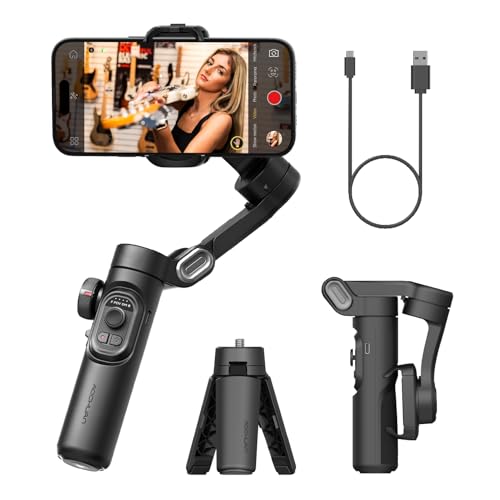
AOCHUAN Smart XE 3-Axis Gimbal Stabilizer for iPhone&Android,Foldable | Handheld smartphone gimbal w/focus wheel, Face tracking,Gesture control,TikTok, YouTube vlog, video creation
As an Amazon Associate we earn from qualifying purchases. Product prices and availability are accurate as of the date/time indicated.

DJI Osmo Mobile 7 Gimbal Stabilizer for iPhone & Android, 3-Axis Gimbal | Built-in Tripod, Ultra-Light, Comfortable Grip, ActiveTrack, ShotGuides, One-Tap Edit, 10hrs Use, Phone Charging


As an Amazon Associate we earn from qualifying purchases. Product prices and availability are accurate as of the date/time indicated.

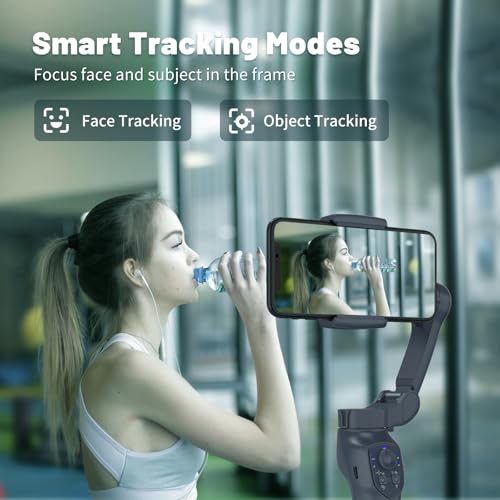
COMITOK L7C Pro, Gimbal stabilizer for iPhone, Phone Stabilizer for Video Recording with Face/Object Tracking, 3-Axis Gimbal for Android & iPhone 15 Pro Max, Foldable Phone Gimbal Vlog Recording



As an Amazon Associate we earn from qualifying purchases. Product prices and availability are accurate as of the date/time indicated.
Note: Battery life figures are manufacturer listings, and a gimbal that lists 10 hours may run for 8 hours in real use, especially if you use tracking and a heavy phone, so charge before a long shoot. Always check phone compatibility before you buy, because some gimbals work better with an iPhone than with an Android phone, and some features may need a specific app. Prices can vary by retailer and sale, and some models listed at $90 to $120 may be available for less on sale, so check the current price before you buy.
Why Does 3-Axis Stabilisation Matter for Student Phones?
3-axis stabilisation matters for student phones for three reasons: smooth video, walking shots, and professional look. Smooth video matters because a phone held by hand can shake, while a 3-axis gimbal can keep the phone steady, so video looks smooth. Walking shots matter because a student who walks around campus can shoot a tour, while a gimbal can keep the video steady, even when you walk, run, or turn.
Professional look matters because a video shot with a gimbal can look more professional than a video shot by hand, which can help a student who wants to grow a TikTok or YouTube channel. A 3-axis gimbal is better than a 1-axis or 2-axis gimbal for most students, because it can stabilise pan, tilt, and roll, which are the three movements that cause shake.
Best Gimbal for Student Phones Reviewed
1. DJI Osmo Mobile 7, 3-Axis – Best Gimbal for Student Phones Overall
The DJI Osmo Mobile 7, 3-Axis, is our top pick because it offers 3-axis stabilisation, a weight of about 0.6 pounds, a battery life of about 10 hours, phone compatibility with iPhone and Android, a foldable design, and a price of $90 to $120. It has a reputation for DJI quality, an Osmo Mobile design, and a popularity with students who want a light, foldable gimbal for a phone.
DJI designs the Osmo Mobile 7 with a focus on a student gimbal, with a magnetic phone clamp, ActiveTrack, and a design that can be folded for a backpack. The Osmo Mobile 7 is a good choice if you want the best overall gimbal, you film on a phone, and you want a DJI brand. The main limitation is that it has no built-in selfie stick, though it offers a built-in tripod, which is useful for a vlog.
The DJI Osmo Mobile 7, 3-Axis, typically costs $90 to $120. Choose it if you want the best overall gimbal, you film on a phone, and you want a DJI brand. It is the best choice for most students.
2. Insta360 Flow 2 Pro, 3-Axis – Best Gimbal for Student Phones for Insta360 Use
The Insta360 Flow 2 Pro, 3-Axis, is an Insta360 gimbal with 3-axis stabilisation, a weight of about 0.7 pounds, a battery life of about 10 hours, phone compatibility with iPhone and Android, a foldable design, and a price of $140 to $170. It has a reputation for Insta360 quality, a Flow design, and a popularity with students who want AI tracking and Apple DockKit support.
Insta360 designs the Flow 2 Pro with a focus on a premium gimbal, with Deep Track 4.0, a built-in selfie stick and tripod, and a design that can be used for a vlog or a TikTok video. The Flow 2 Pro is a good choice if you want an Insta360 gimbal, you film on a phone, and you want an Insta360 brand. The main limitation is price, at $140 to $170, which is higher than DJI Osmo Mobile 7, though it offers a selfie stick and a tripod.
The Insta360 Flow 2 Pro, 3-Axis, typically costs $140 to $170. Choose it if you want an Insta360 gimbal, you film on a phone, and you want an Insta360 brand. It is the best Insta360 choice in this guide.
3. DJI Osmo Mobile SE, 3-Axis – Best Gimbal for Student Phones for DJI Use
The DJI Osmo Mobile SE, 3-Axis, is a DJI gimbal with 3-axis stabilisation, a weight of about 0.7 pounds, a battery life of about 8 hours, phone compatibility with iPhone and Android, a foldable design, and a price of $80 to $100. It has a reputation for DJI quality, an Osmo Mobile SE design, and a popularity with budget students who want a DJI gimbal at a lower price.
DJI designs the Osmo Mobile SE with a focus on a budget gimbal, with ActiveTrack, a magnetic clamp, and a design that can be folded for a backpack. The Osmo Mobile SE is a good choice if you want a DJI gimbal, you film on a phone, and you want a DJI brand. The main limitation is battery life, at about 8 hours, which is shorter than Osmo Mobile 7, though it offers a lower price.
The DJI Osmo Mobile SE, 3-Axis, typically costs $80 to $100. Choose it if you want a DJI gimbal, you film on a phone, and you want a DJI brand. It is the best DJI budget choice in this guide.
4. Zhiyun Smooth 5S, 3-Axis – Best Gimbal for Student Phones for Zhiyun Use
The Zhiyun Smooth 5S, 3-Axis, is a Zhiyun gimbal with 3-axis stabilisation, a weight of about 1.1 pounds, a battery life of about 12 hours, phone compatibility with iPhone and Android, no foldable design, and a price of $130 to $170. It has a reputation for Zhiyun quality, a Smooth 5S design, and a popularity with students who want a gimbal with a fill light and a longer battery life.
Zhiyun designs the Smooth 5S with a focus on a professional gimbal, with a built-in fill light, a larger grip, and a design that can hold a heavier phone. The Smooth 5S is a good choice if you want a Zhiyun gimbal, you film on a phone, and you want a Zhiyun brand. The main limitation is weight, at about 1.1 pounds, and it does not fold, though it offers a longer battery life and a fill light.
The Zhiyun Smooth 5S, 3-Axis, typically costs $130 to $170. Choose it if you want a Zhiyun gimbal, you film on a phone, and you want a Zhiyun brand. It is the best Zhiyun choice in this guide.
5. Hohem iSteady Mobile Plus, 3-Axis – Best Gimbal for Student Phones for Budget Use
The Hohem iSteady Mobile Plus, 3-Axis, is a budget gimbal with 3-axis stabilisation, a weight of about 0.9 pounds, a battery life of about 12 hours, phone compatibility with iPhone and Android, a foldable design, and a price of $70 to $90. It has a reputation for Hohem quality, an iSteady design, and a popularity with budget students who want a 3-axis gimbal at the lowest price in this guide.
Hohem designs the iSteady Mobile Plus with a focus on a budget gimbal, with a foldable design, a tripod, and a design that can be used for a vlog. The iSteady Mobile Plus is a good choice if you want a budget gimbal, you film on a phone, and you want a Hohem brand. The main limitation is app support, which may be less polished than DJI, though it offers a low price and a long battery life.
The Hohem iSteady Mobile Plus, 3-Axis, typically costs $70 to $90. Choose it if you want a budget gimbal, you film on a phone, and you want a Hohem brand. It is the best budget choice in this guide.
6. Insta360 Flow, 3-Axis – Best Gimbal for Student Phones for Insta360 Vlog Use
The Insta360 Flow, 3-Axis, is an Insta360 gimbal with 3-axis stabilisation, a weight of about 0.7 pounds, a battery life of about 12 hours, phone compatibility with iPhone and Android, a foldable design, and a price of $120 to $150. It has a reputation for Insta360 quality, a Flow design, and a popularity with vloggers who want a gimbal with a selfie stick and a tripod.
Insta360 designs the Flow with a focus on a vlog gimbal, with Deep Track, a built-in selfie stick and tripod, and a design that can be folded for a backpack. The Flow is a good choice if you want an Insta360 gimbal, you film on a phone, and you want an Insta360 brand. The main limitation is price, at $120 to $150, which is higher than DJI Osmo Mobile SE, though it offers a selfie stick that DJI does not.
The Insta360 Flow, 3-Axis, typically costs $120 to $150. Choose it if you want an Insta360 gimbal, you film on a phone, and you want an Insta360 brand. It is the best Insta360 vlog choice in this guide.
Buying Guide: How to Choose the Best Gimbal for Student Phones
Before you buy, think about what phone you have, whether it is an iPhone or an Android phone, how heavy it is, whether you need AI tracking, how long you film, and how much you want to spend. A gimbal that is perfect for an iPhone may not work as well with an Android phone, and a gimbal that is perfect for a short TikTok may not have enough battery for a long vlog. The six points below cover the decisions that matter most for a gimbal for student phones.
1. Stabilisation, 3-Axis vs 1-Axis, and Smooth Video
Stabilisation is the first decision. A gimbal with 3-axis stabilisation, such as all six gimbals in this guide, can stabilise pan, tilt, and roll, so video looks smooth, while a gimbal with 1-axis stabilisation can only stabilise one direction, so video may still shake. A 3-axis gimbal is better for most students, because it offers a smooth video for a vlog or a TikTok.
Choose a 3-axis gimbal if you walk while filming, you want smooth video, and you do not want to edit out shake. Do not buy a 1-axis gimbal if you want a professional look, because it will not stabilise enough. Test the gimbal by walking and filming, before a long shoot, so you know whether it keeps video steady.
2. Phone Compatibility, iPhone vs Android, and App Features
Phone compatibility is the second decision. A gimbal that works with iPhone and Android, such as all six in this guide, can be used with either phone, though some features, such as Apple DockKit, may only work with an iPhone, and some features, such as AI tracking, may need a specific app. Check the gimbal app before you buy, so you know whether it supports your phone.
Choose a DJI gimbal if you have an iPhone, you want ActiveTrack, and you use the DJI Mimo app. Choose an Insta360 gimbal if you have an iPhone or Android, you want Deep Track, and you use the Insta360 app. Test the app with your phone, before you buy if possible, so you know whether it works.
3. Weight and Foldability, 0.6 lb vs 1.1 lb, and Backpack Carry
Weight and foldability is the third decision. A gimbal that weighs 0.6 pounds and folds, such as DJI Osmo Mobile 7, can fit in a backpack and be carried to class, while a gimbal that weighs 1.1 pounds and does not fold, such as Zhiyun Smooth 5S, is heavier and needs a larger bag. A light, foldable gimbal is better for most students, because it can be carried every day.
Choose a light, foldable gimbal if you carry a backpack, you walk around campus, and you want a portable gimbal. Choose a heavier gimbal only if you need a fill light, you use a heavy phone, and you do not mind carrying a larger bag. Weigh the gimbal with your phone, so you know whether it is comfortable to hold for a long shoot.
4. Battery Life, 8 Hours vs 12 Hours, and Long Shoots
Battery life is the fourth decision. A gimbal with a battery life of 8 hours, such as DJI Osmo Mobile SE, can last for a day of filming, while a gimbal with a battery life of 12 hours, such as Zhiyun Smooth 5S, can last longer, though it may be heavier. A longer battery is better for a student who films all day, though it may not matter for a short TikTok.
Choose a gimbal with at least 8 hours of battery if you film for a class, you shoot a vlog, and you do not want to charge during the day. Charge the gimbal before a long shoot, and carry a power bank, so you can charge the gimbal and your phone, if needed. Check the battery indicator, so you know when to charge.
5. Tracking, ActiveTrack vs Deep Track, and Solo Filming
Tracking is the fifth decision. A gimbal with ActiveTrack, such as DJI, can follow a subject, so a student can film alone, while a gimbal with Deep Track, such as Insta360, can also follow a subject, with AI that can track a person even if they turn. Tracking is useful for a student who films alone, because they do not need a friend to hold the camera.
Choose a gimbal with tracking if you film alone, you walk and talk to the camera, and you want the camera to follow you. Test tracking by walking in front of the gimbal, before a long shoot, so you know whether it keeps you in frame. Do not rely on tracking alone, because it can lose a subject in a crowd.
6. Price, Total Cost, and Choosing a Gimbal on a Student Budget
Price ranges in this guide run from about $70 to $170 for a gimbal for student phones, depending on brand, battery, and features. A budget gimbal at $70 to $100, such as Hohem iSteady or DJI Osmo Mobile SE, is enough for most students. A mid-price gimbal at $90 to $150, such as DJI Osmo Mobile 7 or Insta360 Flow, offers a better build and a foldable design. A premium gimbal at $140 to $170, such as Insta360 Flow 2 Pro or Zhiyun Smooth 5S, offers a longer battery and a selfie stick.
Consider total cost as well as price. A gimbal that costs $90 and needs no extra accessories may cost $90 in total, while a gimbal that costs $70 and needs a tripod for $20 may cost $90 in total. Budget for a gimbal, and if you need it, a case, a phone clamp, and a power bank, not just a gimbal. Do not buy the cheapest gimbal if it does not track well, and do not buy the most expensive gimbal if you only shoot short TikToks. A gimbal that has 3-axis stabilisation, a foldable design, and AI tracking will help you shoot smooth video more than a gimbal that is cheap but shaky, or expensive but too heavy to carry to class.
How to Shoot Smooth Video With a Phone Gimbal as a Student
Shooting smooth video with a phone gimbal as a student starts with balancing the gimbal, by placing your phone in the clamp and adjusting it, so it is level, and turning on the gimbal, so it can stabilise. Use the joystick to pan and tilt, and use the app to set tracking, so the gimbal can follow you. Walk slowly, with knees bent, so the gimbal does not have to correct large movements, and avoid running, because it can cause shake even with a gimbal.
Film in good light, so your phone can focus quickly, and use the gimbal’s built-in tripod for a static shot, so you can film a vlog without holding the gimbal. Practice with the gimbal at home, before a class project, so you know how to use tracking, and charge the gimbal before a shoot, so it does not die during filming.
Which Best Gimbal for Student Phones Should You Buy?
If you want the best gimbal for student phones, buy the DJI Osmo Mobile 7, 3-Axis. It costs $90 to $120, it offers 3-axis stabilisation, a weight of about 0.6 pounds, and a battery life of about 10 hours, which is the best balance for most students.
If you want an Insta360 gimbal, buy the Insta360 Flow 2 Pro, 3-Axis. If you want a DJI budget gimbal, buy the DJI Osmo Mobile SE, 3-Axis. If you want a Zhiyun gimbal, buy the Zhiyun Smooth 5S, 3-Axis. If you want a budget gimbal, buy the Hohem iSteady Mobile Plus, 3-Axis. If you want an Insta360 vlog gimbal, buy the Insta360 Flow, 3-Axis.
All six gimbals in this guide are currently sold, designed for smartphones, and suitable for a student who wants a reliable gimbal for a phone, a vlog, or a school project. Pick the one that matches what phone you have, how heavy it is, whether you need AI tracking, and your budget, and always check phone compatibility before you buy.
Disclosure: techcats.net may earn a commission from purchases made through links on this page, at no extra cost to you. Prices listed are typical ranges and can vary by retailer and sale. Weight, battery, and compatibility figures are manufacturer claims and can vary by model. Always check phone compatibility before you buy, because some features may need a specific app.
Frequently Asked Questions About the Best Gimbal for Student Phones
What is the best gimbal for student phones?
What is the best gimbal for student phones? In most cases, the DJI Osmo Mobile 7, 3-Axis, is best overall, because it costs $90 to $120, it offers 3-axis stabilisation, a weight of about 0.6 pounds, and a battery life of about 10 hours. The Insta360 Flow 2 Pro is best for AI tracking, while the DJI Osmo Mobile SE is best for a budget, and the Hohem iSteady Mobile Plus is best for the lowest price.
Do I need a gimbal for TikTok videos on my phone?
Do you need a gimbal for TikTok videos on your phone? In most cases, you do not need a gimbal for TikTok videos on your phone, because you can shoot a short video by hand, though a gimbal can make video smoother, especially if you walk while filming. A gimbal is useful for a campus tour, a vlog, or a project video, where smooth video matters, while a short TikTok filmed standing still may not need a gimbal. Choose a gimbal if you walk while filming, you want a professional look, and you film regularly.
Will a phone gimbal work with a phone case?
Will a phone gimbal work with a phone case? In most cases, yes, a phone gimbal will work with a phone case, if the case is thin, though a thick case may not fit in the clamp, and it may make the phone too heavy for the gimbal to balance. A thin case can usually fit in a gimbal clamp, while a thick case with a wallet or a battery may need to be removed. Test your phone with its case in the gimbal, before a shoot, so you know whether it fits and balances, and remove the case if the gimbal cannot balance it.
How long does a phone gimbal battery last?
How long does a phone gimbal battery last? In most cases, a phone gimbal battery lasts 8 to 12 hours, depending on the model, how you use it, and how heavy your phone is. A DJI Osmo Mobile SE lasts about 8 hours, while a Zhiyun Smooth 5S lasts about 12 hours, though real battery life may be shorter if you use tracking and a heavy phone. Charge the gimbal before a long shoot, and carry a power bank, so you can charge the gimbal and your phone, if needed.
Related guides
- Phone Case vs Phone Sleeve Budget in 2026: Which Budget Protection Is Best for Your Phone?
- Best NAS Drive for Video Editing in 2026: NAS Drives for Video Editing
- Best Switch for Student NAS Storage: 6 Network Switches for Student NAS in 2026
- Best Cheap Baby Monitor for Parents in 2026: 7 Monitors That Offer Clear Video, Reliable Audio, and Peace of Mind for Parents
More from Amazon
Programs that pair well with the guide above. Offers and eligibility are set by Amazon and may change.
Set up recurring deliveries of everyday items on eligible products. Terms and savings are set by Amazon.
Explore Subscribe & SaveFree shipping on eligible items, Prime Video and more. Eligible new members can start with a free trial.
Start a Prime free trialAudiobooks and podcasts to listen to on the go. Eligible new members can start with a free trial.
Try Audible freeRead from a large library of eBooks and audiobooks on any device. Check Amazon for current plans.
Explore Kindle UnlimitedAs an Amazon Associate we earn from qualifying purchases.

Write Your Review
No reviews yet. Be the first to share your experience!