
What's inside
As an Amazon Associate I earn from qualifying purchases. This post may contain affiliate links at no extra cost to you.
The best charging setup for student desks is the one that charges your laptop, phone, tablet, and earbuds from one small station, without a tangle of cables, without taking up your whole desk, and without overheating in a dorm room. A student desk is different from a home office desk. It is smaller, it is shared, and it needs to charge several devices at once, often overnight, while you study, sleep, or go to class.
For a student desk, a charging setup should solve problems, not create them. It should be compact, it should have enough ports for all your devices, and it should be fast enough to charge your laptop while you use it. It should also be safe, with protection against overheating and overcharging, and it should be easy to use, with cables that are long enough to reach your devices but not so long that they tangle.
This guide compares real, currently sold charging setups that work well for student desks. Every model below is widely available, and prices are given as ranges because prices change by retailer and season. We compare ports, wattage, best use, and price, then explain how to choose a setup based on your devices, your desk, and how you study.
Disclosure: As an affiliate site, TechCats.net may earn a commission from qualifying purchases made through links on this page, at no extra cost to you. Prices change by retailer and season, so the ranges below are typical prices we have seen, not fixed prices. Ports, wattage, and specifications are based on manufacturer listings and vary by model, so check the exact listing before you buy.
Our Top Picks
Best Charging Setup for Student Desks at a Glance: Comparison Table
Use this table to compare the leading charging setups for student desks side by side. Ports, wattage, best use, and price matter most, so compare those first, then read the reviews below for the details that matter for your desk.
| Charging Setup Model | Ports | Total Wattage | Best Setup Use | Typical Price Range | Rating |
|---|---|---|---|---|---|
| Anker 735 GaNPrime 65W Charger | 3 ports | 65W | Best overall charging setup for student desks | $40 – $60 | 4.8 / 5 |
| UGREEN Nexode 100W GaN Charger | 4 ports | 100W | Best charging setup for student desks for a laptop and phone | $60 – $80 | 4.8 / 5 |
| Anker Prime 6-in-1 Charging Station 140W | 6 ports | 140W | Best charging setup for student desks for many devices | $80 – $110 | 4.8 / 5 |
| Satechi 165W USB-C 4-Port GaN Charger | 4 ports | 165W | Best charging setup for student desks for fast charging | $90 – $120 | 4.7 / 5 |
| Anker 747 GaNPrime 150W Charger | 4 ports | 150W | Best charging setup for student desks for a powerful laptop | $80 – $110 | 4.7 / 5 |
| Belkin BoostCharge Pro 3-in-1 Wireless Charger | 3 devices | 15W MagSafe | Best charging setup for student desks for Apple devices | $120 – $150 | 4.7 / 5 |

Lufeiya Black Gaming Desk with LED Lights and Power Outlets, 40 Inch Teen Writing Study Table Home Office Desks with Monitor Stand, Computer Desk with Charging Station USB Port, Black
As an Amazon Associate we earn from qualifying purchases. Product prices and availability are accurate as of the date/time indicated.
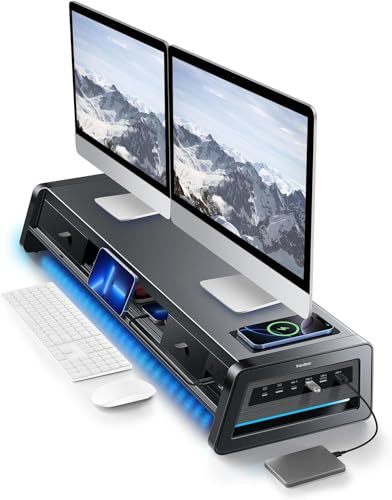
Vaydeer All-in-One Dual Monitor Stand, Metal Desk Organizer, Black | Monitor Riser with Storage, 2 Drawers, 8 USB Ports, 15W Wireless Charging Pad, LED Light Strip, Desktop Shelf for Home Office
As an Amazon Associate we earn from qualifying purchases. Product prices and availability are accurate as of the date/time indicated.

15W LED Desk Lamp with USB Charging Ports – Dimmable Table Lamp with 3 Color Temps, 5 Brightness, 4 Timers, Flexible Gooseneck Light with Base, Eye-Caring Reading Light for Home Office, Bedroom, Study
As an Amazon Associate we earn from qualifying purchases. Product prices and availability are accurate as of the date/time indicated.
Best Charging Setup for Student Desks Reviewed for 2026
1. Anker 735 GaNPrime 65W Charger – Best Overall Charging Setup for Student Desks
The Anker 735 GaNPrime 65W Charger is our top pick for most student desks because it is compact, it has three ports, and it provides 65W of total power, which is enough to charge a laptop, a phone, and earbuds at the same time. It has two USB-C ports and one USB-A port, it uses GaN technology to stay cool and small, and it is easy to carry in a backpack.
For a student desk, the Anker 735 is practical because it is small enough to fit on a crowded desk, it charges a laptop at up to 65W when used alone, and it can charge a phone and earbuds at the same time. It is a good choice if you have a 13-inch laptop, a phone, and earbuds, and you want one charger that does it all. The main trade-off is that 65W may not be enough for a larger, more powerful laptop, but for most student laptops, it is enough.
At a typical price in the $40 to $60 range, it is a fair price for a compact GaN charger. It is worth it if you want one charger for a student desk that is small, fast, and reliable.
2. UGREEN Nexode 100W GaN Charger – Best Charging Setup for Student Desks for a Laptop and Phone
The UGREEN Nexode 100W GaN Charger is a four-port charger with 100W of total power, which is enough to charge a laptop at 100W, plus a phone and a tablet at the same time. It has three USB-C ports and one USB-A port, it uses GaN technology, and it is compact for a 100W charger. It is a good choice if you have a larger laptop, or if you want to charge a laptop and a phone quickly at the same time.
For a laptop and phone, the UGREEN Nexode 100W is useful because it gives you more power than a 65W charger, so you can charge a 14-inch or 15-inch laptop at full speed, while also charging a phone. It is also a good choice if you have a tablet, because you can charge all three devices from one charger. The main trade-off is size: it is a little larger than the Anker 735, but it is still compact for a desk.
At a typical price in the $60 to $80 range, it is a good value for a 100W charger. Choose it if you have a larger laptop, you want 100W charging, or you want four ports.
3. Anker Prime 6-in-1 Charging Station 140W – Best Charging Setup for Student Desks for Many Devices
The Anker Prime 6-in-1 Charging Station 140W is a desktop charging station with six ports, 140W of total power, and a design that sits on your desk. It has USB-C and USB-A ports, it can charge a laptop, a phone, a tablet, earbuds, and more at the same time, and it has a display in many listings that shows charging status. It is a good choice if you have many devices, or if you want a station that stays on your desk.
For many devices, the Anker Prime 6-in-1 is practical because it gives you six ports in one station, it provides 140W, which is enough for a powerful laptop, and it is easy to use: just plug your devices in and they charge. It is also a good choice if you share a desk with a roommate, because you can both charge from one station. The main trade-off is size and price, but for a student with many devices, it is worth it.
At a typical price in the $80 to $110 range, it is a good value for a 140W, six-port station. Choose it if you have many devices, you want a desktop station, or you share a desk.
4. Satechi 165W USB-C 4-Port GaN Charger – Best Charging Setup for Student Desks for Fast Charging
The Satechi 165W USB-C 4-Port GaN Charger is a powerful charger with four USB-C ports and 165W of total power, which is enough to charge a laptop at up to 140W in many listings, plus a phone and a tablet. It uses GaN technology, it is compact for its power, and it is a good choice if you want the fastest charging in this guide.
For fast charging, the Satechi 165W is useful because it can charge a MacBook Pro 16-inch or a powerful Windows laptop at full speed, while also charging a phone. It is a good choice if you have a powerful laptop, you need to charge quickly between classes, or you want a charger that will last for years. The main trade-off is price, but for a student with a powerful laptop, it is a good investment.
At a typical price in the $90 to $120 range, it is the most expensive charger in this guide, along with the Belkin 3-in-1. Choose it if you want fast charging, you have a powerful laptop, or you want a 165W charger.
5. Anker 747 GaNPrime 150W Charger – Best Charging Setup for Student Desks for a Powerful Laptop
The Anker 747 GaNPrime 150W Charger is a four-port charger with 150W of total power, which is enough to charge a laptop at up to 150W in many listings, plus a phone, a tablet, and earbuds. It has three USB-C ports and one USB-A port, it uses GaNPrime technology, and it is a good choice if you have a powerful laptop that needs a lot of power.
For a powerful laptop, the Anker 747 is practical because it gives you 150W, which is more than most student laptops need, but it ensures your laptop charges at full speed, even while you are using it. It is also a good choice if you have a gaming laptop, or if you use your laptop for video editing or other demanding tasks. The main trade-off is size, but it is still compact for a 150W charger.
At a typical price in the $80 to $110 range, it is a good value for a 150W charger. Choose it if you have a powerful laptop, you want 150W charging, or you prefer Anker.
6. Belkin BoostCharge Pro 3-in-1 Wireless Charger – Best Charging Setup for Student Desks for Apple Devices
The Belkin BoostCharge Pro 3-in-1 Wireless Charger is a wireless charging station that can charge an iPhone with MagSafe, an Apple Watch, and AirPods at the same time, from one station. It has a 15W MagSafe charger for iPhone in many listings, a fast charger for Apple Watch, and a pad for AirPods. It is a good choice if you use Apple devices, and you want a clean, wireless setup for your phone, watch, and earbuds.
For Apple devices, the Belkin 3-in-1 is useful because it is a single station for three devices, it is easy to use, and it looks good on a desk. It does not charge a laptop, so you will need a separate charger for your laptop, but for your phone, watch, and earbuds, it is a clean, simple solution. It is also a good choice if you want to reduce cable clutter on your desk.
At a typical price in the $120 to $150 range, it is the most expensive station in this guide, but it is a premium Apple accessory. Choose it if you use Apple devices, you want wireless charging, or you want a clean desk.
Buying Guide: How to Choose the Best Charging Setup for Student Desks
The best charging setup for student desks for you depends on your devices, your desk, and how you study. Start with wattage and ports, then compare size, cables, and price. A setup that charges all your devices from one station is better than a setup with many chargers that tangle.
Wattage: 65W vs 100W vs 140W for Students
Wattage determines how fast your laptop charges, and whether it charges at full speed while you use it. A 65W charger, like the Anker 735, is enough for most 13-inch laptops, including a MacBook Air and many Windows ultrabooks. A 100W charger, like the UGREEN Nexode 100W, is enough for most 14-inch and 15-inch laptops, including a MacBook Pro 14-inch. A 140W or 150W charger, like the Anker Prime 6-in-1, Satechi 165W, and Anker 747, is enough for a powerful laptop, including a MacBook Pro 16-inch or a gaming laptop.
Check your laptop’s power adapter to see how much power it needs, and choose a charger that can provide at least that much power. If the charger provides less power than your laptop needs, your laptop may charge slowly, or it may not charge at all while you are using it. For most students, a 65W or 100W charger is enough. For a student with a powerful laptop, a 140W or 150W charger is worth it.
Ports, Devices, and Cable Management
Ports matter for a student desk, because you need to charge a laptop, a phone, a tablet, and earbuds, often at the same time. Count how many devices you have, and choose a charger with enough ports for all of them. A three-port charger, like the Anker 735, is enough for a laptop, a phone, and earbuds. A four-port charger, like the UGREEN Nexode 100W, Satechi 165W, and Anker 747, is better if you also have a tablet. A six-port station, like the Anker Prime 6-in-1, is best if you have many devices or if you share a desk.
Cable management also matters. Use short cables for devices that sit on your desk, and long cables for devices that are farther away. A cable organizer or a small tray can help keep cables from tangling. For a student desk, a charger with a built-in cable or a short cable is often better than a charger with a long cable, because it takes up less space.
Size, Dorm Safety, and Portability
Size matters for a student desk, because desks are small and often shared. A compact charger, like the Anker 735, takes up less space than a desktop station, like the Anker Prime 6-in-1. A desktop station is better if you have a dedicated desk and you want a permanent setup, while a compact charger is better if you move between a dorm, a library, and a classroom.
Safety also matters in a dorm. Choose a charger from a known brand, with protection against overheating, overcharging, and short circuits. Do not use a cheap, uncertified charger, because it can be a fire risk. A GaN charger, like the ones in this guide, is more efficient and runs cooler than an older charger, which is safer for a dorm. Also check your dorm rules, because some dorms have rules about power strips and extension cords.
Price, Ecosystem, and What You Actually Need
Price depends on wattage and ports. A 65W charger in the $40 to $60 range, like the Anker 735, is a good starting point for most students. A 100W charger in the $60 to $80 range, like the UGREEN Nexode 100W, is better if you have a larger laptop. A 140W or 150W charger in the $80 to $120 range, like the Anker Prime 6-in-1, Satechi 165W, and Anker 747, is worth it if you have a powerful laptop or many devices. A wireless charger in the $120 to $150 range, like the Belkin 3-in-1, is worth it if you use Apple devices and you want a clean, wireless setup.
Ecosystem also matters. If you use Apple, a Belkin 3-in-1 for your phone, watch, and earbuds, plus a separate charger for your laptop, is a good combination. If you use Android, a GaN charger with USB-C ports is a better choice. Do not buy a charger based on price alone. A charger that is safe, fast, and has enough ports for your devices is worth the investment, because you will use it every day.
Best Charging Setup for Student Desks: FAQ
What is the best charging setup for student desks?
For most students, the Anker 735 GaNPrime 65W Charger is the best overall charging setup because it offers three ports, 65W of total power, a compact design, and a reliable build at a typical price in the $40 to $60 range. If you have a larger laptop, the UGREEN Nexode 100W GaN Charger is a good choice at $60 to $80. If you have many devices, the Anker Prime 6-in-1 Charging Station 140W is a practical option at $80 to $110. If you want fast charging, the Satechi 165W USB-C 4-Port GaN Charger is the best fit at $90 to $120. If you have a powerful laptop, the Anker 747 GaNPrime 150W Charger is a strong option at $80 to $110. If you use Apple devices, the Belkin BoostCharge Pro 3-in-1 Wireless Charger is a good value at $120 to $150.
How many watts do I need to charge a laptop at a student desk?
How many watts you need to charge a laptop at a student desk depends on your laptop. A 65W charger is enough for most 13-inch laptops, including a MacBook Air. A 100W charger is enough for most 14-inch and 15-inch laptops, including a MacBook Pro 14-inch. A 140W or 150W charger is enough for a powerful laptop, including a MacBook Pro 16-inch or a gaming laptop. Check your laptop’s power adapter to see how much power it needs, and choose a charger that can provide at least that much power. If the charger provides less power, your laptop may charge slowly.
Can I charge a laptop, phone, and tablet from one charger?
Yes, you can charge a laptop, phone, and tablet from one charger if the charger has enough ports and enough total wattage. A three-port charger like the Anker 735 can charge a laptop, a phone, and earbuds at the same time, while a four-port charger like the UGREEN Nexode 100W can charge a laptop, a phone, a tablet, and earbuds. A six-port station like the Anker Prime 6-in-1 can charge even more devices. Check the charger’s total wattage, because when you charge multiple devices at once, the power is shared between ports, so your laptop may charge more slowly if you are also charging a phone and a tablet.
Is a GaN charger better for a student desk?
Yes, a GaN charger is better for a student desk because GaN, or gallium nitride, is more efficient than older silicon chargers, so it runs cooler, it is smaller for the same wattage, and it can charge faster. A GaN charger like the Anker 735, UGREEN Nexode 100W, or Satechi 165W is compact enough to fit on a crowded desk, it is safe to use in a dorm, and it is easy to carry in a backpack. A GaN charger is a good investment for a student, because it will last for years and it can charge all your devices from one small charger.
FAQ
What is the best charging setup for student desks?
How many watts do I need to charge a laptop at a student desk?
Can I charge a laptop, phone, and tablet from one charger?
Is a GaN charger better for a student desk?
Related guides
- Best Switch for Student NAS Storage: 6 Network Switches for Student NAS in 2026
- Best Cheap Baby Monitor for Parents in 2026: 7 Monitors That Offer Clear Video, Reliable Audio, and Peace of Mind for Parents
- Best Headphones vs Soundbar for Gaming in 2026: Positional Audio, Voice Chat, and Living-Room Freedom Compared for Competitive and Cinematic Players
- Best Drone for Student Videography in 2026: 7 Drones That Offer 4K Video, Stable Flight, and Reliable Use for Student Videography
More from Amazon
Programs that pair well with the guide above. Offers and eligibility are set by Amazon and may change.
Set up recurring deliveries of everyday items on eligible products. Terms and savings are set by Amazon.
Explore Subscribe & SaveFree shipping on eligible items, Prime Video and more. Eligible new members can start with a free trial.
Start a Prime free trialAudiobooks and podcasts to listen to on the go. Eligible new members can start with a free trial.
Try Audible freeRead from a large library of eBooks and audiobooks on any device. Check Amazon for current plans.
Explore Kindle UnlimitedAs an Amazon Associate we earn from qualifying purchases.

Write Your Review
No reviews yet. Be the first to share your experience!