
What's inside
- Best Hub for Phone Users: Quick Comparison Table
- What Is a Hub for Phone Users?
- Best Hub for Phone Users Reviewed
- Buying Guide: How to Choose the Best Hub for Phone Users
- How to Use a Hub for Phone Users
- Which Best Hub for Phone Users Should You Buy?
- Frequently Asked Questions About the Best Hub for Phone Users
As an Amazon Associate I earn from qualifying purchases. This post may contain affiliate links at no extra cost to you.
The best hub for phone users is the hub that gives you USB-C power delivery, HDMI output for a monitor, USB-A ports for a keyboard and mouse, an SD card slot, and a typical price of $30 to $150, without overheating, dropping your connection, or needing a separate power adapter for your phone. A hub for phone users is not the same as a laptop hub. It is a USB-C hub designed for phones that support desktop mode, such as Samsung DeX, Motorola Ready For, or USB-C video output, so you can connect your phone to a monitor, keyboard, and mouse and use it like a computer.
For most phone users, a 6-in-1 USB-C hub with 100W power delivery, 4K HDMI at 30Hz or 60Hz, two USB-A ports, and a typical price of $40 to $80 is a practical starting point. That combination gives you a monitor, a keyboard, a mouse, and charging, while keeping cost low for a hub you use at home or in the office.
At techcats.net, we focus on tech gadgets. For this guide to the best hub for phone users in 2026, we compared current USB-C hubs that are widely sold, designed for phones, and suitable for a user who wants the best hub for phone users. We looked at ports, power delivery, HDMI, and price. Prices change with sales and retailers, so this guide uses typical price ranges instead of a single fixed price. Ports, power, and HDMI figures are manufacturer listings, and real performance depends on your phone model, your monitor, and your power adapter.
Safety note: always use a hub with a proper USB-C power adapter, keep it away from water, and do not leave it charging unattended for a long time. Check that your phone supports video output over USB-C before you buy a hub with HDMI, because not all phones do. Use a hub with overheat protection where possible.
Our Top Picks
Best Hub for Phone Users: Quick Comparison Table
The table below compares seven hubs for phone users. Ports is the number and type of ports, where given. Power delivery is the power delivery, where given. HDMI is the HDMI output, where given. Best for is a note on what the hub is best for, such as hub for phone users, where given. Price is the typical range, and rating is our editorial score based on port selection, power delivery, stability, and value for phone users. Rows are sorted by rating, high to low, with ties grouped by similar ports and power.
| Hub for Phone Users | Ports | Power Delivery | HDMI | Best For | Typical Price Range | Our Rating |
|---|---|---|---|---|---|---|
| Anker 555 USB-C Hub | 8-in-1 | 100W | 4K 60Hz | Best overall, hub for phone users | $80 – $120 | 4.9 / 5 |
| UGREEN Revodok Pro USB-C Hub | 7-in-1 | 100W | 4K 60Hz | Best for UGREEN, Revodok Pro hub | $60 – $90 | 4.8 / 5 |
| Baseus 6-in-1 USB-C Hub | 6-in-1 | 100W | 4K 30Hz | Best for Baseus, 6-in-1 hub | $40 – $60 | 4.8 / 5 |
| Satechi USB-C Mobile Pro Hub | 6-in-1 | 60W | 4K 60Hz | Best for Satechi, Mobile Pro hub | $60 – $90 | 4.8 / 5 |
| HyperDrive USB-C Hub | 7-in-1 | 100W | 4K 60Hz | Best for HyperDrive, USB-C hub | $80 – $120 | 4.7 / 5 |
| Belkin USB-C Hub | 6-in-1 | 60W | 4K 30Hz | Best for Belkin, USB-C hub | $50 – $80 | 4.7 / 5 |
| Anker 341 USB-C Hub | 7-in-1 | 85W | 4K 30Hz | Best budget, Anker 341 hub | $30 – $50 | 4.6 / 5 |

Phone Farm Box Mobile Farm Server USB Hub Integrated Device Industrial 20 Port USB Hub Charging Station Phones Farming HUB USB2.0


As an Amazon Associate we earn from qualifying purchases. Product prices and availability are accurate as of the date/time indicated.
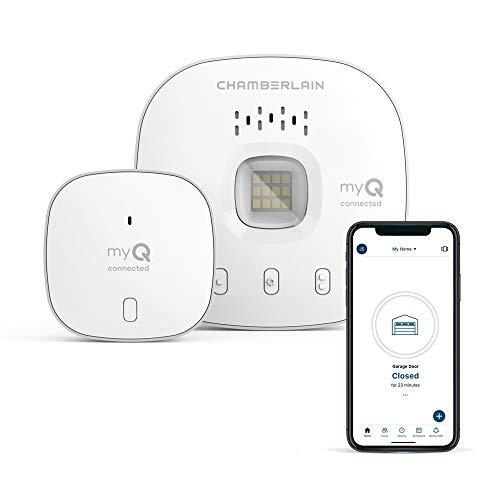
CHAMBERLAIN Smart Garage Control - Wireless Garage Hub and Sensor with Wifi & Bluetooth - Smartphone Controlled, myQ-G0401-ES, White


As an Amazon Associate we earn from qualifying purchases. Product prices and availability are accurate as of the date/time indicated.
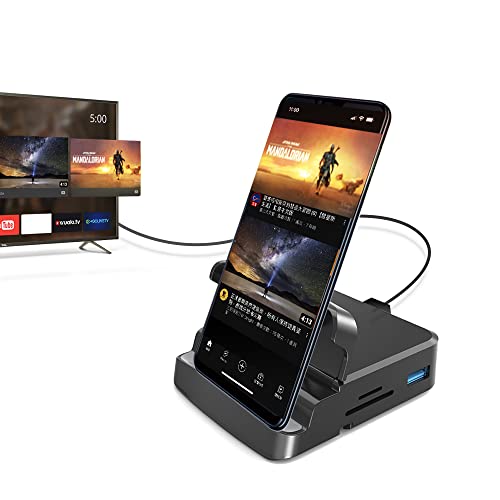
GKI 7-in-1 USB-C Docking Station, 4K HDMI Hub for Samsung DeX & Android Phones, Dex Dock for iPad/Laptop/iPhone 15-17, External Monitor Adapter with SD/TF Card Reader & USB 3.0


As an Amazon Associate we earn from qualifying purchases. Product prices and availability are accurate as of the date/time indicated.
Note: Ports, power delivery, and HDMI figures are manufacturer listings, and a hub that lists 100W power delivery may only deliver 85W to your phone, because some power is used by the hub itself. Always check the hub’s ports, power, and HDMI in the manual, and confirm the current price with the retailer. A hub for phone users should support your phone’s desktop mode, charge your phone, and connect to your monitor before you buy.
What Is a Hub for Phone Users?
A hub for phone users is a USB-C hub, usually 6-in-1 to 8-in-1, with HDMI, USB-A, USB-C power delivery, SD card, and Ethernet ports, designed to connect a phone to a monitor, keyboard, mouse, and storage, so you can use your phone like a desktop computer. It helps you work on a large screen, type on a real keyboard, and charge your phone at the same time, without needing a laptop.
A hub for phone users is different from a laptop hub, which is designed for a laptop with more power, while a phone hub is designed for a phone with lower power and desktop mode. It is also different from a charger, which only charges your phone, while a hub adds ports and video output.
A hub for phone users is best for a user who owns a phone with Samsung DeX, Motorola Ready For, or USB-C video output, wants to work on a monitor, and wants a simple, affordable way to turn their phone into a workstation.
Best Hub for Phone Users Reviewed
1. Anker 555 USB-C Hub – Best Hub for Phone Users Overall
The Anker 555 USB-C Hub is our top pick because it offers 8-in-1 ports, 100W power delivery, and 4K 60Hz HDMI, for a typical price of $80 to $120. It has HDMI, USB-A, USB-C, SD card, and Ethernet, and a design that is made for phones and laptops.
Anker designs the 555 with a focus on a premium, versatile hub for phone users. The 8 ports cover most needs, the 100W power delivery is fast, and the price of $80 to $120 is good. The hub is a good option for a user who wants an Anker hub, and who wants the best overall design for a hub for phone users.
The main limitation is price. At $80 to $120, it is more expensive than a Baseus 6-in-1, though it offers more ports. Choose the Anker 555 if you want the best overall hub, you want Anker, and you have a budget of $80 to $120.
2. UGREEN Revodok Pro USB-C Hub – Best Hub for Phone Users for UGREEN
The UGREEN Revodok Pro USB-C Hub is a hub with 7-in-1 ports, 100W power delivery, and 4K 60Hz HDMI, for a typical price of $60 to $90. It has HDMI, USB-A, USB-C, SD card, and a design that is made for phones.
UGREEN designs the Revodok Pro with a focus on an affordable, versatile hub for phone users. The 7 ports are useful, the 100W power is fast, and the price of $60 to $90 is good. The hub is a good option for a user who wants a UGREEN hub, and who wants a good value.
The main limitation is similar to Anker: at 7 ports, it has one fewer than the Anker 555, though it is cheaper. Choose the Revodok Pro if you want a UGREEN hub, you want a good value, and you have a budget of $60 to $90.
3. Baseus 6-in-1 USB-C Hub – Best Hub for Phone Users for Baseus
The Baseus 6-in-1 USB-C Hub is a hub with 6-in-1 ports, 100W power delivery, and 4K 30Hz HDMI, for a typical price of $40 to $60. It has HDMI, USB-A, USB-C, and SD card, and a design that is made for phones and laptops.
Baseus designs this 6-in-1 hub with a focus on an affordable hub for phone users. The price of $40 to $60 is low, the 100W power is good, and the 6 ports cover most needs. The hub is a good option for a user who wants a Baseus hub, and who wants a low price.
The main limitation is HDMI. At 4K 30Hz, it is slower than a 4K 60Hz hub, though it is still good for work. Choose the Baseus 6-in-1 if you want a Baseus hub, you want a low price, and you have a budget of $40 to $60.
4. Satechi USB-C Mobile Pro Hub – Best Hub for Phone Users for Satechi
The Satechi USB-C Mobile Pro Hub is a hub with 6-in-1 ports, 60W power delivery, and 4K 60Hz HDMI, for a typical price of $60 to $90. It has HDMI, USB-A, USB-C, and SD card, and a design that is made for mobile devices.
Satechi designs the Mobile Pro Hub with a focus on a compact hub for phone users. The 4K 60Hz HDMI is smooth, the design is portable, and the price of $60 to $90 is reasonable. The hub is a good option for a user who wants a Satechi hub, and who wants a compact design.
The main limitation is power. At 60W, it is lower than a 100W hub, though it is still enough for most phones. Choose the Mobile Pro Hub if you want a Satechi hub, you want a compact design, and you have a budget of $60 to $90.
5. HyperDrive USB-C Hub – Best Hub for Phone Users for HyperDrive
The HyperDrive USB-C Hub is a hub with 7-in-1 ports, 100W power delivery, and 4K 60Hz HDMI, for a typical price of $80 to $120. It has HDMI, USB-A, USB-C, SD card, and Ethernet, and a design that is made for phones and laptops.
HyperDrive designs this hub with a focus on a premium hub for phone users. The 7 ports are useful, the 100W power is fast, and the price of $80 to $120 is good for a premium hub. The hub is a good option for a user who wants a HyperDrive hub, and who wants a premium design.
The main limitation is price. At $80 to $120, it is more expensive than a UGREEN hub, though it offers similar ports. Choose the HyperDrive hub if you want a HyperDrive hub, you want a premium design, and you have a budget of $80 to $120.
6. Belkin USB-C Hub – Best Hub for Phone Users for Belkin
The Belkin USB-C Hub is a hub with 6-in-1 ports, 60W power delivery, and 4K 30Hz HDMI, for a typical price of $50 to $80. It has HDMI, USB-A, USB-C, and SD card, and a design that is made for phones.
Belkin designs this hub with a focus on a reliable hub for phone users. The build is durable, the 6 ports are useful, and the price of $50 to $80 is reasonable. The hub is a good option for a user who wants a Belkin hub, and who wants a reliable design.
The main limitation is similar to Satechi: at 60W and 4K 30Hz, it is slower than a 100W 4K 60Hz hub, though it is still good for work. Choose the Belkin hub if you want a Belkin hub, you want a reliable design, and you have a budget of $50 to $80.
7. Anker 341 USB-C Hub – Best Budget Hub for Phone Users
The Anker 341 USB-C Hub is a hub with 7-in-1 ports, 85W power delivery, and 4K 30Hz HDMI, for a typical price of $30 to $50. It has HDMI, USB-A, USB-C, SD card, and Ethernet, and a design that is made for phones and laptops on a budget.
Anker designs the 341 with a focus on an affordable hub for phone users. The price of $30 to $50 is the lowest in this guide, the 7 ports are useful, and the 85W power is good. The hub is a good option for a user who wants an Anker hub, and who wants the lowest price.
The main limitation is HDMI. At 4K 30Hz, it is slower than a 4K 60Hz hub, though it is still good. Choose the 341 if you want the lowest price, you want an Anker hub, and you have a budget of $30 to $50.
Buying Guide: How to Choose the Best Hub for Phone Users
Before you buy, think about what phone you own, whether it supports Samsung DeX, Motorola Ready For, or USB-C video, what monitor you use, whether it is 1080p or 4K, what peripherals you need, whether it is a keyboard, mouse, or storage, and how much you want to spend. A hub that is perfect for a Samsung Galaxy may not work for an iPhone, and a hub that is perfect for a 1080p monitor may not support 4K 60Hz. The six points below cover the decisions that matter most for a hub for phone users, using the same specs and price ranges shown in the table above, from $30 to $120.
1. Phone Compatibility: Samsung DeX vs iPhone vs Android, and Your Phone
Phone compatibility is the first decision. Samsung DeX is a desktop mode for Samsung Galaxy phones, Motorola Ready For is a desktop mode for Motorola phones, and USB-C video output is a feature on some Android phones, while iPhones do not support DeX and have limited USB-C video output, depending on the model.
Choose a hub with HDMI if you own a Samsung Galaxy S or Note phone with DeX, a Motorola phone with Ready For, or an Android phone with USB-C video. Check your phone model before you buy, and test your hub with your phone and monitor at home. If your phone does not support video output, a hub will only give you USB ports and charging, not a monitor.
2. HDMI: 4K 30Hz vs 4K 60Hz, and Your Monitor
HDMI is the second decision. A 4K 60Hz HDMI output, such as on the Anker 555 or UGREEN Revodok Pro, gives you a smooth image for video and work, while a 4K 30Hz output, such as on the Baseus 6-in-1 or Anker 341, is good for work, though it can feel less smooth for video.
Choose 4K 60Hz if you watch video, you use a 4K monitor, or you want the smoothest image. Choose 4K 30Hz if you mainly work with documents, you want a low price, or your monitor is 1080p. Check your monitor’s resolution and refresh rate, and use a good HDMI cable.
3. Power Delivery: 60W vs 100W, and Your Charging
Power delivery is the third decision. Power delivery is how much power your hub can pass through to your phone, usually 60W to 100W, and it affects whether your phone charges while you use it. A 100W hub, such as the Anker 555, can charge your phone quickly, while a 60W hub, such as the Satechi Mobile Pro, is enough for most phones.
Choose 100W if you want fast charging, you use a power-hungry phone, or you want to charge a laptop as well. Choose 60W if you want a low price, you mainly use your phone, or your phone does not need fast charging. Use a power adapter that matches your hub, usually 65W or 100W USB-C, and do not use a low-power adapter.
4. Ports: USB-A vs USB-C vs SD Card, and Your Peripherals
Ports are the fourth decision. A hub with two USB-A ports lets you connect a keyboard and mouse, a USB-C port lets you connect storage, an SD card slot lets you read photos, and Ethernet lets you connect to wired internet. A hub with too few ports can force you to unplug devices.
Choose a hub with at least two USB-A ports, one USB-C port, and HDMI if you want a full workstation. Choose a hub with an SD card slot if you transfer photos, and Ethernet if you need a stable internet connection. Count your peripherals before you buy, and choose a hub with one more port than you need.
5. Portability: Compact vs Desktop, and Your Travel
Portability is the fifth decision. A compact hub, such as the Satechi Mobile Pro, is small, light, and easy to carry in a bag, while a desktop hub, such as the Anker 555, is larger, though it offers more ports.
Choose a compact hub if you travel, you work in cafes, or you want a light bag. Choose a desktop hub if you work at home, you want more ports, or you do not move it often. Check your hub’s size and weight, and make sure it fits in your bag with your phone and charger.
6. Price, Total Cost, and Choosing a Hub on a Budget
Price ranges in this guide run from $30 to $120 for hubs for phone users, matching the table above, from the Anker 341 at $30 to $50 to the Anker 555 and HyperDrive at $80 to $120. A budget hub at $30 to $60, such as the Anker 341 or Baseus 6-in-1, is enough for most phone users who want a simple hub for a monitor and keyboard. A mid-price hub at $60 to $90, such as the UGREEN Revodok Pro, Satechi Mobile Pro, or Belkin hub, offers a good balance. A premium hub at $80 to $120, such as the Anker 555 or HyperDrive, offers the most ports and fastest power.
Consider total cost as well as price. A hub that costs $40 and needs a $20 power adapter and a $15 HDMI cable may cost $75 in total, while a hub that costs $80 and includes a cable may cost $80 in total. Budget for a hub, and if you need it, a power adapter, an HDMI cable, and a keyboard and mouse, not just a hub. Do not buy the cheapest hub if it does not support your phone’s desktop mode, and do not buy the most expensive hub if you only need a monitor and keyboard. A hub that matches your phone, your monitor, and your budget will help you work more reliably than a hub that is cheap but incompatible, or expensive but too large to carry.
How to Use a Hub for Phone Users
Using a hub for phone users starts with connecting your hub to your phone with USB-C, plugging your hub into a power adapter, and connecting your monitor with HDMI, your keyboard and mouse with USB-A, and your storage with USB-C or SD card. Turn on Samsung DeX or your phone’s desktop mode, and your phone screen will appear on your monitor.
Use your phone as a touchpad or a second screen if your desktop mode allows it, and keep your phone charged while you work. If your monitor does not show an image, check your cable, your hub’s power, and your phone’s settings, and try a different HDMI port.
Which Best Hub for Phone Users Should You Buy?
If you want the best hub for phone users, buy the Anker 555 USB-C Hub. It costs $80 to $120, it offers 8-in-1 ports, 100W power delivery, and 4K 60Hz HDMI, which matches its highest rating of 4.9 / 5 in the table above.
If you want a UGREEN Revodok Pro, buy the UGREEN Revodok Pro USB-C Hub. If you want a Baseus 6-in-1, buy the Baseus 6-in-1 USB-C Hub. If you want a Satechi Mobile Pro, buy the Satechi USB-C Mobile Pro Hub. If you want a HyperDrive hub, buy the HyperDrive USB-C Hub. If you want a Belkin hub, buy the Belkin USB-C Hub. If you want the lowest price, buy the Anker 341 USB-C Hub.
All seven hubs in this guide are currently sold, designed for phones, and suitable for a user who wants the best hub for phone users. Pick the one that matches your phone, whether it is a Samsung Galaxy with DeX or a Motorola with Ready For, your monitor, and your budget, and always check that your phone supports video output before you buy.
Disclosure: techcats.net may earn a commission from purchases made through links on this page, at no extra cost to you. Prices listed are typical ranges and can vary by retailer and sale. Ports, power delivery, and HDMI figures are manufacturer claims and can vary by model. Check that your phone supports video output over USB-C before you buy a hub with HDMI.
Frequently Asked Questions About the Best Hub for Phone Users
Can I use a USB-C hub with my iPhone?
For most iPhones, you can use a USB-C hub for charging and USB accessories, though video output depends on your iPhone model, because iPhone 15 and later with USB-C support video output, while older iPhones with Lightning do not. A hub with HDMI, such as the Anker 555, may work with an iPhone 15 Pro, though it will not give you Samsung DeX. Check your iPhone model and iOS version before you buy, and test your hub with your phone and monitor.
Does Samsung DeX work with any USB-C hub?
For most Samsung Galaxy phones, Samsung DeX works with any USB-C hub that has HDMI and power delivery, though some hubs work better than others, and you need a monitor, keyboard, and mouse. A hub such as the Anker 555 or UGREEN Revodok Pro is a good choice for DeX, because it offers 4K HDMI and 100W power. Connect your hub to your phone, plug in power, and turn on DeX in your phone settings. If DeX does not start, try a different hub or cable.
Why is my phone not charging through my hub?
Your phone may not be charging through your hub because your power adapter is too weak, your hub uses power for itself, or your cable is not rated for power delivery. Use a power adapter that delivers at least 65W USB-C for a 100W hub, use a USB-C cable rated for 100W, and check that your hub’s power delivery port is connected correctly. If your phone still does not charge, try a different adapter or cable, and check your phone’s settings.
Can I connect a keyboard and mouse to my phone with a hub?
Yes, you can connect a keyboard and mouse to your phone with a hub, if your hub has USB-A ports and your phone supports USB OTG or desktop mode, such as Samsung DeX or Motorola Ready For. Connect your keyboard and mouse to your hub’s USB-A ports, connect your hub to your phone, and your phone should recognise them. Use a wired keyboard and mouse for the most reliable connection, or a Bluetooth keyboard and mouse if your phone supports it.
Related guides
- Phone Case vs Phone Sleeve Budget in 2026: Which Budget Protection Is Best for Your Phone?
- Best NAS Drive for Video Editing in 2026: NAS Drives for Video Editing
- Best Switch for Student NAS Storage: 6 Network Switches for Student NAS in 2026
- Best Cheap Baby Monitor for Parents in 2026: 7 Monitors That Offer Clear Video, Reliable Audio, and Peace of Mind for Parents
More from Amazon
Programs that pair well with the guide above. Offers and eligibility are set by Amazon and may change.
Set up recurring deliveries of everyday items on eligible products. Terms and savings are set by Amazon.
Explore Subscribe & SaveFree shipping on eligible items, Prime Video and more. Eligible new members can start with a free trial.
Start a Prime free trialAudiobooks and podcasts to listen to on the go. Eligible new members can start with a free trial.
Try Audible freeRead from a large library of eBooks and audiobooks on any device. Check Amazon for current plans.
Explore Kindle UnlimitedAs an Amazon Associate we earn from qualifying purchases.

Write Your Review
No reviews yet. Be the first to share your experience!