
What's inside
- How to Choose Speaker for Remote Workers: Sound for Calls and Music
- How to Choose Speaker for Remote Workers: Connectivity, Size and Microphone
- Best Speakers for Remote Workers Comparison Table
- Top Speakers for Remote Workers Reviewed
- Buying Guide: How to Choose Speaker for Remote Workers
- How to Set Up a Speaker for Remote Work
- Frequently Asked Questions
As an Amazon Associate I earn from qualifying purchases. This post may contain affiliate links at no extra cost to you.
Learning how to choose speaker for remote workers is about choosing a speaker that gives you clear sound for calls, music for focus, and a design that fits on a desk, without being too large or too expensive. A good speaker for remote workers should have a clear midrange for voices, a good Bluetooth connection, and a design that is easy to use for Zoom, Teams, and Spotify. It should also be affordable, with a price that fits a remote worker who wants better sound without a large, expensive speaker.
This guide explains how to choose speaker for remote workers, step by step, how to compare sound quality, microphone, connectivity, and size, and which models work well in 2026. We focus on practical use for remote workers who work from home, with a speaker that is used for calls, music, and focus, and with a design that is suitable for a beginner and for an experienced worker. Whether you work in a home office or a kitchen, the same principles apply: choose a speaker that is clear for calls, good for music, and easy to use.
Our Top Picks
How to Choose Speaker for Remote Workers: Sound for Calls and Music
Choosing a speaker for remote workers starts with sound for calls. A speaker with a clear midrange, such as the Sonos Era 100, is better for voices than a speaker with only bass, because voices are in the midrange. A speaker with a good microphone, such as the Anker Soundcore Motion+, lets you talk on a call without a headset, while a speaker without a microphone cannot be used for calls. A speaker with a wide soundstage is also useful, because it fills a room with sound.
A speaker for remote workers also needs good music sound. A speaker with a balanced sound, such as the Bose SoundLink Flex II, is better for music than a speaker with only bass, because it gives you clear highs and mids. A speaker with a long battery life, such as 20 hours, is useful if you move it between rooms, while a speaker that plugs in is better for a desk.
How to Choose Speaker for Remote Workers: Connectivity, Size and Microphone
Connectivity matters for a speaker, because it determines how you connect it to your laptop or phone. A speaker with Bluetooth 5.3, such as the JBL Flip 6, connects easily to a laptop, while a speaker with only Aux needs a cable. A speaker with WiFi, such as the Sonos Era 100, can stream music from Spotify without Bluetooth, and it can be grouped with other Sonos speakers. A speaker with USB-C charging is more convenient than a speaker with micro-USB.
Size also matters. A speaker that is small, such as the Ultimate Ears Wonderboom 3, fits on a desk, while a speaker that is large, such as a bookshelf speaker, takes up too much space. Microphone matters too: a speaker with a built-in microphone is good for calls, while a speaker without a microphone is only good for music. A speaker with a mute button is useful, because you can mute it quickly on a call.
Best Speakers for Remote Workers Comparison Table
| Model | Power Output | Battery Life | Connectivity | Microphone | Typical Price Range | Rating |
|---|---|---|---|---|---|---|
| Sonos Era 100 Smart Speaker | Up to 20 W | Plugged in, no battery | WiFi, Bluetooth, Aux | Yes, far-field | $200-$230 | 4.8/5 |
| Bose SoundLink Flex II Portable Speaker | Up to 20 W | Up to 12 hours | Bluetooth 5.3, USB-C | Yes, built-in | $130-$150 | 4.8/5 |
| JBL Flip 6 Portable Speaker | Up to 30 W | Up to 12 hours | Bluetooth 5.1, USB-C | No, music only | $100-$120 | 4.8/5 |
| Anker Soundcore Motion+ Portable Speaker | Up to 30 W | Up to 12 hours | Bluetooth 5.0, Aux, USB-C | Yes, built-in | $80-$100 | 4.7/5 |
| Marshall Emberton II Portable Speaker | Up to 20 W | Up to 30 hours | Bluetooth 5.1, USB-C | No, music only | $150-$180 | 4.7/5 |
| Ultimate Ears Wonderboom 3 Portable Speaker | Up to 10 W | Up to 14 hours | Bluetooth 5.3, USB-C | No, music only | $80-$100 | 4.7/5 |

Replacement Remote Control for (Ion Audio Total PA Max Speaker) (ION Audio Pro Glow 8 ION IPA69A) (ION Total PA Ultra) Portable PA System Audio Speaker (with Wall Mounting Bracket)


As an Amazon Associate we earn from qualifying purchases. Product prices and availability are accurate as of the date/time indicated.
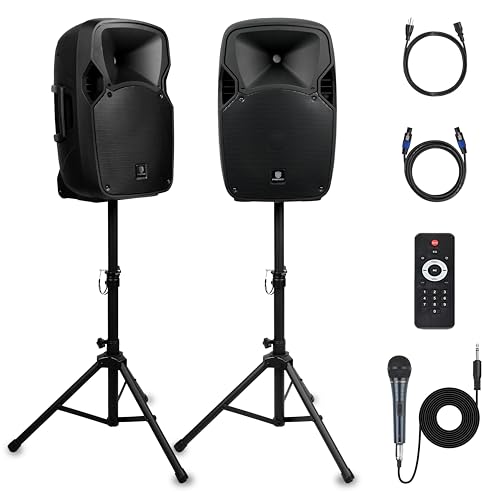
PRORECK Party 12 12-Inch 1800W 2-Way Powered PA Speaker System Combo Set with Bluetooth/USB Drive/SD Card/FM/Remote Control/Speaker Stands for Indoor, Outdoor DJ Parties, Personal Gatherings, Karaoke
As an Amazon Associate we earn from qualifying purchases. Product prices and availability are accurate as of the date/time indicated.

Replacement Remote for Saiyin Sound Bar and Bookshelf Speakers (Upgrade) | Compatible With WebsLand Sound Bar for Smart TV, No Programming, Fast Response, Stable Signal


As an Amazon Associate we earn from qualifying purchases. Product prices and availability are accurate as of the date/time indicated.
Top Speakers for Remote Workers Reviewed
Sonos Era 100 Smart Speaker
The Sonos Era 100 Smart Speaker is a speaker with a power output up to 20W, no battery, WiFi, Bluetooth, and Aux connectivity, a far-field microphone, and a price of $200 to $230. It has a good sound, a smart design, and a good value. It is a good choice if you want the best speaker for remote workers with a proven Sonos design.
Bose SoundLink Flex II Portable Speaker
The Bose SoundLink Flex II Portable Speaker is a speaker with a power output up to 20W, a battery life up to 12 hours, Bluetooth 5.3 and USB-C connectivity, a built-in microphone, and a price of $130 to $150. It has a good sound, a portable design, and a good value. It is a good choice if you want a Bose speaker with a microphone for calls.
JBL Flip 6 Portable Speaker
The JBL Flip 6 Portable Speaker is a speaker with a power output up to 30W, a battery life up to 12 hours, Bluetooth 5.1 and USB-C connectivity, no microphone, and a price of $100 to $120. It has a good sound, a portable design, and a good value. It is a good choice if you want a JBL speaker for music.
Anker Soundcore Motion+ Portable Speaker
The Anker Soundcore Motion+ Portable Speaker is a speaker with a power output up to 30W, a battery life up to 12 hours, Bluetooth 5.0, Aux, and USB-C connectivity, a built-in microphone, and a price of $80 to $100. It has a low price, a good sound, and a good value. It is a good choice if you want an affordable speaker with a microphone.
Marshall Emberton II Portable Speaker
The Marshall Emberton II Portable Speaker is a speaker with a power output up to 20W, a battery life up to 30 hours, Bluetooth 5.1 and USB-C connectivity, no microphone, and a price of $150 to $180. It has a long battery life, a good sound, and a good value. It is a good choice if you want a Marshall speaker with a long battery.
Ultimate Ears Wonderboom 3 Portable Speaker
The Ultimate Ears Wonderboom 3 Portable Speaker is a speaker with a power output up to 10W, a battery life up to 14 hours, Bluetooth 5.3 and USB-C connectivity, no microphone, and a price of $80 to $100. It has a compact design, a good sound, and a good value. It is a good choice if you want a small speaker for a desk.
Buying Guide: How to Choose Speaker for Remote Workers
Start with your work, your calls, and your music. If you take many Zoom calls, a speaker with a built-in microphone, such as the Bose SoundLink Flex II or Anker Soundcore Motion+, is a good choice, because you can talk without a headset. If you only listen to music for focus, a speaker without a microphone, such as the JBL Flip 6, is enough. If you work in a large room, a speaker with a higher power output, such as 30W, is better than a speaker with 10W. If you work in a small room, a speaker with 20W is enough.
Next, check connectivity, size, and battery. A speaker with Bluetooth 5.3 connects easily to a laptop, while a speaker with WiFi, such as the Sonos Era 100, can stream music without Bluetooth. A speaker that is small, such as the Ultimate Ears Wonderboom 3, fits on a desk, while a speaker that is large takes up too much space. A speaker with a battery life of 12 hours is useful if you move it between rooms, while a speaker that plugs in is better for a desk.
Check your budget, your use, and your future. Speakers for remote workers typically cost $80 to $230. A speaker from $80 to $100, such as the Anker Soundcore Motion+ or Ultimate Ears Wonderboom 3, offers a good way to start. A speaker from $100 to $150, such as the JBL Flip 6 or Bose SoundLink Flex II, offers a better sound and a microphone. A speaker from $150 to $230, such as the Marshall Emberton II or Sonos Era 100, offers a premium sound and a smart design.
Finally, do not buy a speaker based only on price or power. A speaker with a high power output but a poor midrange will sound bad for calls, while a speaker with a low power output but a clear midrange will sound good for voices. Choose a speaker that is clear for calls, good for music, and easy to use, with a size that fits your desk. Test the speaker with a Zoom call and with music before you rely on it for work.
How to Set Up a Speaker for Remote Work
To set up a speaker for remote work, first place the speaker on your desk, at ear level, with a distance of 2 to 3 feet from you, and with no walls blocking it. Connect the speaker to your laptop with Bluetooth, and set it as your audio output in Zoom or Teams. Test the speaker with a call, and check that the microphone works if your speaker has one. Set the volume to a comfortable level, with no distortion, and use a mute button to mute yourself on a call. Clean your speaker regularly, with a dry cloth, and update its firmware if needed.
Frequently Asked Questions
What is the best speaker for remote workers?
What is the best speaker for remote workers depends on your calls and music. A speaker with a clear midrange, a built-in microphone, and a good Bluetooth connection, such as the Bose SoundLink Flex II at $130 to $150, is a good choice for most remote workers, because it is good for calls and music. A speaker with WiFi, such as the Sonos Era 100 at $200 to $230, is also good, especially if you want a smart speaker. Choose a speaker that is clear for calls, with a microphone if you take many calls.
Do I need a speaker with a microphone for remote work?
Do you need a speaker with a microphone for remote work, it depends on your calls. A speaker with a built-in microphone, such as the Bose SoundLink Flex II, lets you talk on a Zoom call without a headset, which is convenient. A speaker without a microphone, such as the JBL Flip 6, is only good for music, and you will need a separate microphone or headset for calls. A speaker with a microphone is a good choice if you take many calls, while a speaker without a microphone is enough if you only listen to music.
Is a Bluetooth speaker good for Zoom calls?
Is a Bluetooth speaker good for Zoom calls, yes, a Bluetooth speaker is good for Zoom calls, if it has a built-in microphone and a clear sound. A Bluetooth speaker with a microphone, such as the Anker Soundcore Motion+, can be used for Zoom calls, with a clear voice and a good sound. A Bluetooth speaker without a microphone cannot be used for calls, because you cannot talk. A Bluetooth speaker with a low latency is better for calls than a speaker with a high latency. Test your speaker with a Zoom call before you use it for work.
How do I choose a speaker for a small home office?
How you choose a speaker for a small home office is to choose a speaker that is compact, with a clear sound, and with a size that fits your desk. A speaker with a power output of 20W, such as the Bose SoundLink Flex II, is enough for a small office, while a speaker with 30W may be too loud. A speaker that is small, such as the Ultimate Ears Wonderboom 3, fits on a desk, while a large speaker takes up too much space. A speaker with Bluetooth is easy to connect to a laptop, and a speaker with a microphone is useful for calls. Choose a compact speaker with a clear sound.
Related guides
- Best Switch for Student NAS Storage: 6 Network Switches for Student NAS in 2026
- Best Cheap Baby Monitor for Parents in 2026: 7 Monitors That Offer Clear Video, Reliable Audio, and Peace of Mind for Parents
- Best Headphones vs Soundbar for Gaming in 2026: Positional Audio, Voice Chat, and Living-Room Freedom Compared for Competitive and Cinematic Players
- Best Drone for Student Videography in 2026: 7 Drones That Offer 4K Video, Stable Flight, and Reliable Use for Student Videography
More from Amazon
Programs that pair well with the guide above. Offers and eligibility are set by Amazon and may change.
Set up recurring deliveries of everyday items on eligible products. Terms and savings are set by Amazon.
Explore Subscribe & SaveFree shipping on eligible items, Prime Video and more. Eligible new members can start with a free trial.
Start a Prime free trialAudiobooks and podcasts to listen to on the go. Eligible new members can start with a free trial.
Try Audible freeRead from a large library of eBooks and audiobooks on any device. Check Amazon for current plans.
Explore Kindle UnlimitedAs an Amazon Associate we earn from qualifying purchases.

Write Your Review
No reviews yet. Be the first to share your experience!