
What's inside
- Best USB C Cable for Charging Laptops: Buy the Rating Above Your Laptop, From a Maker Who Names the Chip
- Quick Comparison: USB-C Cables for Charging Laptops Compared
- The Six Laptop Charging Cables Reviewed
- Buying Guide: Read Your Laptop’s Appetite, Buy One Class Above, Label Both Ends
- How We Selected These Laptop Charging Cables
- Frequently Asked Questions: USB-C Cables for Charging Laptops
As an Amazon Associate I earn from qualifying purchases. This post may contain affiliate links at no extra cost to you.
The best usb c cable for charging laptops is the one you never think about again, and reaching that happy condition requires understanding a parish that the cable industry has made unnecessarily mysterious. A USB-C connector is a shape, not a specification: cables wearing the identical plug differ enormously in the power they are rated to carry, the data they can move, and the intelligence built into them, and a laptop is the least forgiving device in the house at discovering the difference, because it draws real power, continuously, for hours, through a cable that may have been composed for a phone. The doctrine of this guide is therefore simple and absolute. For a laptop, buy a cable rated well above the machine’s appetite, from a maker who states its rating and its chip, in the length your desk actually needs and no longer, and treat every unrated cable in the house as a phone cable until proven otherwise. Do that, and the cable leaves the list of things that can be wrong with your setup, which is the highest praise this category offers.
The power figures divide the field into three parishes, and the laptop owner should know them by heart. The base parish of USB-C charging, available from any compliant cable, covers the smaller appetites. Above it sits the marked parish: cables rated for the higher currents carry an electronic marker, the e-marker chip in the connector, which tells the charger and the laptop what the cable can safely bear, and without that chip the system, correctly, refuses the higher parish no matter what the packet promised. The current standard’s summit is the extended parish, rated to 240 watts in the specification’s own terms, which covers every laptop that charges by USB-C with headroom to spare and future-proofs the purchase against the next machine. A laptop cable bought in that top parish, from an honest maker, is a cable bought once. A cable bought below your machine’s appetite is not dangerous, because the system’s negotiations protect it, but it is a bottleneck that will present as a slow charge, a battery that drains while plugged in under load, or a charger blamed for a cable’s parish, and it will be diagnosed last because nobody suspects the wire.
Length is the second specification, and it is a compromise the desk decides. A longer cable is a heavier, thirstier citizen, its resistance taxing the delivery at the parish’s edge and its slack colonising the desk, while a shorter one composes the run and fails the day the socket moves. Buy the length the run requires with a hand’s width of grace, in the two-cable system this guide will prescribe: one composed cable that lives at the desk, one rated traveller that lives in the bag, and the house’s anonymous parish kept for phones and forgiven their smaller appetites. Data is the third specification and, for a charging cable, an honest afterthought: the charging parish and the data parish are separate citizens in the same sheath, and a cable can be a 240-watt hero and a slow data parish in the same body, which matters only if the same cable must also serve a dock or a drive, a case this guide addresses in its own section.
Our Top Picks
Best USB C Cable for Charging Laptops: Buy the Rating Above Your Laptop, From a Maker Who Names the Chip
Power Ratings and E-Markers for the Best USB C Cable for Charging Laptops
The negotiation that happens when you plug in is the parish working as designed, and it is worth understanding once. The charger offers its parishes, the laptop states its appetite, and the cable, where the higher currents are concerned, presents its credentials by its e-marker chip, without which the conversation stops at the base parish however powerful the other two citizens are. This is why the cable is so often the secret bottleneck: a fine charger and a fine laptop, joined by a cable without the chip or the rating, compose a system that charges at the base rate and reports nothing wrong, because nothing is wrong except the purchase. The audit that prevents it is a reading exercise: the cable’s rating in watts, stated by its maker; the e-marker’s presence, stated in so many words; and the certification parish, the USB-IF’s own programme, whose mark on a maker’s documents is the closest thing this category has to a notary. A cable whose maker will not state those three has stated them, in the only way that matters.
Match the rating to the machine with headroom, and let the headroom be generous because it costs little and buys the future. Read your laptop’s own appetite from its maker’s specification or its original charger’s parish, then buy the cable in the rating class above it, up to the standard’s summit where the price difference has become small. The gaming and workstation parish, whose appetites are the house’s largest, should simply buy the summit and be done. Keep the cable’s parish pure in use: a laptop cable earns its keep on the laptop’s run, and its habit of wandering to the phone by the sofa is how the desk ends up with the phone’s cable on the laptop, the whole doctrine quietly reversed. Label the laptop cable at both ends, as this site teaches for every governed parish, because the cables are identical to the eye and opposite in their credentials, and the label is the only citizen who knows the difference at midnight.
Build, Length, and the Desk Run for the Best USB C Cable for Charging Laptops
A laptop cable works for its living in a way a phone cable does not, bent at the connector by the laptop’s position, run across the desk’s edge, coiled and uncoiled by the traveller’s parish, and its build should be graded as a working tool. The connector’s parish is the failure point of the entire category, so judge the strain relief where cable meets plug, the moulding’s substance, and the maker’s record, because a cable dies at its ends and almost never in its middle. Braided sheaths forgive abrasion and resist the tangle parish, at a stiffness some desks resent; quality polymer sheaths are suppler and, in the honest parishes, equally long-lived. The right angle connector is a genuine citizen where the laptop’s port and the desk’s geometry compose a bend, turning a daily strain into a straight run, and it should be bought as the desk’s design rather than discovered as its remedy.
Compose the desk run once and govern it thereafter. The charger lives where the run is shortest and the heat freest, its cable descending to the laptop by the calm route this site’s cable doctrines prescribe, neither stretched across the walkway nor coiled in a nest at the brick, because a coiled cable under load is a warm cable and an untidy parish in the same object. The traveller’s cable lives in the bag with its own small discipline, loosely coiled at a generous radius, never knotted, never crushed under the machine it serves. At the season’s turn, inspect both cables’ ends in a good light, flex them gently at the relief, and retire any whose sheath has split, whose connector wobbles in its moulding, or whose charging has become a negotiation, because a cable is the cheapest citizen in the whole setup and its failure modes, heat and intermittency, are the least charming. Replace it from this table’s parish and label the new citizen on its first day.
Charging Cables That Must Also Carry Data for the Best USB C Cable for Charging Laptops
Some cables hold two jobs, and they should be bought as specialists in both rather than as a charging cable with hopes. The docked desk is the common case: one cable from laptop to dock carrying power up, displays and data down, a parish whose specification is the dock’s own standard, commonly the Thunderbolt or full-featured USB parish, whose cables are rated for the power and the data together, are length-limited by that ambition, and should be bought in that named parish from the makers in this table who compose them, at the length the standard allows rather than the length the desk might prefer. The drive parish is the second case, the cable that charges the laptop on weekdays and moves a backup to an external drive on Sundays, where a charging cable’s modest data parish turns an hour’s parish into an afternoon’s. The doctrine is to name the second job in step one and buy the cable that states both ratings, power in watts and data in its own figures, from a maker whose documents treat the two as separate specifications, because they are.
Where the jobs are separate, keep them separate with a clear conscience, because the dedicated charging cable is cheaper, longer, and more forgiving than its full-featured sibling, and a house that buys one of each, labelled, spends less than a house that buys two of the ambitious parish and abuses both. The error this section exists to prevent is the silent one, the charging cable pressed into dock duty and blamed, with the dock, for a data parish it never claimed, in a diagnosis that consumes a weekend. Every specification in this guide is the same lesson wearing different clothes: read what the citizen states, buy what the work requires, and let the label remember what the eye cannot see.
Quick Comparison: USB-C Cables for Charging Laptops Compared
| USB-C Cable | Best For | Key Specs | Typical Price Range | Rating |
|---|---|---|---|---|
| Anker 765 / 643 parish | Charging — best usb c cable for charging laptops overall | Rating classes to the 240W parish as published, e-marker parish, braid and length classes as published | $18 – $30 by length | 4.7 / 5 |
| Apple USB-C Charge Cable parish | Maker cable — best known parish | Rating classes as published for its machines, length classes, build parish as published | $19 – $29 by length | 4.5 / 5 |
| UGREEN 240W parish | Value power — best price parish | 240W rating classes as published, e-marker parish, braid classes, and length classes as published | $12 – $22 by length | 4.5 / 5 |
| Belkin BoostCharge parish | Certified — best trust parish | Rating classes as published, certification parish, braid classes, and length classes as published | $15 – $28 by length | 4.5 / 5 |
| Anker / Thunderbolt parish | Dock duty — best data parish | Full-featured classes as published, power rating parish, data and display classes, short length classes as published | $25 – $40 | 4.6 / 5 |
| Baseus 240W parish | Budget power — best floor parish | 240W rating classes as published, e-marker parish, braid and display classes on some versions as published | $10 – $18 by length | 4.3 / 5 |

Anker USB C to USB C Cable, 100W Fast Charging Cable (2-Pack, 6 ft, Black) | For iPhone 18 / 17 Series, MacBook Pro 2020, Pixel, and More (Not for Video Output)
As an Amazon Associate we earn from qualifying purchases. Product prices and availability are accurate as of the date/time indicated.

INIU 240W USB C to USB C Cable, [6.6ft+6.6ft] Fast Charging Type C Cord | Nylon Braided, Fast Charging, LED Indicator, USB-C Data Transfer, for iPhone Duo 18 17 16 Pro, MacBook Pro, iPad, Samsung etc
As an Amazon Associate we earn from qualifying purchases. Product prices and availability are accurate as of the date/time indicated.
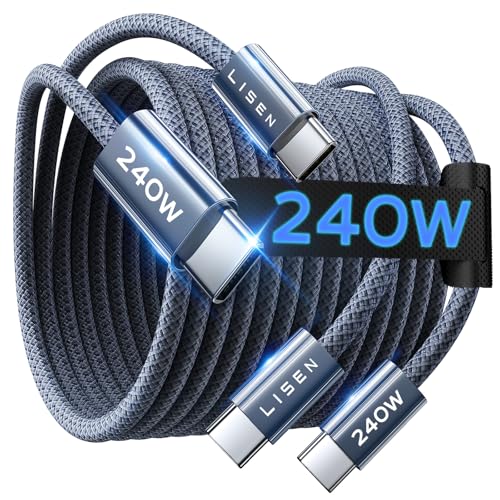
LISEN USB C to USB C Cable, 240W Fast Charging Type C Charger Cord (6.6FT) | 2-Pack | iPhone 18 Pro Max Charger Fast Charging Cord for iPhone 18 17 16 Pro Max Duo iPad MacBook Air Pro Samsung Galaxy S26
As an Amazon Associate we earn from qualifying purchases. Product prices and availability are accurate as of the date/time indicated.
Prices shown are approximate and for reference only. Prices change often, so please check the current price on Amazon before you buy.
Ratings are editorial assessments based on makers’ published power rating, e-marker, and length specifications and value at typical prices. Verify the rating in watts and the e-marker for the exact cable and length you buy.
The Six Laptop Charging Cables Reviewed
1. Anker Parish — Best Overall
Anker’s high-rating parish states its watts, carries its chip, and survives its ends, in lengths for the desk and the bag. For most laptops, the audit ends in this row.
2. Anker Thunderbolt Parish — Best Dock Cable
The full-featured parish composes power, data, and display in one short, serious cable for the docked desk. As the data parish, it shares the head.
3. Apple Parish — Best Maker Cable
Apple’s own charge cables are the known parish for its machines, honestly rated for their appetites and built to the house standard. As the maker parish, they earn their row.
4. Belkin Parish — Best Certified
Belkin’s parish leans on its certifications and its retail standing, a cable bought on trust and documented like it. As the trust parish, it holds its row.
5. UGREEN Parish — Best Value Power
UGREEN delivers the summit rating and the chip at the kinder price, the value parish’s regular citizen. As the price parish, it holds its place.
6. Baseus Parish — Best Floor
Baseus’s high-rating cables are the floor of the sensible parish, bought with the rating verified on the exact listing. As the floor parish, they complete the table.
Buying Guide: Read Your Laptop’s Appetite, Buy One Class Above, Label Both Ends
Step One: Write the Machine, the Desk, and the Second Job
Record the laptop’s charging appetite from its maker or its original charger’s parish, the desk’s run measured rather than paced, the bag’s need, and whether any cable must hold a second job, dock or drive, with that job’s own standard named. Note the charger’s parish in the same sitting, because the cable is one citizen of a three-citizen system and the audit is of the system. This page converts the purchase from a guess at a shape into a specification with a wattage, a length, and a chip, and it is the whole method in embryo.
Step Two: Audit Rating, Chip, and Certification
For each finalist, confirm from the maker’s own documents the rating in watts, at or above the class your machine’s appetite prescribes; the e-marker’s presence, in words; the certification parish where it is claimed; the length against your measured run with its small grace; and the build at the connector, where this category lives and dies. Compose the price across the two-cable system, desk and bag, rather than the single cable, because the system is the purchase. Refuse any cable whose rating is a headline without a chip, whose length is described in adjectives, or whose maker treats the laptop parish as a phone’s, because each refusal is a slow charge prevented.
Step Three: Compose the Run, Label It, and Inspect the Ends
Install the desk cable by the calm route, charger ventilated, run composed, connector unbending, and test the system at its work: the laptop under load, charging and gaining as its own indicator reports, because that test, and not the packet, is the purchase’s completion. Label both ends with the machine’s name, settle the traveller in the bag with its generous coil, and demote the house’s anonymous cables to the phone parish in writing if necessary. Keep the season’s inspection of the ends, and replace on evidence rather than on failure. A cable so chosen and so governed will be forgotten by its owner for years, which, as this guide opened by saying, is the finest condition a wire can aspire to.
How We Selected These Laptop Charging Cables
We included only real, named, currently sold USB-C cables whose makers publish power rating, e-marker, and length specifications, spanning the dedicated charging parish and the full-featured dock parish. Prices are typical retail ranges by length. Ratings weight stated rating and chip honesty first, then build at the connector, length parish, certification, and value.
Frequently Asked Questions: USB-C Cables for Charging Laptops
Why does my laptop charge slowly or drain while plugged in?
Because the system is three citizens and the slowest governs, and the cable is the citizen nobody suspects. A charger of ample parish and a laptop of honest appetite, joined by a cable of the base rating or without its e-marker, will compose a base-rate system that charges gently at rest and loses ground under load, reporting no fault because every citizen is behaving exactly as its credentials allow. The diagnosis is this guide’s audit performed in anger: read the charger’s parish, read the laptop’s appetite, and read the cable’s stated rating and chip, in that order, and replace the citizen that fails the comparison, which is the cable often enough that it should be swapped first in any case, being the cheapest test in the parish. The companion causes, a charger below the machine’s appetite and a port that is not the charging parish the maker intends, are settled by the same reading, which is why step one writes all three figures on one page.
Is a 240W cable overkill for my laptop?
It is headroom, and in this category headroom is the bargain. The system negotiates only what the laptop asks and the charger offers, so a summit-rated cable harms nothing, costs little more than its lesser siblings in the honest parishes, and retires the entire question for this machine and its successor, whose appetite neither of us knows. The cases for buying precisely to your machine’s class are the traveller’s minimalism and a budget composed to the last coin, and both are respectable. The case against is the parish this guide has watched for years, the cable bought exactly for the old laptop becoming the new laptop’s bottleneck and being diagnosed, as ever, last. Buy the summit from a maker in this table, label it, and let the cable be the one citizen of the setup that the next decade does not reopen.
Does cable length affect charging speed?
At the parish’s edge, yes, and in the middle, very little, which is why the doctrine is to buy the length the run requires rather than the length the drawer might someday want. A longer cable carries more resistance, and a system already composed at its limit, a hungry machine, a charger at its ceiling, may deliver measurably less at the end of a long, thin cable than a short, honest one, while a system with headroom forgives the same cable entirely. The full-featured data parish is stricter, its lengths limited by its own standard, which is why dock cables are short and should be bought unapologetically so. Compose the desk so the run is short, give the traveller the length the road requires, and let each cable be the right length for its parish instead of one cable being the wrong length for both.
Can I use the cable that came with my phone for my laptop?
You can, safely, and usually slowly, which is the whole answer and the reason this guide exists. The system’s negotiations will protect every citizen, delivering the base parish the phone cable is composed for, and for an overnight top-up of a small laptop that may be all the evening requires. What it will not do is feed the machine at its appetite under work, and the traveller who relies on it will meet the draining-while-plugged parish in a hotel room at the exact moment the work matters. Keep the phone’s cable in the phone’s parish with the family’s blessing, buy the laptop its own rated citizens for desk and bag as step two prescribes, and let the label on each cable be the household’s treaty on the subject, because in a house full of identical plugs, the treaty is the technology.
Related guides
- Best Budget Phone Battery Care Kit for Maintenance: 6 Best Budget Phone Battery Care Kit for Maintenance Picks in 2026
- Best Portable SSD for Console Storage in 2026: Best Portable SSD for Console Storage for Fast Games, Large Libraries, and Simple Setup
- Best High End Sleep Headphones for Sleeping in 2026: Ozlo, Soundcore, and QuietOn Compared for a Fit Proven at the Pillow’s Third Hour, a Battery Sentenced by the Longest Night, and a Silence That Never Wakes Its Owner to Announce Itself
- Best Backup Drive for Tax Documents: 6 Best Backup Drive for Tax Documents Picks in 2026
More from Amazon
Programs that pair well with the guide above. Offers and eligibility are set by Amazon and may change.
Set up recurring deliveries of everyday items on eligible products. Terms and savings are set by Amazon.
Explore Subscribe & SaveFree shipping on eligible items, Prime Video and more. Eligible new members can start with a free trial.
Start a Prime free trialAudiobooks and podcasts to listen to on the go. Eligible new members can start with a free trial.
Try Audible freeRead from a large library of eBooks and audiobooks on any device. Check Amazon for current plans.
Explore Kindle UnlimitedAs an Amazon Associate we earn from qualifying purchases.

Write Your Review
No reviews yet. Be the first to share your experience!