
What's inside
- Why the Best Home Network Setup for Student Gamers Needs Low Latency
- Best Home Network Setup for Student Gamers: Speed, Coverage and Latency
- Best Home Network Setup for Student Gamers Comparison Table
- Top Best Home Network Setup for Student Gamers Picks Reviewed
- How to Set Up a Home Network for Student Gaming
- Buying Guide: How to Choose the Best Home Network Setup for Student Gamers
- How to Reduce Lag for Student Gaming
- Frequently Asked Questions
As an Amazon Associate I earn from qualifying purchases. This post may contain affiliate links at no extra cost to you.
Finding the best home network setup for student gamers is about choosing a network setup that is fast, stable, and affordable, with a setup that works well for gaming, studying, and streaming, and with a price that fits a student who wants a reliable network without a large, expensive premium model that is too complex for a first home network. A good best home network setup for student gamers should have fast WiFi, low latency, and a price that gives you value. It should also be simple to use, with a design that is suitable for a beginner. Always check the network speed, coverage, and ports before buying, and follow the manufacturer guidance for use.
This guide explains what to look for in the best home network setup for student gamers, how to compare speed, coverage, latency, and price, and which network setups work well in 2026 for student gamers. We focus on practical use for students who buy a home network for the first time, with a setup that is used for gaming, online classes, and streaming in a dorm, apartment, or home, and with a design that is suitable for a beginner. Whether you play competitive games, study online, or stream movies, the same principles apply: choose a setup that is fast, with low latency, and with a price that fits your needs. Always check your network specifications before buying.
Our Top Picks
Why the Best Home Network Setup for Student Gamers Needs Low Latency
The best home network setup for student gamers needs low latency because a setup such as the TP-Link Archer AX55 Router is designed with a fast connection that reduces lag, while a setup without low latency may lag during games. Low latency is better than high latency for gaming, because it ensures your game responds quickly. A setup with WiFi 6 is a good choice, because it is fast and stable. A setup with Ethernet ports is better if you want a wired connection, because it is more stable.
A home network setup for student gamers also needs good coverage. A setup with mesh WiFi is a good choice, because it covers a whole home. A setup with a good router is better if you have a small apartment, because it covers enough. A setup with a good price is a good choice, because it gives you value. Look for a setup with a simple app, so it is easy to manage.
Best Home Network Setup for Student Gamers: Speed, Coverage and Latency
Speed matters most for the best home network setup for student gamers, because it determines how fast your games and downloads run. Setups with gigabit speed are a good choice for most students, while setups with WiFi 6 are better if you have many devices. Setups with enough speed are better than setups without, because they run games smoothly. Setups with 100 Mbps speed are a good choice, because they work for basic gaming, but they are slower.
Coverage and latency also matter for student gamer networks. Setups with mesh coverage are better than setups without, because they cover a whole home. Setups with low latency are a good choice, because they reduce lag. Setups with Ethernet ports are better than setups without, because they give a stable wired connection. Setups with a good price are a good choice, because they give you value.
Best Home Network Setup for Student Gamers Comparison Table
| Model | Speed | WiFi Standard | Coverage | Ethernet Ports | Typical Price Range | Rating |
|---|---|---|---|---|---|---|
| TP-Link Archer AX55 Router | 3000 Mbps | WiFi 6 | 2000 sq ft | 4 | $100-$110 | 4.8/5 |
| Netgear Nighthawk RAX50 Router | 5400 Mbps | WiFi 6 | 2500 sq ft | 5 | $200-$220 | 4.8/5 |
| ASUS RT-AX58U Router | 3000 Mbps | WiFi 6 | 2000 sq ft | 4 | $150-$170 | 4.7/5 |
| TP-Link Deco X55 Mesh System | 3000 Mbps | WiFi 6 | 6500 sq ft | 3 per node | $200-$220 | 4.8/5 |
| Google Nest Wifi Pro | 5400 Mbps | WiFi 6E | 4400 sq ft | 1 per node | $200-$220 | 4.7/5 |
| Netgear Nighthawk RS100 Router | 3600 Mbps | WiFi 7 | 2500 sq ft | 4 | $250-$270 | 4.7/5 |

Suevery Ryzen5 Tower Desktop PC Black Prebuilt Computer | Ryzen 5 4 Cores Up To 4.1G DDR4 8G RAM 256G SSD Business Office Work Home Student 2K Pro
As an Amazon Associate we earn from qualifying purchases. Product prices and availability are accurate as of the date/time indicated.

Desk Cable Management Rack, Carbon Steel Clamp Tray with Hooks | Adjustable Black Holder, No Drill Setup, Conceals Network Cords and USB Hubs for Gamers, Students, Home


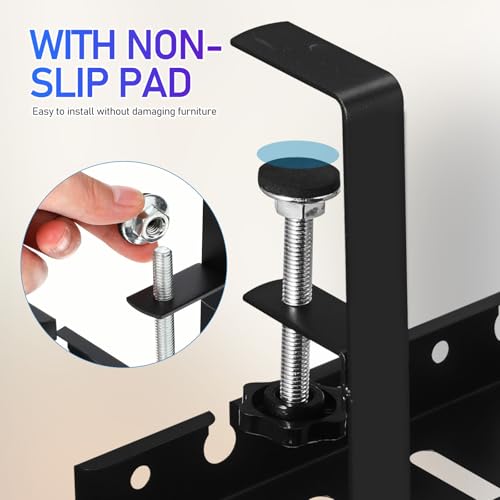
As an Amazon Associate we earn from qualifying purchases. Product prices and availability are accurate as of the date/time indicated.

HOUPOO Mini PC Ryzen 5 3501U (Up to 3.7GHz, 4C/8T) 8GB DDR4 256GB SSD | WiFi 5 & Bluetooth 5 Upgrade Triple 4K Display Expandable Small Desktop Computer for Home Student Daily Office
As an Amazon Associate we earn from qualifying purchases. Product prices and availability are accurate as of the date/time indicated.
Prices shown are approximate and for reference only. Prices change often, so please check the current price on Amazon before you buy.
Top Best Home Network Setup for Student Gamers Picks Reviewed
TP-Link Archer AX55 Router
The TP-Link Archer AX55 Router is a setup with speed of 3000 Mbps, WiFi standard of WiFi 6, coverage of 2000 sq ft, Ethernet ports of 4, and a price of $100 to $110. It has a fast speed, WiFi 6, and a good value for students. It is a good choice if you want the best home network setup for student gamers with a proven TP-Link design, because it is one of the most trusted routers, it has a 3000 Mbps speed, and it has WiFi 6. The Archer AX55 is made for student gamers.
Netgear Nighthawk RAX50 Router
The Netgear Nighthawk RAX50 Router is a setup with speed of 5400 Mbps, WiFi standard of WiFi 6, coverage of 2500 sq ft, Ethernet ports of 5, and a price of $200 to $220. It has a very fast speed, WiFi 6, and a good value for students. It is a good choice if you want a Netgear router with very fast speed for student gamers, because it has a 5400 Mbps speed, it has WiFi 6, and it is made by a trusted brand. It is ideal for students who want a Netgear router.
ASUS RT-AX58U Router
The ASUS RT-AX58U Router is a setup with speed of 3000 Mbps, WiFi standard of WiFi 6, coverage of 2000 sq ft, Ethernet ports of 4, and a price of $150 to $170. It has a fast speed, WiFi 6, and a good value for students. It is a good choice if you want an ASUS router with fast speed for student gamers, because it has a 3000 Mbps speed, it has WiFi 6, and it is made by a trusted brand. It is a popular choice for students who want an ASUS router.
TP-Link Deco X55 Mesh System
The TP-Link Deco X55 Mesh System is a setup with speed of 3000 Mbps, WiFi standard of WiFi 6, coverage of 6500 sq ft, Ethernet ports of 3 per node, and a price of $200 to $220. It has a large coverage, WiFi 6, and a good value for students. It is a good choice if you want a TP-Link mesh system with large coverage for student gamers, because it has a 3000 Mbps speed, it has 6500 sq ft coverage, and it is made by a trusted brand. It is a good entry level option for students who want a TP-Link mesh system.
Google Nest Wifi Pro
The Google Nest Wifi Pro is a setup with speed of 5400 Mbps, WiFi standard of WiFi 6E, coverage of 4400 sq ft, Ethernet ports of 1 per node, and a price of $200 to $220. It has a very fast speed, WiFi 6E, and a good value for students. It is a good choice if you want a Google mesh system with very fast speed for student gamers, because it has a 5400 Mbps speed, it has WiFi 6E, and it is made by a trusted brand. It is ideal for students who want a Google mesh system.
Netgear Nighthawk RS100 Router
The Netgear Nighthawk RS100 Router is a setup with speed of 3600 Mbps, WiFi standard of WiFi 7, coverage of 2500 sq ft, Ethernet ports of 4, and a price of $250 to $270. It has a fast speed, WiFi 7, and a good value for students. It is a good choice if you want a Netgear router with WiFi 7 for student gamers, because it has a 3600 Mbps speed, it has WiFi 7, and it is made by a trusted brand. It is a good option for students who want a Netgear router.
How to Set Up a Home Network for Student Gaming
To set up a home network for student gaming, first connect your router, with its WAN port, to your modem, so it is online, and place your router, with its antennas, in a central location, so it covers your home. Connect your gaming PC, with its Ethernet cable, to your router, so it has a stable wired connection, and connect your phone, with its WiFi, to your network, so it is online. When you are done, test your speed, with its app, so you know it is fast, and follow the manufacturer guidance for use.
Buying Guide: How to Choose the Best Home Network Setup for Student Gamers
Start with your home, your games, and your budget. If you want a proven budget router, a setup such as the TP-Link Archer AX55 is a good choice, because it is $100 to $110. If you want a mesh system, a setup such as the TP-Link Deco X55 is a good choice, because it is $200 to $220. If you want a very fast router, a setup such as the Netgear Nighthawk RAX50 is a good choice, because it is $200 to $220. If you want WiFi 7, a setup such as the Netgear Nighthawk RS100 is a good choice, because it is $250 to $270.
Next, check speed, WiFi standard, and coverage. A setup with 3000 Mbps speed is better than a setup without, because it runs games fast. A setup with WiFi 6 is a good choice, because it is fast and stable. A setup with coverage for 2000 sq ft is better than a setup without, because it covers a home. A setup with Ethernet ports is a good choice, because it gives a stable wired connection for gaming.
Check latency, ports, and ease of use together. A setup with low latency is better than a setup without, because it reduces lag. A setup with 4 Ethernet ports is a good choice, because it connects many devices. A setup with a simple app is better than a setup without, because it is easy to manage. Check your internet plan, with its speed, before buying, so you know the router will work, and check your home, with its size, so you know which coverage is right.
Check your budget, your use, and your future. Home network setups for student gamers typically cost $100 to $270. A setup from $100 to $110, such as the TP-Link Archer AX55, offers a good way to start with a budget router. A setup from $150 to $170, such as the ASUS RT-AX58U, offers a fast design. A setup from $200 to $220, such as the TP-Link Deco X55, offers a mesh design. A setup from $250 to $270, such as the Netgear Nighthawk RS100, offers a premium WiFi 7 design.
Finally, do not buy a home network setup for student gamers based only on price or speed. A setup without Ethernet ports will not give a stable wired connection, even if it is cheap, while a setup without enough coverage will have dead zones, even if it has a good price. A setup without WiFi 6 will be slower, even if it has a large coverage. Choose a setup that is fast, with low latency, and with a price that fits your needs. Always check your network specifications before buying.
How to Reduce Lag for Student Gaming
To reduce lag for student gaming, first use Ethernet, with its cable, for your gaming PC, so it is stable, and place your router, with its location, close to your gaming setup, so it is strong. Close background apps, with their downloads, so they do not use bandwidth, and update your router firmware, with its app, so it is current. When you are done, test your ping, with its app, so you know it is low, and follow the manufacturer guidance for use.
Frequently Asked Questions
What is the best home network setup for student gamers?
What is the best home network setup for student gamers depends on your home and your budget. A setup with speed of 3000 Mbps, WiFi standard of WiFi 6, coverage of 2000 sq ft, Ethernet ports of 4, and a price under $110, such as the TP-Link Archer AX55 Router at $100 to $110, is a good choice for most students, because it has a 3000 Mbps speed, WiFi 6, and is a proven TP-Link design. A setup with a larger coverage, such as the TP-Link Deco X55 at $200 to $220, is also good, especially if you have a large home. Choose a setup that is fast and has low latency.
Do I need mesh WiFi for student gaming?
Do you need mesh WiFi for student gaming, mesh WiFi is useful for student gaming, if you have a large home or many rooms, because it covers the whole home without dead zones. A setup such as the TP-Link Deco X55 covers 6500 sq ft. Use mesh WiFi, with your student gaming, so it covers your home, and check the coverage, with its sq ft, before you buy, so you know it is large enough.
Is Ethernet better than WiFi for gaming?
Is Ethernet better than WiFi for gaming, yes, Ethernet is better than WiFi for gaming, because it is more stable and has lower latency. A setup such as the Netgear Nighthawk RAX50 has 5 Ethernet ports. Use Ethernet, with your gaming PC, so it is stable, and check the ports, with their 5, before you buy, so you know it has enough ports.
What speed do I need for student gaming?
What speed do you need for student gaming, you need at least 100 Mbps for student gaming, because it supports gaming, studying, and streaming, while 300 Mbps or more is better if you have many devices. A setup such as the ASUS RT-AX58U supports 3000 Mbps. Use a fast setup, with your student gaming, so it runs smoothly, and check the speed, with its Mbps, before you buy, so you know it is fast enough.
Related guides
- Best Console Screen for Dorm Gaming in 2026: 6 Best Console Screen for Dorm Gaming Picks for Clear Play, Easy Setup, and Reliable Dorm Use
- Best Durable Home Theatre Speakers Long Term in 2026: 6 Speakers Built to Sound Great for Years
- Best Office Chair for Students in 2026: Best Office Chair for Students for Comfort, Easy Study, and Simple Dorm Use
- Best Cheap Gaming Earbuds for Gamers in 2026: 6 Best Cheap Gaming Earbuds for Gamers Picks for Clear Sound, Low Latency, and Reliable Gaming Use
More from Amazon
Programs that pair well with the guide above. Offers and eligibility are set by Amazon and may change.
Set up recurring deliveries of everyday items on eligible products. Terms and savings are set by Amazon.
Explore Subscribe & SaveFree shipping on eligible items, Prime Video and more. Eligible new members can start with a free trial.
Start a Prime free trialAudiobooks and podcasts to listen to on the go. Eligible new members can start with a free trial.
Try Audible freeRead from a large library of eBooks and audiobooks on any device. Check Amazon for current plans.
Explore Kindle UnlimitedAs an Amazon Associate we earn from qualifying purchases.

Write Your Review
No reviews yet. Be the first to share your experience!