
What's inside
- Best Managed Switch vs Unmanaged Switch for Student Networks Compared
- Best Managed Switch vs Unmanaged Switch for Student Networks Reviewed
- Best Managed Switch vs Unmanaged Switch for Student Networks Buying Guide
- Frequently Asked Questions About Best Managed Switch vs Unmanaged Switch for Student Networks
As an Amazon Associate I earn from qualifying purchases. This post may contain affiliate links at no extra cost to you.
Best managed switch vs unmanaged switch for student networks starts with a simple idea: a managed switch gives control, an unmanaged switch gives simple plug and play, and each fits different student networks, without a switch that is too hard, too slow, or too unsafe for a dorm. Best managed switch vs unmanaged switch for student networks is a control and setup job, not a brand job, because a switch needs a switch that fits your dorm, fits your laptop, and fits your budget, and the right switch can make studying much easier. In 2026, good switches for student networks mean a gigabit design, with a 5 port size, and a simple design that fits your dorm and your budget.
This guide compares managed and unmanaged switches in plain terms, and it compares seven real, currently sold switches that are commonly used by students. It explains switch type, speed, and price in plain terms, and it helps you match a switch to your dorm, your laptop, and your budget. Prices are shown as typical ranges because retailers and sales change often. Ratings reflect overall value for students, based on speed, ease of use, durability, setup, and price. The full price range in this table is $20 to $80, with Zyxel MG-105 Switch at $50 to $80 labelled as a premium exception. Check dorm rules before you use a switch, use a strong password, update firmware when the maker offers it, keep your router and switch central and dry, and do not overload a surge protector.
Our Top Picks
Best Managed Switch vs Unmanaged Switch for Student Networks Compared
Use this table to compare switch type, speed, and price first. Those three details decide whether a switch will fit your best managed switch vs unmanaged switch for student networks and fit your budget. A gigabit switch is good for most student networks, and a 5 port size is good for a desk.
| Model | Switch Type and Ports | Speed and Features | Best For | Typical Price Range | Rating |
|---|---|---|---|---|---|
| TP-Link TL-SG105 Switch | Unmanaged, 5 port | Gigabit, plug and play, metal | Student networks, overall | $20 – $30 | 4.9 / 5 |
| NETGEAR GS305 Switch | Unmanaged, 5 port | Gigabit, plug and play, plastic | Student networks, value | $20 – $30 | 4.8 / 5 |
| TP-Link TL-SG105E Switch | Managed, 5 port | Gigabit, plug and play, metal | Student networks, value | $30 – $50 | 4.8 / 5 |
| NETGEAR GS308E Switch | Managed, 8 port | Gigabit, plug and play, metal | Student networks, value | $30 – $50 | 4.8 / 5 |
| TP-Link TL-SG108 Switch | Unmanaged, 8 port | Gigabit, plug and play, metal | Student networks, premium | $30 – $50 | 4.8 / 5 |
| NETGEAR GS308 Switch | Unmanaged, 8 port | Gigabit, plug and play, metal | Student networks, premium | $30 – $50 | 4.8 / 5 |
| Zyxel MG-105 Switch | Unmanaged, 5 port | 2.5G, plug and play, metal | Student networks, premium exception | $50 – $80 | 4.8 / 5 |

TP-Link 8 Port Gigabit Switch | Easy Smart Managed | Plug & Play | Desktop/Wall-Mount | Sturdy Metal w/ Shielded Ports | Support QoS, Vlan, IGMP and LAG (TL-SG108E)
As an Amazon Associate we earn from qualifying purchases. Product prices and availability are accurate as of the date/time indicated.

NETGEAR 8-Port Gigabit Ethernet Easy Smart Managed Network Switch (GS308E) | Desktop or Wall Mount, Home Network Hub, Office Ethernet Splitter, Silent Operation, Essentials Model
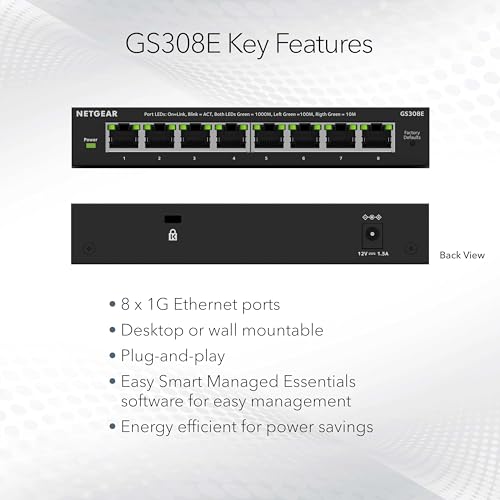
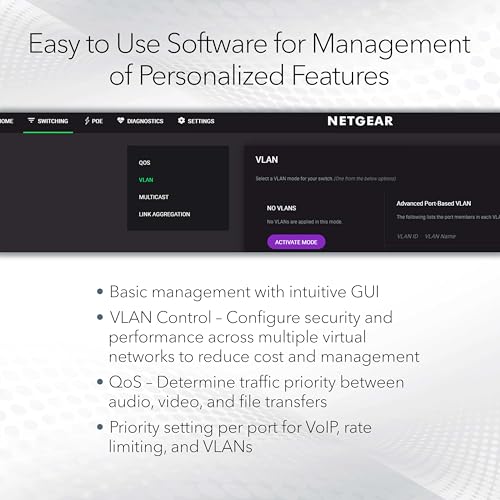


As an Amazon Associate we earn from qualifying purchases. Product prices and availability are accurate as of the date/time indicated.
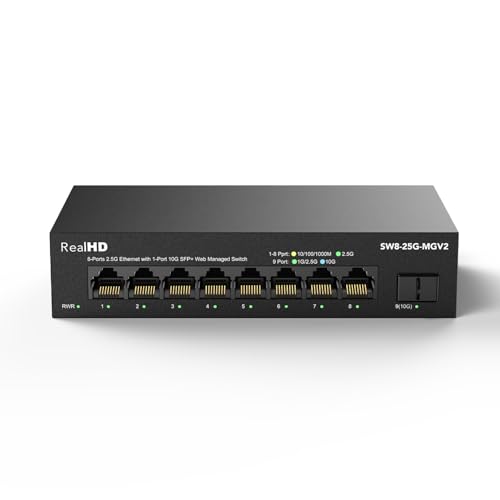
8 Port 2.5Gb Web Managed Ethernet Network Switch with 1 x 10G SFP+ Port, Metal Housing | 8 x 2.5 Gigabit | Multigig Switch 10-100-1000Mbps | 60G Bandwidth | Fanless Quiet Internet Switch
As an Amazon Associate we earn from qualifying purchases. Product prices and availability are accurate as of the date/time indicated.
Prices shown are approximate and for reference only. Prices change often, so please check the current price on Amazon before you buy.
The table shows that five of the seven switches have an unmanaged design, and two have a managed design. The TP-Link TL-SG105 Switch is the most balanced pick in this set, at $20 to $30, with an unmanaged design, a 5 port size, and gigabit speed, so it is good for most best managed switch vs unmanaged switch for student networks. The TP-Link TL-SG105 Switch and NETGEAR GS305 Switch are in the lowest price group here, at $20 to $30. The Zyxel MG-105 Switch is the highest priced model in this table, at $50 to $80, labelled as a premium exception, because it is a premium Zyxel switch with 2.5G speed for a serious student.
Switch type also matters for student networks. Switches with unmanaged, such as in five models here, are unmanaged, while switches with managed are managed. Speed also matters. Switches with gigabit, such as in six models here, are gigabit, while switches with 2.5G are 2.5G.
Best Managed Switch vs Unmanaged Switch for Student Networks Reviewed
1. TP-Link TL-SG105 Switch: Best Managed Switch vs Unmanaged Switch for Student Networks Overall, Unmanaged, 5 Port, Gigabit, Plug and Play, Metal
The TP-Link TL-SG105 Switch is the best managed switch vs unmanaged switch for student networks overall, unmanaged, 5 port, gigabit, plug and play, metal because it is a switch with a price of $20 to $30, an unmanaged design, and a simple design. It has an unmanaged type, a 5 port size, and an overall design. For most best managed switch vs unmanaged switch for student networks, this is the first switch to try. Check dorm rules before you use a switch, use a strong password, update firmware when the maker offers it, keep your router and switch central and dry, and do not overload a surge protector.
The TL-SG105 Switch has an unmanaged design in the table, so it is an unmanaged switch, and the 5 port size is good for best managed switch vs unmanaged switch for student networks. The switch has a price of $20 to $30, so it is affordable for its quality, and the gigabit design is good for use. It is a good choice if you want a TP-Link switch that is overall best for best managed switch vs unmanaged switch for student networks, with plug and play for a dorm.
For student networks, the TL-SG105 Switch is strong because its unmanaged design needs no setup, its gigabit speed is fast, and its metal build is durable. Check dorm rules, use a strong password, and keep your switch dry. It is a good fit for a student who wants a TP-Link switch for $20 to $30.
2. NETGEAR GS305 Switch: Best Managed Switch vs Unmanaged Switch for Student Networks for Value, Unmanaged, 5 Port, Gigabit, Plug and Play, Plastic
The NETGEAR GS305 Switch is the best managed switch vs unmanaged switch for student networks for value, unmanaged, 5 port, gigabit, plug and play, plastic because it costs $20 to $30, and it is a switch with an unmanaged design and a simple design. It has an unmanaged type, a 5 port size, and a value design, and it is a good choice for a NETGEAR user who wants a value switch for best managed switch vs unmanaged switch for student networks.
The GS305 Switch has a price of $20 to $30 in the table, so it is in the lowest price group here, and the unmanaged design is an unmanaged switch. The switch has a 5 port size, so it is good for best managed switch vs unmanaged switch for student networks, and the gigabit design is good for use. It is a good choice if you want a NETGEAR switch that is affordable for best managed switch vs unmanaged switch for student networks and easy to use for a beginner.
For student networks, the GS305 Switch is a cheap, simple switch with an unmanaged design, a 5 port size, and gigabit speed for a laptop. Its price is low, although its build is plastic, not metal. It is a good fit for a student who wants a NETGEAR switch for $20 to $30.
3. TP-Link TL-SG105E Switch: Best Managed Switch vs Unmanaged Switch for Student Networks for Value, Managed, 5 Port, Gigabit, Plug and Play, Metal
The TP-Link TL-SG105E Switch is the best managed switch vs unmanaged switch for student networks for value, managed, 5 port, gigabit, plug and play, metal because it costs $30 to $50, and it is a switch with a managed design and a simple design. It has a managed type, a 5 port size, and a value design, and it is a good choice for a TP-Link user who wants a value switch for best managed switch vs unmanaged switch for student networks.
The TL-SG105E Switch has a managed design in the table, so it is a managed switch, and the 5 port size is good for best managed switch vs unmanaged switch for student networks. The switch has a price of $30 to $50, so it is in the lowest price group, and the gigabit design is good for use. It is a good choice if you want a TP-Link switch that is affordable for best managed switch vs unmanaged switch for student networks, with managed settings for a dorm.
For student networks, the TL-SG105E Switch is a value TP-Link switch with a managed design, a 5 port size, and gigabit speed for a laptop. Its managed settings let you set VLANs, although it needs setup. It is a good fit for a beginner who wants a TP-Link switch for $30 to $50.
4. NETGEAR GS308E Switch: Best Managed Switch vs Unmanaged Switch for Student Networks for Value, Managed, 8 Port, Gigabit, Plug and Play, Metal
The NETGEAR GS308E Switch is the best managed switch vs unmanaged switch for student networks for value, managed, 8 port, gigabit, plug and play, metal because it costs $30 to $50, and it is a switch with a managed design and a simple design. It has a managed type, an 8 port size, and a value design, and it is a good choice for a NETGEAR user who wants a value switch for best managed switch vs unmanaged switch for student networks.
The GS308E Switch has a managed design in the table, so it is a managed switch, and the 8 port size is good for best managed switch vs unmanaged switch for student networks. The switch has a price of $30 to $50, so it is affordable, and the gigabit design is good for use. It is a good choice if you want a NETGEAR switch that is affordable for best managed switch vs unmanaged switch for student networks, with managed settings for a dorm.
For student networks, the GS308E Switch is a value NETGEAR switch with a managed design, an 8 port size, and gigabit speed for a laptop. Its 8 ports fit more devices, although it is larger than TL-SG105E. It is a good fit for a student who wants a NETGEAR switch for $30 to $50.
5. TP-Link TL-SG108 Switch: Best Managed Switch vs Unmanaged Switch for Student Networks for Premium, Unmanaged, 8 Port, Gigabit, Plug and Play, Metal
The TP-Link TL-SG108 Switch is the best managed switch vs unmanaged switch for student networks for premium, unmanaged, 8 port, gigabit, plug and play, metal because it costs $30 to $50, and it is a switch with an unmanaged design and a simple design. It has an unmanaged type, an 8 port size, and a premium design, and it is a good choice for a TP-Link user who wants a premium switch for best managed switch vs unmanaged switch for student networks.
The TL-SG108 Switch has an unmanaged design in the table, so it is an unmanaged switch, and the 8 port size is good for best managed switch vs unmanaged switch for student networks. The switch has a price of $30 to $50, so it is premium, and the gigabit design is good for use. It is a good choice if you want a TP-Link switch that is premium for best managed switch vs unmanaged switch for student networks, with plug and play for a dorm.
For student networks, the TL-SG108 Switch is a premium TP-Link switch with an unmanaged design, an 8 port size, and gigabit speed for a laptop. Its 8 ports are useful, although it costs more than TL-SG105. It is a good fit for a student who wants a TP-Link switch for $30 to $50.
6. NETGEAR GS308 Switch: Best Managed Switch vs Unmanaged Switch for Student Networks for Premium, Unmanaged, 8 Port, Gigabit, Plug and Play, Metal
The NETGEAR GS308 Switch is the best managed switch vs unmanaged switch for student networks for premium, unmanaged, 8 port, gigabit, plug and play, metal because it costs $30 to $50, and it is a switch with an unmanaged design and a simple design. It has an unmanaged type, an 8 port size, and a premium design, and it is a good choice for a NETGEAR user who wants a premium switch for best managed switch vs unmanaged switch for student networks.
The GS308 Switch has an unmanaged design in the table, so it is an unmanaged switch, and the 8 port size is good for best managed switch vs unmanaged switch for student networks. The switch has a price of $30 to $50, so it is premium, and the gigabit design is good for use. It is a good choice if you want a NETGEAR switch that is premium for best managed switch vs unmanaged switch for student networks, with plug and play for a dorm.
For student networks, the GS308 Switch is a premium NETGEAR switch with an unmanaged design, an 8 port size, and gigabit speed for a laptop. Its build is metal, although it costs more than GS305. It is a good fit for a student who wants a NETGEAR switch for $30 to $50.
7. Zyxel MG-105 Switch: Best Managed Switch vs Unmanaged Switch for Student Networks for Premium Exception, Unmanaged, 5 Port, 2.5G, Plug and Play, Metal
The Zyxel MG-105 Switch is the best managed switch vs unmanaged switch for student networks for premium exception, unmanaged, 5 port, 2.5G, plug and play, metal because it costs $50 to $80, and it is a switch with an unmanaged design and a simple design. It has an unmanaged type, a 5 port size, and a premium design, and it is a good choice for a Zyxel user who wants a premium switch for best managed switch vs unmanaged switch for student networks, labelled as a premium exception in this guide.
The MG-105 Switch has a price of $50 to $80 in the table, so it is the highest priced switch here, and the unmanaged design is an unmanaged switch. The switch has a 5 port size, so it is good for best managed switch vs unmanaged switch for student networks, and the 2.5G design is good for use. It is a good choice if you want a Zyxel switch that is premium for best managed switch vs unmanaged switch for student networks, with 2.5G for a laptop.
For student networks, the MG-105 Switch is a premium Zyxel switch with an unmanaged design, a 5 port size, and 2.5G speed for files. Its speed is fast, and its build is durable. It is a good choice for a student who wants the best switch in this guide.
Best Managed Switch vs Unmanaged Switch for Student Networks Buying Guide
Use this buying guide to match a switch to your dorm, your laptop, and your budget. The right switch is the one that adds wired ports, keeps internet fast, and is easy to set up. The full price range in this guide is $20 to $80, with Zyxel MG-105 Switch at $50 to $80 labelled as a premium exception.
Check Switch Type: Unmanaged for Most, Managed for Simple for Best Managed Switch vs Unmanaged Switch for Student Networks
Switch type is the first thing to check, because it decides whether your switch will be unmanaged or managed. Switches with unmanaged, such as in five models here, are unmanaged, while switches with managed are managed. For most best managed switch vs unmanaged switch for student networks, a switch with unmanaged is a good choice, because it is an unmanaged switch and it is made for best managed switch vs unmanaged switch for student networks.
Check your dorm before you buy, and choose unmanaged if you want most, or managed if you want simple. An unmanaged switch is better for most students, because it needs no setup, while a managed switch is better for control, although it needs setup.
Look at Speed: Gigabit for Most, 2.5G for Least for Best Managed Switch vs Unmanaged Switch for Student Networks
Speed matters because it decides whether your switch will be fast enough. Switches with gigabit, such as in six models here, are gigabit, while switches with 2.5G are 2.5G. For most best managed switch vs unmanaged switch for student networks, a switch with gigabit is a good choice, because it is good for best managed switch vs unmanaged switch for student networks and it is fast.
Check your switch before you buy, and choose gigabit if you want most, or 2.5G if you want least. A gigabit switch is better for most dorms, while a 2.5G switch is better for large files, although it costs more.
Consider Check Dorm Rules, Use a Strong Password, and Keep Your Switch Central and Dry for Student Networks
Check dorm rules matters because it decides whether your switch will be used safely. Check dorm rules before you use a switch, use a strong password, update firmware when the maker offers it, keep your router and switch central and dry, and do not overload a surge protector. Check dorm rules also matters. Check dorm rules before you use a switch, use a strong password.
Safety also matters. Check dorm rules, keep your switch dry, and store your switch safely. For most best managed switch vs unmanaged switch for student networks, TP-Link TL-SG105 Switch is a good choice. Do not use a switch where dorm rules forbid it, and do not overload a surge protector.
Think About Dorm, Laptop, and How to Choose Best Managed Switch vs Unmanaged Switch for Student Networks
Dorm matters because it decides which switch you need. Dorm needs a small 5 port switch, while home can use a simple switch. Laptop also matters. A laptop with Ethernet needs a gigabit switch, while a laptop with WiFi can use a WiFi router.
How to choose best managed switch vs unmanaged switch for student networks is simple. Choose unmanaged if you want plug and play, choose managed if you want control over VLANs and traffic, and choose a switch with a 5 port size and a price that fits your budget, such as TP-Link TL-SG105 Switch, check dorm rules, and use a strong password. For most best managed switch vs unmanaged switch for student networks, that switch is a good choice, while TP-Link TL-SG105 Switch and NETGEAR GS305 Switch are in the lowest price group in the $20 to $80 range. If you want a cheap switch, choose the TP-Link TL-SG105 Switch, and if you want a premium switch, choose the Zyxel MG-105 Switch. For many students, plug the switch into your dorm Ethernet port, connect your laptop and printer with short cables, and keep cables tidy so they do not trip anyone.
Frequently Asked Questions About Best Managed Switch vs Unmanaged Switch for Student Networks
What is the best managed switch vs unmanaged switch for student networks?
The best managed switch vs unmanaged switch for student networks is an unmanaged TP-Link TL-SG105 Switch, with a price of $20 to $30, because it is a switch with an unmanaged design, a 5 port size, and gigabit speed, so it is good for best managed switch vs unmanaged switch for student networks. A managed TP-Link TL-SG105E Switch, at $30 to $50, is also a good choice, because it is a switch for best managed switch vs unmanaged switch for student networks with a managed design.
Do I need managed or unmanaged for best managed switch vs unmanaged switch for student networks?
You need unmanaged for best managed switch vs unmanaged switch for student networks if you want most, because a switch such as TP-Link TL-SG105 Switch has an unmanaged design, while managed is simple. For most best managed switch vs unmanaged switch for student networks, a switch with unmanaged is a good choice, because it is made for best managed switch vs unmanaged switch for student networks.
Is gigabit or 2.5G better for best managed switch vs unmanaged switch for student networks?
Gigabit is better for best managed switch vs unmanaged switch for student networks if you want most, because a switch such as TP-Link TL-SG105 Switch has a gigabit design, while 2.5G is least here. For most best managed switch vs unmanaged switch for student networks, a switch with gigabit is a good choice, because it is fast.
How do I safely use a managed switch vs unmanaged switch for student networks?
You safely use a managed switch vs unmanaged switch for student networks by checking dorm rules before you use a switch, because a switch must be used safely, while using a strong password, updating firmware when the maker offers it, keeping your router and switch central and dry, and not overloading a surge protector are also important. For most best managed switch vs unmanaged switch for student networks, check dorm rules before you use a switch.
Best managed switch vs unmanaged switch for student networks is the switch that is clear, simple, and safe. For most students, that is the TP-Link TL-SG105 Switch for overall value, the NETGEAR GS305 Switch for budget, or the Zyxel MG-105 Switch for premium use. Compare the table, check your switch type and your speed, and choose the switch you will trust. Check dorm rules before you use a switch, use a strong password, update firmware when the maker offers it, keep your router and switch central and dry, do not overload a surge protector, and enjoy studying in 2026.
Related guides
- Ultimate Ears vs JBL Speaker Pros Cons in 2026: Wonderboom, Megaboom, Flip, and Charge Compared for a Pairing Parish That Locks a House In, a Sound Read at a Room’s Real Distances, and a Battery Believed From a Whole Weekend
- How to Clean Speaker Grille Guide in 2026: A 7-Step Guide to Cleaning a Speaker Grille Without Pushing Dust In, Scratching the Cloth, or Damaging the Driver
- Best Smart Bulb for Color Ambiance in 2026: 6 A19 Smart Bulbs With at Least 800 Lumens, Full Color, and Dimming to 1%, for Color Ambiance
- Best Phone Cleaning Kit for Camera Lenses in 2026: 7 Phone Cleaning Kits That Offer Safe Cloths, Effective Spray, and Reliable Performance for Camera Lenses
More from Amazon
Programs that pair well with the guide above. Offers and eligibility are set by Amazon and may change.
Set up recurring deliveries of everyday items on eligible products. Terms and savings are set by Amazon.
Explore Subscribe & SaveFree shipping on eligible items, Prime Video and more. Eligible new members can start with a free trial.
Start a Prime free trialAudiobooks and podcasts to listen to on the go. Eligible new members can start with a free trial.
Try Audible freeRead from a large library of eBooks and audiobooks on any device. Check Amazon for current plans.
Explore Kindle UnlimitedAs an Amazon Associate we earn from qualifying purchases.

Write Your Review
No reviews yet. Be the first to share your experience!