
What's inside
As an Amazon Associate I earn from qualifying purchases. This post may contain affiliate links at no extra cost to you.
Choosing phone vs laptop for work is about choosing whether you need a device that fits in your pocket and works anywhere, or a device with a large screen, a full keyboard, and enough power for long documents, spreadsheets, and video calls. A phone is portable, always connected, and easy to use for messages, email, and quick tasks. A laptop is more powerful, more comfortable for long work, and better for multitasking.
A phone can handle many work tasks in 2026, especially if your job is mostly email, chat, photos, and short documents. A laptop can handle almost any work task, from writing a long report to editing a video, and it gives you a larger screen to see more at once. The best choice depends on your job, your work style, and how much you need to type, read, and multitask.
This guide explains phone vs laptop for work, what each device does well, and when to choose one over the other. It compares six real, currently sold phones and laptops that cover both sides of the choice, from an affordable Lenovo laptop to a premium MacBook Pro. Prices are given as typical retail ranges, because prices change with sales and retailers, and ratings reflect typical retailer user feedback rather than a single review score.
Our Top Picks
Phone vs Laptop for Work: The Core Difference
A phone is designed for mobility. It has a 6 inch screen, a touch interface, and a battery that lasts a day. You can carry it in your pocket, use it on a train, and take a photo or a call in seconds. It is always connected to mobile data, so you do not need Wi-Fi to check email or join a call. That makes it ideal for field work, sales, delivery, and any job where you move a lot.
A laptop is designed for productivity. It has a 13 to 14 inch screen, a physical keyboard, and a trackpad or mouse. You can open multiple windows, type for hours, and see a full document without scrolling constantly. It has more storage, more RAM, and a more powerful processor than a phone, which makes it better for large files, complex spreadsheets, and video editing.
For most workers, the answer is not one or the other, but both. A phone is best for quick tasks on the move, while a laptop is best for deep work at a desk. If you can only choose one, think about how much you type, how many windows you need open, and how long you work at a time. If you type for hours, a laptop is better. If you move all day and only need to check messages, a phone may be enough.
Portability, Screen Size, and Typing for Phone vs Laptop for Work
Portability is the phone’s biggest advantage. A phone weighs under 0.5 pounds, fits in a pocket, and can be used with one hand. A laptop weighs 2 to 4 pounds, needs a bag, and needs a flat surface to use comfortably. If your job involves walking, driving, or visiting clients, a phone is much easier to carry.
Screen size is the laptop’s biggest advantage. A 13 inch laptop screen shows about four times as much as a 6 inch phone screen, which makes it easier to read a long document, compare two files, or join a video call while taking notes. A phone screen is good for a quick check, but it is tiring for long reading or editing, because you have to scroll constantly.
Typing is also easier on a laptop. A physical keyboard lets you type faster and more accurately than a touch keyboard, especially for long documents. A phone keyboard is good for short messages, but it is slow for a report. If your job involves writing, a laptop is almost always better, even if you add a Bluetooth keyboard to a phone.
Power, Storage, and Multitasking
Power is another difference. A laptop has a more powerful processor, more RAM, and more storage than a phone. That means it can run a large spreadsheet, open many browser tabs, and edit a video without slowing down. A phone can do many of those tasks, but it will be slower and may run out of storage or battery faster.
Storage matters for work files. A laptop often has 256GB to 512GB of storage, while a phone often has 128GB to 256GB, and some of that is used by the system and apps. If you work with large files, such as photos, videos, or design files, a laptop gives you more room and makes it easier to organise files.
Multitasking is easier on a laptop because you can see multiple windows at once. On a phone, you usually see one app at a time, and switching between apps takes more taps. That is fine for a quick task, but it is frustrating for a complex task that needs you to compare a document, a spreadsheet, and an email at the same time.
Phone vs Laptop for Work Comparison
The table below compares six real, currently sold phones and laptops suitable for work. Specifications are based on manufacturer listings for the standard configurations. Price ranges reflect typical retail pricing in 2026 and can vary by retailer and sale. Ratings summarize typical retailer user feedback for performance, ease of use, design, and value.
| Device | Type | Screen | RAM / Storage | Battery Life | Typical Price Range | Rating |
|---|---|---|---|---|---|---|
| Lenovo IdeaPad Slim 3 | Laptop | 14 inch | 8GB / 256GB | 8 hours | $400-$500 | 4.6 / 5 |
| Samsung Galaxy S24 | Phone | 6.2 inch | 8GB / 128GB | 24 hours | $600-$700 | 4.7 / 5 |
| iPhone 15 | Phone | 6.1 inch | 6GB / 128GB | 20 hours | $700-$800 | 4.7 / 5 |
| Dell XPS 13 | Laptop | 13.4 inch | 16GB / 512GB | 12 hours | $900-$1000 | 4.7 / 5 |
| MacBook Air M3 | Laptop | 13.6 inch | 8GB / 256GB | 15 hours | $1000-$1100 | 4.8 / 5 |
| MacBook Pro 14 | Laptop | 14.2 inch | 16GB / 512GB | 18 hours | $1500-$1700 | 4.8 / 5 |

2026 Laptops Computer,15.6" Windows 11 Pro Laptop with Office 365 included,8GB RAM 256GB SSD,Intel Pentium Process,6H Battery,Mini HDMI,cam|Mic,Portable Thin Lap Top for College Student Business Work
As an Amazon Associate we earn from qualifying purchases. Product prices and availability are accurate as of the date/time indicated.

16" Laptop with Win11, 8GB RAM 256GB SSD, AMD A9(up to 3.2GHz) | Laptop Computer PC, IPS FHD Display,Students & Work Notebook Computer, Cooling System, 9000mAh Battery


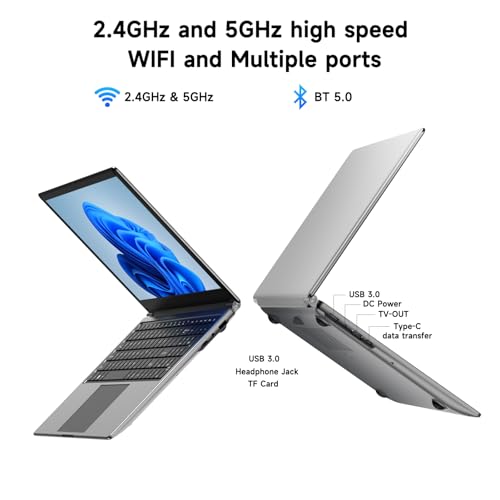


As an Amazon Associate we earn from qualifying purchases. Product prices and availability are accurate as of the date/time indicated.

Lenovo V14 G5 Hybrid Work Laptop - 14" FHD Display - Core 7-240H - 16GB Memory - 512GB Storage - Integrated UHD Graphics - Windows 11 Home - Business Black


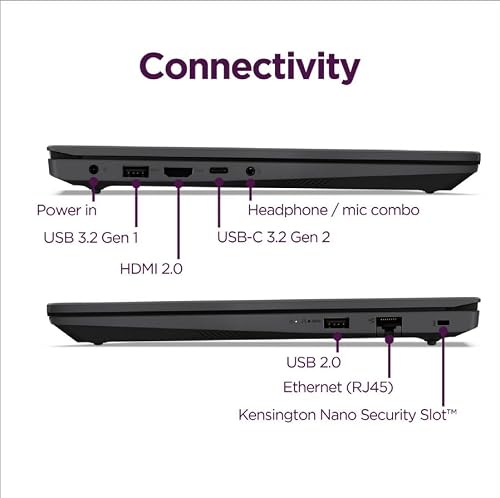


As an Amazon Associate we earn from qualifying purchases. Product prices and availability are accurate as of the date/time indicated.
Prices shown are approximate and for reference only. Prices change often, so please check the current price on Amazon before you buy.
Phone vs Laptop for Work Reviewed for 2026
1. Lenovo IdeaPad Slim 3 Phone vs Laptop for Work
The Lenovo IdeaPad Slim 3 is a laptop with a 14 inch screen, 8GB RAM and 256GB storage, and 8 hours of battery life. It is priced in the range of $400 to $500, which makes it the most affordable device in this comparison. Its 14 inch screen is large enough for documents and video calls, and its keyboard is comfortable for typing.
For work, the IdeaPad Slim 3 is a practical first laptop because it gives you a full Windows system, a large screen, and enough power for email, documents, and web browsing, at a low price. Its 8 hours of battery is enough for a workday, and its 8GB RAM is enough for most office tasks. It is not the fastest laptop here, but for a worker who needs a laptop on a budget, it is a sensible choice.
2. Samsung Galaxy S24 Phone vs Laptop for Work
The Samsung Galaxy S24 is a phone with a 6.2 inch screen, 8GB RAM and 128GB storage, and 24 hours of battery life. It is priced in the range of $600 to $700. Its 6.2 inch screen is bright and clear, and its 8GB RAM helps it run multiple apps smoothly.
For work on the move, the Galaxy S24 is useful because it is always connected, it has a good camera for photos and video calls, and it can run email, chat, and documents. Its 24 hours of battery life is the longest in this table, which means you can work all day without charging. It is best for a worker who moves a lot and needs a phone for quick tasks, rather than for long typing sessions.
3. iPhone 15 Phone vs Laptop for Work
The iPhone 15 is a phone with a 6.1 inch screen, 6GB RAM and 128GB storage, and 20 hours of battery life. It is priced in the range of $700 to $800. Its 6.1 inch screen is sharp, and its iOS system works well with other Apple devices, such as a MacBook or an iPad.
For work in the Apple system, the iPhone 15 is a strong choice because it syncs email, notes, and files with a Mac, and it can take a call on a Mac or an iPad. Its 20 hours of battery is enough for a full day, and its camera is good for video calls. It is best for a worker who already uses Apple devices and who needs a phone for communication and quick tasks.
4. Dell XPS 13 Phone vs Laptop for Work
The Dell XPS 13 is a laptop with a 13.4 inch screen, 16GB RAM and 512GB storage, and 12 hours of battery life. It is priced in the range of $900 to $1000. Its 13.4 inch screen is compact but clear, and its 16GB RAM and 512GB storage give it enough power for multitasking and large files.
For work, the XPS 13 is a good balance of portability and power. Its 12 hours of battery is enough for a workday, and its 16GB RAM lets you open many tabs and apps without slowing down. It suits a worker who needs a premium Windows laptop that is light enough to carry, but powerful enough for most office and creative tasks.
5. MacBook Air M3 Phone vs Laptop for Work
The MacBook Air M3 is a laptop with a 13.6 inch screen, 8GB RAM and 256GB storage, and 15 hours of battery life. It is priced in the range of $1000 to $1100. Its 13.6 inch screen is bright, and its M3 chip is fast and efficient, which gives it long battery life in a thin, light body.
For work, the MacBook Air M3 is a popular choice because it is silent, light, and fast for most tasks. Its 15 hours of battery is longer than the Dell XPS 13, and its macOS system works well with an iPhone. It is best for a worker who wants a light laptop for writing, browsing, and video calls, and who does not need a very powerful machine for video editing or gaming.
6. MacBook Pro 14 Phone vs Laptop for Work
The MacBook Pro 14 is a laptop with a 14.2 inch screen, 16GB RAM and 512GB storage, and 18 hours of battery life. It is priced in the range of $1500 to $1700. Its 14.2 inch screen is larger and brighter than the MacBook Air, and its 16GB RAM and 512GB storage make it suitable for more demanding work.
For a worker who edits video, works with large design files, or needs to run many apps at once, the MacBook Pro 14 is the most capable laptop in this comparison. Its 18 hours of battery is the longest among the laptops here, and its performance is enough for professional work. It is more expensive and heavier than the MacBook Air, so it only makes sense if you need its extra power every day.
Buying Guide: How to Choose Phone vs Laptop for Work
Start with your job, your work style, and your budget, not with a single device. List the tasks you do every day, how much you type, and how many windows you need open. If you type for hours, a laptop is better. If you move all day and only check messages, a phone may be enough. Then check the practical details: screen size, keyboard, battery life, and storage.
Choose a Phone for Mobility and Quick Tasks
A phone is best when mobility matters. Choose a phone with a good camera for video calls, a long battery life, and enough storage for your apps and files. Check that it works with your work apps, such as email, chat, and document editing. A phone with 8GB RAM, such as the Samsung Galaxy S24, will run multiple apps more smoothly than a phone with less RAM. If you need to type a lot on a phone, add a Bluetooth keyboard, but remember that it will not be as comfortable as a laptop keyboard.
Choose a Laptop for Long Work and Multitasking
A laptop is best when you need to work for hours, type a lot, or multitask. Choose a laptop with at least 8GB RAM and 256GB storage for office work, and 16GB RAM and 512GB storage if you work with large files or many apps. Check the screen size, because a 13 to 14 inch screen is a good balance of portability and readability. Check battery life, because a laptop with 12 hours or more will last a full workday without charging.
Consider Using Both a Phone and a Laptop
Many workers use both a phone and a laptop, because each does a different job well. A phone is best for calls, messages, and photos on the move, while a laptop is best for writing, spreadsheets, and video calls at a desk. If you can afford both, choose a phone and a laptop that work well together, such as an iPhone with a MacBook, or a Samsung phone with a Windows laptop. Sync your files with cloud storage, so you can start a document on your phone and finish it on your laptop.
Budget Guide for Phone vs Laptop for Work
A laptop in the $400 to $500 range can provide good basic work performance, while a phone in the $600 to $800 range can provide good mobile work. A laptop in the $900 to $1100 range often provides better performance, battery life, and build quality. A laptop in the $1500 to $1700 range is for a worker who needs premium performance for demanding tasks. The budget pick in this comparison is the Lenovo IdeaPad Slim 3, at $400-$500, because it is the cheapest model in the table. For most workers, a well built laptop that you use for deep work is better value than an expensive phone that you only use for quick tasks. Spend the saving on a good phone, if you need one, or on a monitor and keyboard for your desk.
Frequently Asked Questions About Phone vs Laptop for Work
What is the best phone vs laptop for work in 2026?
For phone vs laptop for work in 2026, the Lenovo IdeaPad Slim 3 is often the best budget choice because it offers a 14 inch screen, 8GB RAM and 256GB storage, and a price of $400 to $500. The Samsung Galaxy S24 is a strong choice for mobile work, while the MacBook Pro 14 is a good choice for demanding work. Choose based on your job, how much you type, and how much you move.
Can a phone replace a laptop for work?
A phone can replace a laptop for some work, especially if your job is mostly email, chat, and short documents. It cannot fully replace a laptop for long writing, complex spreadsheets, or video editing, because its screen is small and its keyboard is slower. A phone with a Bluetooth keyboard and a large screen can help, but it will still be less comfortable than a laptop for a full workday. For most workers, a phone is a supplement to a laptop, not a replacement.
Is a laptop better than a phone for video calls?
A laptop is usually better than a phone for video calls, because it has a larger screen, a better camera angle, and a more stable connection. You can see more participants, share your screen, and take notes at the same time. A phone is good for a quick call on the move, but its small screen makes it hard to see a presentation and participants at once. If you join video calls every day, a laptop is the better choice.
What should I look for in a work laptop?
For a work laptop, look for at least 8GB RAM, 256GB storage, a 13 to 14 inch screen, and 8 hours or more of battery life. A comfortable keyboard and a clear screen are also important, because you will use them for hours. If you work with large files, choose 16GB RAM and 512GB storage. Check the weight, because a laptop under 3 pounds is easier to carry, and check the ports, because you may need USB-C, HDMI, or a headphone jack for your work setup.
Related guides
- Best Tripod vs Monopod for Student Travel Photography in 2026: How to Pick a Tripod vs Monopod for Student Travel Photography That Is Light, Stable, and Works for Your Camera on the Road
- Best MicroSD Card for Baby Monitors: 6 Best MicroSD Card for Baby Monitors Picks in 2026
- Best Budget Phone Lens Under 50 in 2026: Clip-On Wide, Macro, and Telephoto Lenses That Are Actually Worth Carrying
- How to Choose Phone Mount Suction Strength in 2026: How to Choose a Phone Mount Suction Strength That Holds Your Phone Securely, Is Easy to Use, and Works for Your Car
More from Amazon
Programs that pair well with the guide above. Offers and eligibility are set by Amazon and may change.
Set up recurring deliveries of everyday items on eligible products. Terms and savings are set by Amazon.
Explore Subscribe & SaveFree shipping on eligible items, Prime Video and more. Eligible new members can start with a free trial.
Start a Prime free trialAudiobooks and podcasts to listen to on the go. Eligible new members can start with a free trial.
Try Audible freeRead from a large library of eBooks and audiobooks on any device. Check Amazon for current plans.
Explore Kindle UnlimitedAs an Amazon Associate we earn from qualifying purchases.

Write Your Review
No reviews yet. Be the first to share your experience!