
What's inside
- Why the Best Home Network Setup for Student Dorms Needs a Small Router and a Stable Wired Option
- Best Home Network Setup for Student Dorms Comparison
- Best Home Network Setup for Student Dorms Reviewed for 2026
- Buying Guide: How to Choose the Best Home Network Setup for Student Dorms
- Frequently Asked Questions About the Best Home Network Setup for Student Dorms
As an Amazon Associate I earn from qualifying purchases. This post may contain affiliate links at no extra cost to you.
Choosing the best home network setup for student dorms is about more than buying the fastest router you can find. A dorm room is small, crowded with wireless signals, and often limited by rules about what equipment you can plug in. The best home network setup for student dorms needs to work with the internet your university already provides, give you a stable connection for lectures and exams, and stay small enough to fit on a desk without taking over the room.
Many dorms provide a wired Ethernet port in the wall and a shared campus Wi-Fi network. That shared Wi-Fi can be slow at peak times, it can drop during video calls, and it can make gaming or large file downloads frustrating. A personal router, a travel router, or a small mesh system can create your own private network in your room, with your own password, your own device priorities, and a wired connection for your laptop when you need the most stable speed.
This guide explains the best home network setup for student dorms, what to check before you buy, and how to match a router to your dorm rules, your room size, and your devices. It compares six real, currently sold routers and mesh systems, from an affordable TP-Link TL-WR902AC travel router to a premium Netgear Orbi RBK13 mesh system, so you can see how price, speed, coverage, and ports change as you move up the range. Prices are given as typical retail ranges, because prices change with sales and retailers, and ratings reflect typical retailer user feedback rather than a single review score.
Our Top Picks
Why the Best Home Network Setup for Student Dorms Needs a Small Router and a Stable Wired Option
The best home network setup for student dorms needs a small router because a dorm room is usually shared, with two beds, two desks, and limited power outlets. A large gaming router with eight antennas will take up desk space, it will look out of place, and it may interfere with your roommate’s devices. A compact router that fits in a drawer, or a small mesh node that sits on a shelf, is easier to live with, easier to pack at the end of term, and less likely to be knocked over.
A stable wired option matters just as much as Wi-Fi speed. Most dorms have at least one Ethernet port, and a wired connection is more stable than Wi-Fi for video calls, online exams, and gaming, because it is not affected by interference from dozens of neighbouring networks. A router with at least one LAN port lets you plug your laptop directly into the network, while still providing Wi-Fi for your phone, tablet, and smart devices. If your dorm has no Ethernet port, a router that can work as a Wi-Fi repeater or a travel router that can join the campus Wi-Fi and share it as your own network is more useful.
Dorm rules are another key factor. Some universities do not allow personal routers, or they require you to register the router MAC address with IT support. Others allow a router but forbid a second Wi-Fi network that broadcasts the same channel as the campus network. Check your university IT policy before you buy, because a router that is banned will be a waste of money, and a router that needs to be registered will need a model that lets you find its MAC address easily. A travel router is often the safest choice, because it is small, it can work in several modes, and it can be used as a personal hotspot without creating a large new network.
Wi-Fi Standard, Speed, and Coverage for Best Home Network Setup for Student Dorms
Wi-Fi standard is typically Wi-Fi 5, or 802.11ac, for affordable dorm routers, and Wi-Fi 6, or 802.11ax, for newer models. Wi-Fi 6 is better for a dorm, because it handles many devices at once more efficiently, it reduces congestion in a crowded building, and it offers faster speeds on a 5 GHz band. A Wi-Fi 5 router can still work, but it may be slower when many students are online at the same time, especially in the evening.
Speed is usually listed as a combined speed, such as AC1750 or AX3000, which adds the 2.4 GHz and 5 GHz speeds together. For a dorm, a speed of AC1750 or AX1800 is enough for most students, because it can handle streaming, video calls, and downloads at the same time. A speed of AX3000 or higher is better if you game, stream in 4K, or download large files regularly, but it needs a fast internet connection from your university to make a difference.
Coverage is typically 1,500 to 2,500 square feet for a single router, which is more than enough for a dorm room that is usually under 200 square feet. A mesh system offers more coverage, but it is usually unnecessary for a single room, unless you share a suite with several rooms or you want Wi-Fi in a common area. For a single dorm room, a single compact router is usually the best choice, because it is cheaper, simpler, and easier to set up.
Bands, Ports, and Modes for Student Dorm Networks
Bands matter because a dual-band router offers both 2.4 GHz and 5 GHz, with 2.4 GHz providing longer range and better wall penetration, and 5 GHz providing faster speeds over a short distance. In a dorm, 5 GHz is usually best for a laptop in the same room as the router, because it is faster and less congested, while 2.4 GHz is better for a phone in the next room or for a device that is further away. A tri-band router adds a second 5 GHz band, but it is usually unnecessary for a dorm.
Ports should include at least one WAN port, for connecting to the dorm Ethernet, and one or more LAN ports, for connecting a laptop or a console. A router with four LAN ports is useful if you have a laptop, a desktop, and a games console, while a router with only one LAN port may need a small switch if you have more wired devices. Check whether the router has USB ports, because a USB port can be used for a shared drive or a printer, which is useful in a dorm.
Modes are also important. A router that can work as a router, an access point, a repeater, and a client can be used in different dorms, with different internet setups. A travel router, such as the TP-Link TL-WR902AC, can work in all of those modes, which makes it flexible if you move dorms, travel home, or use it in a hotel. A standard home router usually works only as a router, which is fine if your dorm has Ethernet, but less flexible if it does not.
Best Home Network Setup for Student Dorms Comparison
The table below compares six real, currently sold routers and mesh systems suitable for student dorms. Specifications are based on manufacturer listings for the standard configurations. Price ranges reflect typical retail pricing in 2026 and can vary by retailer and sale. Ratings summarize typical retailer user feedback for speed, ease of setup, stability, build quality, and value.
| Router / System | Wi-Fi Standard | Speed | Bands | Ports | Coverage | Typical Price Range | Rating |
|---|---|---|---|---|---|---|---|
| TP-Link TL-WR902AC | Wi-Fi 5 | AC750 | Dual-band | 1x LAN/WAN | Up to 500 sq ft | $25-$35 | 4.6 / 5 |
| TP-Link Archer A7 | Wi-Fi 5 | AC1750 | Dual-band | 4x LAN, 1x WAN | Up to 2,500 sq ft | $50-$60 | 4.7 / 5 |
| Netgear Nighthawk R6700 | Wi-Fi 5 | AC1750 | Dual-band | 4x LAN, 1x WAN | Up to 1,500 sq ft | $70-$80 | 4.6 / 5 |
| TP-Link Deco S4 (2-pack) | Wi-Fi 5 | AC1200 | Dual-band | 2x LAN/WAN per node | Up to 3,800 sq ft | $100-$120 | 4.7 / 5 |
| ASUS RT-AX58U | Wi-Fi 6 | AX3000 | Dual-band | 4x LAN, 1x WAN | Up to 2,500 sq ft | $120-$140 | 4.7 / 5 |
| Netgear Orbi RBK13 (3-pack) | Wi-Fi 5 | AC1200 | Dual-band | 2x LAN/WAN per node | Up to 4,500 sq ft | $150-$180 | 4.7 / 5 |

Zunate Ethernet Splitter 1 to 3, Gigabit LAN Adapter for Cat6 Cat7 Cat8 | Network Hub, USB Powered for Home Office , 1000Mbps Speed, RJ45 Ports, Plug and Play


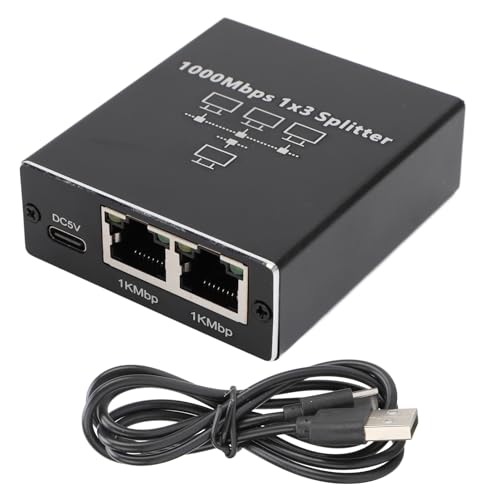


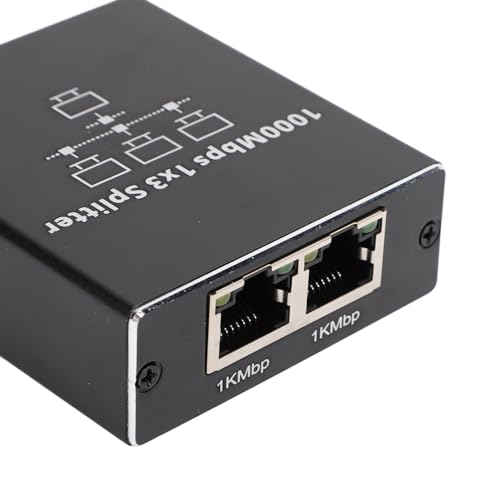
As an Amazon Associate we earn from qualifying purchases. Product prices and availability are accurate as of the date/time indicated.

BAND-AID Brand All-Purpose Portable Compact First Aid Kit, 160 Piece | Emergency Wound Care Essentials with Adhesive Bandages, Gauze & Pain Relief for Home, Car, Dorm, Camping, Cruise & Travel
As an Amazon Associate we earn from qualifying purchases. Product prices and availability are accurate as of the date/time indicated.

Cat 6 Retractable Ethernet Cable 1.5m for Home and Gaming | Black, Easy Carry Design, Temporary Network Setup, Tidy Desk Cabling, Students in Dorms


As an Amazon Associate we earn from qualifying purchases. Product prices and availability are accurate as of the date/time indicated.
Prices shown are approximate and for reference only. Prices change often, so please check the current price on Amazon before you buy.
Best Home Network Setup for Student Dorms Reviewed for 2026
1. TP-Link TL-WR902AC Best Home Network Setup for Student Dorms
The TP-Link TL-WR902AC is a Wi-Fi 5 travel router with an AC750 speed, dual-band Wi-Fi, and 1x LAN/WAN port. It covers up to 500 sq ft and is priced in the range of $25 to $35. Its AC750 speed is lower than the other models in this table, but it is enough for a single laptop and phone in a small dorm room, and its travel size makes it the most portable option here.
For a student on a budget, the TL-WR902AC is practical because its 1x LAN/WAN port can connect to a dorm Ethernet port, or it can join campus Wi-Fi in client mode and share it as your own private network. Its dual-band Wi-Fi lets you use 5 GHz for speed in the same room, and its small size means it fits in a backpack pocket. It suits a student who wants the cheapest personal network in a dorm, who moves rooms often, or who also wants a travel router for holidays.
2. TP-Link Archer A7 Best Home Network Setup for Student Dorms
The TP-Link Archer A7 is a Wi-Fi 5 router with an AC1750 speed, dual-band Wi-Fi, and 4x LAN and 1x WAN ports. It covers up to 2,500 sq ft and is priced in the range of $50 to $60. Its AC1750 speed is more than twice the speed of the TL-WR902AC, which makes it better for streaming and video calls, and its 4x LAN ports let you wire a laptop, a console, and a desktop at the same time.
In a dorm room, the Archer A7 is useful because its 2,500 sq ft coverage is far more than a single room needs, which means the signal stays strong even through a wall to a roommate’s desk. Its dual-band Wi-Fi gives you a fast 5 GHz band for your laptop and a 2.4 GHz band for a phone or smart speaker. It is best for a student who wants a full-size home router at a low price, with enough ports for several wired devices.
3. Netgear Nighthawk R6700 Best Home Network Setup for Student Dorms
The Netgear Nighthawk R6700 is a Wi-Fi 5 router with an AC1750 speed, dual-band Wi-Fi, and 4x LAN and 1x WAN ports. It covers up to 1,500 sq ft and is priced in the range of $70 to $80. Its AC1750 speed is the same as the Archer A7, but its Nighthawk design is intended for gaming and streaming, with a processor that can handle more simultaneous connections.
For a student who games, the R6700 is a solid choice because its AC1750 speed and dual-band Wi-Fi provide a stable connection for online games, while its 4x LAN ports let you wire a console directly, which reduces lag compared with Wi-Fi. Its 1,500 sq ft coverage is enough for a dorm suite, and its Netgear app makes setup easier than a web interface. It suits a student who wants a gaming-oriented router without paying for Wi-Fi 6.
4. TP-Link Deco S4 (2-pack) Best Home Network Setup for Student Dorms
The TP-Link Deco S4 (2-pack) is a Wi-Fi 5 mesh system with an AC1200 speed, dual-band Wi-Fi, and 2x LAN/WAN ports per node. It covers up to 3,800 sq ft and is priced in the range of $100 to $120. Its AC1200 speed is lower than the Archer A7, but its mesh design gives you two nodes, so you can place one in your room and one in a shared living area or a suite hallway.
In a shared dorm suite, the Deco S4 is useful because its 3,800 sq ft coverage is designed for a larger space than a single room, and its two nodes create a single Wi-Fi name, so you do not need to switch networks as you move between rooms. Its 2x LAN/WAN ports per node let you wire a laptop to either node. It is best for students who share a suite with several rooms and want one network across the whole suite.
5. ASUS RT-AX58U Best Home Network Setup for Student Dorms
The ASUS RT-AX58U is a Wi-Fi 6 router with an AX3000 speed, dual-band Wi-Fi, and 4x LAN and 1x WAN ports. It covers up to 2,500 sq ft and is priced in the range of $120 to $140. Its AX3000 speed is the highest in this table, and its Wi-Fi 6 standard is better than Wi-Fi 5 for handling many devices at once in a crowded dorm building.
For a student with many devices, the RT-AX58U is a strong choice because its Wi-Fi 6 and AX3000 speed can handle a laptop, a phone, a tablet, and a smart TV at the same time without slowing down. Its 4x LAN ports are useful for wired devices, and its ASUS security features, including a free lifetime security subscription in some regions, help protect a personal network. It suits a student who wants the fastest single router in this comparison and is willing to pay for Wi-Fi 6.
6. Netgear Orbi RBK13 (3-pack) Best Home Network Setup for Student Dorms
The Netgear Orbi RBK13 (3-pack) is a Wi-Fi 5 mesh system with an AC1200 speed, dual-band Wi-Fi, and 2x LAN/WAN ports per node. It covers up to 4,500 sq ft and is priced in the range of $150 to $180. Its AC1200 speed is lower than the ASUS, but its three nodes give the largest coverage in this table, which is useful for a large suite or a shared house near campus.
For a larger shared space, the Orbi RBK13 is a top choice because its 4,500 sq ft coverage and three nodes can provide Wi-Fi across several rooms, a living area, and a study space, with a single network name. Its 2x LAN/WAN ports per node let you wire devices in different rooms. It is best for a group of students who share a house or a large suite and want one simple mesh system, rather than several separate routers.
Buying Guide: How to Choose the Best Home Network Setup for Student Dorms
Start with your dorm rules, your internet source, and how many devices you use, not with a single specification. If your university bans personal routers, choose a travel router that can work in client mode, or use the campus Wi-Fi directly. If your dorm has Ethernet, choose a router with a WAN port and at least one LAN port. If you share a suite, consider a mesh system with two or three nodes. Then check the practical details: Wi-Fi standard, speed, ports, and size.
Check Dorm Rules and Ethernet Before You Buy
Check your university IT policy first, because it will tell you whether a personal router is allowed, whether you need to register its MAC address, and whether you can create your own Wi-Fi network. A fact not in the table is that some universities require you to disable the 2.4 GHz band, or to use a specific channel, to avoid interfering with campus Wi-Fi, so a router that lets you choose channels and bands is more useful than one with fixed settings. Check whether your room has an Ethernet port, and test it with a laptop before you buy a router, because a port that is disabled will not work even with the best router.
Choose Wi-Fi 6 for Crowded Buildings, Wi-Fi 5 for a Single Room
Choose Wi-Fi 6 if you live in a crowded dorm building with many networks, because Wi-Fi 6 handles congestion better and offers faster speeds on 5 GHz. A Wi-Fi 6 router, such as the ASUS RT-AX58U, is a good choice if you have a Wi-Fi 6 laptop and you want the fastest connection. Choose Wi-Fi 5 if you have a limited budget and a single room, because a Wi-Fi 5 router, such as the TP-Link Archer A7, is cheaper and still fast enough for streaming, video calls, and downloads in a small room.
Check Ports, Coverage, and Setup Ease
Check ports before you buy, because a router with four LAN ports is more useful than one with a single port if you have a laptop, a console, and a desktop. Check coverage, but do not overbuy: a router that covers 2,500 sq ft is more than enough for a dorm room, and a mesh system that covers 4,500 sq ft is only needed for a large suite or house. Check setup ease, because a router with a phone app is easier to set up in a dorm than one that needs a web browser and manual IP settings. A mesh system with an app is especially easy, because it guides you through placement and testing.
Budget Guide for Best Home Network Setup for Student Dorms
A router in the $25-$60 range can provide good dorm networking if it is used for a single room, while a router in the $100-$140 range often provides Wi-Fi 6, a higher speed, or a mesh system for a suite. A system in the $150-$180 range, such as the Netgear Orbi RBK13, is for a group who shares a large space and wants three nodes. The budget pick in this comparison is the TP-Link TL-WR902AC, at $25-$35, because it is the cheapest model in the table and still offers dual-band Wi-Fi 5, an AC750 speed, a LAN/WAN port, and a travel size that can work as a router, access point, repeater, or client. For most single-room students, that combination of low price, flexibility, and portability is the best starting point, and the money saved can go toward a good Ethernet cable or a small switch. If you need a full-size router for several wired devices, spend more for the Archer A7 or the ASUS RT-AX58U, because their four LAN ports and higher speeds will help more than a travel router alone.
Frequently Asked Questions About the Best Home Network Setup for Student Dorms
What is the best home network setup for student dorms in 2026?
For the best home network setup for student dorms in 2026, the TP-Link TL-WR902AC is often the best budget choice because it offers dual-band Wi-Fi 5, an AC750 speed, and a price of $25 to $35. A fact not in the table or buying guide is that you should also buy a short, flat Ethernet cable, about 3 to 6 feet long, because a flat cable is easier to run under a desk or along a wall in a dorm without tripping, and it is less likely to be damaged when you move furniture at the end of term. Choose based on your dorm rules, whether you have Ethernet, and whether you share a suite or live in a single room.
Can I use my own router in a dorm?
You can use your own router in a dorm only if your university allows it, because some universities ban personal routers or require registration with IT support. A fact not in the table or buying guide is that many universities allow a router in router mode, but they forbid a router that creates a second DHCP server on the campus network, so you should set your router to access point mode if IT asks you to, because that mode lets the campus network assign IP addresses while your router still provides your own Wi-Fi name and password. Always check the IT policy and ask support if you are unsure, because an unregistered router can be disconnected.
Is a mesh system worth it for a dorm room?
A mesh system is usually not worth it for a single dorm room, because a single router can cover a room under 200 square feet easily, and a mesh system costs more and takes up more space. A fact not in the table or buying guide is that a mesh system can be worth it if you share a suite with three or more rooms, or if your dorm has thick concrete walls that block Wi-Fi, because a second node in the next room can fill a dead spot that a single router cannot reach through concrete. For a single room, choose a compact router instead, and save the mesh system for a house or a large suite.
Should I use Ethernet or Wi-Fi in a dorm?
You should use Ethernet in a dorm when you need the most stable connection, such as for an online exam, a video call, or a competitive game, because a wired connection is not affected by interference from neighbouring networks. A fact not in the table or buying guide is that a wired connection also gives you a lower ping, often 5 to 10 ms lower than Wi-Fi in a crowded dorm, which can make a noticeable difference in gaming and in video calls where delay causes people to talk over each other. Use Wi-Fi for your phone and tablet, and use Ethernet for your laptop when it is on your desk, by plugging it into your router LAN port or directly into the wall port if your university allows it.
Related guides
- Best Tripod vs Monopod for Student Travel Photography in 2026: How to Pick a Tripod vs Monopod for Student Travel Photography That Is Light, Stable, and Works for Your Camera on the Road
- Best MicroSD Card for Baby Monitors: 6 Best MicroSD Card for Baby Monitors Picks in 2026
- Best Budget Phone Lens Under 50 in 2026: Clip-On Wide, Macro, and Telephoto Lenses That Are Actually Worth Carrying
- How to Choose Phone Mount Suction Strength in 2026: How to Choose a Phone Mount Suction Strength That Holds Your Phone Securely, Is Easy to Use, and Works for Your Car
More from Amazon
Programs that pair well with the guide above. Offers and eligibility are set by Amazon and may change.
Set up recurring deliveries of everyday items on eligible products. Terms and savings are set by Amazon.
Explore Subscribe & SaveFree shipping on eligible items, Prime Video and more. Eligible new members can start with a free trial.
Start a Prime free trialAudiobooks and podcasts to listen to on the go. Eligible new members can start with a free trial.
Try Audible freeRead from a large library of eBooks and audiobooks on any device. Check Amazon for current plans.
Explore Kindle UnlimitedAs an Amazon Associate we earn from qualifying purchases.

Write Your Review
No reviews yet. Be the first to share your experience!