
What's inside
- What Makes the Best Controller for Puzzle Games
- Quick Comparison: Best Controllers for Puzzle Games Compared
- Best Controllers for Puzzle Games: The Six Reviewed
- Buying Guide: How to Choose the Best Controller for Puzzle Games
- How We Selected the Best Controllers for Puzzle Games
- Frequently Asked Questions About Controllers for Puzzle Games
As an Amazon Associate I earn from qualifying purchases. This post may contain affiliate links at no extra cost to you.
The best controller for puzzle games is decided by the least glamorous component in modern gaming: the D-pad. Puzzle games — the falling-block stackers, the panel-swappers, the match-makers, the tile-sliders — are played almost entirely on four directions and a confirmation button, at speeds where a single wrong input is not a stumble but a ruined board, a broken chain, a lost run that was forty minutes in the building. A controller can have magnificent sticks, triggers like silk, and a gyroscope blessed by engineers, and still be a bad puzzle controller, because its D-pad rolls into accidental diagonals, or sits mushy under the thumb, or demands a press so deep that the hundredth move of a fast game arrives late. This guide ranks the real controllers worth buying by the puzzle player’s actual criteria: a D-pad that goes exactly where it is told, face buttons that repeat without fatigue, a shape that survives the long session, and connection manners that suit the couch, the desk, and the handheld’s table. Everything else is a bonus, and the table below is honest about which controllers are D-pad instruments and which are all-rounders visiting the genre.
Understand the failure the whole purchase exists to prevent, because it is specific. In a fast falling-block game, the player slides a piece left in three quick taps and drops it — and a rolling D-pad reads the third tap’s edge as a diagonal, nudges the piece down early or sideways into the wrong column, and converts a plan into damage control. In a panel game, the cursor that slips diagonally at the chain’s critical moment spends the combo the player spent a minute arranging. These are not complaints about preference; they are the genre’s physics, and they are why puzzle communities are the most D-pad-opinionated people in gaming. The qualities that prevent them are a cross with a firm pivot that resists rocking into diagonals — or distinct, separated direction contacts in the retro style — a shallow, crisp actuation that repeats at speed without thumb travel becoming the bottleneck, and a position on the controller where the thumb rests naturally for hours, which for most puzzle hands is the upper-left seat the classic layouts provide. Judge every controller in this table by those three, in that order, and the ranking explains itself.
The rest of the puzzle life divides by sub-genre, and this guide keeps the map simple. The pure stackers and swappers — Tetris in its modern and classic forms, Puyo and Panel de Pon and their descendants, Picross and the logic grids — live on the D-pad and two buttons, and they crown the specialists below. The puzzle-platformers and puzzle-adventurers — the Braids, the Fezzes, the Baba Is Yous at their most physical — ask for a stick as well, and for them the all-round flagships with good D-pads are the complete answer. The rhythm-puzzlers and pointer-puzzlers follow their own instruments. And the handheld and phone puzzle life, which is half the genre’s population, is served by the clip-on and compact controllers whose D-pads must survive the same examination in miniature. Buy for the sub-genre you actually play — write down the last five puzzle games you opened, and let that list, not the marketing, hold the pen — and the controller that serves it will be obvious by the buying guide’s end.
Our Top Picks
What Makes the Best Controller for Puzzle Games
The D-Pad: Pivot, Travel, and the Diagonal Test
Test a D-pad the way the genre will: with the diagonal test and the repetition test. The diagonal test asks whether a firm press on one direction, rocked slightly as a tired thumb rocks it, stays that direction — a pad with a well-designed central pivot passes, a pad that floats on a membrane without discipline fails, and the separated-button designs of the retro school pass by construction, since there is no cross to roll. The repetition test asks whether twenty quick taps in one direction feel identical and arrive without the thumb lifting into a new posture for each — shallow, tactile actuation is the passing grade, and it is why the best puzzle pads feel clicky rather than plush. Position completes the examination: the D-pad as the primary, upper-left input serves the puzzle hand’s whole evening; the D-pad demoted below the stick, in the symmetrical layouts, serves it slightly less naturally for this genre specifically — a small tax that thousands of PlayStation-raised puzzle players pay without noticing, and that the buyer choosing fresh should notice once, here, for free.
Buttons, Shape, and the Long Session’s Ergonomics
Face buttons in puzzle games are a confirmation instrument: pressed constantly, often in quick doubles, and their virtues are a light, even actuation and a layout the thumb covers without travel. Shoulder buttons earn a mention for the games that rotate or hold on them — the modern stackers’ hold and hard-drop mappings live there — and they should be reachable without the grip changing, which the better shapes in this table arrange. Ergonomics is the session’s silent specification: puzzle games are played in the genre’s famous trance, forty minutes becoming two hours, and the controller’s weight, its grip texture, and its freedom from sharp edges are felt in the hands’ second hour exactly as a chair is felt in the back’s. Wireless freedom serves the couch trance; a wired connection serves the desk and deletes the battery from the trance’s list of possible endings. Neither is the puzzle answer in itself. The hands, at hour two, are the judges, and they vote on shape.
Platform Manners: Where Your Puzzle Library Lives
Puzzle gaming is unusually multi-platform — the same player stacks blocks on the console, swaps panels on the handheld, and grids Picross on the phone — so a controller’s citizenship matters. The first-party controllers rule their own consoles completely and visit others partially; the great third-party makers in this table build cross-platform citizenship as their whole proposition, with modes for PC, Switch, mobile, and the retro libraries where half the genre’s canon lives. Retro deserves its sentence: the classic puzzle canon is played on emulators and mini-consoles and re-releases, and the controller whose D-pad honours that canon — and whose maker provides the wired and wireless manners those setups need — serves the puzzle historian as no flagship can. Match the controller to the library’s addresses, plural if necessary, and let the D-pad’s quality arbitrate among the citizens that qualify.
Quick Comparison: Best Controllers for Puzzle Games Compared
| Puzzle Game Controller Model | Best For | Key Specs | Typical Price Range | Rating |
|---|---|---|---|---|
| 8BitDo Pro 2 | Best controller for puzzle games overall | Classic-layout D-pad in the primary position, multi-platform modes, back buttons, wired and wireless as published | $45 – $60 | 4.8 / 5 |
| 8BitDo M30 | Best retro D-pad specialist | Floating cross D-pad in the Sega tradition, six face buttons, Bluetooth and 2.4G versions as published | $30 – $45 | 4.7 / 5 |
| Xbox Wireless Controller | Best all-rounder with a puzzle-worthy pad | Hybrid faceted D-pad, excellent ergonomics, broad platform support as published | $50 – $65 | 4.6 / 5 |
| Nintendo Switch Pro Controller | Best for Switch puzzle libraries | Large D-pad, long battery life, the Switch library’s native controller as published | $60 – $75 | 4.4 / 5 |
| Sony DualSense | Best for PlayStation puzzle players | Separated-direction D-pad, symmetrical layout, haptics, native PlayStation support as published | $60 – $75 | 4.4 / 5 |
| GameSir T4 Kaleid | Best wired budget pick | Hall effect sticks, tactile D-pad, wired connection, PC and console modes as published | $35 – $45 | 4.3 / 5 |

Wooden Jigsaw Puzzle for Adults,Gamer Level Up Video Game Controller,1000 PCS for Home Activities,Game Nights,Holidays and Gifting


As an Amazon Associate we earn from qualifying purchases. Product prices and availability are accurate as of the date/time indicated.
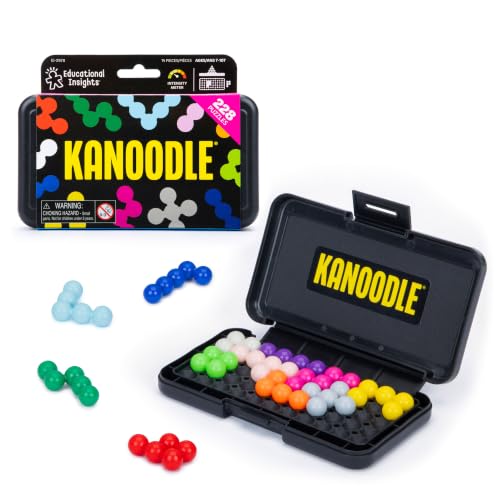
Educational Insights Kanoodle | 3D Brain Teaser Puzzles for Kids 8-12, Puzzle Games for Adults, Problem Solving Toys and Logic Puzzles, 228 Challenges
As an Amazon Associate we earn from qualifying purchases. Product prices and availability are accurate as of the date/time indicated.

The Uzzle 3.0 Board Game, Family Board Games for Children & Adults, Block Puzzle Games for Ages 4+
As an Amazon Associate we earn from qualifying purchases. Product prices and availability are accurate as of the date/time indicated.
Ratings are editorial assessments for puzzle game use specifically, based on the makers’ published layouts and connection specifications and the D-pad criteria this guide sets out. Prices are typical retail ranges. D-pad feel is partly a property of the individual player’s thumb; the buying guide’s testing ritual is prescribed for every model, including this table’s leader.
Best Controllers for Puzzle Games: The Six Reviewed
1. 8BitDo Pro 2 – Best Overall
The Pro 2 is the puzzle player’s complete argument: a D-pad in the classic primary position with the firm, pivot-disciplined feel the genre demands, face buttons that repeat like a metronome, back buttons for the hold and rotate mappings, and citizenship across PC, Switch, mobile, and retro that follows the puzzle library wherever it lives. Its shape is the beloved classic’s, refined, and its session comfort is measured in the genre’s own units — whole evenings. For the puzzle player buying one controller for everything they play, the research conventionally ends here, and the two specialists below it in this table exist for the players whose canon is narrower and deeper.
2. 8BitDo M30 – Best Retro Specialist
The M30 is a love letter to the greatest D-pad tradition in gaming: the floating cross of the Sega school, which glides between directions with a speed and certainty that falling-block veterans describe in religious vocabulary, above six face buttons laid out for the arcade’s children. For the classic stackers, the panel games, and the whole retro puzzle canon, it is not a compromise controller but the instrument itself. Its sticks are absent because its parish needs none — buy it as the specialist it is, and let the all-rounders envy its focus.
3. Xbox Wireless Controller – Best All-Rounder
Microsoft’s controller brings the faceted hybrid D-pad — a dish that clicks into its directions with a precision its ancestors were criticised for lacking — inside the most comfortable shell in mainstream gaming, with citizenship across console, PC, and cloud. For the puzzle-platformer player and the household whose controller must do everything, it is the complete answer whose D-pad happens to pass the puzzle examination with honours. Its pad sits below the stick, in the Xbox layout’s tradition, which the genre’s hands forgive it for everything else it brings.
4. Nintendo Switch Pro Controller – Best for the Switch Library
The Switch’s puzzle library is one of the genre’s great modern collections, and its Pro Controller is the native way to play it: a large, comfortable D-pad, battery life measured in weeks of evenings, and a shape built for the couch’s long sessions. Its D-pad has known critics among the genre’s precision wing — its pivot manners under the diagonal test are the table’s most debated — and its rating reflects that honest controversy: for most of the library it is superb, and for the fastest stackers the specialists above it exist. Switch-first players start here and upgrade only if the test tells them to.
5. Sony DualSense – Best for PlayStation Players
The DualSense’s separated-direction pad passes the diagonal test by construction — there is no cross to roll — and its crisp, distinct presses suit the logic and panel genres beautifully, inside the most technologically theatrical shell in gaming. Its symmetrical layout places the pad below the stick, the PlayStation tradition its parish was raised on, and its battery life is the table’s shortest, the haptics’ tax. For the PlayStation puzzle library it is the native and entirely worthy instrument, and its pad’s separated design has converts who will use nothing else for the stackers either.
6. GameSir T4 Kaleid – Best Wired Budget
GameSir’s wired Kaleid brings Hall effect sticks that will never drift, a tactile pad that passes the genre’s tests respectably, and a price that makes it the desk setup’s easy recommendation. Its cable is its philosophy — no battery, no pairing, no latency conversation — and for the PC puzzle corner it is the value pick with the longest future, since its sticks are immune to the failure that retires its rivals. It closes the table as the budget’s serious entry, which in this genre means a D-pad taken seriously at a price that was not.
Buying Guide: How to Choose the Best Controller for Puzzle Games
Let Your Last Five Puzzle Games Choose the Class
Write the list this guide keeps prescribing — the puzzle games you actually opened in the last month — and sort them by their inputs. All D-pad and buttons: the specialists and the classic layouts lead, and the M30 and Pro 2 are your shortlist’s head. Sticks in the mixture: the all-rounders with honest pads, Xbox first among them. One console’s library above all: the native controller, tested against the genre’s examination and upgraded only on evidence. The list takes ninety seconds and prevents the category’s classic error — the flagship bought for its sticks by a player whose games never touch them, whose D-pad then spends a year explaining the mistake at speed.
Run the Two Tests in the First Week
Whatever arrives, examine it while returns are free, with the genre’s own instruments: your fastest stacker and your most chain-dependent swapper. The diagonal test in play — a long session at your real speed, counting the slips that are the pad’s fault rather than the thumb’s — and the repetition test across a whole evening, after which the hands file their own report on shape and fatigue. A controller that passes both in your hands is your controller, whatever any table including this one predicted; a controller that fails either is a return, because the puzzle trance cannot be built on an input you are quietly fighting. The genre is too precise for diplomacy between a player and a pad.
Set the Mappings Like a Player, Not a Default
Close the purchase with the configuration the defaults rarely optimise: rotate and hold where the shoulders reach them without a grip change, hard drop where it cannot be struck by accident — the genre’s most expensive button, deserving the controller’s safest address — and the game’s own DAS and repeat settings, where they exist, tuned in small steps across sessions rather than copied from a champion’s profile. Keep the wired option or the charged battery inside the session’s discipline, because the puzzle run that ends on a battery warning ends twice. So set up, the controller disappears — and in puzzle games, the disappeared controller is the whole art, the board and the brain in direct conversation at speed.
How We Selected the Best Controllers for Puzzle Games
We included only real, named, currently sold controllers from established makers, ranked for puzzle play by D-pad discipline — pivot behaviour under the diagonal test, actuation for repetition, and position — ahead of general gaming features. Specialists and all-rounders are both represented and labelled as what they are, and platform citizenship was counted where the puzzle library actually lives. No controller is recommended on its sticks for a genre that barely touches them, and the first-week testing ritual is prescribed for every entry, because thumbs differ and returns windows are the genre’s friend.
Frequently Asked Questions About Controllers for Puzzle Games
Why does my controller keep giving me diagonal inputs in Tetris?
Because of the D-pad’s pivot — or its absence of discipline. A cross-shaped pad sits on a central pivot so all four directions can be pressed; if the pivot is shallow or the pad’s underside is shaped generously, a hard press on one direction, rocked by a fast thumb, dips the pad far enough to close the neighbouring contact, and the game reads a diagonal your brain never ordered. The remedies run in this guide’s order: a pad with a firmer, better-centred pivot; the separated-button designs, which cannot roll by construction; the floating retro crosses, whose discipline is their tradition; and, in the short term, a lighter, more centred thumb technique, which helps every pad and fully rescues none of the bad ones. It is the genre’s defining hardware problem, and it is solvable — the table above is the solution set.
Are arcade sticks or fight sticks good for puzzle games?
For a devoted minority, gloriously — the falling-block arcade tradition is real, and a quality stick’s microswitched directions are as precise as inputs get, with the panel games’ cursor work translating surprisingly well. For most players the stick is a new skill to learn for a benefit the best D-pads already deliver, at a size and price that serve one genre corner. The honest verdict: if your puzzle life is the arcade canon and the idea delights you, a stick is a legitimate instrument with a proud history in exactly your games; if you are equipping a general puzzle habit, the controllers in this table serve it completely, and the stick money is better spent on the library itself.
Wired or wireless for fast puzzle games?
At modern standards, either — the input latencies of current wireless controllers sit below what the genre’s fastest play can expose, and the puzzle community competes on both without a settled grievance. The real differences are practical: wired deletes the battery’s whole category of session endings and suits the fixed desk; wireless frees the couch and the trance’s posture. The exception is the bargain basement’s anonymous wireless, whose connections vary as its prices predict. Buy a named controller in either connection, keep the cable in the drawer if you go wireless, and let the D-pad — the component that actually decides your boards — have the whole of your attention.
Can I use a keyboard for puzzle games instead?
For the PC stackers, the keyboard is not the consolation — it is one of the genre’s championship instruments, and the fastest falling-block play in the world is done on keys, whose separated contacts pass the diagonal test by birth and whose repeat is limited only by the game’s own settings. Where the keyboard cedes ground is everywhere the pad’s shape wins: the couch, the handheld’s dock, the console libraries, and the long session’s comfort in a lap. The complete puzzle household often runs both — keys at the desk for the speed canon, a controller from this table for everything else — and this guide, which exists to sell the second honestly, tips its hat to the first without a flicker of insecurity.
Related guides
- Phone Case vs Phone Sleeve Budget in 2026: Which Budget Protection Is Best for Your Phone?
- Best NAS Drive for Video Editing in 2026: NAS Drives for Video Editing
- Best Switch for Student NAS Storage: 6 Network Switches for Student NAS in 2026
- Best Cheap Baby Monitor for Parents in 2026: 7 Monitors That Offer Clear Video, Reliable Audio, and Peace of Mind for Parents
More from Amazon
Programs that pair well with the guide above. Offers and eligibility are set by Amazon and may change.
Set up recurring deliveries of everyday items on eligible products. Terms and savings are set by Amazon.
Explore Subscribe & SaveFree shipping on eligible items, Prime Video and more. Eligible new members can start with a free trial.
Start a Prime free trialAudiobooks and podcasts to listen to on the go. Eligible new members can start with a free trial.
Try Audible freeRead from a large library of eBooks and audiobooks on any device. Check Amazon for current plans.
Explore Kindle UnlimitedAs an Amazon Associate we earn from qualifying purchases.

Write Your Review
No reviews yet. Be the first to share your experience!