
Our Short List of 3

- Best for: A first-time animator or hobbyist making 2D cartoons on a PC or Mac.
- Version: Moho Debut 13.5
- Operating systems: PC and Mac OS; Windows 10 64-bit required on PC
- System needs on Windows: 2.0 GHz Intel Core i3 or higher, 4 GB RAM or higher, 1.6 GB free hard drive space, OpenGL 4.1 supported graphics card
- Features: vector-based draw, paint and fill tools, bone rigging system, Beginner’s Mode, pre-built content library
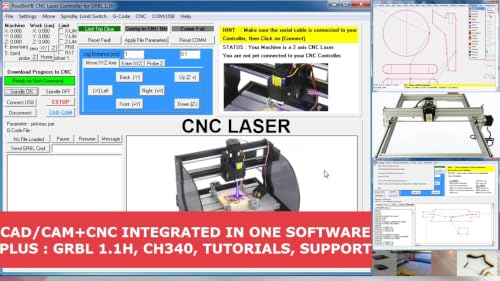
- Best for: A hobbyist driving a 3018, 3020 or 1610 CNC or laser machine with GRBL firmware.
- Product: RoutCad Premium, CAD CAM CNC software for GRBL
- Compatible machines: CNC 3018, 3020 and 1610 models
- Includes: RoutCad CAD-CAM for GRBL, RoutBot CNC for GRBL, GRBL 1.1F automatic installer
- Workflow: 1-design, 2-define machine sequence, 3-drive CNC

- Best for: A homeowner planning a house, garden, balcony or rooftop photovoltaic layout in 2D and 3D.
- Version: 3D CAD Architecture 12, by Ashampoo
- Operating systems: Windows 11 and 10
- Includes: more than 1,200 new 3D objects for house and garden
- Features: step-by-step wizard, 2D, 3D and cross-section views, auto-dimensioning, door and window catalog, railing editor, photovoltaic planning, electrical planning assistant
All 3 Picks at a Glance
| Product | Specs | Action |
|---|---|---|
| 2. Moho Debut 13.5 | Create your own cartoons and animations in minutes | Software for PC and Mac OS |
| Check price on Amazon |
| 3. CAD CAM CNC 3018 3020 1610 Laser Software integrated easy to use tutorial videos RoutCad |
| Check price on Amazon |
| 5. 3D CAD Architecture 12 – design Software for house, garden, balcony, photovoltaic, walls – 2D 3D objects |
| Check price on Amazon |
Key takeaways
- Five creative software picks for photo editing, 2D animation, CNC and laser work, audio conversion and home design, with versions and system needs explained.
What's inside
- Quick Picks
- How to Choose
- 1. GIMP 2.10 – Graphic Design & Image Editing Software
- 2. Moho Debut 13.5 | Create your own cartoons and animations in minutes | Software for PC and Mac OS
- 3. CAD CAM CNC 3018 3020 1610 Laser Software integrated easy to use tutorial videos RoutCad
- 4. Audio Converter – Edit and convert your sound and music files to other audio formats – easy audio editing software
- 5. 3D CAD Architecture 12 – design Software for house, garden, balcony, photovoltaic, walls – 2D 3D objects
- Which One Fits Your Situation
- Common Mistakes
- Frequently Asked Questions
As an Amazon Associate I earn from qualifying purchases. This post may contain affiliate links at no extra cost to you.
A photo editor, an animation tool, a CNC controller, an audio converter and a home-design program do not compete with each other, so the real decision is not which one is stronger in general. It is which kind of work you actually do, and which of these five matches it. A buyer who picks the wrong category ends up with a capable program that never gets opened, while the job that needed doing stays undone.
This list is for people who make things at home: editing photos for a shop or a family album, drawing a first cartoon, running a small CNC or laser machine, converting a folder of old audio files, or planning a house and garden. Each product below was chosen from its Amazon listing title and details, with the version, the operating systems and what is included stated plainly, so you can check the current price on Amazon and confirm it fits your computer before buying.
Quick Picks
As an Amazon Associate we earn from qualifying purchases
| Product | Best for | Key spec from title |
|---|---|---|
| GIMP 2.10 Graphic Design & Image Editing Software | Editing photos and graphics on Windows or Mac | Includes 20,000 clip art images |
| Moho Debut 13.5 | A first attempt at 2D cartoons and animation | Software for PC and Mac OS |
| RoutCad Premium CAD CAM CNC Software | Driving a 3018, 3020 or 1610 CNC or laser machine | Integrated tutorial videos |
| Audio Converter | Converting and trimming sound and music files | Compatible with Windows 10, 8 and 7 |
| 3D CAD Architecture 12 | Planning a house, garden, balcony or photovoltaic layout | 2D and 3D objects for Win 11, 10 |
How to Choose
Start With the Job, Not the Category
Photo editing, animation, CNC control, audio conversion and home design are five different jobs, and no single program in this list covers more than one of them well. Write down the one task you need done this month, then match it to a single product: GIMP 2.10 for still images, Moho Debut 13.5 for moving drawings, RoutCad Premium for a CNC or laser machine, Audio Converter for sound files, and 3D CAD Architecture 12 for a house or garden plan. If your task does not match any of these five, the honest answer is to keep looking rather than buy the closest fit and hope it stretches.
Check the Operating System First
Every program here names its supported systems in its listing, and that is the first detail to confirm. GIMP 2.10 lists Windows 11, 10, 8, 7, Vista and XP plus Mac, Moho Debut 13.5 lists PC and Mac, Audio Converter lists Windows 10, 8 and 7, and 3D CAD Architecture 12 lists Windows 11 and 10. RoutCad Premium is built around GRBL-based machines, so the machine matters as much as the computer. Check the listing for your exact system version before buying, since an older program may not install cleanly on a newer operating system.
Beginner Editions and Older Versions Are Different Things
Moho Debut 13.5 is the beginner edition of Moho, not the Pro edition, so it suits first-time animators and hobbyists rather than a working studio. GIMP 2.10 is an older version of GIMP, sold as a packaged bundle with clip art, frames and a manual, rather than the newest release. 3D CAD Architecture 12 is the current version in its line, and it is aimed at homeowners rather than professional architects. Knowing which of these you are buying keeps expectations realistic and avoids paying for a professional tool you will never use, or buying a beginner tool and finding it stops short.
Read What Is Actually in the Box
Software arrives in different forms, and the listing usually says which one. 3D CAD Architecture 12 comes as a product key card with a download link and license key. Audio Converter comes on a disc, which means the computer needs a disc drive or another way to read it. GIMP 2.10 is a bundle that adds 20,000 clip art images, 10,000 photo frames and a printed manual to the program itself. Check whether the purchase is a one-time license, whether online activation is required, and whether the package includes the disc, the key card or a download before you order.
1. GIMP 2.10 – Graphic Design & Image Editing Software
This is a packaged edition of GIMP 2.10, the long-running image editor, sold with a large bundle of extra material. It suits someone who wants to edit photos, prepare graphics for a small shop or a website, or learn image editing without a monthly subscription. The bundle adds 20,000 clip art images, 10,000 photo frames and a 900-page manual to the program, plus technical support from the publisher, Markt+Technik. Note clearly that GIMP 2.10 is an older version of GIMP, so buyers who want the newest release should check the listing for the current version instead.
Specs
- Version: GIMP 2.10
- Includes: 20,000 clip art images, 10,000 photo frames, instruction manual
- Operating systems: Windows 11, 10, 8, 7, Vista and XP, and Mac
- Manufacturer: Markt+Technik
- Item model number: 43222-30353
- Date first available: August 25, 2016
Best for: Editing photos and graphics on a Windows or Mac computer, with a large clip art library included.
Watch out for: This is the 2.10 version, an older release, and the included manual was written for an earlier version, so check the listing for the current version and confirm the manual matches what you need.
ASIN: 3959828179
2. Moho Debut 13.5 | Create your own cartoons and animations in minutes | Software for PC and Mac OS
- Best for: A first-time animator or hobbyist making 2D cartoons on a PC or Mac.
- Version: Moho Debut 13.5
- Operating systems: PC and Mac OS; Windows 10 64-bit required on PC
- System needs on Windows: 2.0 GHz Intel Core i3 or higher, 4 GB RAM or higher, 1.6 GB free hard drive space, OpenGL 4.1 supported graphics card
- Features: vector-based draw, paint and fill tools, bone rigging system, Beginner’s Mode, pre-built content library
A first-time animator or hobbyist making 2D cartoons on a PC or Mac.
Check that your computer meets the Windows 10 64-bit requirement and has an OpenGL 4.1 graphics card, and remember this is the Debut edition, so features found in the Pro edition may not be included.
Moho Debut 13.5 is the entry-level edition of Moho, made for people making their first cartoon or short animation. It suits a hobbyist, a teacher, or a digital artist who wants to draw characters, rig them with bones and animate them without learning a professional animation suite first. Its Beginner’s Mode and pre-built content help a new animator start quickly, and the vector drawing tools let characters be drawn, painted and filled inside the program. Note clearly that this is the Debut edition, not Moho Pro, so it is aimed at first-time animators rather than a studio workflow.
Watch out for: Check that your computer meets the Windows 10 64-bit requirement and has an OpenGL 4.1 graphics card, and remember this is the Debut edition, so features found in the Pro edition may not be included.
3. CAD CAM CNC 3018 3020 1610 Laser Software integrated easy to use tutorial videos RoutCad
- Best for: A hobbyist driving a 3018, 3020 or 1610 CNC or laser machine with GRBL firmware.
- Product: RoutCad Premium, CAD CAM CNC software for GRBL
- Compatible machines: CNC 3018, 3020 and 1610 models
- Includes: RoutCad CAD-CAM for GRBL, RoutBot CNC for GRBL, GRBL 1.1F automatic installer
- Workflow: 1-design, 2-define machine sequence, 3-drive CNC
A hobbyist driving a 3018, 3020 or 1610 CNC or laser machine with GRBL firmware.
Confirm your machine is a GRBL-based 3018, 3020 or 1610 before buying, and check the listing for the Windows versions the installer supports, since the documentation references older Windows releases.
RoutCad Premium is a CAD, CAM and CNC package in one program, built for hobby CNC and laser machines. It suits someone who owns a 3018, 3020 or 1610 machine and wants to design a part, define the machining sequence and drive the machine from a single program. The three steps in the listing are design, define machine sequence, and drive the CNC, and tutorial videos under the help menu walk through basic and advanced tasks. Note clearly that this software is made for specific GRBL machines, mainly the 3018, 3020 and 1610 models, so it is not a general-purpose CAD program for other machine types.
Watch out for: Confirm your machine is a GRBL-based 3018, 3020 or 1610 before buying, and check the listing for the Windows versions the installer supports, since the documentation references older Windows releases.
4. Audio Converter – Edit and convert your sound and music files to other audio formats – easy audio editing software
Audio Converter is a straightforward Windows program for changing audio files from one format to another and making simple edits. It suits someone with a folder of old recordings, tracks a car stereo cannot play, or audio pulled from video files that needs to be in a different format. It converts between more than 20 input and output formats, trims and merges tracks, adjusts sample and bit rates, and extracts audio from video files. The program comes on a disc and is sold as a one-time purchase with free technical support from the publisher, Markt+Technik.
Specs
- Product: Audio Converter by Markt+Technik
- Operating systems: Windows 10, 8 and 7, 32 and 64-bit
- Input formats: MP3, MP2, AAC, AC3, WAV, WMA, M4A, OGG, AU, AIFF and more, over 20 in total
- Output formats: AAC, AC3, AIFF, AMR, AU, FLAC, M4A, MKA, MP2, MP3, OGG, WAV and WMA
- Features: convert, edit, trim and merge audio; adjust sample and bit rate; extract audio from video files; batch conversion
- Format: disc, with free technical support
- Manufacturer: Markt+Technik
- Date first available: January 2, 2020
Best for: Converting a collection of audio files into a format a phone, car stereo or player can use.
Watch out for: The program is Windows only, so Mac users need a different tool, and it arrives on a disc, so confirm the computer has a disc drive or another way to install it.
5. 3D CAD Architecture 12 – design Software for house, garden, balcony, photovoltaic, walls – 2D 3D objects
- Best for: A homeowner planning a house, garden, balcony or rooftop photovoltaic layout in 2D and 3D.
- Version: 3D CAD Architecture 12, by Ashampoo
- Operating systems: Windows 11 and 10
- Includes: more than 1,200 new 3D objects for house and garden
- Features: step-by-step wizard, 2D, 3D and cross-section views, auto-dimensioning, door and window catalog, railing editor, photovoltaic planning, electrical planning assistant
A homeowner planning a house, garden, balcony or rooftop photovoltaic layout in 2D and 3D.
This is Windows only and not compatible with ARM-based Windows systems, so confirm the computer runs Windows 10 or 11 on a standard processor before buying.
3D CAD Architecture 12 is a home-design program for planning a house, a garden, a balcony or a photovoltaic layout on a Windows computer. It suits a homeowner planning a renovation or a new build who wants to see the finished project before work starts. A step-by-step wizard guides the design, and 2D, 3D and cross-section views show the project from every angle, with auto-dimensioning for floor plans, a door and window catalog, railing tools and more than 1,200 new 3D objects for house and garden. The box includes a product key card with a download link and license key.
Watch out for: This is Windows only and not compatible with ARM-based Windows systems, so confirm the computer runs Windows 10 or 11 on a standard processor before buying.
Which One Fits Your Situation
You Edit Photos or Graphics for a Shop or a Family Album
GIMP 2.10 is the match here. It is the only still-image editor in the list, and the bundle adds clip art, frames and a manual that a beginner can lean on. Check the current price on Amazon, confirm the version is the one you want, and make sure the computer runs Windows or Mac as listed.
You Want to Draw a First Cartoon
Moho Debut 13.5 is made for this. Its Beginner’s Mode, vector drawing tools and bone rigging system are aimed at first-time animators, and the pre-built content helps a first project get moving. Confirm the computer meets the Windows 10 64-bit requirement or runs Mac OS, and remember it is the Debut edition rather than Pro.
You Own a Small CNC or Laser Machine
RoutCad Premium is the only product in this list that drives a machine. If the machine is a GRBL-based 3018, 3020 or 1610, the three-step workflow of design, define the sequence and drive the CNC covers the whole job. If the machine is a different model, check the listing for compatibility before buying, since this software is built for those three.
You Are Planning a House, Garden or Balcony
3D CAD Architecture 12 is the match. Its wizard, 2D and 3D views, object catalog and photovoltaic planning are built around residential projects, and the key card with a download link makes installation simple. Confirm the computer runs Windows 10 or 11 on a standard processor, and check the current price on Amazon before ordering.
Common Mistakes
- Buying a program for the wrong job, such as an animation tool when the task is photo editing, or a CNC controller when there is no machine to drive.
- Skipping the operating system check and finding out after purchase that the program does not run on the computer.
- Buying a beginner edition like Moho Debut and expecting the features of the Pro edition, or buying an older version like GIMP 2.10 and expecting the newest release.
- Ignoring what is in the box, such as a disc that needs a drive, a key card that needs a download, or an activation step that needs an internet connection.
- Assuming a CNC program works with any machine, when RoutCad Premium is built for GRBL-based 3018, 3020 and 1610 models.
Frequently Asked Questions
Is GIMP 2.10 the newest version of GIMP?
No. GIMP 2.10 is an older version, sold here as a packaged bundle with 20,000 clip art images, 10,000 photo frames and a manual. It still edits photos and graphics on Windows and Mac, but buyers who want the newest release should check the listing for the current version before buying.
Can Moho Debut 13.5 run on a Mac?
Yes, the listing says the software is for PC and Mac OS. On a PC it needs Windows 10 64-bit, a 2.0 GHz Intel Core i3 or higher, 4 GB of RAM or more, 1.6 GB of free hard drive space and an OpenGL 4.1 graphics card, plus an internet connection for online activation.
Will RoutCad Premium work with my CNC machine?
It is built for GRBL-based machines, mainly the 3018, 3020 and 1610 models, and it includes an automatic installer for GRBL 1.1F firmware. Check the listing for your exact machine model before buying, and confirm the Windows version the installer supports.
Does Audio Converter work on a Mac?
No, Audio Converter is Windows only, listing Windows 10, 8 and 7 in 32 and 64-bit versions. It converts between more than 20 formats, trims and merges tracks, and extracts audio from video files, but Mac users need a different program for the same job.
Related guides
- Best Home Network Setup for Student Gamers: 6 Best Home Network Setup for Student Gamers Picks in 2026
- Best Car Charger for Road Trips with Friends in 2026: 6 Best Car Charger for Road Trips with Friends Picks for Fast Charging, Easy Use, and Reliable Road Trip Power
- Best Handheld Console vs Phone for Gaming in 2026: Best Handheld Console vs Phone for Gaming for Controls, Battery, and Simple Portable Play
- Best Headphones With Long Battery Life in 2026: 60-Hour Champions, Honest ANC Numbers, and the 6 Headphones That Outlast Your Longest Week
More from Amazon
Programs that pair well with the guide above. Offers and eligibility are set by Amazon and may change.
Set up recurring deliveries of everyday items on eligible products. Terms and savings are set by Amazon.
Explore Subscribe & SaveFree shipping on eligible items, Prime Video and more. Eligible new members can start with a free trial.
Start a Prime free trialAudiobooks and podcasts to listen to on the go. Eligible new members can start with a free trial.
Try Audible freeRead from a large library of eBooks and audiobooks on any device. Check Amazon for current plans.
Explore Kindle UnlimitedAs an Amazon Associate we earn from qualifying purchases.

Write Your Review
No reviews yet. Be the first to share your experience!