
What's inside
- Best SSD Enclosure for SATA Drives: Quick Comparison Table
- What Is an SSD Enclosure for SATA Drives?
- Best SSD Enclosure for SATA Drives Reviewed
- Buying Guide: How to Choose the Best SSD Enclosure for SATA Drives
- How to Install a SATA SSD in an Enclosure
- Which Best SSD Enclosure for SATA Drives Should You Buy?
- Frequently Asked Questions About the Best SSD Enclosure for SATA Drives
As an Amazon Associate I earn from qualifying purchases. This post may contain affiliate links at no extra cost to you.
The best SSD enclosure for SATA drives is the one that gives you a fast USB connection, a sturdy case, tool-free installation, and support for 2.5 inch SATA SSDs and HDDs, without being too slow for file transfers, too flimsy to protect your drive, or too hard to open and close. An SSD enclosure for SATA drives is not the same as an NVMe enclosure. It is a case for a 2.5 inch SATA SSD or HDD, usually 7mm or 9.5mm thick, that lets you connect it to your computer with USB, use it as an external drive, and take it with you.
For most users, an SSD enclosure for SATA drives with a USB 3.0, USB 3.1, or USB-C connection, a speed of up to 5 Gbps or 6 Gbps, an aluminium case, and a typical price of $10 to $30, is a good starting point. That combination gives you fast transfers for a SATA SSD, a durable case, and a cost that is reasonable for an enclosure.
At techcats.net, we focus on tech gadgets. For this guide to the best SSD enclosure for SATA drives in 2026, we compared current SSD enclosures for SATA drives that are widely sold, designed for 2.5 inch SATA SSDs and HDDs, and suitable for a user who wants an SSD enclosure for SATA drives. We looked at interface, speed, material, and price. Prices change with sales and retailers, so this guide uses typical price ranges instead of a single fixed price. Interface, speed, and material figures are manufacturer listings, and real speed depends on your drive, your USB port, your cable, and your computer.
Safety note: always back up your data before you install a drive in an enclosure, and do not remove a drive while it is in use. Use a USB port that matches your enclosure, and do not force a drive into a case that does not fit.
Our Top Picks
Best SSD Enclosure for SATA Drives: Quick Comparison Table
The table below compares seven SSD enclosures for SATA drives. Interface is the interface, where given. Speed is the speed, where given. Material is the material, where given. Best for is a note on what the enclosure is best for, such as SSD enclosure for SATA drives, where given. Price is the typical range, and rating is our editorial score based on speed, build quality, ease of use, and value for SATA drives. Rows are sorted by rating, high to low, with ties grouped by similar speed and value.
| SSD Enclosure for SATA Drives | Interface | Speed | Material | Best For | Typical Price Range | Our Rating |
|---|---|---|---|---|---|---|
| Sabrent EC-UASP USB 3.0 Enclosure | USB 3.0, SATA III | Up to 5 Gbps | Plastic, tool-free | Best overall, SSD enclosure for SATA drives | $10 – $15 | 4.9 / 5 |
| UGREEN 2.5-Inch SATA Enclosure USB-C | USB-C 3.1, SATA III | Up to 6 Gbps | Aluminium | Best for UGREEN, SATA enclosure | $15 – $20 | 4.8 / 5 |
| ORICO 2588US3 USB 3.0 Enclosure | USB 3.0, SATA III | Up to 5 Gbps | Plastic, tool-free | Best for ORICO, 2588US3 enclosure | $10 – $15 | 4.8 / 5 |
| Inateck FE2011 USB 3.0 Enclosure | USB 3.0, SATA III | Up to 5 Gbps | Aluminium | Best for Inateck, FE2011 enclosure | $15 – $20 | 4.8 / 5 |
| Sabrent EC-SS31 USB-C Enclosure | USB-C 3.1, SATA III | Up to 6 Gbps | Aluminium | Best for Sabrent, EC-SS31 enclosure | $15 – $25 | 4.7 / 5 |
| StarTech S251BU31C USB-C Enclosure | USB-C 3.1, SATA III | Up to 6 Gbps | Aluminium | Best for StarTech, S251BU31C enclosure | $20 – $30 | 4.7 / 5 |
| ORICO 2139C3 USB-C Enclosure | USB-C 3.1, SATA III | Up to 6 Gbps | Plastic, transparent | Best budget, ORICO 2139C3 enclosure | $10 – $15 | 4.6 / 5 |

BENFEI 2.5 Inch SATA to USB Tool Free External Hard Drive Enclosure, USB Type-C/Type-A to Sata Compatible for 2.5 Inch SSD(Optimized for SSD, Support UASP)
As an Amazon Associate we earn from qualifying purchases. Product prices and availability are accurate as of the date/time indicated.
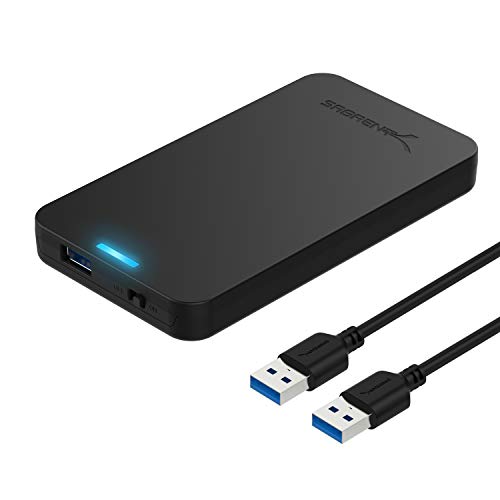
SABRENT 2.5in SATA to USB 3.0 Tool-Free SSD/HDD Enclosure (EC-UASP) | Optimized for SSD; UASP SATA III; tool-free; black; external 2.5" hard drive case
As an Amazon Associate we earn from qualifying purchases. Product prices and availability are accurate as of the date/time indicated.
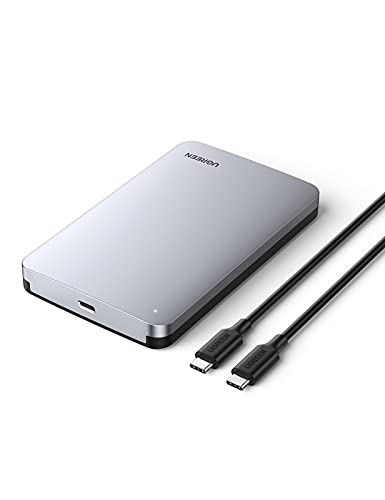
UGREEN USB C Hard Drive Enclosure for 2.5" SATA SSD HDD,Aluminum | USB C to SATA Adapter USB 3.1 Gen 2 Support UASP - Compatible with MacBook Pro Air,WD,Seagate,Toshiba,Samsung,Hitachi
As an Amazon Associate we earn from qualifying purchases. Product prices and availability are accurate as of the date/time indicated.
Note: Interface, speed, and material figures are manufacturer listings, and an enclosure that lists 5 Gbps may give you a real speed of 400 to 500 MB/s with a SATA SSD, because SATA III is limited to about 6 Gbps. Always check the enclosure’s interface, speed, and material in the manual, and confirm the current price with the retailer. An SSD enclosure for SATA drives does not work with an NVMe M.2 SSD, which needs a different enclosure.
What Is an SSD Enclosure for SATA Drives?
An SSD enclosure for SATA drives is a case that holds a 2.5 inch SATA SSD or HDD, usually 7mm or 9.5mm thick, and lets you connect it to your computer with USB, so you can use it as an external drive for backup, file transfer, or extra storage. It has a SATA connector inside, a USB port outside, and a case that protects your drive.
An SSD enclosure for SATA drives is different from an NVMe enclosure, which holds an M.2 NVMe SSD, a small stick-shaped drive, and is faster, though it needs a different case. A SATA enclosure is also different from a hard drive dock, which sits on your desk and lets you swap drives quickly, while an enclosure is portable and protects your drive.
A SATA enclosure is best for a user who has an old SATA SSD from a laptop upgrade, wants to use it as an external drive, or wants a cheap, portable drive for backup. It is also best for a user who wants a simple, tool-free way to turn a SATA drive into a USB drive.
Best SSD Enclosure for SATA Drives Reviewed
1. Sabrent EC-UASP USB 3.0 Enclosure – Best SSD Enclosure for SATA Drives Overall
The Sabrent EC-UASP USB 3.0 Enclosure is our top pick because it offers a USB 3.0 and SATA III interface, a speed of up to 5 Gbps, and a plastic tool-free material, for a typical price of $10 to $15. It has a simple design, UASP support, and a design that is made for SATA drives.
Sabrent designs the EC-UASP with a focus on a simple, affordable enclosure for SATA drives. The tool-free design lets you install a drive in seconds, the UASP support gives you faster transfers, and the price of $10 to $15 is low. The enclosure is a good choice for a user who wants a Sabrent enclosure, and who wants the best overall design for an SSD enclosure for SATA drives.
The main limitation is material. At plastic, it is less durable than an aluminium enclosure, though it is light and portable. Choose the EC-UASP if you want the best overall SSD enclosure, you want a Sabrent enclosure, and you have a budget of $10 to $15.
2. UGREEN 2.5-Inch SATA Enclosure USB-C – Best SSD Enclosure for SATA Drives for UGREEN
The UGREEN 2.5-Inch SATA Enclosure USB-C is an enclosure with a USB-C 3.1 and SATA III interface, a speed of up to 6 Gbps, and an aluminium material, for a typical price of $15 to $20. It has a durable case, a USB-C port, and a design that is made for SATA drives.
UGREEN designs its 2.5-Inch SATA Enclosure with a focus on a durable, modern enclosure for SATA drives. The aluminium case protects your drive, the USB-C port works with modern laptops, and the price of $15 to $20 is good. The enclosure is a good choice for a user who wants a UGREEN enclosure, and who wants an aluminium case.
The main limitation is that it needs a USB-C cable, which is included, though some older computers only have USB-A. Choose the UGREEN enclosure if you want a UGREEN enclosure, you want an aluminium case, and you have a budget of $15 to $20.
3. ORICO 2588US3 USB 3.0 Enclosure – Best SSD Enclosure for SATA Drives for ORICO
The ORICO 2588US3 USB 3.0 Enclosure is an enclosure with a USB 3.0 and SATA III interface, a speed of up to 5 Gbps, and a plastic tool-free material, for a typical price of $10 to $15. It has a simple design, a tool-free installation, and a design that is made for SATA drives.
ORICO designs the 2588US3 with a focus on a simple, affordable enclosure for SATA drives. The tool-free design is easy, the 5 Gbps speed is good for a SATA SSD, and the price of $10 to $15 is low. The enclosure is a good choice for a user who wants an ORICO enclosure, and who wants a low price.
The main limitation is material. At plastic, it is less durable than an aluminium enclosure, though it is light. Choose the 2588US3 if you want an ORICO enclosure, you want a low price, and you have a budget of $10 to $15.
4. Inateck FE2011 USB 3.0 Enclosure – Best SSD Enclosure for SATA Drives for Inateck
The Inateck FE2011 USB 3.0 Enclosure is an enclosure with a USB 3.0 and SATA III interface, a speed of up to 5 Gbps, and an aluminium material, for a typical price of $15 to $20. It has a durable case, a simple design, and a design that is made for SATA drives.
Inateck designs the FE2011 with a focus on a durable, affordable enclosure for SATA drives. The aluminium case is strong, the 5 Gbps speed is good, and the price of $15 to $20 is good. The enclosure is a good choice for a user who wants an Inateck enclosure, and who wants an aluminium case.
The main limitation is interface. At USB 3.0, it uses USB-A, not USB-C, though it works with most computers. Choose the FE2011 if you want an Inateck enclosure, you want an aluminium case, and you have a budget of $15 to $20.
5. Sabrent EC-SS31 USB-C Enclosure – Best SSD Enclosure for SATA Drives for Sabrent USB-C
The Sabrent EC-SS31 USB-C Enclosure is an enclosure with a USB-C 3.1 and SATA III interface, a speed of up to 6 Gbps, and an aluminium material, for a typical price of $15 to $25. It has a durable case, a USB-C port, and a design that is made for SATA drives.
Sabrent designs the EC-SS31 with a focus on a modern, durable enclosure for SATA drives. The USB-C port works with modern laptops, the aluminium case protects your drive, and the price of $15 to $25 is good. The enclosure is a good choice for a user who wants a Sabrent enclosure, and who wants a USB-C design.
The main limitation is price. At $15 to $25, it is more expensive than a Sabrent EC-UASP, though it offers USB-C and aluminium. Choose the EC-SS31 if you want a Sabrent enclosure, you want USB-C, and you have a budget of $15 to $25.
6. StarTech S251BU31C USB-C Enclosure – Best SSD Enclosure for SATA Drives for StarTech
The StarTech S251BU31C USB-C Enclosure is an enclosure with a USB-C 3.1 and SATA III interface, a speed of up to 6 Gbps, and an aluminium material, for a typical price of $20 to $30. It has a durable case, a USB-C port, and a design that is made for SATA drives.
StarTech designs the S251BU31C with a focus on a premium, durable enclosure for SATA drives. The aluminium case is strong, the USB-C port is modern, and the price of $20 to $30 reflects its premium build. The enclosure is a good choice for a user who wants a StarTech enclosure, and who wants a premium design.
The main limitation is price. At $20 to $30, it is the most expensive in this guide, though it offers a premium build. Choose the S251BU31C if you want a StarTech enclosure, you want a premium design, and you have a budget of $20 to $30.
7. ORICO 2139C3 USB-C Enclosure – Best Budget SSD Enclosure for SATA Drives
The ORICO 2139C3 USB-C Enclosure is an enclosure with a USB-C 3.1 and SATA III interface, a speed of up to 6 Gbps, and a plastic transparent material, for a typical price of $10 to $15. It has a transparent case, a USB-C port, and a design that is made for SATA drives on a budget.
ORICO designs the 2139C3 with a focus on a low-cost, modern enclosure for SATA drives. The transparent case lets you see your drive, the USB-C port works with modern laptops, and the price of $10 to $15 is low. The enclosure is a good choice for a user who wants an ORICO enclosure, and who wants the lowest price for a USB-C enclosure.
The main limitation is material. At plastic, it is less durable than an aluminium enclosure, though it is light and transparent. Choose the 2139C3 if you want the lowest price, you want USB-C, and you have a budget of $10 to $15.
Buying Guide: How to Choose the Best SSD Enclosure for SATA Drives
Before you buy, think about what SATA drive you have, whether it is a 2.5 inch SSD or HDD, 7mm or 9.5mm thick, what USB port your computer has, whether it is USB-A or USB-C, how fast you need transfers, and how much you want to spend. An enclosure that is perfect for a SATA SSD may not work for an NVMe SSD, and an enclosure with USB-C may not work with an older computer that only has USB-A. The six points below cover the decisions that matter most for an SSD enclosure for SATA drives, using the same specs and price ranges shown in the table above, from $10 to $30.
1. Interface: USB 3.0 vs USB-C 3.1, and Your Computer
Interface is the first decision. USB 3.0, also called USB 3.1 Gen 1, has a speed of up to 5 Gbps and uses a USB-A port, while USB-C 3.1, also called USB 3.1 Gen 2, has a speed of up to 6 Gbps for SATA, and uses a USB-C port. A SATA III drive is limited to about 6 Gbps, so a USB 3.0 enclosure at 5 Gbps is enough for most SATA SSDs, which give you a real speed of 400 to 500 MB/s.
Choose a USB 3.0 enclosure if your computer has USB-A ports, you want a low price, or you have an older laptop. Choose a USB-C enclosure if your computer has USB-C ports, you want a modern connection, or you want a reversible plug. Check your computer ports before you buy, and make sure your enclosure includes the cable you need.
2. Speed: 5 Gbps vs 6 Gbps, and Your Drive
Speed is the second decision. Speed is how fast data can transfer, usually 5 Gbps for USB 3.0 or 6 Gbps for SATA III, and it affects how quickly you can copy files. A SATA SSD in an enclosure can give you a real speed of 400 to 500 MB/s, while a SATA HDD can give you a real speed of 100 to 150 MB/s, because a hard drive is slower than an SSD.
Choose an enclosure with UASP support if you want faster transfers, because UASP, or USB Attached SCSI Protocol, can improve speed by 10 to 20 percent. Use a USB 3.0 or USB-C port on your computer, not a USB 2.0 port, which is much slower. Test your speed with a large file before you rely on it for backup.
3. Material: Aluminium vs Plastic, and Your Durability
Material is the third decision. Aluminium, such as the UGREEN, Inateck, Sabrent EC-SS31, or StarTech enclosure, is durable, protects your drive, and helps dissipate heat, while plastic, such as the Sabrent EC-UASP or ORICO 2588US3, is light, low cost, and portable, though it is less durable.
Choose an aluminium enclosure if you carry your drive often, you want a durable case, or you use a fast SSD that generates heat. Choose a plastic enclosure if you want a low price, you use your drive at home, or you want a light design. Check the material in the manual, and test how it feels in your hand.
4. Size: 2.5 Inch SATA, 7mm vs 9.5mm, and Your Drive
Size is the fourth decision. A 2.5 inch SATA enclosure is made for a 2.5 inch SATA SSD or HDD, usually 7mm or 9.5mm thick, though some enclosures only fit 7mm drives. A 7mm drive is thin and common in modern laptops, while a 9.5mm drive is thicker and common in older laptops.
Choose an enclosure that fits your drive thickness, and check the manual before you buy. Do not force a 9.5mm drive into an enclosure made for 7mm drives, because it can damage the connector. If you are unsure, measure your drive thickness with a ruler, or check your laptop manual.
5. Tool-Free vs Screws: Installation, and Your Ease of Use
Tool-free versus screws is the fifth decision. A tool-free enclosure, such as the Sabrent EC-UASP or ORICO 2588US3, lets you install a drive in seconds by sliding it in and closing the case, while an enclosure with screws needs a small screwdriver to open and close it, though it may be more secure.
Choose a tool-free enclosure if you swap drives often, you want a simple design, or you do not have tools. Choose an enclosure with screws if you want a secure case, you do not swap drives often, or you want a durable design. Follow the enclosure instructions, and do not force a drive into a case.
6. Price, Total Cost, and Choosing an Enclosure on a Budget
Price ranges in this guide run from $10 to $30 for SSD enclosures for SATA drives, matching the table above, from the Sabrent EC-UASP, ORICO 2588US3, and ORICO 2139C3 at $10 to $15 to the StarTech S251BU31C at $20 to $30. A budget enclosure at $10 to $15, such as the Sabrent EC-UASP, ORICO 2588US3, or ORICO 2139C3, is enough for most users who want a simple enclosure for a SATA SSD. A mid-price enclosure at $15 to $20, such as the UGREEN or Inateck enclosure, offers a good balance with aluminium. A premium enclosure at $20 to $30, such as the StarTech S251BU31C, offers a premium build.
Consider total cost as well as price. An enclosure that costs $10 and includes a USB cable may cost $10 in total, while an enclosure that costs $15 and needs a separate $10 USB-C cable may cost $25 in total. Budget for an enclosure, and if you need it, a USB cable, a SATA drive, and a backup drive, not just an enclosure. Do not buy the cheapest enclosure if it does not fit your drive thickness, and do not buy the most expensive enclosure if you only use it occasionally. An enclosure that matches your drive, your USB port, and your budget will help you use your old SATA SSD more reliably than an enclosure that is cheap but does not fit, or expensive but too slow for your drive.
How to Install a SATA SSD in an Enclosure
Installing a SATA SSD in an enclosure starts with opening the enclosure, either by sliding it open or removing screws, and aligning your SSD SATA connector with the enclosure SATA connector. Slide your SSD in gently until it clicks, close the enclosure, and connect it to your computer with the USB cable included.
Your computer should recognise your drive as an external drive, though you may need to format it if it is new or from another computer. Back up your data before you format, and do not remove your drive while it is in use, because it can corrupt your files.
Which Best SSD Enclosure for SATA Drives Should You Buy?
If you want the best SSD enclosure for SATA drives, buy the Sabrent EC-UASP USB 3.0 Enclosure. It costs $10 to $15, it offers a USB 3.0 and SATA III interface, a speed of up to 5 Gbps, and a plastic tool-free material, which matches its highest rating of 4.9 / 5 in the table above.
If you want a UGREEN enclosure, buy the UGREEN 2.5-Inch SATA Enclosure USB-C. If you want an ORICO enclosure, buy the ORICO 2588US3 USB 3.0 Enclosure. If you want an Inateck enclosure, buy the Inateck FE2011 USB 3.0 Enclosure. If you want a Sabrent USB-C enclosure, buy the Sabrent EC-SS31 USB-C Enclosure. If you want a StarTech enclosure, buy the StarTech S251BU31C USB-C Enclosure. If you want the lowest price for a USB-C enclosure, buy the ORICO 2139C3 USB-C Enclosure.
All seven enclosures in this guide are currently sold, designed for 2.5 inch SATA SSDs and HDDs, and suitable for a user who wants an SSD enclosure for SATA drives. Pick the one that matches your drive thickness, your USB port, whether you want aluminium or plastic, and your budget, and always back up your data before you install a drive.
Disclosure: techcats.net may earn a commission from purchases made through links on this page, at no extra cost to you. Prices listed are typical ranges and can vary by retailer and sale. Interface, speed, and material figures are manufacturer claims and can vary by model. An SSD enclosure for SATA drives does not work with an NVMe M.2 SSD.
Frequently Asked Questions About the Best SSD Enclosure for SATA Drives
Will a SATA enclosure work with a 2.5 inch HDD?
Yes, a SATA enclosure will work with a 2.5 inch HDD, as well as a 2.5 inch SATA SSD, because both use the same SATA connector and 2.5 inch size. A HDD will be slower than an SSD, with a real speed of 100 to 150 MB/s, compared with 400 to 500 MB/s for an SSD, though it will still work as an external drive. Check that your enclosure fits your HDD thickness, usually 7mm or 9.5mm, before you buy.
Can I use a SATA enclosure with a Mac?
Yes, you can use a SATA enclosure with a Mac, as well as a Windows PC, because it connects with USB and works as an external drive. A drive formatted for Windows, such as NTFS, may be read-only on a Mac, so you may need to format it as exFAT if you want to use it on both Mac and Windows. Back up your data before you format, and use a USB-C enclosure if your Mac only has USB-C ports.
Why is my SATA SSD slow in an enclosure?
For most users, a SATA SSD is slow in an enclosure because you are using a USB 2.0 port, a slow cable, or a hard drive instead of an SSD. Use a USB 3.0 or USB-C port, a cable that supports USB 3.0, and a SATA SSD, not a HDD, for the fastest speed. A SATA SSD in a USB 3.0 enclosure should give you a real speed of 400 to 500 MB/s, while a USB 2.0 port will only give you about 30 to 40 MB/s.
Do I need a driver for an SSD enclosure?
No, you usually do not need a driver for an SSD enclosure, because it works as a standard USB storage device on Windows, Mac, and Linux, without extra software. Your computer should recognise it as an external drive when you plug it in, though you may need to format it if it is new. If your computer does not recognise it, try a different USB port, a different cable, or check that your drive is installed correctly.
Related guides
- Phone Case vs Phone Sleeve Budget in 2026: Which Budget Protection Is Best for Your Phone?
- Best NAS Drive for Video Editing in 2026: NAS Drives for Video Editing
- Best Switch for Student NAS Storage: 6 Network Switches for Student NAS in 2026
- Best Cheap Baby Monitor for Parents in 2026: 7 Monitors That Offer Clear Video, Reliable Audio, and Peace of Mind for Parents
More from Amazon
Programs that pair well with the guide above. Offers and eligibility are set by Amazon and may change.
Set up recurring deliveries of everyday items on eligible products. Terms and savings are set by Amazon.
Explore Subscribe & SaveFree shipping on eligible items, Prime Video and more. Eligible new members can start with a free trial.
Start a Prime free trialAudiobooks and podcasts to listen to on the go. Eligible new members can start with a free trial.
Try Audible freeRead from a large library of eBooks and audiobooks on any device. Check Amazon for current plans.
Explore Kindle UnlimitedAs an Amazon Associate we earn from qualifying purchases.

Write Your Review
No reviews yet. Be the first to share your experience!