
What's inside
- Why a Webcam with Noise Cancelling Microphone Matters
- Best Webcam with Noise Cancelling Microphone: Resolution, Frame Rate and Mic
- Best Webcam with Noise Cancelling Microphone Comparison Table
- Top Webcams with Noise Cancelling Microphone Reviewed
- Buying Guide: How to Choose the Best Webcam with Noise Cancelling Microphone
- How to Set Up a Webcam with Noise Cancelling Microphone
- Frequently Asked Questions
As an Amazon Associate I earn from qualifying purchases. This post may contain affiliate links at no extra cost to you.
Finding the best webcam with noise cancelling microphone is about choosing a webcam that is clear, with a design that is a 4K video, and with a microphone that cancels noise, with a design that is a dual mic, for video calls, for streaming, and for remote work, and with a webcam that is easy to use, with a design that is a USB, and with a webcam that is reliable, with a design that is a plug-and-play, for a home office, with a design that is a desk. A good webcam with noise cancelling microphone should have a resolution, with a design that is a 1080p or 4K, and with a microphone that reduces background, with a design that is a fan, and with a webcam that is compatible, with a design that is a Zoom, for a meeting.
This guide explains what to look for in a webcam with noise cancelling microphone, how to compare resolution, frame rate, microphone, and field of view, and which models work well in 2026. We focus on practical use for remote workers, streamers, and students who need clear video, with a webcam that is used for a call, and with a design that is suitable for a beginner and for an experienced user. Whether you work from home, stream on Twitch, or study online, the same principles apply: choose a webcam that is clear, with a design that is a 4K, and with a microphone that is noise cancelling, with a design that is a dual, for a call.
Our Top Picks
Why a Webcam with Noise Cancelling Microphone Matters
A webcam with noise cancelling microphone matters because a video call is only as good, with a design that is a clear, as your audio, with a design that is a voice, and with a microphone that cancels noise, with a design that is a background, will let others hear you, with a design that is a clear, without a fan, with a design that is a loud, or a dog, with a design that is a bark, in your home, with a design that is a office, and with a webcam that is a noise cancelling, with a design that is a dual mic, being a good choice, because it is practical, with a design that is a home, for a remote worker, with a design that is a call, and with a webcam that is a Logitech Brio, with a design that is a 4K, being a good example, because it has a clear video, with a design that is a sharp, and with a microphone that is a noise cancelling, with a design that is a dual.
A webcam with noise cancelling microphone also matters because it saves you from buying, with a design that is a separate, a microphone, with a design that is a USB, for your desk, with a design that is a clutter, and with a webcam that has a built-in mic, with a design that is a dual, being a good choice, because it is simple, with a design that is a plug-and-play, and with a webcam that is a compact, with a design that is a small, for a desk, with a design that is a home office, and with a webcam that is a noise cancelling, with a design that is a clear, for a call, with a design that is a Zoom, and with a webcam that is a professional, with a design that is a work, for a remote, with a design that is a meeting.
Best Webcam with Noise Cancelling Microphone: Resolution, Frame Rate and Mic
Resolution matters most for a webcam with noise cancelling microphone, because it determines how clear, with a design that is a sharp, your video is, with a design that is a call, for a meeting. A webcam with a resolution of 4K, such as the Logitech MX Brio, is a good choice, because it is clear, with a design that is a detailed, and with a webcam that is ideal for a professional, with a design that is a work, while a webcam with a resolution of 1080p, such as the Anker PowerConf C200, is also good, with a design that is a adequate, although it is less clear, with a design that is a trade-off, for a large screen, with a design that is a monitor, and with a webcam that is a 4K, with a design that is a best, for a video call, with a design that is a clear, in 2026.
Frame rate also matters, because a webcam with a frame rate of 60fps, with a design that is a smooth, is a good choice, because it makes your video, with a design that is a movement, feel fluid, with a design that is a natural, for a call, with a design that is a streaming, while a webcam with a frame rate of 30fps, with a design that is a standard, is also good, with a design that is a adequate, for a meeting, with a design that is a Zoom, and with a webcam that is a 60fps, with a design that is a best, for a streamer, with a design that is a Twitch, and with a webcam that is a noise cancelling, with a design that is a mic, for a call, with a design that is a clear.
Best Webcam with Noise Cancelling Microphone Comparison Table
| Model | Resolution | Frame Rate | Microphone | Field of View | Typical Price Range | Rating |
|---|---|---|---|---|---|---|
| Logitech Brio 4K | 4K UHD | 30fps at 4K, 60fps at 1080p | Dual, noise cancelling | 65, 78, 90 degrees | $150-$180 | 4.8/5 |
| Logitech MX Brio 4K | 4K UHD | 30fps at 4K, 60fps at 1080p | Dual, noise cancelling | 65, 78, 90 degrees | $180-$200 | 4.8/5 |
| OBSBOT Tiny 2 | 4K UHD | 60fps at 1080p | Dual, noise cancelling | 85 degrees | $250-$300 | 4.8/5 |
| Razer Kiyo Pro Ultra | 4K UHD | 30fps at 4K, 60fps at 1080p | Dual, noise cancelling | 72, 82 degrees | $250-$300 | 4.7/5 |
| Dell Pro Webcam WB5023 | 2K QHD | 60fps at 1080p | Dual, noise cancelling | 65, 78, 90 degrees | $120-$150 | 4.7/5 |
| Anker PowerConf C200 | 2K | 30fps | Dual, noise cancelling | 95 degrees | $60-$80 | 4.6/5 |

Acer A610 1080p Webcam for PC with Microphones Computer Camera for Meeting | A-to-C Adapter, Noise-Cancelling Mics, Fixed Focus, Privacy Cover, Plug and Play, Webcam for Switch 2, Teams, Zoom and more
As an Amazon Associate we earn from qualifying purchases. Product prices and availability are accurate as of the date/time indicated.

AOC 4K Webcam for PC, Streaming Computer Camera with Noise-Canceling Mic | 80° FOV, Privacy Cover, Plug & Play, Zoom/Skype/FaceTime Compatible, Works with Mac/Laptop/Switch 2, USB C-A Adapter Included
As an Amazon Associate we earn from qualifying purchases. Product prices and availability are accurate as of the date/time indicated.
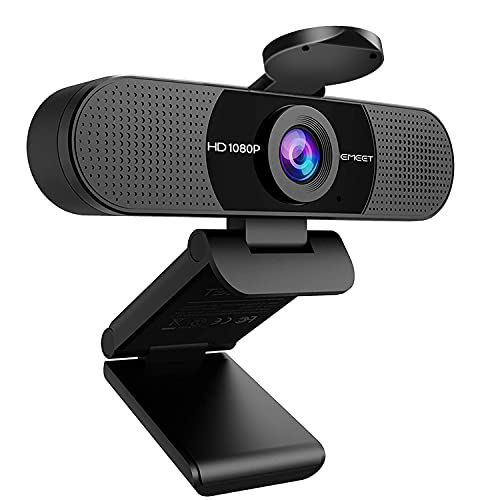
EMEET 1080P Webcam with Microphone, C960 Web Camera 2 Mics Streaming Webcam | 90°FOV Computer Camera, Plug and Play USB Web Cam for Online Calling/Conferencing, Zoom/Teams/Facetime/YouTube, Laptop/PC
As an Amazon Associate we earn from qualifying purchases. Product prices and availability are accurate as of the date/time indicated.
Top Webcams with Noise Cancelling Microphone Reviewed
Logitech Brio 4K
The Logitech Brio 4K is a webcam with a resolution of 4K UHD, a frame rate of 30fps at 4K and 60fps at 1080p, a microphone of dual noise cancelling, a field of view of 65, 78, and 90 degrees, and a price of $150 to $180. It has a design that is known for Logitech quality, with a webcam that is popular, and with a design that is clear. It is a good choice if you want the best webcam with noise cancelling microphone, with a design that is a good balance, and with a webcam that is ideal for a professional.
Logitech MX Brio 4K
The Logitech MX Brio 4K is a webcam with a resolution of 4K UHD, a frame rate of 30fps at 4K and 60fps at 1080p, a microphone of dual noise cancelling, a field of view of 65, 78, and 90 degrees, and a price of $180 to $200. It has a design that is known for Logitech quality, with a webcam that is newer, and with a design that is sharp. It is a good choice if you want a webcam with noise cancelling microphone that is the newest Logitech, with a design that is good and with a webcam that is ideal for a home office.
OBSBOT Tiny 2
The OBSBOT Tiny 2 is a webcam with a resolution of 4K UHD, a frame rate of 60fps at 1080p, a microphone of dual noise cancelling, a field of view of 85 degrees, and a price of $250 to $300. It has a design that is known for OBSBOT quality, with a webcam that is AI tracking, and with a design that is a gimbal. It is a good choice if you want a webcam with noise cancelling microphone that follows you, with a design that is good and with a webcam that is ideal for a presenter.
Razer Kiyo Pro Ultra
The Razer Kiyo Pro Ultra is a webcam with a resolution of 4K UHD, a frame rate of 30fps at 4K and 60fps at 1080p, a microphone of dual noise cancelling, a field of view of 72 and 82 degrees, and a price of $250 to $300. It has a design that is known for Razer quality, with a webcam that is large sensor, and with a design that is a low light. It is a good choice if you want a webcam with noise cancelling microphone that is best in low light, with a design that is good and with a webcam that is ideal for a streamer.
Dell Pro Webcam WB5023
The Dell Pro Webcam WB5023 is a webcam with a resolution of 2K QHD, a frame rate of 60fps at 1080p, a microphone of dual noise cancelling, a field of view of 65, 78, and 90 degrees, and a price of $120 to $150. It has a design that is known for Dell quality, with a webcam that is professional, and with a design that is a 2K. It is a good choice if you want a webcam with noise cancelling microphone that is mid-range, with a design that is good and with a webcam that is ideal for a business call.
Anker PowerConf C200
The Anker PowerConf C200 is a webcam with a resolution of 2K, a frame rate of 30fps, a microphone of dual noise cancelling, a field of view of 95 degrees, and a price of $60 to $80. It has a design that is known for Anker quality, with a webcam that is affordable, and with a design that is a 2K. It is a good choice if you want a webcam with noise cancelling microphone that is budget-friendly, with a design that is good and with a webcam that is ideal for a student.
Buying Guide: How to Choose the Best Webcam with Noise Cancelling Microphone
Start with your resolution, your mic, and your use. Look for a webcam with a resolution of 4K, because it is clear, with a design that is a sharp, and with a webcam that is ideal for a professional, with a design that is a work, while a webcam with a resolution of 1080p, with a design that is a standard, is also good, with a design that is a adequate, for a casual call, with a design that is a Zoom, and with a webcam that is a 2K, with a design that is a middle, being a good choice, because it is clear, with a design that is a balanced, and with a webcam that is a value, for a home office, with a design that is a desk, and with a microphone that is a dual noise cancelling, with a design that is a clear, being essential, with a design that is a voice, for a call, with a design that is a meeting, and with a webcam that is a noise cancelling, with a design that is a best, for a noisy home, with a design that is a fan, and with a webcam that is a clear, for a remote, with a design that is a work.
Next, check frame rate, field of view, and your room. Look for a webcam with a frame rate of 60fps, because it is smooth, with a design that is a fluid, and with a webcam that is ideal for a streamer, with a design that is a Twitch, while a webcam with a frame rate of 30fps, with a design that is a standard, is also good, with a design that is a adequate, for a meeting, with a design that is a Zoom, and with a webcam that is a 60fps, with a design that is a best, for a video, with a design that is a movement, and with a field of view of 65 degrees, with a design that is a narrow, being a good choice, because it focuses, with a design that is a you, on your face, with a design that is a close, while a field of view of 90 degrees, with a design that is a wide, is better, with a design that is a group, for a meeting with two people, with a design that is a shared, and with a webcam that is a adjustable, with a design that is a 65, 78, and 90, being a good choice, because it lets you choose, with a design that is a flexible, for a call, with a design that is a Zoom.
Check low light, autofocus, and your lighting. Look for a webcam with a large sensor, because it performs, with a design that is a clear, in low light, with a design that is a dim, and with a webcam that is a Razer Kiyo Pro Ultra, with a design that is a large sensor, being a good choice, because it is bright, with a design that is a low light, for a home office, with a design that is a evening, while a webcam with a small sensor, with a design that is a standard, will be grainy, with a design that is a noise, in low light, with a design that is a dark, and with a webcam that is a autofocus, with a design that is a fast, being also important, because it keeps you, with a design that is a face, in focus, with a design that is a sharp, as you move, with a design that is a natural, in a call, with a design that is a Zoom, and with a webcam that is a Logitech Brio, with a design that is a autofocus, being a good choice, because it is quick, with a design that is a reliable, for a meeting, with a design that is a professional.
Consider your compatibility, your privacy, and your desk. If you use Zoom, Teams, or Google Meet, a webcam with a USB, with a design that is a plug-and-play, is a good choice, because it works, with a design that is a simple, without drivers, with a design that is a easy, and with a webcam that is a Windows Hello, with a design that is a facial, being also useful, because it lets you log in, with a design that is a secure, with your face, with a design that is a Windows, and with a webcam that is a privacy shutter, with a design that is a cover, being also important, because it lets you block, with a design that is a camera, your video, with a design that is a private, when you are not on a call, with a design that is a home, and with a webcam that is a Logitech Brio, with a design that is a shutter, being a good choice, because it is a physical, with a design that is a secure, for a privacy, with a design that is a work, and with a webcam that is a professional, for a home office, with a design that is a desk.
Finally, set a realistic budget. Webcams with noise cancelling microphone typically cost $60 to $300, depending on resolution and brand. A webcam from $60 to $80, such as the Anker PowerConf C200, offers a good way to start, with a design that is affordable. A webcam from $120 to $200, such as the Dell Pro Webcam or Logitech Brio, offers a better webcam, with a design that is clear, and with a webcam that is worth it if you work from home regularly. A webcam from $250 to $300, such as the OBSBOT Tiny 2 or Razer Kiyo Pro Ultra, offers the best webcam, with a design that is premium, and with a webcam that is worth it if you stream, with a design that is a Twitch, or present, with a design that is a professional, for a call. Do not buy a webcam based only on resolution. Choose one that has a noise cancelling mic, with a design that is a dual, and with a webcam that is clear, so your calls are professional.
How to Set Up a Webcam with Noise Cancelling Microphone
To set up a webcam with noise cancelling microphone, first place your webcam, with a design that is a top, on your monitor, with a design that is a centre, and plug it, with a design that is a USB, into your PC, with a design that is a port, and open your video app, with a design that is a Zoom, and select your webcam, with a design that is a camera, and select your microphone, with a design that is a dual, in your settings, with a design that is a audio, and test your audio, with a design that is a voice, by speaking, with a design that is a clear, and check your background, with a design that is a noise, by playing a fan, with a design that is a loud, and see if your mic, with a design that is a noise cancelling, reduces it, with a design that is a clear, and adjust your lighting, with a design that is a lamp, in front, with a design that is a face, for a clear video, with a design that is a bright, and with a webcam that is a noise cancelling, with a design that is a professional, for a call, with a design that is a Zoom, and with a webcam that is a clear, for a home office, with a design that is a desk.
Frequently Asked Questions
Do webcams with noise cancelling microphones really work?
Do webcams with noise cancelling microphones really work, yes, a webcam with a dual noise cancelling mic, with a design that is a beamforming, can reduce, with a design that is a background, a fan, with a design that is a loud, or a keyboard, with a design that is a click, in your home, with a design that is a office, although it will not remove, with a design that is a limitation, all noise, with a design that is a loud, such as a dog barking, with a design that is a close, or a construction, with a design that is a outside, and with a webcam that is a Logitech Brio, with a design that is a dual mic, being a good choice, because it is effective, with a design that is a clear, for a typical home office, with a design that is a fan, and with a webcam that is a noise cancelling, with a design that is a best, for a video call, with a design that is a Zoom, and with a webcam that is a professional, for a remote, with a design that is a work, in 2026.
Is 4K better than 1080p for a webcam?
Is 4K better than 1080p for a webcam, yes, a 4K webcam, with a design that is a clear, is better, with a design that is a sharp, than a 1080p webcam, with a design that is a standard, because it has more detail, with a design that is a resolution, and with a webcam that is a 4K, with a design that is a Logitech MX Brio, being a good choice, because it is clear, with a design that is a professional, for a video call, with a design that is a Zoom, although most video apps, with a design that is a Zoom, will compress, with a design that is a 1080p, your video, with a design that is a call, and with a webcam that is a 4K, with a design that is a trade-off, being less noticeable, with a design that is a compressed, on a small screen, with a design that is a laptop, and with a webcam that is a 1080p, with a design that is a adequate, being a good choice, with a design that is a budget, for a casual call, with a design that is a student, and with a webcam that is a 4K, with a design that is a best, for a professional, with a design that is a work, in 2026.
Can I use a webcam microphone instead of a headset?
Yes, you can use a webcam microphone instead of a headset, if you use a webcam with a dual noise cancelling mic, with a design that is a clear, and with a webcam that is a Logitech Brio, with a design that is a dual, being a good choice, because it picks up, with a design that is a voice, your voice, with a design that is a clear, from a desk, with a design that is a distance, although a headset, with a design that is a close, will always be clearer, with a design that is a direct, than a webcam mic, with a design that is a far, and with a webcam mic, with a design that is a noise cancelling, being a good choice, because it is simple, with a design that is a plug-and-play, for a meeting, with a design that is a Zoom, and with a webcam that is a professional, for a home office, with a design that is a desk, and with a headset, with a design that is a best, for a noisy room, with a design that is a loud, and with a webcam mic, with a design that is a good, for a quiet room, with a design that is a home, in 2026.
What is the best webcam for Zoom meetings?
What is the best webcam for Zoom meetings is a webcam such as the Logitech Brio 4K or Logitech MX Brio 4K, with a price of $150 to $200, and with a webcam that is a 4K, with a design that is a clear, and with a microphone that is a dual noise cancelling, with a design that is a clear, and with a webcam that is a good choice, because it works, with a design that is a plug-and-play, with Zoom, with a design that is a compatible, and with a webcam that is a professional, with a design that is a work, for a remote, with a design that is a meeting, and with a webcam that is a privacy shutter, with a design that is a cover, being also useful, with a design that is a secure, for a home office, with a design that is a desk, and with a webcam that is a best, for a Zoom, with a design that is a clear, in 2026, and with a webcam that is a Logitech, with a design that is a trusted, for a video call, with a design that is a professional.
Related guides
- Best Console Camera for Student Streamers in 2026: 7 Affordable Cameras That Make Your Console Streams Look Clear, Bright, and Professional
- Best Smart Switch for Living Room in 2026: Dimmers and Switches From Lutron, Leviton, and Kasa That Handle LED Bulbs, 3-Way Circuits, and Movie Night Without Flicker
- Best Budget Gaming Speaker with Lights for Gamers in 2026: 7 Speakers That Offer Clear Sound, RGB Lights, and Reliable Use for Gamers
- Best WiFi 6 Router for Students in 2026: Fast, Cheap Routers for Student Houses and Studios — and the Dorm Rule You Must Check Before You Buy Anything
More from Amazon
Programs that pair well with the guide above. Offers and eligibility are set by Amazon and may change.
Set up recurring deliveries of everyday items on eligible products. Terms and savings are set by Amazon.
Explore Subscribe & SaveFree shipping on eligible items, Prime Video and more. Eligible new members can start with a free trial.
Start a Prime free trialAudiobooks and podcasts to listen to on the go. Eligible new members can start with a free trial.
Try Audible freeRead from a large library of eBooks and audiobooks on any device. Check Amazon for current plans.
Explore Kindle UnlimitedAs an Amazon Associate we earn from qualifying purchases.

Write Your Review
No reviews yet. Be the first to share your experience!