
What's inside
- How to Choose USB C Cable for Students: Wattage Matters Most
- How to Choose USB C Cable for Students: Length, Durability and Certification
- How to Choose USB C Cable for Students Comparison Table
- Top USB-C Cables for Students Reviewed
- Buying Guide: How to Choose USB C Cable for Students
- How to Use a USB-C Cable Safely for Students
- Frequently Asked Questions
As an Amazon Associate I earn from qualifying purchases. This post may contain affiliate links at no extra cost to you.
Learning how to choose USB C cable for students is about choosing a cable that charges your laptop, phone, and tablet safely, with a fast charging speed, a durable design, and a price that fits a student budget, without buying a cheap cable that breaks or damages your device. A good USB-C cable for students should support at least 60W charging, have a length of at least 3 feet, and have a braided design for durability. It should also be affordable, with a price that fits a student who wants a reliable cable without a large, expensive premium cable.
This guide explains how to choose USB C cable for students, how to compare wattage, data speed, length, and durability, and which cables work well in 2026. We focus on practical use for students who charge a laptop, phone, and tablet, with a cable that is used for charging and data transfer, and with a design that is suitable for a beginner. Whether you use a MacBook, a Windows laptop, or an Android phone, the same principles apply: choose a cable with enough wattage, with a length that fits your desk, and with a durable design.
Our Top Picks
How to Choose USB C Cable for Students: Wattage Matters Most
How to choose USB C cable for students starts with wattage, because wattage determines how fast your cable can charge your device. A cable with a wattage of 60W, such as the Anker 543, is enough for most phones and tablets, while a cable with a wattage of 100W, such as the Anker PowerLine III, is better for a laptop. A cable with a wattage of 240W is even better for a high-power laptop, but it is more expensive. A cable with a wattage under 60W may not charge your laptop.
How to choose USB C cable for students also needs data speed. A cable with a data speed of 480 Mbps, such as USB 2.0, is enough for charging, while a cable with a data speed of 10 Gbps, such as USB 3.2, is better for transferring files. A cable with a data speed of 40 Gbps, such as Thunderbolt 4, is best for a laptop, but it is more expensive. A cable with a braided design is more durable than a cable with a plastic design.
How to Choose USB C Cable for Students: Length, Durability and Certification
Length matters for a USB-C cable, because it determines where you can charge. A cable with a length of 3 feet is a good choice for most students, while a cable with a length of 6 feet is better if you charge from a wall outlet far from your desk. A cable with a length of 10 feet is even longer, but it may charge slower. A cable with a length under 3 feet is too short for most desks.
Durability also matters. A cable with a braided nylon design, such as the Anker PowerLine III, is more durable than a cable with a plastic design, because it can handle bending. A cable with a USB-IF certification is safer than a cable without, because it has been tested for safety. A cable with a lifetime warranty, such as Anker, is better than a cable without.
How to Choose USB C Cable for Students Comparison Table
| Model | Length | Max Wattage | Data Speed | Material | Typical Price Range | Rating |
|---|---|---|---|---|---|---|
| Anker 543 USB-C to USB-C Cable, 6 ft, 240W | 6 ft | 240 W | 480 Mbps | Braided nylon | $15-$20 | 4.8/5 |
| Anker PowerLine III USB-C to USB-C Cable, 6 ft, 100W | 6 ft | 100 W | 480 Mbps | Braided nylon | $10-$15 | 4.8/5 |
| UGREEN USB-C to USB-C Cable, 6 ft, 100W | 6 ft | 100 W | 480 Mbps | Braided nylon | $10-$15 | 4.8/5 |
| Cable Matters USB-C to USB-C Cable, 6 ft, 100W | 6 ft | 100 W | 10 Gbps | Braided nylon | $15-$20 | 4.7/5 |
| Belkin BoostCharge USB-C to USB-C Cable, 6 ft, 60W | 6 ft | 60 W | 480 Mbps | Plastic | $10-$15 | 4.7/5 |
| Amazon Basics USB-C to USB-C Cable, 6 ft, 60W | 6 ft | 60 W | 480 Mbps | Plastic | $8-$12 | 4.7/5 |

INIU 240W USB C to USB C Cable, [6.6ft+6.6ft] Fast Charging Type C, Orange | Nylon Braided, Fast Charging, LED Indicator, USB-C Data Transfer, for iPhone Duo 18 17 16 Pro, MacBook Pro, iPad, Samsung etc
As an Amazon Associate we earn from qualifying purchases. Product prices and availability are accurate as of the date/time indicated.
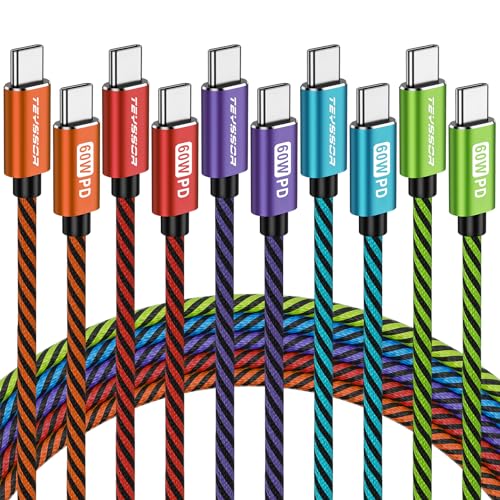
Teyssor USB C to USB C Cable, Type-C Charger Cable 10FT 5Pack 60W, USBC to USBC Fast Charging Cable for Phone 17/16/ 15 Series, Type C Charger Cable for Samsung S24/S24+, MacBook, Pad Pro/Air


As an Amazon Associate we earn from qualifying purchases. Product prices and availability are accurate as of the date/time indicated.
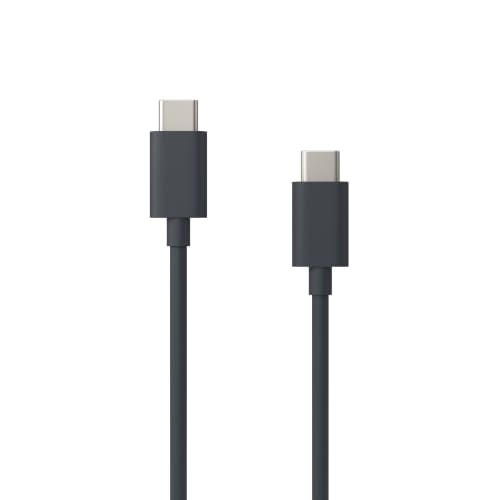
Amazon Official USB-C to USB-C Cable for Fire Tablets & other compatible Amazon devices
As an Amazon Associate we earn from qualifying purchases. Product prices and availability are accurate as of the date/time indicated.
Top USB-C Cables for Students Reviewed
Anker 543 USB-C to USB-C Cable, 6 ft, 240W
The Anker 543 USB-C to USB-C Cable, 6 ft, 240W is a cable with a length of 6 feet, a max wattage of 240W, a data speed of 480 Mbps, a braided nylon material, and a price of $15 to $20. It has a high wattage, a durable design, and a good value. It is a good choice if you want to learn how to choose USB C cable for students with a proven Anker design.
Anker PowerLine III USB-C to USB-C Cable, 6 ft, 100W
The Anker PowerLine III USB-C to USB-C Cable, 6 ft, 100W is a cable with a length of 6 feet, a max wattage of 100W, a data speed of 480 Mbps, a braided nylon material, and a price of $10 to $15. It has a good wattage, a durable design, and a good value. It is a good choice if you want an Anker cable with a good wattage.
UGREEN USB-C to USB-C Cable, 6 ft, 100W
The UGREEN USB-C to USB-C Cable, 6 ft, 100W is a cable with a length of 6 feet, a max wattage of 100W, a data speed of 480 Mbps, a braided nylon material, and a price of $10 to $15. It has a good wattage, a durable design, and a good value. It is a good choice if you want a UGREEN cable with a good wattage.
Cable Matters USB-C to USB-C Cable, 6 ft, 100W
The Cable Matters USB-C to USB-C Cable, 6 ft, 100W is a cable with a length of 6 feet, a max wattage of 100W, a data speed of 10 Gbps, a braided nylon material, and a price of $15 to $20. It has a fast data speed, a durable design, and a good value. It is a good choice if you want a Cable Matters cable with a fast data speed.
Belkin BoostCharge USB-C to USB-C Cable, 6 ft, 60W
The Belkin BoostCharge USB-C to USB-C Cable, 6 ft, 60W is a cable with a length of 6 feet, a max wattage of 60W, a data speed of 480 Mbps, a plastic material, and a price of $10 to $15. It has a good wattage for phones, a simple design, and a good value. It is a good choice if you want a Belkin cable with a good wattage for phones.
Amazon Basics USB-C to USB-C Cable, 6 ft, 60W
The Amazon Basics USB-C to USB-C Cable, 6 ft, 60W is a cable with a length of 6 feet, a max wattage of 60W, a data speed of 480 Mbps, a plastic material, and a price of $8 to $12. It has a low price, a simple design, and a good value. It is a good choice if you want an Amazon Basics cable with a low price.
Buying Guide: How to Choose USB C Cable for Students
Start with your devices, your charger, and your budget. If you charge a laptop, a cable with a wattage of 100W, such as the Anker PowerLine III, is a good choice, because it can charge your laptop. If you charge only a phone, a cable with a wattage of 60W, such as the Belkin BoostCharge, is enough. If you have a budget under $15, a cable such as the Anker PowerLine III or UGREEN is a good choice.
Next, check length, data speed, and durability. A cable with a length of 6 feet is a good choice for most students, while a cable with a length of 3 feet is better for a backpack. A cable with a data speed of 480 Mbps is enough for charging, while a cable with a data speed of 10 Gbps is better for transferring files. A cable with a braided nylon design is more durable than a cable with a plastic design.
Check your budget, your use, and your future. USB-C cables for students typically cost $8 to $20. A cable from $8 to $12, such as the Amazon Basics, offers a good way to start. A cable from $10 to $15, such as the Anker PowerLine III, UGREEN, or Belkin BoostCharge, offers a better durability and wattage. A cable from $15 to $20, such as the Anker 543 or Cable Matters, offers a higher wattage and a faster data speed.
Finally, do not buy a USB-C cable based only on price or length. A cable with a low wattage will not charge your laptop, while a cable with a high wattage but a poor design may break quickly. Choose a cable that fits your devices, with a wattage that fits your charger, and with a durable braided design. Check for USB-IF certification, and test your cable with your laptop before you rely on it for class.
How to Use a USB-C Cable Safely for Students
To use a USB-C cable safely for students, first check your cable’s wattage, with your charger’s wattage, and make sure they match. Plug your cable into your charger, then into your laptop or phone, and check that your device shows charging. Do not use a cable that is frayed, bent, or damaged, because it can damage your device or cause a fire. Store your cable in a cable organizer, with a loose coil, not a tight wrap, and keep it away from water. After class, unplug your cable and store it in your backpack, in a separate pocket.
Frequently Asked Questions
How do I choose a USB-C cable for my laptop?
How you choose a USB-C cable for your laptop depends on your laptop’s wattage. A laptop that needs 60W charging, such as a MacBook Air, needs a cable with a wattage of at least 60W, such as the Belkin BoostCharge. A laptop that needs 100W charging, such as a MacBook Pro, needs a cable with a wattage of at least 100W, such as the Anker PowerLine III. Check your laptop’s charger wattage before you buy, and choose a cable with a wattage that matches or exceeds it.
What is the difference between 60W and 100W USB-C cables?
What is the difference between 60W and 100W USB-C cables, a 60W cable can charge a phone, tablet, and some laptops, while a 100W cable can charge a larger laptop, such as a MacBook Pro. A 100W cable, such as the Anker PowerLine III at $10 to $15, is a good choice for most students, because it can charge a laptop and a phone. A 60W cable, such as the Amazon Basics at $8 to $12, is a good choice if you only charge a phone. Choose a 100W cable if you charge a laptop.
Are braided USB-C cables better than plastic cables?
Are braided USB-C cables better than plastic cables, yes, braided USB-C cables are better than plastic cables for most students, because a braided nylon design is more durable and can handle bending, while a plastic design can crack or fray. A braided cable, such as the Anker PowerLine III, is a good choice for a backpack, because it can handle being stuffed in a bag. A plastic cable, such as the Amazon Basics, is cheaper, but it may break faster. Choose a braided cable if you carry it daily.
How long should a USB-C cable be for students?
How long a USB-C cable should be for students depends on your desk and outlet. A cable with a length of 6 feet is a good choice for most students, because it reaches from a wall outlet to your desk. A cable with a length of 3 feet is better for a backpack or a library, where outlets are close. A cable with a length of 10 feet is even longer, but it may charge slower. Choose a 6-foot cable for your desk, and a 3-foot cable for your backpack.
Related guides
- Best Smart Switch for Living Room in 2026: Dimmers and Switches From Lutron, Leviton, and Kasa That Handle LED Bulbs, 3-Way Circuits, and Movie Night Without Flicker
- Best Budget Gaming Speaker with Lights for Gamers in 2026: 7 Speakers That Offer Clear Sound, RGB Lights, and Reliable Use for Gamers
- Best WiFi 6 Router for Students in 2026: Fast, Cheap Routers for Student Houses and Studios — and the Dorm Rule You Must Check Before You Buy Anything
- Best Mesh WiFi System for Student Shared Houses: 6 Systems for Shared Student Homes in 2026
More from Amazon
Programs that pair well with the guide above. Offers and eligibility are set by Amazon and may change.
Set up recurring deliveries of everyday items on eligible products. Terms and savings are set by Amazon.
Explore Subscribe & SaveFree shipping on eligible items, Prime Video and more. Eligible new members can start with a free trial.
Start a Prime free trialAudiobooks and podcasts to listen to on the go. Eligible new members can start with a free trial.
Try Audible freeRead from a large library of eBooks and audiobooks on any device. Check Amazon for current plans.
Explore Kindle UnlimitedAs an Amazon Associate we earn from qualifying purchases.

Write Your Review
No reviews yet. Be the first to share your experience!