
What's inside
- Smart Lock vs Traditional Lock Budget: What Each Tier Buys
- Quick Comparison: Smart Lock vs Traditional Lock Budget Models
- Detailed Reviews: Smart Lock vs Traditional Lock Budget Picks
- Buying Guide: Choosing Between a Smart Lock and a Traditional Lock on a Budget
- Frequently Asked Questions About Smart Lock vs Traditional Lock Budget
As an Amazon Associate I earn from qualifying purchases. This post may contain affiliate links at no extra cost to you.
The smart lock vs traditional lock budget question is not really about technology. It is about what a lock budget buys at each level: at the bottom, a sound mechanical deadbolt that will work for decades with no batteries and no app; above it, a keypad deadbolt that ends the hidden spare key and the locked-out phone call; above that, a connected smart lock that opens for a fingerprint, a phone, or a code you can issue to a guest and revoke when they leave. This guide compares real, currently sold locks from Schlage, Kwikset, Yale, and August across all three tiers, states plainly what each tier does not do, and gives the budget verdict most households actually need: the door’s security is a system of lock grade, door and frame strength, and installation, and electronics add convenience to that system rather than replacing its foundations.
Security honesty comes first, because lock marketing blurs it. A lock’s resistance to forced entry and picking is described by its grade, the ANSI/BHMA grading system in which Grade 1 is the highest residential and commercial class, Grade 2 a strong residential standard, and Grade 3 the basic residential minimum, in the grading bodies’ terms. A smart lock and a traditional lock can share the same grade, because the grade tests the bolt and the hardware, not the electronics, and a cheap ungraded smart lock is a worse security purchase than a graded mechanical one at half its price. The second foundation is the door itself: a strong bolt in a weak frame with short strike screws fails at the frame, which is why the buying guide includes the inexpensive reinforcement, long strike screws into the wall stud and a sound strike plate, that improves every lock in this table equally. Follow your local building and fire codes for egress, your insurer’s and landlord’s requirements where they apply, and each maker’s installation instructions exactly.
Prices are typical retail ranges, and specifications, grade where stated, power, connectivity, and compatibility, are each maker’s stated details for the current version, so confirm them on the exact model before you buy, because every brand here sells several grades and feature sets under one family name.
Our Top Picks
Smart Lock vs Traditional Lock Budget: What Each Tier Buys
The Traditional Deadbolt: Security Without a Battery
A quality mechanical deadbolt, the Schlage B60 class being the widely sold pattern, is a single cylinder, a key outside, a thumb turn inside, a bolt thrown by hand, and nothing to charge, update, or hack. Its virtues compound over decades: it works in a power cut, a flood, and a freeze, its failure modes are visible and mechanical, and its cost is the lowest in this guide by a factor of three or more. Its costs are the key itself: copies to manage, a spare hidden somewhere a burglar also knows to look, lockouts when the key is elsewhere, and no record of who entered or when. For a door used by one household with settled habits, a rental where electronics are not permitted, and any door where budget is the binding constraint, a Grade 2 or better traditional deadbolt, properly installed into a reinforced frame, is not a compromise. It is the correct lock, and the rest of this guide exists for the households whose lives have outgrown the key.
The Keypad Deadbolt: The Budget Sweet Spot
The keypad tier, Schlage Camelot and Kwikset SmartKey keypad classes among them, replaces the carried key with a code while keeping the lock mechanically self-contained: no app, no Wi-Fi, no account, just a battery that typically serves a long period in the makers’ terms and a key cylinder as backup on most models. For families it ends the child’s lost key, the dog walker’s hidden spare, and the cleaner’s copy, because codes can be individual and changeable. It is, for most households, the budget answer this guide recommends first: nearly all of the daily convenience people actually want from a smart lock, at roughly half the connected tier’s price, with a security grade available equal to the best traditional locks when the buyer chooses the graded models. Its limits are the absence of remote control and of any record beyond the door itself, and for many doors those limits never matter.
The Connected Smart Lock: Remote Life at a Remote Price
A connected lock, Yale Assure and Schlage Encode classes with built-in Wi-Fi in their makers’ versions, August’s retrofit system that keeps your existing exterior hardware, adds the phone to the keyring: lock and unlock remotely, issue temporary codes to guests, a sitter, or a delivery in the services’ terms, see a log of entries in the app, and integrate the door with a smart home system, Alexa, Google, Apple, and Matter ecosystems in the makers’ stated compatibilities. The conveniences are real and, for a household with carers, cleaners, short-term guests, or a teenager’s changing cast, transformative. The costs are equally real: the highest prices here, batteries consumed faster by Wi-Fi models in particular, an account and an app in your security chain, and a setup that must be done properly, strong account password, updates applied, auto-lock configured, to be a security improvement rather than a new attack surface with a keypad attached. Buy this tier for a named need, not for the idea of it.
Quick Comparison: Smart Lock vs Traditional Lock Budget Models
| Model | Type and Key Specs in Maker’s Terms | Power and Access Notes | Typical Price Range | Rating |
|---|---|---|---|---|
| Schlage B60 class deadbolt | Traditional single-cylinder deadbolt, Grade 1 class rating in maker’s line for stated versions | Key and thumb turn, no power, no electronics | $35 – $60 | 4.6 / 5 |
| Kwikset SmartKey deadbolt class | Traditional deadbolt with rekeyable cylinder in maker’s terms, grades by version | Key, owner rekeying without a locksmith in maker’s system | $30 – $55 by version | 4.4 / 5 |
| Schlage Camelot Keypad class (FE595 / Connect by version) | Keypad lever and deadbolt classes, grades by version in maker’s line | Codes plus key backup, battery, no app on base versions | $110 – $180 by version | 4.6 / 5 |
| Kwikset Premis / Halo class keypad and smart versions | Keypad deadbolts, connected versions in maker’s range, SmartKey cylinder | Codes, app on connected versions, battery | $120 – $230 by version | 4.4 / 5 |
| Yale Assure Lock 2 class | Connected smart deadbolt, keypad and key-free versions, modular radios in maker’s system | Wi-Fi and other modules by version, codes, app, auto-lock features | $160 – $260 by version | 4.5 / 5 |
| August Wi-Fi Smart Lock class (retrofit) | Retrofit interior unit driving the existing deadbolt in maker’s design | Keeps exterior lock and keys, app, auto-unlock class features | $200 – $280 | 4.3 / 5 |

eufy Security Smart Lock C220, Fingerprint Keyless Entry Door Lock | Built-in Wi-Fi, App Remote Control, Up to 8-Month Battery, Front Door Smart Lock Deadbolt, IP53 Waterproof, BHMA Grade 3
As an Amazon Associate we earn from qualifying purchases. Product prices and availability are accurate as of the date/time indicated.
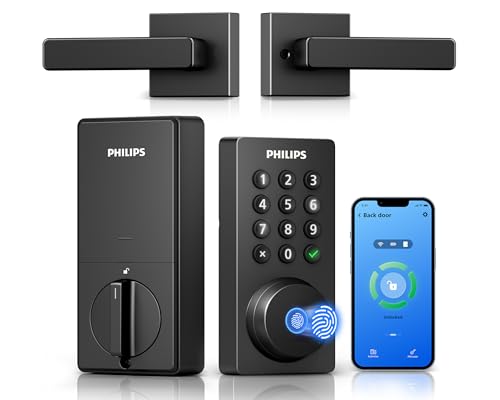
Philips WiFi Keypad Deadbolt with Handle, Built-in WiFi, APP Remote Control | Smart Locks for Front Door, Voice & Fingerprint Unlock, Flexible Codes, Auto-Lock, Backlit Keypad, Come with Door Lever
As an Amazon Associate we earn from qualifying purchases. Product prices and availability are accurate as of the date/time indicated.

Veise VE017 Fingerprint Smart Door Lock with App Control, Matte Black | 8-in-1 Keyless Entry, Smart User Management, Auto Lock, Electronic Touchscreen Keypad, USB-C Port, Deadbolt for Front Door
As an Amazon Associate we earn from qualifying purchases. Product prices and availability are accurate as of the date/time indicated.
Grades, connectivity, and included features are each maker’s stated specifications for the current version and vary significantly between versions sharing a family name, particularly keypad models sold in purely electronic and connected forms, so verify the exact version’s grade and radio. Price ranges are typical retail ranges and vary by finish, retailer, and promotion. Ratings are editorial ratings within a budget frame: security as graded and installed, daily convenience for the tier, reliability and battery practicality, installation fairness, and value.
Detailed Reviews: Smart Lock vs Traditional Lock Budget Picks
1. Schlage B60 Class – Best Traditional Lock on a Budget
The B60 class is the traditional benchmark: a deadbolt whose stated versions carry the highest residential grade in its maker’s line, a simple key-and-thumb-turn operation, and a record across an enormous installed base, at a price that makes it the automatic choice for a second door, a rental, or a budget that must also fund the frame reinforcement this guide insists on. It offers no convenience beyond doing its one job for decades, and for a great many doors that is the complete job description. If the budget in this guide’s title is yours, start here and spend what remains on the strike, the screws, and the door itself.
2. Schlage Camelot Keypad Class – Best Budget Keypad Lock
The Camelot keypad class is the sweet spot made physical: codes for the household, a key cylinder in reserve, a battery routine measured in seasons rather than weeks in ordinary use, and Schlage’s graded hardware behind the electronics in its stated versions. It ends the hidden spare key, the most insecure convenience in domestic life, for roughly the price of two locksmith callouts, which is the arithmetic that sells it to every family that has paid one. Choose the purely keypad version for simplicity or the connected version in the maker’s range if the app features are genuinely wanted, and do not pay for the radio by accident.
3. Yale Assure Lock 2 Class – Best Connected Smart Lock on a Budget
Yale’s Assure 2 class is the connected tier done with a budget conscience: a clean keypad deadbolt whose radio is modular in the maker’s system, so a buyer can start with local codes and add Wi-Fi or another ecosystem module in the maker’s terms rather than replacing the lock, with auto-lock and guest code features in the app. Its key-free versions demand confidence in the electronics and this guide steers most households to the keyed versions for the reserve cylinder. For the household with a named remote need, guests, carers, a rental room where lawful, it is the connected recommendation.
4. Kwikset SmartKey Deadbolt Class – Best Traditional Lock for Rekeying
Kwikset’s SmartKey cylinder answers the traditional lock’s recurring cost: rekeying after a lost key, a moved-out tenant, or a changed cleaner normally means a locksmith, and the SmartKey system in its maker’s terms lets the owner rekey the cylinder to a new key in moments with the tool provided. Its grades vary by version, so choose the higher-graded versions for an exterior door as this guide’s security section requires. For landlords within their local rules and households whose key population changes, it is the traditional tier’s smartest feature, bought without a battery in sight.
5. Kwikset Halo and Premis Classes – Best Mid-Budget Smart Lock Options
Kwikset’s connected classes bring Wi-Fi and app control in the maker’s versions at prices that undercut the premium connected names, with the SmartKey cylinder’s rekeying as a bonus and a keypad as the daily interface. Their apps and ecosystems are a step behind Yale and Schlage’s in polish, as the price predicts, and for a household whose connected need is basic, remote check, guest code, a log, they deliver it for less. Verify the exact version’s connectivity before ordering, because this family spans keypad-only and connected models under close names, the category’s commonest buying mistake.
6. August Wi-Fi Smart Lock Class – Best Smart Lock for Renters
August’s retrofit design is the renter’s and the traditionalist’s bridge: an interior unit that drives the deadbolt you already own, in the maker’s design, leaving the exterior hardware, the key, and the landlord’s lock untouched, while adding app control, guest access, and auto-unlock class features in its system. Its price is the table’s highest against hardware it does not include, which is the honest cost of keeping the existing lock, and its battery appetite is the connected tier’s usual. For a household forbidden to change its lock, it is not a compromise, it is the only route to the connected life, and it travels to the next home in a pocket.
Buying Guide: Choosing Between a Smart Lock and a Traditional Lock on a Budget
Spend on the Door System in the Right Order
Budget in security order. First, the door and frame: a solid door, a sound frame, a quality strike plate fitted with long screws that reach the wall stud, in the standard practice of the trade, because this inexpensive work raises the real resistance of every lock in this guide more than any upgrade between them. Second, the lock’s grade: choose Grade 2 or better in the maker’s stated rating for an exterior door, whatever the tier. Third, and only then, the convenience tier your household’s life justifies, traditional for settled key habits, keypad for families and shared access, connected for a named remote need. A household that funds the tiers in that order ends with a door that is genuinely secure and appropriately convenient; one that funds them in reverse owns an expensive app attached to a weak frame.
Install and Configure Like It Matters
Fit the lock to the maker’s instructions exactly, checking the door’s thickness, backset, and alignment first, because a deadbolt that binds against a misaligned strike will defeat a motorised lock outright and wear a manual one, and alignment, not electronics, is the first cause of smart lock failure in the field. For keypad and connected models, configure deliberately on day one: individual codes rather than one shared birthday, auto-lock set to a short interval in the maker’s options, the app account protected with a strong password and the maker’s two-step verification where offered, firmware updated, and the physical key stored as a genuine reserve rather than hidden outside. Test the lock from both sides, with the door open and closed, in the cold and with the battery the maker specifies, and put the battery change on the calendar the makers’ low-battery warnings assume you will heed.
Plan the Failure Modes Before They Visit
Every tier fails differently, and a budget buyer should choose with the failures in view. A traditional lock fails by lost keys and lockouts, answered by the SmartKey rekeying system or a key held by a trusted neighbour rather than hidden outdoors. A keypad fails by battery, answered by the reserve key and the calendar. A connected lock adds account, app, and network failures, answered by the same reserve key, a household member who knows the manual operation, and the discipline that the lock must work, and be workable, with the internet down and the phone flat, because a front door is not a gadget and its worst day is not the day to discover its dependencies. Bought with its failure plan included, any lock in this guide serves for years; the tier matters less than the honesty, and that, in the end, is what a lock budget is really buying.
Frequently Asked Questions About Smart Lock vs Traditional Lock Budget
Is a smart lock more secure than a traditional lock?
Not inherently. Security against force and picking is set by the lock’s grade, ANSI/BHMA Grade 1 to 3 in the grading bodies’ terms, and by the door, frame, and installation, and a graded traditional deadbolt, Schlage B60 class, outranks an ungraded smart lock at any price. A smart lock of equal grade adds convenience and an entry log, and adds an account and app that must be configured properly, strong password, updates, auto-lock, to avoid becoming a new weakness. Buy the grade first and the electronics second.
What is the best lock to buy on a tight budget?
A Grade 2 or better traditional deadbolt, Schlage B60 or a higher-graded Kwikset SmartKey version in this guide, typically in the $30 to $60 range, fitted into a reinforced strike with long screws. That combination is the strongest security per dollar in this guide. If the budget stretches once, the keypad tier, Schlage Camelot class, is the next purchase, because it removes the hidden spare key and the lockout, the two commonest real-world weaknesses of a key-only household.
Do smart locks work when the power or internet goes out?
The lock itself runs on its own batteries and keeps working locally, codes, fingerprint, and key, through a power or internet outage on the models in this guide, in their makers’ designs; what is lost in an outage is the remote layer, app control from away and live logs. A dead battery is the real risk, answered by heeding the low-battery warnings, keeping the reserve key accessible to the household, and changing batteries on a calendar. No lock in this guide should ever leave a household unable to enter or, for fire safety, unable to exit.
Can a renter fit a smart lock?
Only within the tenancy’s terms and local rules, which the renter must check first, because replacing a lock usually needs the landlord’s permission. The August retrofit class exists for this case: it fits the interior side and drives the existing deadbolt in its maker’s design, leaving the exterior lock and the landlord’s key system unchanged, and removes without trace at the end of the tenancy. A keypad or full smart lock replacement, however convenient, should wait for written permission, and in some jurisdictions tenants have specific rights and duties about locks that local advice should confirm.
Related guides
- Best Console for Horror Games in 2026: 7 Consoles That Make Horror Scarier, With the Best Exclusives, Atmosphere, and Performance for Horror Fans
- Best WiFi Extender vs Mesh WiFi for Student Dorms in 2026: TP-Link, Netgear, and Amazon eero Options for Small Rooms, Shared Houses, and Rules You Did Not Write
- Best Microphone for Recording Violin at Home in 2026: Clear, Detailed Mics for Warm Violin Sound
- Best Backup Software for Family PCs in 2026: 7 Backup Tools That Protect Photos, Homework, and Family Files Without Complicated Setup
More from Amazon
Programs that pair well with the guide above. Offers and eligibility are set by Amazon and may change.
Set up recurring deliveries of everyday items on eligible products. Terms and savings are set by Amazon.
Explore Subscribe & SaveFree shipping on eligible items, Prime Video and more. Eligible new members can start with a free trial.
Start a Prime free trialAudiobooks and podcasts to listen to on the go. Eligible new members can start with a free trial.
Try Audible freeRead from a large library of eBooks and audiobooks on any device. Check Amazon for current plans.
Explore Kindle UnlimitedAs an Amazon Associate we earn from qualifying purchases.

Write Your Review
No reviews yet. Be the first to share your experience!