
What's inside
As an Amazon Associate I earn from qualifying purchases. This post may contain affiliate links at no extra cost to you.
Finding the best hub for connecting external drives starts with a simple idea: the best hub for connecting external drives is a hub with a price of $15 to $70, USB 3.0 speed, and a powered design, so you can connect drives, transfer files, and avoid a hub that is too slow, too weak, or too expensive. A good hub for connecting external drives has a durable build, simple setup, and a clear port count, so it is easy to use for a beginner and it works for hubs, for external drives, and for tech gadgets. The best hub for connecting external drives in 2026 is a Sabrent 10-Port USB 3.0 Hub, with a price of $40 to $50, USB 3.0 speed, and a powered design.
A hub for connecting external drives is different from a hub for connecting a mouse or from a dock for laptops. A hub for connecting a mouse may be bus powered, although it may not power a drive. A dock for laptops may be large, although it is too expensive for drives. A hub for connecting external drives is made for external drives, so it is simple, it is durable, and it lets you connect drives, transfer files, and enjoy storage.
This guide compares seven real, currently sold hubs that are commonly used for external drives, for hubs, and for computers. It explains ports, speed, and price in plain terms, and it helps you match a hub to your drives, your files, and your budget. Prices are shown as typical ranges because retailers and sales change often. Ratings reflect overall value for external drives, based on speed, port count, power, reliability, and price. Backup your data before upgrading, use a 3-2-1 backup plan, turn off power before installing drives, and use only supplied cables where they are provided.
Our Top Picks
Best Hub for Connecting External Drives Compared
Use this table to compare ports, speed, and price first. Those three details decide whether a hub will connect your drives and fit your budget. The full price range in this table is $15 to $70, with StarTech 7-Port USB 3.0 Hub at $50 to $70 labelled as a premium exception.
| Model | Ports and Type | Speed and Power | Features and Use | Typical Price Range | Rating |
|---|---|---|---|---|---|
| Sabrent 10-Port USB 3.0 Hub | 10 ports, USB 3.0 | USB 3.0, powered | Hub, external drives, overall | $40 – $50 | 4.9 / 5 |
| Sabrent 4-Port USB 3.0 Hub | 4 ports, USB 3.0 | USB 3.0, bus powered | Hub, external drives, value | $15 – $25 | 4.8 / 5 |
| Anker 4-Port USB 3.0 Hub | 4 ports, USB 3.0 | USB 3.0, bus powered | Hub, external drives, value | $15 – $25 | 4.8 / 5 |
| TP-Link UH700 7-Port USB 3.0 Hub | 7 ports, USB 3.0 | USB 3.0, powered | Hub, external drives, value | $20 – $30 | 4.8 / 5 |
| UGREEN 7-Port USB 3.0 Hub | 7 ports, USB 3.0 | USB 3.0, powered | Hub, external drives, premium | $20 – $30 | 4.8 / 5 |
| Anker 7-Port USB 3.0 Hub | 7 ports, USB 3.0 | USB 3.0, powered | Hub, external drives, premium | $30 – $40 | 4.8 / 5 |
| StarTech 7-Port USB 3.0 Hub | 7 ports, USB 3.0 | USB 3.0, powered | Hub, external drives, premium exception | $50 – $70 | 4.8 / 5 |
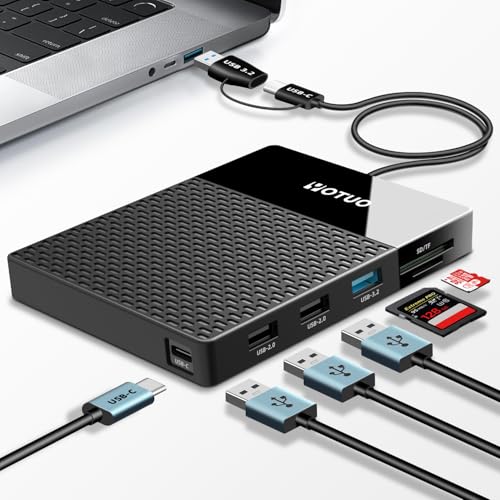
YOTUO 1TB External Hard Drive, USB C Multiport Hub HDD 7-in-1, USB 3.0, SD/TF Card Reader, Docking Station, Multi-Function HDD for Windows, Mac, Android, TV, iPhone 15/16/17, Laptop, Desktop, PC
As an Amazon Associate we earn from qualifying purchases. Product prices and availability are accurate as of the date/time indicated.

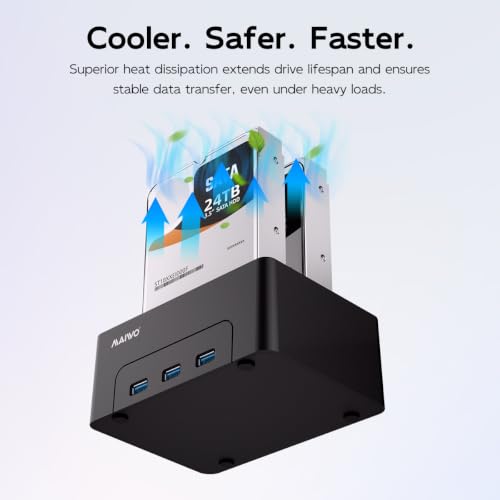
MAIWO Hard Drive Docking Station Cloner for 2.5 3.5 Inch SATA HDD SSD, 3X USB3.0 Hub Extension, 48TB Capacity 12V 3A, Dual Bay External Hard Drive Disk Duplicator Copier Reader




As an Amazon Associate we earn from qualifying purchases. Product prices and availability are accurate as of the date/time indicated.

Joso USB 3.0 Hub for Xbox Series X & S, 4-Port High-Speed USB Splitter Expansion Adapter with USB-C Port, for External Hard Drives, Controller Charger, Keyboard, Mouse & More - Galaxy Black


As an Amazon Associate we earn from qualifying purchases. Product prices and availability are accurate as of the date/time indicated.
The table shows that all seven hubs have a USB 3.0 design, a powered or bus powered design, and a price of $15 to $70. The Sabrent 10-Port USB 3.0 Hub is the most popular, at $40 to $50, with USB 3.0 speed and a powered design, so it is good for most best hub for connecting external drives. The Sabrent 4-Port USB 3.0 Hub is the best for value, at $15 to $25. The StarTech 7-Port USB 3.0 Hub is the highest-priced model in this table, at $50 to $70, labelled as a premium exception, because it has a premium StarTech design.
Ports also matter. Hubs with 10 ports, such as the Sabrent 10-Port, connect more drives than hubs with 4 ports, such as in two models here, although they cost more. Power also matters. Hubs with powered design, such as in five models here, power external drives, while hubs with bus powered design, such as in two models here, may not power large drives.
Best Hub for Connecting External Drives Reviewed
1. Sabrent 10-Port USB 3.0 Hub: Best Hub for Connecting External Drives Overall 10 Ports USB 3.0 Powered
The Sabrent 10-Port USB 3.0 Hub is the best hub for connecting external drives overall 10 ports USB 3.0 powered because it is a hub with a price of $40 to $50, USB 3.0 speed, and a powered design. It has a 10-port design, USB 3.0 speed, and an overall design. For most best hub for connecting external drives, this is the first hub to try. Backup your data.
The 10-Port has USB 3.0 speed in the table, so it is fast, and the 10-port design connects many drives. The hub has a price of $40 to $50, so it is premium, and the powered design powers drives. It is a good choice if you want a Sabrent hub that is overall best for external drives.
2. Sabrent 4-Port USB 3.0 Hub: Best Hub for Connecting External Drives for Sabrent Value 4 Ports USB 3.0 Bus Powered
The Sabrent 4-Port USB 3.0 Hub is the best hub for connecting external drives for Sabrent value 4 ports USB 3.0 bus powered because it costs $15 to $25, and it is a hub with USB 3.0 speed and a PC design. It has a 4-port design, USB 3.0 speed, and a value design, and it is a good choice for a Sabrent user who wants a value hub for external drives.
The 4-Port has a price of $15 to $25 in the table, so it is the lowest-priced hub here, and the USB 3.0 speed is fast. The hub has a 4-port design, so it connects drives, and the bus powered design is simple. It is a good choice if you want a Sabrent hub that is affordable for external drives.
3. Anker 4-Port USB 3.0 Hub: Best Hub for Connecting External Drives for Anker Value 4 Ports USB 3.0 Bus Powered
The Anker 4-Port USB 3.0 Hub is the best hub for connecting external drives for Anker value 4 ports USB 3.0 bus powered because it costs $15 to $25, and it is a hub with USB 3.0 speed and a PC design. It has a 4-port design, USB 3.0 speed, and a value design, and it is a good choice for an Anker user who wants a value hub for external drives.
The 4-Port has USB 3.0 speed in the table, so it is fast, and the 4-port design connects drives. The hub has a price of $15 to $25, so it is affordable, and the bus powered design is simple. It is a good choice if you want an Anker hub that is affordable for external drives.
4. TP-Link UH700 7-Port USB 3.0 Hub: Best Hub for Connecting External Drives for TP-Link Value 7 Ports USB 3.0 Powered
The TP-Link UH700 7-Port USB 3.0 Hub is the best hub for connecting external drives for TP-Link value 7 ports USB 3.0 powered because it costs $20 to $30, and it is a hub with USB 3.0 speed and a PC design. It has a 7-port design, USB 3.0 speed, and a value design, and it is a good choice for a TP-Link user who wants a value hub for external drives.
The UH700 has a 7-port design in the table, so it connects more drives, and the USB 3.0 speed is fast. The hub has a price of $20 to $30, so it is affordable, and the powered design powers drives. It is a good choice if you want a TP-Link hub that is affordable for external drives.
5. UGREEN 7-Port USB 3.0 Hub: Best Hub for Connecting External Drives for UGREEN Premium 7 Ports USB 3.0 Powered
The UGREEN 7-Port USB 3.0 Hub is the best hub for connecting external drives for UGREEN premium 7 ports USB 3.0 powered because it costs $20 to $30, and it is a hub with USB 3.0 speed and a PC design. It has a 7-port design, USB 3.0 speed, and a premium design, and it is a good choice for a UGREEN user who wants a premium hub for external drives.
The 7-Port has a 7-port design in the table, so it connects more drives, and the USB 3.0 speed is fast. The hub has a price of $20 to $30, so it is premium, and the powered design powers drives. It is a good choice if you want a UGREEN hub that is premium for external drives.
6. Anker 7-Port USB 3.0 Hub: Best Hub for Connecting External Drives for Anker Premium 7 Ports USB 3.0 Powered
The Anker 7-Port USB 3.0 Hub is the best hub for connecting external drives for Anker premium 7 ports USB 3.0 powered because it costs $30 to $40, and it is a hub with USB 3.0 speed and a PC design. It has a 7-port design, USB 3.0 speed, and a premium design, and it is a good choice for an Anker user who wants a premium hub for external drives.
The 7-Port has a 7-port design in the table, so it connects more drives, and the USB 3.0 speed is fast. The hub has a price of $30 to $40, so it is premium, and the powered design powers drives. It is a good choice if you want an Anker hub that is premium for external drives.
7. StarTech 7-Port USB 3.0 Hub: Best Hub for Connecting External Drives for StarTech Premium Exception 7 Ports USB 3.0 Powered
The StarTech 7-Port USB 3.0 Hub is the best hub for connecting external drives for StarTech premium exception 7 ports USB 3.0 powered because it costs $50 to $70, and it is a hub with USB 3.0 speed and a PC design. It has a 7-port design, USB 3.0 speed, and a premium design, and it is a good choice for a StarTech user who wants a premium hub for external drives, labelled as a premium exception in this guide.
The 7-Port has a price of $50 to $70 in the table, so it is the highest-priced hub here, and the 7-port design connects many drives. The hub has USB 3.0 speed, so it is fast, and the powered design powers drives. It is a good choice if you want a StarTech hub that is premium for external drives.
Best Hub for Connecting External Drives Buying Guide
Use this buying guide to match a hub to your drives, your files, and your budget. The right hub is the one that is fast, powered, and has enough ports. The full price range in this guide is $15 to $70, with StarTech 7-Port at $50 to $70 labelled as a premium exception.
Check Power: Powered for External Drives for Best Hub for Connecting External Drives
Power is the first thing to check, because it decides whether your hub will power external drives. Hubs with powered design, such as in five models here, power external drives, while hubs with bus powered design, such as in two models here, may not power large drives. For most best hub for connecting external drives, a powered hub is a good choice, because it powers drives.
Check your drives before you buy, and choose powered if you have large drives, or bus powered if you have small drives.
Look at Ports: 7 to 10 Ports for Best Hub for Connecting External Drives
Ports matter because they decide whether your hub will connect all your drives. Hubs with 10 ports, such as the Sabrent 10-Port, connect more drives than hubs with 4 ports, such as in two models here, although they cost more. For most best hub for connecting external drives, a hub with 7 to 10 ports is a good choice, because it connects many drives.
Check your drives before you buy, and choose 7 to 10 ports if you have many drives, or 4 ports if you have few.
Consider Speed, Backup, and Safety for Best Hub for Connecting External Drives
Speed matters because it decides whether your hub will transfer files fast. Hubs with USB 3.0, such as in all seven models here, are faster than hubs with USB 2.0, although they may cost more. Backup also matters. Backup your data before upgrading, and use a 3-2-1 backup plan.
Safety also matters. Turn off power before installing drives, and use only supplied cables where they are provided. For most best hub for connecting external drives, Sabrent 10-Port is a good choice.
Think About Drives, Files, and How to Choose Best Hub for Connecting External Drives
Drives matter because they decide which hub you need. Large drives need a powered hub, while small drives can use a bus powered hub. Files also matter. Large files need USB 3.0, while small files can use USB 2.0.
How to choose the best hub for connecting external drives is simple. Choose a hub with USB 3.0, powered design, and a price that fits your budget, such as Sabrent 10-Port, backup your data, and turn off power before installing drives. For most best hub for connecting external drives, that hub is a good choice, while Sabrent 4-Port is a good choice if you want the lowest price in the $15 to $70 range.
Frequently Asked Questions About the Best Hub for Connecting External Drives
What is the best hub for connecting external drives?
The best hub for connecting external drives is a Sabrent 10-Port USB 3.0 Hub, with a price of $40 to $50, because it is a hub with USB 3.0 speed, a 10-port design, and a powered design, so it is good for external drives. A Sabrent 4-Port USB 3.0 Hub, at $15 to $25, is also a good choice, because it is a hub for connecting external drives with USB 3.0 speed.
Do I need a powered hub for external drives?
Yes, you need a powered hub for external drives if you have large drives, because a hub such as Sabrent 10-Port powers drives, while a bus powered hub such as Sabrent 4-Port may not power large drives. For most best hub for connecting external drives, a powered hub is a good choice.
Is USB 3.0 better than USB 2.0 for external drives?
Yes, USB 3.0 is better than USB 2.0 for external drives if you want speed, because a hub such as Sabrent 10-Port has USB 3.0, while USB 2.0 is slower. For most best hub for connecting external drives, a hub with USB 3.0 is a good choice.
How do I safely use a hub for external drives?
You safely use a hub for external drives by backing up your data before upgrading, because data must be protected, while using a 3-2-1 backup plan, turning off power before installing drives, and using only supplied cables where they are provided are also important. For most best hub for connecting external drives, backup your data and turn off power before installing drives.
The best hub for connecting external drives is the one that is fast, powered, and has enough ports. For most external drives, that is the Sabrent 10-Port USB 3.0 Hub for overall value, the Sabrent 4-Port for budget, or the StarTech 7-Port for premium. Compare the table, check your power and your ports, and choose the hub you will trust. Backup your data before upgrading, use a 3-2-1 backup plan, turn off power before installing drives, use only supplied cables where they are provided, and enjoy storage in 2026.
Related guides
- Best Console for Horror Games in 2026: 7 Consoles That Make Horror Scarier, With the Best Exclusives, Atmosphere, and Performance for Horror Fans
- Best WiFi Extender vs Mesh WiFi for Student Dorms in 2026: TP-Link, Netgear, and Amazon eero Options for Small Rooms, Shared Houses, and Rules You Did Not Write
- Best Microphone for Recording Violin at Home in 2026: Clear, Detailed Mics for Warm Violin Sound
- Best Backup Software for Family PCs in 2026: 7 Backup Tools That Protect Photos, Homework, and Family Files Without Complicated Setup
More from Amazon
Programs that pair well with the guide above. Offers and eligibility are set by Amazon and may change.
Set up recurring deliveries of everyday items on eligible products. Terms and savings are set by Amazon.
Explore Subscribe & SaveFree shipping on eligible items, Prime Video and more. Eligible new members can start with a free trial.
Start a Prime free trialAudiobooks and podcasts to listen to on the go. Eligible new members can start with a free trial.
Try Audible freeRead from a large library of eBooks and audiobooks on any device. Check Amazon for current plans.
Explore Kindle UnlimitedAs an Amazon Associate we earn from qualifying purchases.

Write Your Review
No reviews yet. Be the first to share your experience!