
What's inside
As an Amazon Associate I earn from qualifying purchases. This post may contain affiliate links at no extra cost to you.
How to choose portable SSD for travel starts with one simple question: what will you store, and how will you use it on the road? A portable SSD is a small, fast external drive that you can carry in a pocket, a bag, or a camera case. It is useful for backing up photos and videos, for editing files on a laptop, for carrying a large library of work, and for moving files between computers without relying on cloud storage or a slow internet connection.
For travel, a portable SSD needs to be more than just fast. It needs to be durable enough to survive a drop, a bump, or rain, small enough to pack easily, and compatible with the devices you actually use. It also needs to be the right size: too small and you will run out of space, too large and you will pay for storage you do not need.
This guide explains how to choose a portable SSD for travel step by step, compares real, currently sold models, and helps you decide based on capacity, speed, durability, and price. Every model below is widely available, and prices are given as ranges because prices change by retailer, capacity, and season.
Disclosure: As an affiliate site, TechCats.net may earn a commission from qualifying purchases made through links on this page, at no extra cost to you. Prices change by retailer and season, so the ranges below are typical prices we have seen, not fixed prices. Capacity, speed, and specifications are based on manufacturer listings and vary by model, so check the exact listing before you buy.
Our Top Picks
How to Choose Portable SSD for Travel at a Glance: Comparison Table
Use this table to compare the leading portable SSDs for travel side by side. Capacity, speed, durability, best use, and price matter most, so compare those first, then read the steps below to choose the right size and speed for your trip.
| Portable SSD Model | Capacity | Speed | Durability | Best SSD Use | Typical Price Range | Rating |
|---|---|---|---|---|---|---|
| Samsung T9 Portable SSD 1TB | 1TB | Up to 2,000 MB/s | Drop resistant | Best overall portable SSD for travel | $100 – $130 | 4.8 / 5 |
| SanDisk Extreme Pro Portable SSD 1TB | 1TB | Up to 2,000 MB/s | Water and dust resistant | Best portable SSD for travel for outdoor use | $120 – $150 | 4.8 / 5 |
| Crucial X10 Pro Portable SSD 2TB | 2TB | Up to 2,100 MB/s | Water and dust resistant | Best portable SSD for travel for large files | $150 – $200 | 4.7 / 5 |
| Kingston XS2000 Portable SSD 1TB | 1TB | Up to 2,000 MB/s | Water and dust resistant | Best portable SSD for travel for a compact size | $80 – $110 | 4.7 / 5 |
| WD My Passport SSD 1TB | 1TB | Up to 1,050 MB/s | Drop resistant | Best portable SSD for travel for a lower price | $80 – $110 | 4.7 / 5 |
| Seagate One Touch SSD 1TB | 1TB | Up to 1,030 MB/s | Drop resistant | Best portable SSD for travel for simple backup | $80 – $110 | 4.6 / 5 |

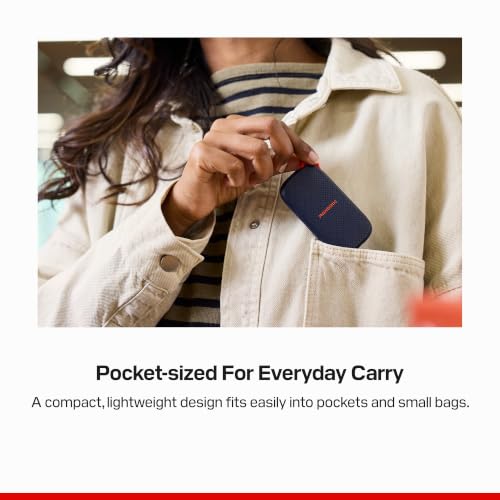
SANDISK 1TB Portable SSD, Up to 1000MB/s Read Speeds, Black (New Model) | External Solid State Drive, Compatible with Laptops & Tablets, Up to 2M Drop Protection, Up to 5x faster than HDD Pocket Size




As an Amazon Associate we earn from qualifying purchases. Product prices and availability are accurate as of the date/time indicated.

SSK Portable SSD 250GB External Solid State Hard Drive USB C Up to 1050MB/s | USB3.2 Gen2 A&C Cable, SMART TRIM, LED Light, OTG, iPhone 18/17/16/15 Pro Compatible 4KHDR ProRes, Aluminum
As an Amazon Associate we earn from qualifying purchases. Product prices and availability are accurate as of the date/time indicated.
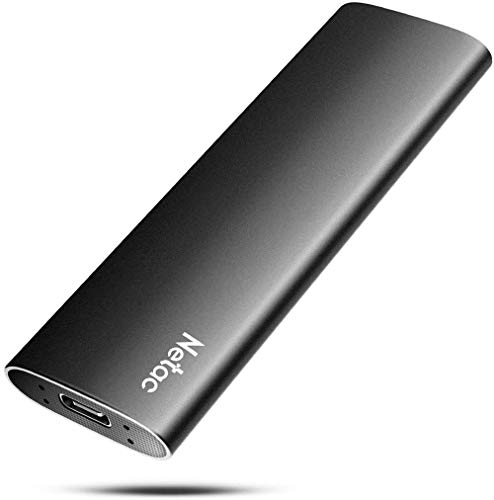
Netac ZSlim 500GB Portable SSD, Up to 550MB/s Read and 450MB/s Write, USB 3.2 Gen 2 USB-C External Solid State Drive, 30g Aluminum Alloy Storage for Windows PC, Mac and Android
As an Amazon Associate we earn from qualifying purchases. Product prices and availability are accurate as of the date/time indicated.
How to Choose Portable SSD for Travel Reviewed for 2026
1. Samsung T9 Portable SSD 1TB – Best Overall Portable SSD for Travel
The Samsung T9 is our top pick for most travelers because it balances speed, size, and durability. It offers 1TB of storage, speeds of up to 2,000 MB/s according to the manufacturer listing, and a compact design that fits in a pocket or a small bag. It is also drop resistant, which matters when you are traveling and your bag gets bumped or dropped.
For travel, the T9 is fast enough for backing up photos and videos, for editing files directly from the drive, and for moving large files between a laptop and a desktop. It connects via USB-C, it works with Windows, Mac, Android, and other devices that support USB-C, and it is easy to use without extra software. It is a good choice if you want one SSD for photos, work, and backup.
At a typical price in the $100 to $130 range for the 1TB version, it is a fair price for a fast, durable SSD. It is worth it if you travel regularly, you need a reliable drive for photos and work, and you want a drive that is fast enough for editing as well as for backup.
2. SanDisk Extreme Pro Portable SSD 1TB – Best Portable SSD for Travel for Outdoor Use
The SanDisk Extreme Pro is a rugged SSD made for outdoor travel. It offers 1TB of storage, speeds of up to 2,000 MB/s according to the manufacturer listing, and water and dust resistance, which makes it a good choice if you travel in rain, dust, or rough conditions. It also has a carabiner loop, so you can clip it to a bag or a belt loop, and it is drop resistant.
For travel, the Extreme Pro is useful because it is built to survive being dropped, bumped, or exposed to water. It is fast enough for photo and video backup, and it is a good choice for photographers, videographers, and anyone who travels outdoors. It is also compatible with USB-C, and it works with Windows, Mac, and Android devices.
At a typical price in the $120 to $150 range for the 1TB version, it costs a little more than the Samsung T9, but it offers better water and dust resistance. Choose it if you travel outdoors, you need a rugged drive, or you want a drive that can handle rain and dust.
3. Crucial X10 Pro Portable SSD 2TB – Best Portable SSD for Travel for Large Files
The Crucial X10 Pro is a good choice if you need more storage for travel. The 2TB version offers twice the capacity of a 1TB drive, speeds of up to 2,100 MB/s according to the manufacturer listing, and water and dust resistance. That makes it a good choice for videographers, photographers, and anyone who carries a large library of photos, videos, or work files.
For travel, the X10 Pro is fast, compact, and durable. It is small enough to fit in a pocket, it connects via USB-C, and it is easy to use for backup and for editing. The 2TB capacity means you do not need to carry two drives, which is useful on a long trip where you will shoot a lot of photos or video.
At a typical price in the $150 to $200 range for the 2TB version, it costs more than a 1TB drive, but it offers more storage for the price per terabyte. Choose it if you need 2TB, you shoot a lot of video, or you want one drive for a long trip instead of two smaller drives.
4. Kingston XS2000 Portable SSD 1TB – Best Portable SSD for Travel for a Compact Size
The Kingston XS2000 is one of the smallest portable SSDs in this guide, with 1TB of storage, speeds of up to 2,000 MB/s according to the manufacturer listing, and water and dust resistance. It is about the size of a small USB stick in some dimensions, which makes it easy to carry in a pocket, a wallet, or a camera bag.
For travel, the XS2000 is useful because it is compact and fast. It is a good choice if you want a drive that takes up almost no space, you travel light, or you want a second drive for backup. It connects via USB-C, it works with Windows, Mac, and Android, and it is durable enough for travel.
At a typical price in the $80 to $110 range for the 1TB version, it is one of the more affordable fast SSDs in this guide. Choose it if you want a very compact drive, you travel light, or you want a fast SSD for a low price.
5. WD My Passport SSD 1TB – Best Portable SSD for Travel for a Lower Price
The WD My Passport SSD is a good lower-priced option for travel. It offers 1TB of storage, speeds of up to 1,050 MB/s according to the manufacturer listing, and a compact, drop resistant design. It is slower than the Samsung T9 or SanDisk Extreme Pro, but it is still much faster than a traditional hard drive, and it is fast enough for backup, for storing photos, and for moving files.
For travel, the My Passport SSD is practical because it is affordable, it is easy to use, and it comes with backup software in many listings. It connects via USB-C, it works with Windows and Mac, and it is a good choice if you mainly need a drive for backup and storage, rather than for editing video directly from the drive.
At a typical price in the $80 to $110 range for the 1TB version, it is a good value for a reliable SSD. Choose it if you want a lower-priced drive, you mainly need backup and storage, or you do not need the fastest speed available.
6. Seagate One Touch SSD 1TB – Best Portable SSD for Travel for Simple Backup
The Seagate One Touch SSD is a simple, portable SSD made for backup. It offers 1TB of storage, speeds of up to 1,030 MB/s according to the manufacturer listing, and a compact, drop resistant design. It is designed to be easy to use, with a simple setup and backup software in many listings.
For travel, the One Touch SSD is useful because it is light, it is easy to carry, and it is good for backing up photos and work files at the end of the day. It is not as fast as the Samsung T9 or Crucial X10 Pro, but it is fast enough for backup and for storing files, and it is a good choice if you want a simple drive that does not require a lot of setup.
At a typical price in the $80 to $110 range for the 1TB version, it is priced in line with the WD My Passport SSD. Choose it if you want a simple backup drive, you prefer Seagate, or you want a drive that is easy to use for travel backup.
Buying Guide: How to Choose Portable SSD for Travel
The best portable SSD for travel for you depends on how much storage you need, how fast you need it to be, and how durable it needs to be for your trip. Start by checking capacity and speed, then compare durability, size, and price. A drive that fits your travel style is better than a drive with the highest specs on paper.
Step 1: Choose Capacity Based on What You Will Store
Step 1 is to choose capacity. A 1TB drive is enough for most travelers who store photos, documents, and a moderate amount of video. It can hold thousands of photos, many hours of video, and a large work library. A 2TB drive is better if you shoot a lot of video, you carry a large photo library, or you will be traveling for a long time without a way to offload files to a computer at home.
Think about how much you will shoot or create on your trip. If you take photos on a phone, 1TB is usually enough. If you shoot 4K video on a camera, 2TB may be better. Do not buy a drive that is too small, because you will run out of space, and do not buy a drive that is much larger than you need, because you will pay for storage you do not use. For most travelers, 1TB is a good starting point, and 2TB is a good choice for video work.
Step 2: Check Speed and USB Compatibility
Step 2 is to check speed and USB compatibility. Speed is measured in MB/s, and faster speeds mean faster file transfers and faster editing from the drive. A drive with speeds of up to 2,000 MB/s, like the Samsung T9, SanDisk Extreme Pro, or Kingston XS2000, is fast enough for editing photos and video directly from the drive. A drive with speeds of up to 1,050 MB/s, like the WD My Passport SSD, is fast enough for backup and storage, but it may be slower for editing large video files.
Check the USB port on your laptop, phone, or tablet. Most portable SSDs in this guide use USB-C, which is common on modern laptops and phones. If your device uses USB-A, you may need an adapter or a cable that supports USB-A. Also check whether your device supports USB 3.2 Gen 2 or faster, because a fast SSD will only reach its full speed if your device and cable support it. A slower USB port will still work, but the drive will be slower.
Step 3: Check Durability for Travel
Step 3 is to check durability. A portable SSD for travel should be drop resistant, and ideally water and dust resistant if you travel outdoors. The SanDisk Extreme Pro, Crucial X10 Pro, and Kingston XS2000 all offer water and dust resistance, which makes them good choices for outdoor travel. The Samsung T9, WD My Passport SSD, and Seagate One Touch SSD are drop resistant, which is enough for most travel in a bag or a pocket.
Think about where you will travel. If you hike, camp, or travel in rain, choose a rugged drive with water and dust resistance. If you mainly travel by plane or car and keep your drive in a bag, a drop resistant drive is enough. Also consider the size and weight of the drive. A compact drive like the Kingston XS2000 is easier to carry, while a larger drive may be easier to find in a bag.
Step 4: Check Price, Warranty, and Backup Plan
Step 4 is to check price, warranty, and your backup plan. A 1TB portable SSD in this guide costs $80 to $150, depending on speed and durability. A 2TB drive costs $150 to $200. Do not buy a drive based on price alone. A cheaper drive that is slower may be fine for backup, but a faster drive is better if you edit from the drive.
Also think about your backup plan. A portable SSD is a good backup device, but it is not a complete backup plan by itself. If you lose the drive, you lose the files on it. For important photos and work, use two copies: one on the portable SSD and one on a laptop, a second drive, or cloud storage if you have internet access. Check the warranty on the drive, and make sure you know how to use it before your trip. Test the drive at home, copy a few files to it, and make sure it works with your devices before you rely on it on a trip.
How to Choose Portable SSD for Travel: FAQ
What is the best portable SSD for travel?
For most travelers, the Samsung T9 Portable SSD 1TB is the best overall portable SSD because it offers 1TB of storage, speeds of up to 2,000 MB/s, a compact design, and drop resistance at a typical price in the $100 to $130 range. If you travel outdoors, the SanDisk Extreme Pro is a good choice at $120 to $150. If you need 2TB, the Crucial X10 Pro is a strong option at $150 to $200. If you want a very compact drive, the Kingston XS2000 is a good fit at $80 to $110. If you want a lower price, the WD My Passport SSD is a good value at $80 to $110. If you want a simple backup drive, the Seagate One Touch SSD is a practical choice at $80 to $110.
How much storage do I need on a portable SSD for travel?
How much storage you need depends on what you will store. For most travelers, 1TB is enough for photos, documents, and a moderate amount of video. It can hold thousands of photos and many hours of video. For videographers, photographers who shoot a lot, or travelers who will be away for a long time, 2TB is better. Think about how much you will shoot or create on your trip, and choose a drive that gives you room to grow. Do not buy a drive that is too small, because you will run out of space, and do not buy a drive that is much larger than you need.
Is a portable SSD better than a hard drive for travel?
Yes, a portable SSD is better than a traditional hard drive for travel in most cases, because it is faster, smaller, lighter, and more durable. An SSD has no moving parts, so it is less likely to be damaged by a drop or a bump. It is also faster for transferring files and for editing directly from the drive. A hard drive is cheaper per terabyte, but it is larger, heavier, slower, and more fragile. For travel, an SSD is the better choice, especially if you need to back up photos and video quickly.
Can I use a portable SSD with my phone for travel?
Yes, you can use a portable SSD with many modern phones for travel, especially phones with USB-C that support external storage. You can connect the SSD via USB-C, copy photos and videos from your phone to the drive, and free up space on your phone. Check that your phone supports external storage, that you have the right cable, and that the SSD is formatted in a way your phone can read. Test the SSD with your phone before your trip, and make sure you know how to copy files safely. For iPhone users, check the specific model and iOS version, because support for external drives varies by model.
FAQ
What is the best portable SSD for travel?
How much storage do I need on a portable SSD for travel?
Is a portable SSD better than a hard drive for travel?
Can I use a portable SSD with my phone for travel?
Related guides
- Best External SSD for Work Laptops in 2026: 7 Fast, Durable SSDs That Backup Files, Transfer Large Projects, and Fit in Your Laptop Bag
- Best Budget Travel Headphones for Travelers in 2026: 7 Headphones That Offer Noise Cancelling, Long Battery, and Reliable Use for Travelers
- Best Mesh WiFi System for Student Flats in 2026: 7 Mesh WiFi Systems With Fast Speed, Easy Setup, and Simple Coverage for Student Flats
- Best Budget Wireless Headphones for Students in 2026: 7 Affordable Headphones That Sound Good, Last All Day, and Fit a Student Budget
More from Amazon
Programs that pair well with the guide above. Offers and eligibility are set by Amazon and may change.
Set up recurring deliveries of everyday items on eligible products. Terms and savings are set by Amazon.
Explore Subscribe & SaveFree shipping on eligible items, Prime Video and more. Eligible new members can start with a free trial.
Start a Prime free trialAudiobooks and podcasts to listen to on the go. Eligible new members can start with a free trial.
Try Audible freeRead from a large library of eBooks and audiobooks on any device. Check Amazon for current plans.
Explore Kindle UnlimitedAs an Amazon Associate we earn from qualifying purchases.

Write Your Review
No reviews yet. Be the first to share your experience!