
What's inside
- Best Budget Security Camera Under 100: Resolution, Detection, and Storage Honesty
- Best Budget Security Camera Under 100: Quick Comparison
- The Six Budget Security Cameras Reviewed
- Buying Guide: How to Choose and Install the Best Budget Security Camera
- Frequently Asked Questions About Budget Security Cameras
As an Amazon Associate I earn from qualifying purchases. This post may contain affiliate links at no extra cost to you.
The best budget security camera under 100 dollars has become a genuinely good camera, and the reason is competition: the features that defined the premium tier five years ago, 2K resolution, color night vision, person detection, two-way talk, and local recording, have all marched down into the double digits, leaving the modern budget buyer to choose not between good and bad but between ecosystems and their fine print. That fine print is where this guide earns its keep, because the camera’s price is no longer the purchase’s whole cost: cloud subscriptions, required hubs, and app ecosystems decide what the camera costs across three years and what it does on the day the subscription lapses. This guide grades six real, currently sold cameras under the hundred on the criteria that decide ownership: image quality in the day and, more importantly, at night; motion detection that distinguishes a person from a swaying branch; storage that works without a monthly fee, microSD local recording being the budget’s great emancipation; weather rating for the outdoor posts; and the setup a non-engineer can finish from a ladder with a phone in one hand. It closes with a buying guide that places and configures the camera like a security tool rather than a gadget, because a cheap camera aimed wrong is a documentary of the top of a burglar’s hat.
Learn the category’s three honesties before the table. Resolution is the first: 2K and 1080p, at a porch’s distances, differ less than their marketing, while the lens’s field of view and the sensor’s night performance differ more, a wide, bright, well-exposed night image being worth more than a narrow 4K one, and infrared versus color night vision being a genuine choice, infrared’s monochrome clarity and range against the spotlight cameras’ color evidence and deterrence. Detection is the second honesty: the camera that alerts for every moth and headlight trains its owner to ignore it within a month, a security failure disguised as sensitivity, so person and vehicle detection, on-device where the class offers it, and adjustable zones and sensitivity are graded as the product’s core rather than its garnish. Storage is the third: local microSD recording, continuous or event-based by model, keeps the evidence in your hand and off a subscription’s leash, while cloud plans buy off-site safety for the footage, a real virtue priced per camera per month, and the buyer should total both before admiring either.
Our Top Picks
Best Budget Security Camera Under 100: Resolution, Detection, and Storage Honesty
Image Quality Where It Matters: Night, Faces, and the Porch Test
Judge a security camera by its worst hour, which is 2 a.m. in the rain, and by its one job, which is evidence: a face at the door’s distance, a figure at the gate’s, rendered recognizably. The specifications that predict that hour are the night system’s type and reach, the sensor’s size class, and the field of view that decides how much of the approach the camera owns, with the practical tests being the reviews’ night samples and, better, your own first night’s footage reviewed with a critic’s eye and the camera re-aimed while the return window is open. Frame rate and compression write the fine print of motion: a camera that smears a walking figure into a ghost has recorded an alibi rather than an identification, and the bitrates of the budget class are its known compromise, mitigated by positioning, closer and higher-value angles over heroic wide ones.HDR, where offered, answers the porch’s hardest exposure, the backlit face under a bright sky, and is worth more to the door camera than a resolution tier. Grade the table, therefore, as evidence machines, and let the daylight demo footage, always gorgeous, count for the least of any paragraph in this guide.
Detection and Alerts: The Camera That Cries Wolf Is a Decoration
A security camera’s alert stream is a trust account: every false alert spends it, and the bankrupt account, notifications muted, is the state in which most budget cameras end their first season. The defenses are layered and all of them are graded below: detection that classifies, person and vehicle and animal in the better budget models, increasingly computed on the camera itself rather than in a subscription’s cloud, which is the budget story of the last two years and the reason several rows here can offer it free; zones that fence the street’s traffic and the neighbor’s flag out of the camera’s concern; and sensitivity and scheduling that match the property’s rhythms. Two-way talk and the siren and spotlight deterrents belong in this section as the alert’s other half, the owner’s ability to speak to the doorstep and to make the camera’s presence known, features whose value is real and whose novelty expires in a week, after which the detection’s accuracy is, again, the whole product. Test the alert stream for a fortnight before judging, tune the zones twice, and let the camera that still cries wolf be returned while returning is a remedy, since a tuned camera that cannot learn your porch will not improve with age.
Power and Placement: Battery, Plug-In, and the Ladder’s Logic
The budget camera’s power source is its maintenance schedule wearing a disguise. Battery cameras install anywhere in minutes and repay it with a recharge rhythm measured in months, variable with traffic, cold, and how often the household admires its live view; they belong on the low-traffic posts, the side gate, the shed, and they punish the busy front door with a ladder’s monthly visit. Plug-in cameras, indoor and outdoor, trade the outlet’s geography for an endless watch and continuous recording where offered, and for most front doors and driveways the outlet exists or can be reached, making the plug the professional’s quiet preference. Solar panels, offered in several ecosystems here, split the difference for the sunny post. Placement obeys the evidence’s geometry: eight to ten feet up, angled down at the approach rather than across it, close enough that a face at the door fills a meaningful share of the frame, out of the direct sun’s daily stare, and within the Wi-Fi’s honest reach, tested at the post with the phone before the screws are turned, since a camera’s connection at the edge of the network is a documentary of buffering. The steps will walk this placement as a procedure, because it decides more outcomes than the choice among this table’s rows.
Best Budget Security Camera Under 100: Quick Comparison
| Budget Security Camera Model | Key Specs | Best For | Typical Price Range | Rating |
|---|---|---|---|---|
| Tapo C120 / C110 class (TP-Link) | 2K class in line, local microSD, person detection positioning, indoor/outdoor in class by model | Best budget security camera under 100 overall | $25 – $45 | 4.6 / 5 |
| Wyze Cam v4 class | 2.5K class in line, color night vision positioning, local storage in class, very low price | Best value and night color | $30 – $45 | 4.5 / 5 |
| Blink Outdoor 4 class | Battery camera in class, long battery positioning, local storage via sync module in line | Best battery camera | $65 – $100, often less on sale | 4.4 / 5 |
| Ring Stick Up Cam (battery) class | Battery camera in class, established ecosystem in line, subscription-centric positioning | Best for Ring households | $70 – $100 | 4.3 / 5 |
| eufy SoloCam / Indoor Cam class | Local storage and on-device detection positioning in line, no-subscription design in class | Best no-subscription ecosystem | $55 – $100 by model | 4.5 / 5 |
| Reolink Argus / Lumus class | Battery and plug-in classes in line, local storage positioning, solar options in class | Best flexible power options | $55 – $95 by model | 4.4 / 5 |
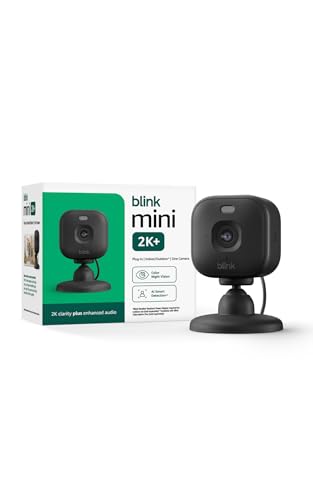
Blink Mini 2K+ (newest model) – Plug-in Home & Pet Indoor Security Camera with 2K video resolution, night vision, enhanced audio, motion detection – 1 camera (Black)
As an Amazon Associate we earn from qualifying purchases. Product prices and availability are accurate as of the date/time indicated.
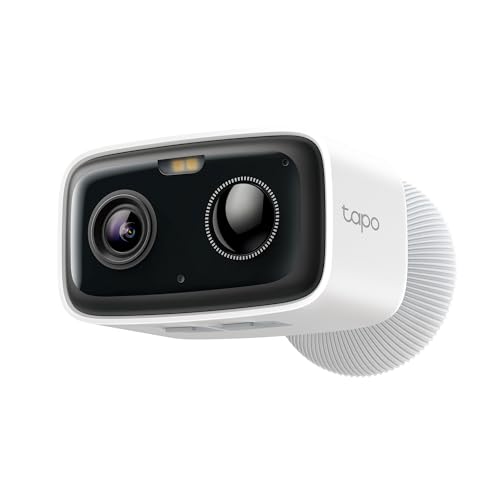
Tapo 1080p Outdoor Wireless Security Camera, Up to 180-Day Battery, C400 | Person Detection, Color Night Vision, Subscription-Free Local Storage or Optional Cloud, Works with Alexa & Google Assistant
As an Amazon Associate we earn from qualifying purchases. Product prices and availability are accurate as of the date/time indicated.

GNCC 2K Security Camera Indoor, 5G WiFi Cameras for Home Security,Phone App | AI Motion Tracking,Night Vision, Smart detection and alerts,SD Card or Paid Cloud, WiFi Security Camera for Pet/Elderly/Nanny
As an Amazon Associate we earn from qualifying purchases. Product prices and availability are accurate as of the date/time indicated.
Prices shown are approximate and for reference only. Prices change often, so please check the current price on Amazon before you buy.
Features and subscription terms change by model and over time; verify local storage and detection terms for the exact model before purchase. Prices are typical street ranges. Ratings are editorial, weighing night evidence quality, detection accuracy, local storage freedom, setup, and total cost of ownership.
The Six Budget Security Cameras Reviewed
1. Tapo C120 Class: Best Overall
TP-Link’s Tapo line leads the budget field because it refuses the category’s central ransom: 2K-class evidence, person detection, and microSD local recording that works fully without a subscription, in indoor and outdoor models at prices that make a three-camera property a modest line item. Its night performance and its app have matured into the class’s reference, its setup is the ladder-friendly kind, and its ecosystem’s extras are sold rather than extorted. For the buyer starting a system from zero, it is the recommendation this guide defends, the camera whose three-year cost is its sticker, a sentence that cannot be written about half the shelf it competes with.
2. Wyze Cam v4 Class: Best Value and Night Color
Wyze’s flagship budget camera continues the company’s founding argument, specifications that embarrass its price: a 2.5K-class image in its line, color night vision with a spotlight’s help, local storage, and an app ecosystem of remarkable breadth for the money. Its history argues for the buyer’s open eyes, the company’s security chapters being public record, answered by its improvements and by the steps’ configuration doctrine, strong passwords, two-factor authentication, firmware kept current, which this guide applies to every row. For the value hunter who will run the configuration properly, it is the most camera per dollar in this table, and its night color at the porch is the budget class’s showpiece.
3. Blink Outdoor 4 Class: Best Battery Camera
Blink’s proposition is time: battery life in its class measured toward the years rather than the months, on a camera that installs in minutes anywhere the Wi-Fi reaches, with local storage available through its sync module for the subscription-averse. Its image and detection are its class’s competent work, its ecosystem is Amazon’s, and its sale prices, frequent and deep, regularly make it the cheapest credible way to watch a side gate. For the low-traffic posts and the renter forbidden from drilling toward an outlet, it is the correct tool, and its rating reflects a specialist whose specialty, endurance, is the one battery cameras are actually bought for.
4. Ring Stick Up Cam Class: Best for Ring Households
Ring’s battery camera is bought with its ecosystem and should be priced with its subscription, since its design center is the cloud plan, without which its recording story thins to live view and alerts in the common configuration. Within a Ring household, its virtues are integration’s: one app, one plan across the doorbell and the cameras, a neighborhood network’s alerts, and hardware of the established kind. This guide grades it honestly as the ecosystem row, excellent for the committed and a poor first camera for the uncommitted, whose three-year arithmetic belongs to the rows above, and the distinction, stated plainly, is the most useful service a budget guide can perform.
5. eufy Camera Class: Best No-Subscription Ecosystem
eufy’s founding promise, local storage and on-device intelligence without the monthly fee, is kept across its SoloCam and indoor lines in the classes this table prices: detection computed on the camera, footage kept in the home, and an app that treats the owner as the customer rather than as the subscription’s hostage. Its models vary, battery and plug-in, indoor and out, and should be chosen by the post’s power as the steps direct. For the privacy-minded buyer and the subscription refuser building a whole system, it is the coherent alternative ecosystem, and its rating reflects a philosophy executed at prices the philosophy’s fans once paid premiums for.
6. Reolink Class: Best Flexible Power
Reolink’s budget lines cover the power map completely: battery cameras with solar panel partners for the sunny fence line, plug-in models for the porch, local storage as a house doctrine, and a path upward into the maker’s serious NVR systems for the property that grows. Its app and polish trail the leaders by a half-step, its hardware choice is the table’s widest, and its constituency, the larger property and the DIY installer, is served with a completeness the app-first brands do not attempt. For the acreage on a budget, it is the closing row and often the correct first one, its ecosystem being the one that scales from a hundred dollars to a homestead without changing its mind about local storage.
Buying Guide: How to Choose and Install the Best Budget Security Camera
Step One: Choose the Ecosystem by Its Three-Year Cost
Price the system, not the camera: the unit, the microSD card in the size its recording mode wants, any hub the design requires, and the subscription, if any, multiplied by thirty-six months and by the number of cameras the property will eventually carry, since the second and third cameras inherit the first’s ecosystem with a tenant’s lack of choice. Let that total, read beside the detection and storage freedoms each row offers free, choose the ecosystem, and only then choose the model within it by the post’s needs, resolution and night type, field of view, and power. Buy one camera first even in a multi-camera plan, live with its app and its alerts for a fortnight, and let the property’s expansion follow evidence, because the ecosystem decision is the expensive one to reverse and the camera decision, at these prices, is the cheap one to correct.
Step Two: Place for Evidence and Test the Night
Install by the evidence’s geometry: the camera eight to ten feet up, angled down the approach, the door’s faces crossing its frame rather than shrinking toward it, the sun’s daily path kept out of its stare, and the Wi-Fi’s strength at the post verified with the phone held where the camera will live, before the mount is committed. Set the detection zones on the first evening, fencing out the street and the flag, sensitivity begun at the maker’s middle and tuned by the fortnight’s alert diary rather than by the first hour’s impressions. That night, review the footage as an examiner: walk the approach yourself at a natural pace, read your own face’s recognizability at the door, note the smear and the exposure, and re-aim while the ladder is still out and the return window open, because the second night’s footage, aimed by the first’s evidence, is the system you actually bought, and no specification in this guide can substitute for that one honest review.
Step Three: Secure the System Itself and Keep It Current
A security camera is a computer on your wall with a view of your life, and it should be administered like one: a unique, strong password on its account, two-factor authentication enabled before the first alert arrives, the camera’s firmware set to update and checked on the season’s round, and the home Wi-Fi beneath it held to the same standard, since the camera’s security is the network’s. Configure the sharing deliberately, family members by their own accounts rather than by a passed-around password, guests never, and review the recorded retention, the card’s overwrite cycle understood, the clips that matter exported before they age off. Mind the law and the courtesy that travel with the lens: your own property is your subject, the neighbor’s windows are not, audio recording carries its own rules in many places, and a sign announcing the cameras is, in most neighborhoods, both a deterrent and a diplomacy. Kept so, the hundred-dollar camera becomes what its price once could not buy, a watchful, honest witness, maintained like the security tool it is.
Frequently Asked Questions About Budget Security Cameras
Do budget security cameras require a subscription?
The best of the current budget class, no, and that sentence is the category’s good news and this guide’s organizing principle: the Tapo, eufy, Reolink, and Wyze rows in this table record to a local microSD card and offer their core detection without a monthly fee, the footage living in your home under your hand. What subscriptions buy, where offered, is cloud storage of the footage, off-site safety if the camera itself is stolen, longer retention, and sometimes richer detection, legitimate services to price knowingly rather than discover resentfully. The brands whose design centers the plan, Ring being the table’s example, should be bought only with the plan’s three-year cost added to the sticker in the buyer’s arithmetic. Read the exact model’s storage terms before purchase, since they vary within brands and change over time, and prefer, at any tie in the hardware, the camera whose evidence you own outright, because a security system that stops recording when a payment lapses has a failure mode no burglar needs to arrange.
Is 2K noticeably better than 1080p for a security camera?
At the distances that matter, modestly, and less than the properties this guide grades above it: the night system’s quality, the field of view’s fit to the approach, the exposure’s handling of the backlit porch, and the compression’s manners with a moving figure. A 2K sensor’s extra pixels pay their clearest dividend in digital zoom, reading the plate at the curb or the face at the gate from a wide frame, where 1080p’s crop dissolves; at the door’s own distance both resolutions identify comfortably when the light and the lens cooperate. The budget buyer’s correct order of spending is therefore position first, a camera close enough to its subject, night performance second, detection third, and resolution as the tiebreak it honestly is, which is why this table’s ordering does not follow the megapixels and why a well-placed 1080p camera will out-evidence a badly placed 4K one every night of the year.
Battery or plug-in security camera: which should I choose?
By the post’s traffic and its access to power, in that order. The busy front door, with its dozens of daily events and its household’s live views, belongs to the plug-in camera, whose endless watch and continuous recording options never meet a battery’s accounting, provided an outlet is within the cable’s honest reach, which at most porches it is. The battery camera owns the posts where power is absent and traffic is light, the side gate, the shed, the far fence, where its months of endurance are real and its recharge is a season’s errand rather than a month’s chore, with a solar panel extending its parish to the sunny posts between. The error is the mismatch, the battery camera on the busy door dying its quiet death in the cold’s third week, or the plug-in’s cable strung across a facade to a post a battery would have served from a ladder’s single visit. Count the post’s daily events before choosing, and let the count, rather than the installation’s first-day ease, decide, since the camera will be maintained for years at the rhythm its power source sets.
Where should I place a security camera for the best evidence?
Close to the subject’s path, high enough to be safe from a reach, and angled so faces cross the light rather than hide from it, which in practice means eight to ten feet up at the door’s approach, aimed down the walk so a visitor’s face is captured frontally as they arrive and not as a scalp receding, with the frame’s width spent on the approach and the door rather than on the street’s theater. Keep the sun’s rising or setting out of its direct stare where the architecture allows, give faces the porch light’s or the camera’s own night system’s best angle, and resist the heroic wide placement at the property’s corner, which records the whole scene and identifies none of it, the classic budget system’s failure. One camera placed by this doctrine outperforms three placed by enthusiasm, and the system’s growth should follow the same rule post by post, each new camera assigned a subject, a door, a gate, a driveway’s plate line, and judged, on its first night’s footage, by whether that subject can be named from the evidence, the only review that has ever mattered in this category.
Related guides
- Best Complete Desk Phone Starter Kit: 6 Best Complete Desk Phone Starter Kit Picks in 2026
- Best SD Card for Sports Photography in 2026: SanDisk, Lexar, Sony, and ProGrade Compared for a Sustained Write Proven Across a Whole Burst, a Slot Read in the Camera’s Own Documents, and Cards Bought Only From Their Makers’ Parishes
- Best Beginner Waterproof Speaker Starter Kit in 2026: IP67 Speakers, Honest Battery Life, and the Accessories a First Setup Actually Needs
- Best Cheap Cleaning Spray for Smart Display in 2026: 6 Affordable Sprays That Clean Without Streaks or Damage
More from Amazon
Programs that pair well with the guide above. Offers and eligibility are set by Amazon and may change.
Set up recurring deliveries of everyday items on eligible products. Terms and savings are set by Amazon.
Explore Subscribe & SaveFree shipping on eligible items, Prime Video and more. Eligible new members can start with a free trial.
Start a Prime free trialAudiobooks and podcasts to listen to on the go. Eligible new members can start with a free trial.
Try Audible freeRead from a large library of eBooks and audiobooks on any device. Check Amazon for current plans.
Explore Kindle UnlimitedAs an Amazon Associate we earn from qualifying purchases.

Write Your Review
No reviews yet. Be the first to share your experience!