
What's inside
- What Makes the Best Handheld Console Cable for Dorm TVs
- Quick Comparison: Handheld Console Cables and Docks for Dorm TVs Compared
- The Six Cables and Docks Reviewed
- Buying Guide: Wiring a Handheld to the Dorm TV
- How We Selected These Cables and Docks for Dorm TVs
- Frequently Asked Questions About Handheld Console Cables for Dorm TVs
As an Amazon Associate I earn from qualifying purchases. This post may contain affiliate links at no extra cost to you.
The best handheld console cable for dorm TVs is the purchase that turns a seven-inch screen into the room’s cinema and its tournament stage — and it is also, quietly, the most returned cable in the student parish, because the handhelds do not share one doctrine of getting their picture onto a television. The Steam Deck and the ROG Ally speak the universal language: USB-C with DisplayPort alternate mode, which a single good cable carries to any HDMI television in one run. The Nintendo Switch, the dorm’s commonest handheld, refuses the plain cable entirely — its video travels only through a dock that performs its particular handshake, and the student who buys a generic USB-C to HDMI lead for it owns a cable for some future laptop and a lesson for tonight. This guide exists to teach that map before the money moves: which consoles take a cable, which demand a dock, what the cable itself must be rated for — the resolution and refresh the dorm television can actually show, the charging the handheld needs while it plays at television power — and the dorm’s own parish of constraints: the shared television’s one free HDMI port, the cable length from the bed-desk republic to the screen, and the whole arrangement’s ability to be packed away when the room returns to study. The real cables and docks in the table are graded inside their consoles’ doctrines, because in this category the first specification is not speed. It is whether it works at all.
The universal parish first, stated precisely. USB-C is a plug, not a promise: the cable carries video only if the device at its end outputs video on that port — the DisplayPort alternate mode that the Deck, the Ally, the Legion’s handheld parish, and the modern gaming phone all support — and if the cable itself is built for the signal, which the honest parish’s cables are and the charging-only leads in the drawer are not. The dorm’s diagnostic is therefore ordered: console first, since its maker’s own page states whether its port carries video and through what; cable second, rated for the television’s parish — the 4K-at-60 class of cable that covers every dorm screen now sold, bought in the length the room measures rather than the length the listing defaults to; television third, whose HDMI port and picture settings decide the rest, including the game-mode parish that governs the input lag the fighting-game republic will measure in frames and feelings. The Switch stands outside this universality by its maker’s design: its dock is not a luxury but the console’s only video door, and the third-party mini docks in this table exist by replicating that door in a traveller’s size — which is why the guide grades them on their dock fidelity, their power requirements, and their makers’ standing, since a bad dock is the one accessory in the parish that can argue with the console itself. Buy the door your console actually has; the table is organised by exactly that.
Power is the dorm cable’s second doctrine, and the one the product photographs omit. A handheld driving a television is working at its hardest — the picture rendered for the big screen, the wireless controllers drinking from its battery, the session stretching to the tournament’s length — and its battery alone will not see the evening out. The cable parish answers in two forms: the simple video cable, which serves the console whose port can charge through a second door or whose sessions are short; and the dock and hub parish, where the charger plugs into the dock and the console plays and charges in one connection, which is the dorm’s true requirement and the reason the table’s centre of gravity sits there. The charger’s wattage follows the console maker’s own specification — the Switch’s dock wants its class of adapter, the Deck its own — and the guide’s rule is the maker’s number, met or exceeded, from a named brand, because the underpowered dock’s symptoms are the parish’s familiar ghosts: the picture that flickers, the charge that drains while plugged, the session that ends at the final boss. The television’s USB port, it must be said plainly, is not a charger for this parish: its trickle was designed for streaming sticks, and the console fed from it is a console slowly dying with a picture on. One wall adapter, honestly rated, in the same order as the cable — the worksheet’s standing line.
Our Top Picks
What Makes the Best Handheld Console Cable for Dorm TVs
By Console: Cable Consoles and Dock Consoles
The map, console by console, as the makers publish it. The Steam Deck takes the plain cable with the parish’s blessing — USB-C to HDMI, one run, the television lit — and takes docks and hubs equally, for the desk parish that wants the controllers’ receivers and the wired network in the same object. The ROG Ally and its Windows parish follow the same universal doctrine, with their makers’ own docks adding the graphics parish this guide leaves to the gaming sites. The Nintendo Switch and its OLED sibling take the dock — the maker’s, or the reputable mini docks graded here — and the plain cable not at all; the Switch Lite takes neither, its video door never having been built, which the Lite’s owners must hear from this guide rather than from a checkout page, its parish being the handheld screen entire. The gaming phone and the tablet parish follow their makers’ own video-out lists, which vary by model in a way only the model’s page settles. And the retro and mini handhelds divide by their own ports — the mini-HDMI parish taking its own small cable — each settled the same way: the console’s manual first, the cable second. The worksheet’s first line is therefore the console’s exact name, and every row of the table is labelled with the consoles it serves, cross-parish rows being this category’s original sin.
Length, Rating, and the Dorm’s Geography
The dorm room is a specific geography and the cable is bought for it, measured. The run from the console’s station — the desk, the bed’s republic, the futon’s edge — to the television’s port is paced off and a measured slack added, because the cable at its limit is a tripwire and a port-strain, and the cable bought in heroic excess is a coil that lives on the floor and dies under the chair’s castors by November. The two-to-three-metre parish serves most dorm rooms’ honest runs; the five-metre ambition is answered by the dock at the television and the wireless controller, which is the geography’s better solution — the console housed at the screen, the player roaming with the pad, the cable reduced to a dock’s short parish. Rating follows the screen: the cable bought to the 4K-at-60 class covers the dorm television’s present and the room’s next, with the refresh parish of the high-refresh gaming screens noted for the few dorms that keep them, whose owners know their frames and buy their cables by them. The connector’s build is graded as the student’s handling deserves: the reinforced strain relief, the braided parish’s abrasion manners, the plug that survives the bag’s daily republic — because the dorm cable is packed, coiled, lent, and retrieved across a whole degree, and its construction is its lifespan.
The Shared Television’s Parish: Ports, Lag, and Manners
The dorm television is a commons and the cable’s doctrine includes its governance. The port parish: the shared screen commonly offers two or three HDMI doors, of which the roommate’s console, the streaming stick, and the household’s laptop all hold claims — so the worksheet counts them, and the switcher or the dock’s pass-through enters the plan where the count fails, with the room’s treaty agreeing whose plug yields when, in daylight, rather than at the tournament’s first round. The lag parish: the television’s game mode, found in its picture settings and switched on for the console’s port, is worth more frames of responsiveness than any cable upgrade sold, and the guide directs it be set once and labelled with the tape flag of the organised parish. The audio parish follows the picture through the same cable — the HDMI’s one-cord doctrine — with the television’s own speakers the dorm’s standard and the soundbar a later treaty. And the manners: the session’s hours agreed in the room’s own constitution, the console’s station struck and packed by the arrangement the room accepts, the cable coiled by its owner’s hand and not left as the floor’s parish. The best cable in the dorm is the one whose presence the roommate never has cause to resent, which is a specification no laboratory measures and every returning student understands.
Quick Comparison: Handheld Console Cables and Docks for Dorm TVs Compared
| Cable / Dock Model | Consoles / Best For | Key Specs | Typical Price Range | Rating |
|---|---|---|---|---|
| JSAUX USB-C to HDMI Cable (4K@60 class) | Steam Deck, ROG Ally — best handheld console cable for dorm TVs overall | USB-C DP alt mode to HDMI, 4K at 60Hz class, braided lengths as published | $12 – $20 | 4.6 / 5 |
| Valve Docking Station for Steam Deck | Steam Deck — best full dock | Official dock, HDMI and DisplayPort parish, Ethernet, USB ports, charger as published | $70 – $90 | 4.7 / 5 |
| Genki Covert Dock Mini | Nintendo Switch — best travel mini dock | Pocket dock replicating Switch TV mode, charger built in parish as published | $40 – $55 | 4.5 / 5 |
| Skull & Co Jump Gate Dock | Nintendo Switch — best mini dock value | Compact Switch dock core, removable design for cases as published | $30 – $45 | 4.4 / 5 |
| Nintendo Switch Dock (official) | Nintendo Switch — best guaranteed dock | Maker’s own dock, TV mode with charging, LAN parish on OLED dock as published | $60 – $90 | 4.6 / 5 |
| Anker USB-C to HDMI Cable (4K class) | Deck, Ally, phones — best mainstream cable | USB-C to HDMI 4K class, aluminium shell parish, mainstream lengths as published | $15 – $25 | 4.5 / 5 |
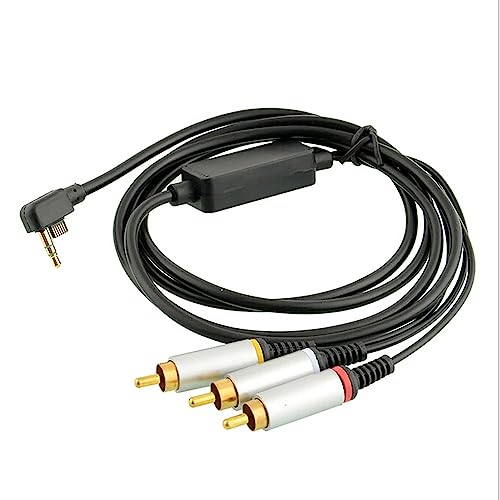
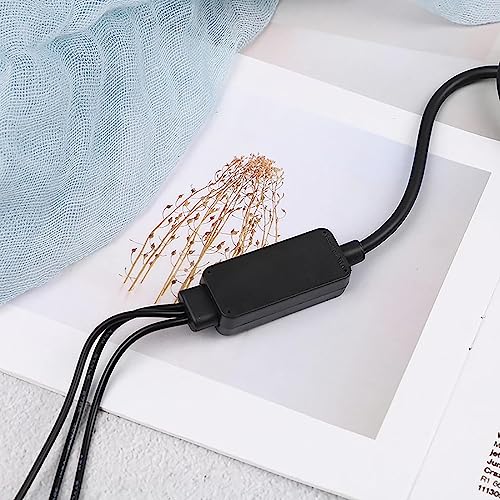
AV Cable for Compatible Handheld Consoles with Three, Black | Three Color-Coded and Video Plugs, Device-Side Connector, AV Input Connection for Compatible Handheld




As an Amazon Associate we earn from qualifying purchases. Product prices and availability are accurate as of the date/time indicated.

WYGAMING Arcade Machine, Built in Classic Retro Games, 14 Inch Screen | 9800 Classic Video Games, Handheld Game Console, Rechargeable Battery, Support for TV Output, Birthday Present for kids


As an Amazon Associate we earn from qualifying purchases. Product prices and availability are accurate as of the date/time indicated.

Universal Premium High-Speed 6 ft - HDMI Cable Compatible with Televisions, Digital Cameras, Camcorders, Gaming Consoles, and Portable Electronics

As an Amazon Associate we earn from qualifying purchases. Product prices and availability are accurate as of the date/time indicated.
Ratings are editorial assessments for dorm use, based on the makers’ published console compatibility, video ratings, charging arrangements, and construction, and value at typical prices. Prices are typical retail ranges for the cable or dock; chargers are included only where the maker states. The Nintendo Switch requires a dock for TV output and the Switch Lite has no TV output at all, as the guide explains — confirm your exact console’s video method on its maker’s page before ordering.
The Six Cables and Docks Reviewed
1. JSAUX USB-C to HDMI Cable – Best Plain Cable
JSAUX built its name in the Deck’s parish and its cable is the universal doctrine’s reference: alt mode carried honestly to the 4K-at-60 class, a braided build that survives the bag, lengths that cover the dorm’s runs, at the student’s figure. For the Deck and Ally owner whose need is the picture and nothing else, it is the recommendation — one cable, no dock, the television lit in the time it takes to find the remote. Its limit is its doctrine’s: no charging in the same run, which the long session answers with the dock parish below or the console’s own second arrangements, stated plainly as the guide’s power doctrine requires.
2. Valve Docking Station – Best Steam Deck Dock
Valve’s own dock is the Deck’s complete station: the picture by HDMI or DisplayPort, the wired network the dorm’s congested wireless argues for, the USB parish for the controllers’ receivers and the fighting stick, and the power to play and charge in one seating — with the firmware’s updates arriving through the Deck itself, the maker’s integration entire. Its price is the official parish’s and its parish is the desk that the Deck calls home. For the Deck owner whose dorm setup is a station rather than an occasion, it is the dock recommendation, and its rating reflects the first-party fit that the third parish cannot promise.
3. Genki Covert Dock Mini – Best Switch Mini Dock
The Covert Dock Mini is the Switch’s travelling door: the dock’s handshake replicated in a charger-sized body, built by a maker whose name in the Switch parish was made on exactly this object and its successors. It lives in the bag, seats the console on any television the student visits — the dorm’s, the home’s, the tournament’s — and charges as it plays by its built-in parish. For the Switch owner whose television life is mobile, it is the mini dock recommendation, bought from its maker’s own shelf as the parish’s standing counsel directs for dock electronics.
4. Skull & Co Jump Gate – Best Switch Dock Value
The Jump Gate is the mini dock at the value tier, with a design parish of its own: a compact core that seats the Switch for the television and accommodates the gripped and cased console its parish of owners actually carries. Its maker is an established name in the Switch accessory parish, which in the dock category is a safety specification and not a snobbery, as the introduction’s doctrine states. For the dorm Switch whose dock must be bought on the term’s budget, it is the graded answer — the door replicated by a house with a reputation to lose.
5. Nintendo Switch Dock – The Guaranteed Door
Nintendo’s own dock is the parish’s certainty: the console’s maker selling the console’s door, with the television mode and the charging exactly as designed, and in its OLED generation the wired network port the dorm’s wireless argues for. Its bulk is the traveller’s objection and its price the student’s, and it remains the recommendation wherever certainty outranks both — the household’s second dock for the dorm, bought once, argued with never. Its presence in the table disciplines the minis: they are graded against it, and the student who finds their premium small against its guarantee has read the category correctly.
6. Anker USB-C to HDMI Cable – Best Mainstream Cable
Anker’s cable is the universal parish from the mainstream’s most organised house: the 4K class carried in an aluminium-shelled, honestly rated lead that serves the Deck and Ally tonight and the laptop’s presentation tomorrow, which in the dorm’s economy is a virtue with a bursar’s smile. Its lengths are the standard parish rather than the dorm’s longest runs. Graded as the cable for the student whose devices are many and whose budget is one cable deep, it completes the table as the dual-parish answer — and its maker’s warranty parish is the mainstream’s own argument, fairly stated.
Buying Guide: Wiring a Handheld to the Dorm TV
Step One: The Console’s Door, the Room’s Measure
Write the worksheet’s three lines before the order. The console’s exact name and its video doctrine from its maker’s page — cable, dock, or in the Lite’s case the honest none — with the charger’s wattage its maker specifies copied beside it. The room’s geography paced: the console’s station to the television’s port, the port count on the shared screen and the room’s treaty for them, the socket the adapter will honestly occupy. And the session’s shape: the occasion’s hour, which the plain cable serves, against the station’s permanence, which the dock serves — the dorm’s two real buying patterns, between which the budget chooses once and correctly. The order that follows from a worksheet so written contains no surprises, which in the first month of term is a form of wealth.
Step Two: Connect, Set the Screen, Prove the Session
Commission the arrangement in daylight, before the tournament depends on it. The cable or dock seated, the adapter at the wall and never the television’s USB, the console’s television mode confirmed on its maker’s instructions. The screen’s settings walked once: the port’s game mode on, the picture’s parish set for the console, the audio following the HDMI as it should. Then the session proven at length — an hour’s play, not a menu’s glance — watching for the power doctrine’s ghosts: the flicker, the draining charge, the dock’s warmth beyond the hand’s comfort, each answered by the adapter’s rating audited first and the cable’s seating second. The controllers paired from the couch’s distance, the lag felt and the game mode’s benefit confirmed. What passes the hour is the dorm’s system; what fails returns inside its window with the worksheet’s evidence, and the room’s treaty is amended by experience rather than by the final’s eve.
Step Three: Pack It, Coil It, Keep the Peace
Keep the arrangement by the dorm’s own doctrines. The cable coiled loose in the hand’s loops, never wound tight around the adapter, its home the bag’s pocket or the desk’s hook rather than the floor’s republic of castors and heels. The dock’s station struck or left by the room’s treaty, the shared port yielded as agreed, the tape flag on the console’s cable end saving the nightly archaeology behind the television. The firmware’s parish attended — the Deck’s and the docks’ updates taken in the quiet weeks — and the whole arrangement inspected at term’s turns, since the dorm cable’s life is semesters and its enemies are mechanical. So chosen, proven, and kept, the best handheld console cable for dorm TVs performs the small miracle the parish asks of it nightly: the little screen’s world made large, the room gathered round it, and the study’s republic restored by morning — the dorm’s whole social contract, carried on one honestly rated lead.
How We Selected These Cables and Docks for Dorm TVs
We included only real, named, currently sold cables and docks whose makers publish console compatibility and video ratings, spanning the plain-cable, official-dock, and reputable mini-dock parishes. Switch docks are included only from established makers, and no plain cable is represented as serving the Switch’s TV mode, which requires a dock by its maker’s design. Prices are ranges for the cable or dock alone except where the maker bundles a charger, as the table notes.
Frequently Asked Questions About Handheld Console Cables for Dorm TVs
Can I connect a Nintendo Switch to a TV with just a USB-C to HDMI cable?
No — and this guide’s prominence on the point is deliberate, because it is the category’s most purchased mistake. The Switch’s video does not travel on its USB-C port in the universal alternate mode the Deck and Ally use; it emerges only through a dock performing the console maker’s own arrangement, which is why every working Switch-to-television product in this table is a dock, full-size or mini, and every plain cable claiming the parish is selling the buyer a disappointment with a braid on it. The reputable mini docks — the Genki and Skull & Co parish — replicate the dock in a bag-sized body from makers with standing in the category, and the official dock remains the certainty against which they are graded. The Switch Lite, for completeness, has no television output by any accessory: its design omits the door entire, and its owners’ big-screen parish is another console. Check your exact model on its maker’s page before any order; the worksheet’s first line exists because this paragraph needed writing at all.
Will a USB-C to HDMI cable charge my handheld while I play on TV?
A plain video cable will not — it carries the picture in one direction and nothing back — and the session’s length therefore decides whether that matters. The universal consoles at television load draw their batteries at the gaming parish’s rate, so the evening’s tournament on a cable alone ends with a low battery or a ended session, which is the dock parish’s whole argument: the dock or hub takes the wall adapter into itself and delivers picture and power in the one seating. The worksheet’s answer is to buy by the session’s shape — the occasion’s hour on the cable, the station’s season on the dock — with the adapter honestly rated to the console maker’s specification in either case, and never the television’s USB port, whose trickle belongs to streaming sticks. The student who finds the dock’s price steep is directed to the table’s sequence: cable now, dock at the term’s next budget, the cable remaining useful for every visit and every laptop thereafter. Nothing in the parish is wasted except the underpowered adapter, which is why the guide refuses to recommend one.
What cable length do I need for a dorm room?
The measured run, plus the slack of manners — paced off in your own room rather than guessed from a listing’s photograph. The console’s usual stations put the honest figure in the two-to-three-metre parish for most dorm rooms: the desk or futon to the television’s port, with enough left to route along the wall’s edge rather than across the floor’s traffic. Beyond three metres the geography’s better answer changes form: the dock housed at the television, its short cable parish tidy behind the screen, and the player freed to the wireless controller’s range — which is also the arrangement the shared room’s treaty prefers, since nothing crosses the floor and nothing is struck but the dock itself. Buy the length the room measures, coil the modest excess loosely at the station, and resist the five-metre bargain whose spare metres will live as a tripwire and a castor’s victim. The tape measure is this category’s cheapest accessory and the one whose absence fills its returns bins.
Why is there input lag on the dorm TV, and how do I fix it?
Almost always the television, not the cable — the screen’s picture processing, designed to beautify films, stands between your button and its result by a margin the fighting and rhythm parishes can feel in their bones. The remedy is the game mode in the television’s picture settings, applied to the console’s HDMI port: it dismisses the processing and returns the panel’s native responsiveness, a difference larger than any cable or console setting in the category, and it is set once and left. Beyond it, the honest residuals: the wireless controller’s small parish, answered by the wired connection for the parish that counts frames; the console’s own performance settings where its maker offers them; and the shared television’s age, whose panel the room inherits rather than chooses. The cable’s part in lag is nil at any honest rating — the signal’s speed is not the bottleneck in any dorm — which is why this guide grades cables on compatibility, power, and build, and sends the lag complaint to the settings menu, where it belongs and where it is, happily, free to fix.
Related guides
- Best Console for Horror Games in 2026: 7 Consoles That Make Horror Scarier, With the Best Exclusives, Atmosphere, and Performance for Horror Fans
- Best WiFi Extender vs Mesh WiFi for Student Dorms in 2026: TP-Link, Netgear, and Amazon eero Options for Small Rooms, Shared Houses, and Rules You Did Not Write
- Best Microphone for Recording Violin at Home in 2026: Clear, Detailed Mics for Warm Violin Sound
- Best Backup Software for Family PCs in 2026: 7 Backup Tools That Protect Photos, Homework, and Family Files Without Complicated Setup
More from Amazon
Programs that pair well with the guide above. Offers and eligibility are set by Amazon and may change.
Set up recurring deliveries of everyday items on eligible products. Terms and savings are set by Amazon.
Explore Subscribe & SaveFree shipping on eligible items, Prime Video and more. Eligible new members can start with a free trial.
Start a Prime free trialAudiobooks and podcasts to listen to on the go. Eligible new members can start with a free trial.
Try Audible freeRead from a large library of eBooks and audiobooks on any device. Check Amazon for current plans.
Explore Kindle UnlimitedAs an Amazon Associate we earn from qualifying purchases.

Write Your Review
No reviews yet. Be the first to share your experience!