
Our Short List of 3

- Best for: Someone who burns, copies or archives discs regularly and wants a one-time license rather than a subscription.
- Burn, copy, rip and back up CDs, DVDs and Blu-ray discs
- Create covers, inlays and disc labels
- Revamped ripping module with audio extraction up to 48 kHz in WAV format and AAC support
- Over 1,800 car radio presets and AES-256 encryption

- Best for: Recovering files that were deleted or lost from a Windows PC, including an older machine running Windows 7 or 8.1.
- Recovers deleted and lost files, including images, photos, audio, videos, documents and emails
- Recovers files from formatted drives, including drives of 1 TB and larger
- Compatible with Windows 11, 10, 8.1 and 7
- Manufacturer: Markt+Technik
- Best for: Protecting two Windows 11 or 10 PCs with full system backup and a restore path after a crash or infection.
- System, disk, partition, file and email backup, plus disk and partition clone
- Recovery in case of malware infection, hard drive failure, or Windows crash
- For 2 PCs, lifetime license
- For Windows 11 and 10
All 4 Picks at a Glance
| Product | Specs | Action |
|---|---|---|
| 2. Burning Studio 27 |
| Check price on Amazon |
| 3. Data Recovery Software |
| Check price on Amazon |
| 4. AOMEI Backupper PRO |
| Check price on Amazon |
 5. Nero Platinum 2019 |
| Check price on Amazon |
Key takeaways
- Five backup, recovery and optimization tools for Windows, from driver updates and disc burning to full system backup, with licenses and fit explained.
What's inside
As an Amazon Associate I earn from qualifying purchases. This post may contain affiliate links at no extra cost to you.
A Windows PC fills up with work that cannot be replaced: family photos, tax records, and projects built over years. The real decision is not which program has the longest feature list, but which job you need done — keeping a working copy of your files, pulling deleted files back after a mistake, or fixing the small problems that make Windows feel slow. Each job points to a different kind of software, and buying the wrong kind leaves the risk untouched.
This list is for people who want one answer for one job: a home user protecting photos and documents, someone rescuing files from a drive formatted by accident, a household with more than one PC, and anyone burning discs or keeping an older machine running. Every product below was picked from its Amazon listing title and details, with the version, supported Windows versions, and license spelled out so you can match it to your PC. Check the current price on Amazon, since listings can change.
Quick Picks
As an Amazon Associate we earn from qualifying purchases
| Product | Best for | Key spec from title |
|---|---|---|
| DriverUpdater | Keeping drivers current across several PCs | License for 3 PCs, 1 year, Win 11, 10, 8, 7 |
| Burning Studio 27 | Burning and copying CDs, DVDs and Blu-ray discs | Lifetime license, 1 PC, Win 11, 10 |
| Data Recovery software | Recovering deleted and lost files | Compatible with Windows 11, 10, 8.1, 7 |
| AOMEI Backupper PRO | Full system backup on two PCs | For 2 PCs, lifetime license, Win 11 and 10 |
| Nero Platinum 2019 | A 6-in-1 multimedia suite on one older PC | Lifetime license, 1 PC, Windows 10/8/7 |
How to Choose
Start From the Job, Not the Feature List
Backup, recovery, and optimization sound similar, but they solve different problems, and no single program on this list does all three equally well. A backup tool copies your files before anything goes wrong, so a failed drive or a malware infection costs you an afternoon instead of years of work. A recovery tool works after the damage, scanning a drive for files that were deleted or lost. A driver updater or a burning suite keeps the machine itself running smoothly or handles optical media. Before looking at any listing, write down the one problem you want solved, then check whether the product description actually names that problem, because a driver updater will never bring back a deleted photo.
Match the Windows Version to Your PC
Every listing here names the Windows versions it supports, and that line matters more than it looks. AOMEI Backupper PRO and Burning Studio 27 list Windows 11 and 10, which suits most recent machines. DriverUpdater and the Data Recovery software reach further back, covering Windows 11, 10, 8.1, 8 and 7, so they fit an older family PC or a machine kept for one specific program. Nero Platinum 2019 lists Windows 10, 8 and 7, with no Windows 11 support stated, as expected from a 2019 release. Check the version on your own PC first, then read the listing, because installing software built for a different Windows version is the most common avoidable mistake.
Read the License: PCs, Duration, and Format
Software licenses vary more than hardware does, and the listing title usually carries the key facts. Count the PCs first: DriverUpdater covers 3 PCs for 1 year, AOMEI Backupper PRO covers 2 PCs with a lifetime license, and Burning Studio 27 and Nero Platinum 2019 each cover 1 PC for life. Then check the duration, because a 1-year license needs renewing while a lifetime license does not, and the two are not interchangeable. Finally, check the format: DriverUpdater and Burning Studio 27 arrive as a product key card with a download link and license key, so there is no disc in the box. If you have two PCs to protect, a 1-PC license will leave one of them uncovered.
Know What an Older Version Means
Two products on this list are older releases, which changes what you should expect. Nero Platinum 2019 is a 2019 suite, so its video editor, burner and backup tools come from that year, and its stated Windows support stops at Windows 10. The Data Recovery software first appeared in early 2022, but still predates recent Windows updates. An older version can be a sensible buy when it covers the job and the price on the listing suits you, yet it will not include newer codecs, features, or support for the newest Windows releases. Read the version year in the title, compare it with the Windows version on your PC, and decide with that gap in mind.
1. DriverUpdater
DriverUpdater suits someone whose PC has started misbehaving in small, irritating ways: a printer that stops responding, sound that cuts out, or a graphics card that no longer behaves after a Windows update. Outdated drivers sit behind many of those problems, and tracking each one down by hand takes an afternoon. This tool scans the PC, finds drivers that are out of date, and replaces them with verified versions from a database of over 400,000 drivers. It also includes a driver backup function, so you can roll back to the previous driver if a new one causes trouble.
Specs
- Automatically finds and updates device drivers for Windows 11, 10, 8.1, 8 and 7
- Driver database of over 400,000 drivers, covering printers, graphics cards, headsets and more
- Driver backup function for easy rollback to the previous driver if problems arise
- License for 3 PCs, 1-year duration
- Included in box: Product KEY Card with download link and license key
- Manufacturer: Markt+Technik
Best for: A household with up to three Windows PCs that needs drivers kept current without manual searching.
Watch out for: The license lasts 1 year and covers 3 PCs, so check how many machines you need and whether you want a subscription-style license before buying. Check the current price on Amazon.
2. Burning Studio 27
- Best for: Someone who burns, copies or archives discs regularly and wants a one-time license rather than a subscription.
- Burn, copy, rip and back up CDs, DVDs and Blu-ray discs
- Create covers, inlays and disc labels
- Revamped ripping module with audio extraction up to 48 kHz in WAV format and AAC support
- Over 1,800 car radio presets and AES-256 encryption
Someone who burns, copies or archives discs regularly and wants a one-time license rather than a subscription.
The license covers 1 PC only, and ARM-based systems are not supported, so confirm your PC is a standard x64 Windows 11 or 10 machine before buying. Check the current price on Amazon.
Burning Studio 27 suits anyone who still works with optical media: burning a music CD for the car, copying a DVD, archiving photos on a Blu-ray disc, or making a data disc for long-term storage. It is the current version of Ashampoo’s long-running burning suite, released in December 2025, and it handles CDs, DVDs and Blu-ray discs in one place, including ripping audio CDs and creating covers, inlays and disc labels. A revamped interface with light and dark themes keeps the workflow straightforward, and the suite also covers backup of files to disc.
Watch out for: The license covers 1 PC only, and ARM-based systems are not supported, so confirm your PC is a standard x64 Windows 11 or 10 machine before buying. Check the current price on Amazon.
3. Data Recovery Software
- Best for: Recovering files that were deleted or lost from a Windows PC, including an older machine running Windows 7 or 8.1.
- Recovers deleted and lost files, including images, photos, audio, videos, documents and emails
- Recovers files from formatted drives, including drives of 1 TB and larger
- Compatible with Windows 11, 10, 8.1 and 7
- Manufacturer: Markt+Technik
Recovering files that were deleted or lost from a Windows PC, including an older machine running Windows 7 or 8.1.
Recovery works best when the drive has not been heavily used since the files were lost, because new data can overwrite them, and the listing does not state a PC count or license duration, so confirm those details on the Amazon listing before buying. Check the current price on Amazon.
This Data Recovery software suits the moment after a mistake: a folder deleted in a hurry, a drive formatted by accident, or files that vanished after a crash. It scans the drive for deleted and lost files and works to bring back images, photos, audio, video, documents and emails, including files on formatted drives and drives of 1 TB and larger. Its broad Windows support makes it useful on both a current machine and an older PC that still holds years of files, which is often where lost data actually lives.
Watch out for: Recovery works best when the drive has not been heavily used since the files were lost, because new data can overwrite them, and the listing does not state a PC count or license duration, so confirm those details on the Amazon listing before buying. Check the current price on Amazon.
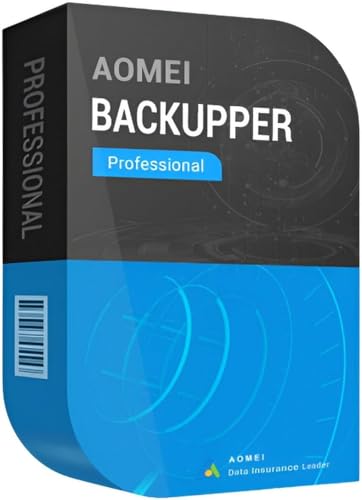
4. AOMEI Backupper PRO
- Best for: Protecting two Windows 11 or 10 PCs with full system backup and a restore path after a crash or infection.
- System, disk, partition, file and email backup, plus disk and partition clone
- Recovery in case of malware infection, hard drive failure, or Windows crash
- For 2 PCs, lifetime license
- For Windows 11 and 10
Protecting two Windows 11 or 10 PCs with full system backup and a restore path after a crash or infection.
The listing states Windows 11 and 10 only, so it is not the pick for a PC still running Windows 7 or 8.1, and a backup only helps if it is made before trouble strikes, so set up the first backup soon after installing. Check the current price on Amazon.
AOMEI Backupper PRO suits someone who wants a proper safety net for their whole system rather than a copy of a few folders. It backs up the system, disks, partitions, files and email, and it can clone a disk or partition when you move to a new drive. When malware, a hard drive failure or a Windows crash strikes, the backup is what lets you restore the machine instead of starting over. The listing covers 2 PCs with a lifetime license, which fits a household with a desktop and a laptop, or a main PC plus a spare.
Watch out for: The listing states Windows 11 and 10 only, so it is not the pick for a PC still running Windows 7 or 8.1, and a backup only helps if it is made before trouble strikes, so set up the first backup soon after installing. Check the current price on Amazon.
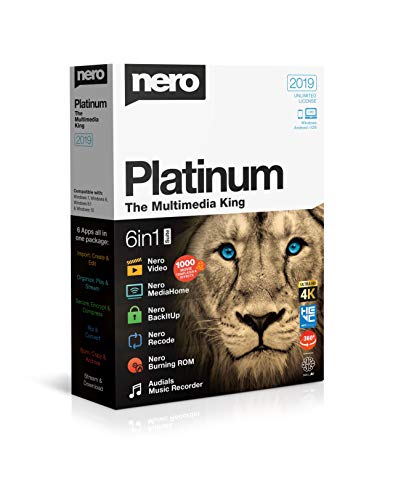
5. Nero Platinum 2019
- Best for: A single Windows 10, 8 or 7 PC that needs one suite for editing, burning and backup at a one-time license.
- 6-in-1 multimedia suite: Nero Video, MediaHome, BackItUp, Recode, Burning ROM and Audio Music Recorder
- Video editing, burning, backup, converting, playing, streaming and ripping
- 1,000 effects and movie themes, 4K editing support on 64-bit systems
- Lifetime license, 1 PC
A single Windows 10, 8 or 7 PC that needs one suite for editing, burning and backup at a one-time license.
This is the 2019 version, so it predates current codec and OS updates, lists no Windows 11 support, and covers 1 PC only, so do not buy it expecting a current release or use on a second machine. Check the current price on Amazon.
Nero Platinum 2019 is an older version — a 6-in-1 multimedia suite from 2019 — and that fact should be clear before anything else. It bundles six apps in one package: Nero Video for editing, MediaHome for managing media, BackItUp for backups, Recode for converting files, Burning ROM for discs, and an audio music recorder, with 1,000 effects and 4K editing support. It suits someone with a Windows 10, 8 or 7 PC who wants one suite for video editing, burning and backup, and who is comfortable using software from 2019 rather than a current release.
Watch out for: This is the 2019 version, so it predates current codec and OS updates, lists no Windows 11 support, and covers 1 PC only, so do not buy it expecting a current release or use on a second machine. Check the current price on Amazon.
Which One Fits Your Situation
You Want Your Files Safe Before Anything Goes Wrong
AOMEI Backupper PRO fits this situation, because it backs up the whole system, not just a folder of documents, and covers 2 PCs with a lifetime license. Set up a system and file backup, keep the backup drive separate from the PC, and a failed drive or malware infection becomes a restore job instead of a data loss. DriverUpdater does not back up your files, and the Data Recovery software only helps after files are lost, so neither replaces one.
You Already Lost Files and Need Them Back
The Data Recovery software fits this situation, because it is built for the moment after deletion or a format, and it works across Windows 11, 10, 8.1 and 7, including older machines. Stop using the affected drive as soon as files go missing, install the software on a different drive, and scan before writing anything new to the disk. AOMEI Backupper PRO cannot help here unless a backup was made beforehand, which is why recovery and backup are different jobs.
You Keep Several PCs Running and Drivers Keep Breaking Things
DriverUpdater fits this situation, because its license covers 3 PCs for 1 year and it handles the tedious part, finding the right driver for each device, across printers, graphics cards and headsets. Its driver backup function also gives you a way back if a new driver causes a problem. For a single PC, the 3-PC license is more than you need, so weigh that against the other picks, and remember that a driver updater does not protect your files.
You Still Burn Discs or Run an Older PC
Burning Studio 27 fits the disc side of this situation, with a lifetime license for 1 PC and support for CDs, DVDs and Blu-ray discs. Nero Platinum 2019 fits the older-PC side, but only if your machine runs Windows 10, 8 or 7 and you accept a 2019 suite with no Windows 11 support stated. Check the Windows version on the PC first, then choose between the two based on whether discs or the full multimedia bundle matter more.
Common Mistakes
- Buying a backup tool after files are already lost, when what you need is recovery software, not a backup plan.
- Ignoring the Windows version in the listing and installing software that does not support the PC it is meant for.
- Buying a 1-PC license for a household with several PCs, or confusing a 1-year license with a lifetime license.
- Buying Nero Platinum 2019 without noticing the 2019 in the title, then expecting current features or Windows 11 support.
- Writing new files to a drive before running recovery software, which can overwrite the deleted files you are trying to rescue.
Frequently Asked Questions
What is the difference between backup and recovery software?
Backup software copies your files and system before anything goes wrong, so you can restore them after a failure. Recovery software works after files are deleted or a drive is formatted, scanning for what remains and trying to bring it back. AOMEI Backupper PRO is a backup tool, while the Data Recovery software in this list is a recovery tool, and each one only does its own job well.
Can I use these programs on more than one PC?
It depends on the license, and the listing states it clearly. DriverUpdater covers 3 PCs for 1 year, AOMEI Backupper PRO covers 2 PCs with a lifetime license, and Burning Studio 27 and Nero Platinum 2019 each cover 1 PC. The Data Recovery listing does not state a PC count, so confirm that detail on the Amazon listing before buying if you need it on more than one machine.
Will Nero Platinum 2019 work on Windows 11?
The listing states Windows 10, 8 and 7, with no Windows 11 support listed, and it is a 2019 release. If your PC runs Windows 11, this version is not the safe pick, and you should look for a current release that lists Windows 11 support instead. If your PC runs Windows 10, 8 or 7, the stated support matches.
How do I receive the software after buying?
DriverUpdater and Burning Studio 27 arrive as a product key card with a download link and license key, so you download the software and activate it with the key. The other listings do not state their delivery format in the title, so check the format and license details on each Amazon listing before buying, and check the current price on Amazon at the same time.
Related guides
- Best External SSD for Live Performances: 6 Best External SSD for Live Performances Picks in 2026
- Best Wireless Earbuds for Running Workouts: 6 Best Wireless Earbuds for Running Workouts Picks in 2026
- How to Choose Ring Light for Student Streaming in 2026: How to Choose Ring Light for Student Streaming for Clear Video, Easy Setup, and Simple Classes
- Best Budget Smart Bulb Under 30: 6 Best Budget Smart Bulb Under 30 Picks in 2026
More from Amazon
Programs that pair well with the guide above. Offers and eligibility are set by Amazon and may change.
Set up recurring deliveries of everyday items on eligible products. Terms and savings are set by Amazon.
Explore Subscribe & SaveFree shipping on eligible items, Prime Video and more. Eligible new members can start with a free trial.
Start a Prime free trialAudiobooks and podcasts to listen to on the go. Eligible new members can start with a free trial.
Try Audible freeRead from a large library of eBooks and audiobooks on any device. Check Amazon for current plans.
Explore Kindle UnlimitedAs an Amazon Associate we earn from qualifying purchases.

Write Your Review
No reviews yet. Be the first to share your experience!