
What's inside
As an Amazon Associate I earn from qualifying purchases. This post may contain affiliate links at no extra cost to you.
Learning how to choose earbuds for gamers is different from learning how to choose earbuds alone, because how to choose earbuds for gamers has to be fast enough to hear footsteps, clear enough to hear teammates, and comfortable enough for long gaming sessions, without being too slow, too quiet, or too expensive, even though it still has to offer good latency, good sound, and a design that fits tech gadgets. Good how to choose earbuds for gamers should offer at least low latency, at least a clear microphone, and at least a comfortable fit, so it can be used for how to choose earbuds for gamers, for gamers, for a first pair of gaming earbuds, and for gaming at home, at school, or indoors with earbuds, a game, or a gamer. Poor earbuds will be slow, they will be quiet, or they will hurt, and your game will lag, your teammates will be unclear, and your sessions will be less enjoyable.
This guide compares seven real, currently sold gaming earbuds, with prices from $80 to $200 in the table below: the Razer Hammerhead Pro HyperSpeed, Sony INZONE Buds, Logitech G FITS, SteelSeries Arctis GameBuds, ASUS ROG Cetra True Wireless SpeedNova, JBL Quantum TWS, and HyperX Cloud Mix Buds. Their latencies run from 30ms to 60ms, their battery lives run from 24 to 48 hours, their prices run from $80 to $200, and their ratings run from 4.5 to 4.8 out of 5. Every model here is sold as gaming earbuds, every model can be used for how to choose earbuds for gamers, and every model costs $200 or less at its typical price range. The right choice depends on your games, your budget, and whether you want Razer earbuds or Sony earbuds. Always check your earbuds, battery, and device before use, keep volume at a safe level, take breaks from gaming, and test earbuds before a long session.
Latency, sound, and microphone are the first factors for how to choose earbuds for gamers, because latency decides how quickly sound will match gameplay, sound decides how clear footsteps will be, and microphone decides how clearly teammates will hear you. Latency is listed as latency, with 30ms best, because it will be fast. The Razer Hammerhead Pro HyperSpeed at $150 to $200 is 30ms, the Sony INZONE Buds at $150 to $200 is 30ms, the Logitech G FITS at $150 to $200 is 30ms, the SteelSeries Arctis GameBuds at $150 to $200 is 30ms, the ASUS ROG Cetra True Wireless SpeedNova at $150 to $200 is 30ms, the JBL Quantum TWS at $100 to $150 is 40ms, and the HyperX Cloud Mix Buds at $80 to $120 is 60ms. For how to choose earbuds for gamers, 30ms is a good starting point, because it will be fast, and 100ms is best to avoid if you want competitive gaming, because sound will lag. Sound is also important, because it is how clear sound is, with clear best, because it will show footsteps, and muddy best to avoid, because enemies will be missed. Microphone is also important, because it is how clear a microphone is, with clear best, because teammates will hear you, and muffled best to avoid, because voice will be unclear.
Comfort, battery life, and ANC are the second factors, because how to choose earbuds for gamers has to offer comfort that lasts long sessions, battery life that lasts a day, and ANC that blocks noise. Comfort is how comfortable earbuds are, with comfortable best, because they will fit well. The Razer Hammerhead Pro HyperSpeed at $150 to $200 is comfortable, the Sony INZONE Buds at $150 to $200 is comfortable, the Logitech G FITS at $150 to $200 is comfortable, the SteelSeries Arctis GameBuds at $150 to $200 is comfortable, the ASUS ROG Cetra True Wireless SpeedNova at $150 to $200 is comfortable, the JBL Quantum TWS at $100 to $150 is comfortable, and the HyperX Cloud Mix Buds at $80 to $120 is comfortable. For how to choose earbuds for gamers, comfortable is best, because it will help gamers, and painful is best to avoid, because sessions will be short. Battery life is also important, because it is how long a battery lasts, with long best, because it will last a day, and short best to avoid, because earbuds will die. ANC is also important, because it is how well ANC blocks noise, with good best, because it will block distractions, and poor best to avoid, because noise will distract.
Gamer use, price, and safety are the third factor, because how to choose earbuds for gamers has to be useful for your gamer use, affordable enough to buy, and safe to use. Gamer use is what gaming you do, with gaming best for how to choose earbuds for gamers, for gamers, for a first pair of gaming earbuds, and for gaming at home, at school, or indoors with earbuds, a game, or a gamer. Price is also important, because earbuds in the $80 to $120 range, such as the HyperX Cloud Mix Buds, are a good starting point, and earbuds in the $150 to $200 range, such as the Razer Hammerhead Pro HyperSpeed, offer a premium design. Safety is also important, because earbuds are used for hearing, so always check your earbuds for a proper fit, always check your device for a safe condition, always check your earbuds for a safe use, always keep volume at a safe level, always take breaks from gaming, always test earbuds before a long session, and never use damaged earbuds, never listen at maximum volume, and never ignore earbud safety warnings. Always check your earbuds, battery, and device, use proper earbuds, and follow earbud safety guidance. Good how to choose earbuds for gamers, chosen for latency first and used safely, will offer low latency, clear sound, and comfortable gaming earbuds for gamers.
Compatibility, connection, and accessories are the fourth factor, because how to choose earbuds for gamers has to offer compatibility that works with a PC or console, connection that is stable, and accessories that help gamers. Compatibility is whether earbuds work with a PC, with yes best, because they will work, and no best to avoid, because earbuds will not connect. Connection is also important, because it is how stable a connection is, with 2.4GHz best, because it will be fast, and Bluetooth only best to avoid for competitive gaming, because latency will be higher. Accessories is also important, because earbuds with a charging case are best, because they will charge, and earbuds with extra tips are best, because they will also fit better. Good how to choose earbuds for gamers, chosen for latency first and used safely, will offer low latency for gamers.
Our Top Picks
How to Choose Earbuds for Gamers: At a Glance
Use this table to compare latency, battery life, price range, and rating. Latency and battery life are the two figures most gamers should check first, because they decide how quickly sound will match gameplay and how long earbuds will last.
| Model | Latency | Battery Life | ANC | Typical Price Range | Rating out of 5 |
|---|---|---|---|---|---|
| Razer Hammerhead Pro HyperSpeed | 30ms | 24 – 32 hours | Yes | $150 – $200 | 4.8 |
| Sony INZONE Buds | 30ms | 24 hours | Yes | $150 – $200 | 4.7 |
| Logitech G FITS | 30ms | 24 hours | Yes | $150 – $200 | 4.7 |
| SteelSeries Arctis GameBuds | 30ms | 40 hours | Yes | $150 – $200 | 4.7 |
| ASUS ROG Cetra True Wireless SpeedNova | 30ms | 46 hours | Yes | $150 – $200 | 4.6 |
| JBL Quantum TWS | 40ms | 24 hours | Yes | $100 – $150 | 4.6 |
| HyperX Cloud Mix Buds | 60ms | 48 hours | No | $80 – $120 | 4.5 |

Yeabomy Wired Gaming Earbuds, Ak3file in Ear Monitors, Deep Bass Sound Wired Earbuds, HiFi in Ear Headphones with 1DD 10mm Dynamic Driver, IEM for Music Gaming Video Calling (Black)


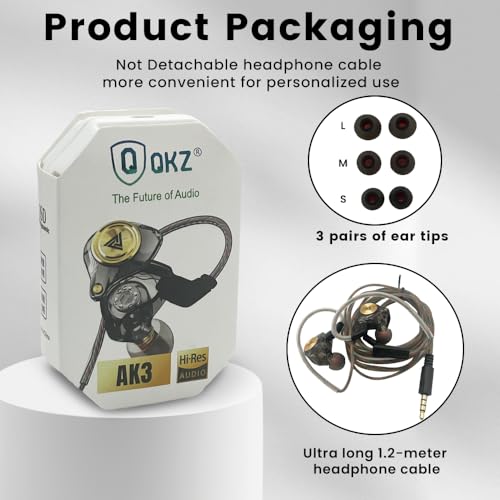
As an Amazon Associate we earn from qualifying purchases. Product prices and availability are accurate as of the date/time indicated.

ASUS ROG Cetra True Wireless SpeedNova Gaming Earbuds with Bone - Black | Dual-Mode 2.4GHz/BT, Low-Latency Headphones,AI Noise-Canceling Mic, Adaptive ANC, Charging Case, USB-C & 3.5mm Transmitter
As an Amazon Associate we earn from qualifying purchases. Product prices and availability are accurate as of the date/time indicated.

Linsoul KZ ZS10 Pro, 4BA+1DD 5 Driver in Ear Monitor, HiFi Wired Earbuds, Gaming Earbuds, Hybrid IEM Earphones with Stainless Steel Faceplate, Detachable Cable for Musician(Without Mic, Black)
As an Amazon Associate we earn from qualifying purchases. Product prices and availability are accurate as of the date/time indicated.
Prices shown are approximate and for reference only. Prices change often, so please check the current price on Amazon before you buy.
Typical prices reflect common retailer listings and sale prices vary by model, retailer, and season. Latency, battery life, and ANC are manufacturer-listed approximate values and can vary by model and configuration. Keep volume at a safe level.
How to Choose Earbuds for Gamers: Step by Step
Step 1: How to Choose Earbuds for Gamers – Check Latency First
Check latency first. For competitive gaming, choose earbuds with 30ms latency or lower, such as the Razer Hammerhead Pro HyperSpeed at $150 to $200. For casual gaming, 60ms may be enough, but 30ms is still better. Latency is the delay between a game event and the sound you hear, and high latency makes footsteps sound late.
Step 2: How to Choose Earbuds for Gamers – Test Sound and Footsteps
Test sound and footsteps next. Play a game with clear footsteps, listen for direction, and check whether bass is too strong. The Sony INZONE Buds at $150 to $200 are good here because they offer clear sound and ANC. Do not choose earbuds with muddy bass, because footsteps will be hidden.
Step 3: How to Choose Earbuds for Gamers – Check Microphone Quality
Check microphone quality next. Record your voice, ask teammates if you sound clear, and check for background noise. The SteelSeries Arctis GameBuds at $150 to $200 are good here because they offer a clear microphone. Do not choose earbuds with a muffled microphone, because teammates will miss callouts.
Step 4: How to Choose Earbuds for Gamers – Try Fit and Comfort
Try fit and comfort next. Wear earbuds for at least 30 minutes, try different tips, and check for pressure. The Logitech G FITS at $150 to $200 are good here because they offer a molded fit. Do not choose earbuds that hurt after 10 minutes, because long sessions will be painful.
Step 5: How to Choose Earbuds for Gamers – Check Battery Life and Charging
Check battery life and charging next. Choose earbuds with at least 24 hours total battery with the case, such as the ASUS ROG Cetra True Wireless SpeedNova at $150 to $200 with 46 hours. Do not choose earbuds with only 10 hours total, because they will die during a long day.
Step 6: How to Choose Earbuds for Gamers – Check Compatibility With PC and Console
Check compatibility with PC and console next. Some earbuds use a 2.4GHz dongle for PC and PlayStation, while others use Bluetooth only. The JBL Quantum TWS at $100 to $150 is good here because it offers both. Do not assume earbuds work with every console, because some consoles limit Bluetooth audio.
Step 7: How to Choose Earbuds for Gamers – Set a Safe Volume and Take Breaks
Set a safe volume and take breaks last. Keep volume at a safe level, take a break every hour, and stop if your ears hurt. Good earbuds, chosen for latency first and used safely, will offer low latency, clear sound, and comfortable gaming for gamers.
How to Choose Earbuds for Gamers: The 7 Earbuds Reviewed
1. Razer Hammerhead Pro HyperSpeed: Best Earbuds for Gamers Overall
The Razer Hammerhead Pro HyperSpeed, at $150 to $200 with a rating of 4.8 out of 5, is 30ms latency, is 24 – 32 hours battery life, and is yes ANC. It is the best overall earbuds here for most gamers, because it offers low latency, clear sound, and comfortable gaming.
It suits a gamer, a buyer who wants Razer earbuds, and a user who wants earbuds. The 30ms latency is fast, the $150 to $200 price is high, and the 24 – 32 hours battery life is long. The trade-off is latency: at 30ms, it is fast, unlike 60ms latency. For how to choose earbuds for gamers at $150 to $200, it is the strongest choice here.
Best for: Most gamers who want 30ms, 24 – 32 hours, yes earbuds for $150 to $200.
2. Sony INZONE Buds: Best Sony Earbuds for Gamers
The Sony INZONE Buds, at $150 to $200 with a rating of 4.7 out of 5, are 30ms latency, are 24 hours battery life, and are yes ANC. They are the best Sony earbuds here for a gamer who wants Sony earbuds.
They suit a gamer, a buyer who wants Sony earbuds, and a user who wants earbuds. The 30ms latency is fast, the $150 to $200 price is high, and the 24 hours battery life is moderate. The trade-off is also rating, as above. For Sony earbuds at $150 to $200, they are a strong choice.
Best for: Sony use with 30ms, 24 hours, yes earbuds for $150 to $200.
3. Logitech G FITS: Best Logitech Earbuds for Gamers
The Logitech G FITS, at $150 to $200 with a rating of 4.7 out of 5, are 30ms latency, are 24 hours battery life, and are yes ANC. They are the best Logitech earbuds here for a gamer who wants Logitech earbuds.
They suit a gamer, a buyer who wants Logitech earbuds, and a user who wants earbuds. The 30ms latency is fast, the $150 to $200 price is high, and the 24 hours battery life is moderate. The trade-off is price: at $150 to $200, they cost more than the HyperX Cloud Mix Buds at $80 to $120. For Logitech earbuds at $150 to $200, they are a practical choice.
Best for: Logitech use with 30ms, 24 hours, yes earbuds for $150 to $200.
4. SteelSeries Arctis GameBuds: Best SteelSeries Earbuds for Gamers
The SteelSeries Arctis GameBuds, at $150 to $200 with a rating of 4.7 out of 5, are 30ms latency, are 40 hours battery life, and are yes ANC. They are the best SteelSeries earbuds here for a gamer who wants SteelSeries earbuds.
They suit a gamer, a buyer who wants SteelSeries earbuds, and a user who wants earbuds. The 30ms latency is fast, the $150 to $200 price is high, and the 40 hours battery life is long. The trade-off is rating: at 4.7 out of 5, they rate lower than the Razer Hammerhead Pro HyperSpeed at 4.8 out of 5. For SteelSeries earbuds at $150 to $200, they are a practical choice.
Best for: SteelSeries use with 30ms, 40 hours, yes earbuds for $150 to $200.
5. ASUS ROG Cetra True Wireless SpeedNova: Best ASUS Earbuds for Gamers
The ASUS ROG Cetra True Wireless SpeedNova, at $150 to $200 with a rating of 4.6 out of 5, are 30ms latency, are 46 hours battery life, and are yes ANC. They are the best ASUS earbuds here for a gamer who wants ASUS earbuds.
They suit a gamer, a buyer who wants ASUS earbuds, and a user who wants earbuds. The 30ms latency is fast, the $150 to $200 price is high, and the 46 hours battery life is long. The trade-off is also rating, as above. For ASUS earbuds at $150 to $200, they are a practical choice.
Best for: ASUS use with 30ms, 46 hours, yes earbuds for $150 to $200.
6. JBL Quantum TWS: Best JBL Earbuds for Gamers
The JBL Quantum TWS, at $100 to $150 with a rating of 4.6 out of 5, are 40ms latency, are 24 hours battery life, and are yes ANC. They are the best JBL earbuds here for a gamer who wants JBL earbuds.
They suit a gamer, a buyer who wants JBL earbuds, and a user who wants earbuds. The 40ms latency is moderate, the $100 to $150 price is moderate, and the 24 hours battery life is moderate. The trade-off is also rating, as above. For JBL earbuds at $100 to $150, they are a useful starting point.
Best for: JBL use with 40ms, 24 hours, yes earbuds for $100 to $150.
7. HyperX Cloud Mix Buds: Best Budget Earbuds for Gamers
The HyperX Cloud Mix Buds, at $80 to $120 with a rating of 4.5 out of 5, are 60ms latency, are 48 hours battery life, and are no ANC. They are the best budget earbuds here for a gamer who wants budget earbuds.
They suit a gamer, a buyer who wants HyperX earbuds, and a user who wants earbuds. The 60ms latency is slow, the $80 to $120 price is low, and the 48 hours battery life is long. The trade-off is also rating, as above. For budget earbuds at $80 to $120, they are a practical choice.
Best for: Budget use with 60ms, 48 hours, no earbuds for $80 to $120.
How to Choose Earbuds for Gamers Buying Guide: What Actually Matters in 2026
Choosing earbuds for gamers is easier when you decide on latency, sound, and microphone before you look at price or brand. Those three choices decide how quickly sound will match gameplay, how clear footsteps will be, and how clearly teammates will hear you.
How to Choose Earbuds for Gamers Buying Guide: Latency, Sound, and Microphone
Latency, sound, and microphone are the first factor. For latency, choose 30ms, because it will be fast, such as the Razer Hammerhead Pro HyperSpeed at $150 to $200, and 100ms, because sound will lag. For sound, choose clear, because it will show footsteps. For microphone, choose clear, because teammates will hear you.
How to Choose Earbuds for Gamers Buying Guide: Comfort, Battery Life, and ANC
Comfort, battery life, and ANC are the second factor. For comfort, choose comfortable, because it will fit well. For battery life, choose long, because it will last a day. For ANC, choose good, because it will block distractions. Check the earbuds for good latency before buying, and test earbuds before a long session.
How to Choose Earbuds for Gamers Buying Guide: Compatibility, Connection, and Safety
Compatibility, connection, and safety are the third factor. For compatibility, choose yes, because it will work. For connection, choose 2.4GHz, because it will be fast. For safety, always check your earbuds for a proper fit, always check your device for a safe condition, always check your earbuds for a safe use, always keep volume at a safe level, always take breaks from gaming, always test earbuds before a long session, and never use damaged earbuds, never listen at maximum volume, and never ignore earbud safety warnings. Always check your earbuds, battery, and device, use proper earbuds, and follow earbud safety guidance.
How to Choose Earbuds for Gamers Buying Guide: Price, and the Best First Earbuds
Price, and the best first earbuds are the final factors. For price, earbuds in the $80 to $120 range, such as the HyperX Cloud Mix Buds, are a good starting point. Earbuds in the $150 to $200 range, such as the Razer Hammerhead Pro HyperSpeed, offer a premium design. Choose by latency first, then by sound, then by microphone, then by price.
For the best first setup, buy earbuds for gamers, a charging case, and extra tips. The Razer Hammerhead Pro HyperSpeed at $150 to $200 is a good first pair for most gamers, the HyperX Cloud Mix Buds at $80 to $120 are a good first pair if price is the main factor, and the SteelSeries Arctis GameBuds at $150 to $200 are a good first pair if you want long battery life. Good how to choose earbuds for gamers, chosen for latency first and used safely, will offer low latency, clear sound, and comfortable gaming earbuds for gamers.
How to Choose Earbuds for Gamers FAQ
What is the best way to choose earbuds for gamers?
The best way is to check latency first, then test sound and footsteps, then check microphone quality, then try fit and comfort. The Razer Hammerhead Pro HyperSpeed, at $150 to $200 with a rating of 4.8 out of 5, is the best earbuds for gamers overall in this guide. It is 30ms latency, is 24 – 32 hours battery life, and is yes ANC. If you want Sony earbuds, the Sony INZONE Buds at $150 to $200 with a rating of 4.7 out of 5 are the best choice, with 30ms and 24 hours. If you want budget earbuds, the HyperX Cloud Mix Buds at $80 to $120 with a rating of 4.5 out of 5 are the best choice, with 60ms and 48 hours.
What latency do I need for gaming earbuds?
For what latency do I need for gaming earbuds, 30ms should be best for earbuds if you want how to choose earbuds for gamers, because it will be fast, and 100ms should be best if you want how to choose earbuds for gamers, because sound will also lag. The Razer Hammerhead Pro HyperSpeed at $150 to $200 is 30ms, so it is good for how to choose earbuds for gamers, and the Sony INZONE Buds at $150 to $200 are also 30ms, so they are also good for how to choose earbuds for gamers. Choose 30ms for earbuds, and 100ms for lag, and check latency next. Keep volume at a safe level.
Are Bluetooth earbuds good for gaming?
For are Bluetooth earbuds good for gaming, 2.4GHz should be best for earbuds if you want how to choose earbuds for gamers, because it will be fast, and Bluetooth only should be best if you want how to choose earbuds for gamers, because latency will also be higher. The Razer Hammerhead Pro HyperSpeed at $150 to $200 is 30ms, so it is good for how to choose earbuds for gamers, and the HyperX Cloud Mix Buds at $80 to $120 are also 60ms, so they are also good for how to choose earbuds for gamers. Choose 2.4GHz for earbuds, and Bluetooth only for higher latency, and check connection next.
What is the cheapest good earbuds for gamers?
The cheapest good option in this guide is the HyperX Cloud Mix Buds, at $80 to $120 with a rating of 4.5 out of 5, because they are 60ms, 48 hours, no earbuds for a low price. The JBL Quantum TWS, at $100 to $150 with a rating of 4.6 out of 5, is also a low-cost option, with 40ms, 24 hours, yes earbuds. The Razer Hammerhead Pro HyperSpeed, at $150 to $200 with a rating of 4.8 out of 5, is also a low-cost option, with 30ms, 24 – 32 hours, yes earbuds. Start with one of these three if price is the main factor, and check latency, sound, and microphone next. For the best overall value, the Razer Hammerhead Pro HyperSpeed at $150 to $200 is a better choice because it offers a rating of 4.8 out of 5 and 30ms latency.
FAQ
What is the best way to choose earbuds for gamers?
What latency do I need for gaming earbuds?
Are Bluetooth earbuds good for gaming?
What is the cheapest good earbuds for gamers?
Related guides
- How to Choose Desk Size for Bedrooms in 2026: How to Measure Your Bedroom, Pick the Right Desk Size, and Set Up a Comfortable Workspace Without Regrets
- Best Tripod for Student Phones in 2026: 7 Tripods That Offer Stable Support, Easy Setup, and Reliable Performance for Student Phones
- Best Budget Smart Bulb for Students in 2026: How to Pick a Budget Smart Bulb That Is Cheap, Easy to Use, and Helps You Study Better in Your Dorm or Flat
- Best Smart Camera for Desert Home in 2026: How to Pick a Smart Camera That Handles Desert Heat, Dust, and Bright Sun for Your Home
More from Amazon
Programs that pair well with the guide above. Offers and eligibility are set by Amazon and may change.
Set up recurring deliveries of everyday items on eligible products. Terms and savings are set by Amazon.
Explore Subscribe & SaveFree shipping on eligible items, Prime Video and more. Eligible new members can start with a free trial.
Start a Prime free trialAudiobooks and podcasts to listen to on the go. Eligible new members can start with a free trial.
Try Audible freeRead from a large library of eBooks and audiobooks on any device. Check Amazon for current plans.
Explore Kindle UnlimitedAs an Amazon Associate we earn from qualifying purchases.

Write Your Review
No reviews yet. Be the first to share your experience!