
What's inside
- Smart Switch vs Smart Bulb for Lighting: Quick Comparison Table
- What Is a Smart Switch?
- What Is a Smart Bulb?
- Smart Switch vs Smart Bulb for Lighting: Key Differences
- Best Smart Switch vs Smart Bulb for Lighting Reviewed
- Buying Guide: Smart Switch vs Smart Bulb for Lighting – How to Choose
- How to Install a Smart Switch vs Smart Bulb Safely
- Which Smart Switch vs Smart Bulb for Lighting Should You Buy?
- Frequently Asked Questions About Smart Switch vs Smart Bulb for Lighting
As an Amazon Associate I earn from qualifying purchases. This post may contain affiliate links at no extra cost to you.
Smart switch vs smart bulb for lighting is a common choice for homeowners who want smart lighting, but do not know whether to replace a light switch or a light bulb. A smart switch replaces a standard wall switch, and it controls all the bulbs on that circuit, with a physical switch, an app, and voice control. A smart bulb replaces a standard bulb, and it controls one bulb, with colour, brightness, and schedules, through an app or voice control.
For most homes, a smart switch is best if you have many bulbs on one switch, you want a physical switch that anyone can use, and you do not need colour changing. A smart bulb is best if you have one bulb, you want colour and dimming, and you do not want to install a switch. That is the short answer, but the full answer depends on your home, your wiring, your budget, and how you use light. This guide compares smart switches and smart bulbs, so you can choose the right smart lighting for your home.
At techcats.net, we focus on tech gadgets. For this guide to smart switch vs smart bulb for lighting in 2026, we compared current smart switches and smart bulbs that are widely sold, designed for home lighting, and suitable for a homeowner who wants smart lighting in a living room, bedroom, or kitchen. We looked at type, protocol, dimming, colour, installation, and price. Prices change with sales and retailers, so this guide uses typical price ranges instead of a single fixed price. Protocol, dimming, and colour figures are manufacturer listings, and real performance depends on your home wiring, your Wi-Fi, your hub, and your app.
Tech tip: check your home wiring before you buy a smart switch. Most smart switches need a neutral wire, which is a white wire in the switch box, to power the switch. If your home is older and does not have a neutral wire, choose a smart switch that works without a neutral, such as the Lutron Caseta, or choose a smart bulb instead, which does not need wiring changes.
Our Top Picks
Smart Switch vs Smart Bulb for Lighting: Quick Comparison Table
The table below compares seven smart switches and smart bulbs for lighting. Type is the device type, where given. Protocol is the protocol, where given. Dimming is whether it dims, where given. Colour is whether it changes colour, where given. Installation is the installation type, where given. Best for is a note on what the device is best for, such as switch or bulb, where given. Price is the typical range, and rating is our editorial score based on ease of use, compatibility, features, and value for smart lighting.
| Smart Switch vs Smart Bulb for Lighting | Type | Protocol | Dimming | Colour Changing | Installation | Best For | Typical Price Range | Our Rating |
|---|---|---|---|---|---|---|---|---|
| Lutron Caseta Smart Switch | Smart switch | Clear Connect, Wi-Fi via hub | Yes | No | Hardwired, no neutral needed | Best overall, smart switch | $50 – $60 | 4.9 / 5 |
| TP-Link Kasa Smart Switch HS200 | Smart switch | Wi-Fi | No | No | Hardwired, neutral needed | Best for TP-Link, switch | $20 – $25 | 4.8 / 5 |
| Philips Hue White and Color Ambiance Bulb | Smart bulb | Zigbee, Bluetooth, Wi-Fi via hub | Yes | Yes, 16 million colours | Screw-in, E26 | Best for Philips Hue, bulb | $40 – $50 | 4.9 / 5 |
| Wyze Bulb Color | Smart bulb | Wi-Fi | Yes | Yes, 16 million colours | Screw-in, E26 | Best budget, Wyze bulb | $10 – $15 | 4.7 / 5 |
| Leviton Decora Smart Switch | Smart switch | Wi-Fi | Yes | No | Hardwired, neutral needed | Best for Leviton, dimmer | $40 – $50 | 4.7 / 5 |
| LIFX Color Bulb | Smart bulb | Wi-Fi | Yes | Yes, 16 million colours | Screw-in, E26 | Best for LIFX, Wi-Fi bulb | $25 – $35 | 4.7 / 5 |
| TP-Link Kasa Smart Bulb KL125 | Smart bulb | Wi-Fi | Yes | Yes, 16 million colours | Screw-in, E26 | Best for TP-Link, bulb | $15 – $20 | 4.8 / 5 |

Kasa Smart Light Switch, Single Pole, Need Neutral Wire, HS200P3
As an Amazon Associate we earn from qualifying purchases. Product prices and availability are accurate as of the date/time indicated.

TP-Link Tapo Matter Smart Light Switch: Voice Control w/Siri, Alexa & Google Home | UL Certified | Timer & Schedule | Easy Guided Install | Neutral Wire Required | Single Pole | Tapo S505(2-Pack)
As an Amazon Associate we earn from qualifying purchases. Product prices and availability are accurate as of the date/time indicated.
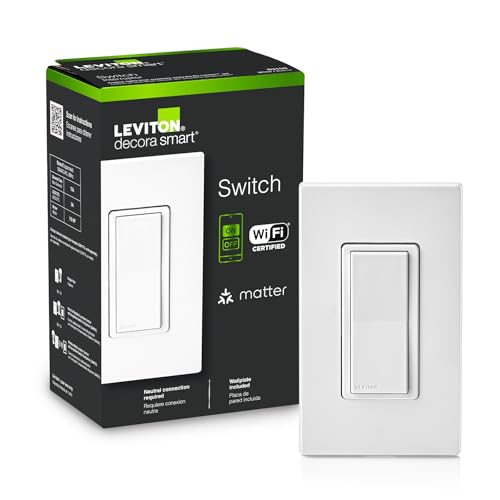
Leviton Decora Smart Switch, Wi-Fi, D315S-1RW, White | Works with Matter, My Leviton, Alexa, Google Assistant, Apple Home/Siri. Wired or Wire-Free 3-Way, Neutral Wire Required
As an Amazon Associate we earn from qualifying purchases. Product prices and availability are accurate as of the date/time indicated.
Note: Protocol and colour figures are manufacturer listings, and a bulb that lists 16 million colours may show fewer colours in practice depending on the app. Always check the device’s protocol, dimming, and installation in the manual, and confirm the current price with the retailer.
What Is a Smart Switch?
A smart switch is a wall switch that replaces a standard light switch, and it controls all the bulbs on that circuit, whether they are regular bulbs or smart bulbs. A smart switch has a physical button you can press, an app you can use on your phone, and voice control with Alexa, Google Assistant, or Apple HomeKit in many versions. A smart switch such as the Lutron Caseta or TP-Link Kasa HS200 lets you turn lights on and off, dim them if it is a dimmer switch, and set schedules, all from one switch.
A smart switch is different from a smart bulb because it controls a whole circuit, not just one bulb. If you have a living room with 4 recessed lights on one switch, a smart switch can control all 4 lights at once, for the price of one switch, while 4 smart bulbs would cost 4 times as much. A smart switch is also better for guests, because anyone can press the physical switch, without needing an app.
What Is a Smart Bulb?
A smart bulb is a bulb that replaces a standard bulb, and it controls one bulb, with colour, brightness, and schedules, through an app or voice control. A smart bulb such as the Philips Hue White and Color Ambiance, Wyze Bulb Color, or LIFX Color lets you change colour to 16 million colours, dim brightness, set a schedule, and create scenes, all from your phone. A smart bulb screws into a standard E26 socket, so it is easy to install, with no wiring.
A smart bulb is different from a smart switch because it controls one bulb, not a whole circuit, and it can change colour, while most smart switches cannot. A smart bulb is best for a lamp, a bedroom, or a single bulb where you want colour, and you do not want to install a switch. A smart bulb needs power at all times, so the wall switch must stay on, or the bulb will not work.
Smart Switch vs Smart Bulb for Lighting: Key Differences
Cost: One Switch vs Many Bulbs, and Your Home
Cost is the first difference between a smart switch and a smart bulb. A smart switch costs $20 to $60 for one switch, and it controls all the bulbs on that circuit, whether there are 2, 4, or 6 bulbs. A smart bulb costs $10 to $50 per bulb, and you need one bulb for each light. If you have a room with 4 bulbs on one switch, a smart switch for $25 is cheaper than 4 smart bulbs for $40 each, which would cost $160.
Choose a smart switch if you have many bulbs on one switch, you want to save money, and you do not need colour. Choose a smart bulb if you have one bulb, you want colour, and you do not want to install a switch. Calculate the total cost for your room before you buy, by counting bulbs and switches.
Colour and Dimming: Colour Changing vs Dimming Only, and Mood
Colour and dimming are the second difference. A smart bulb can change colour to 16 million colours, and it can dim brightness, so you can create a warm light for evening, a bright white light for work, or a red light for a movie. A smart switch can usually only dim, if it is a dimmer switch, and it cannot change colour, because the bulbs are regular bulbs that do not change colour.
Choose a smart bulb if you want colour, you want to create scenes, or you want to change light for mood. Choose a smart switch if you only need dimming, you want a simple white light, and you do not need colour. Some smart switches, such as the Lutron Caseta dimmer, can dim, but they cannot change colour.
Installation: Hardwired vs Screw-In, and Wiring
Installation is the third difference. A smart switch needs to be hardwired, which means you need to turn off power at the breaker, remove the old switch, connect wires, and install the new switch. Most smart switches need a neutral wire, which is a white wire in the switch box, to power the switch. If your home does not have a neutral wire, you need a switch that works without a neutral, such as the Lutron Caseta, or you need an electrician.
A smart bulb screws into a standard socket, like a regular bulb, so it is easy to install, with no wiring, no tools, and no electrician. Choose a smart switch if you are comfortable with wiring, you have a neutral wire, and you want a permanent solution. Choose a smart bulb if you rent, you do not want to change wiring, or you want a simple installation.
Use: Physical Switch vs App Only, and Guests
Use is the fourth difference. A smart switch has a physical button that anyone can press, so guests, kids, or family members who do not have the app can still turn lights on and off. A smart bulb needs an app or voice control, and if someone turns off the wall switch, the bulb loses power and will not work until the switch is turned back on. That can be confusing for guests.
Choose a smart switch if you have guests, kids, or family who need a physical switch, and you want lights to work like normal lights. Choose a smart bulb if you live alone, you always use an app or voice, and you do not mind keeping the wall switch on. You can also use a smart bulb with a smart switch, but you need to keep the switch on, or the bulb will not work.
Best Smart Switch vs Smart Bulb for Lighting Reviewed
1. Lutron Caseta Smart Switch – Best Smart Switch for Lighting Overall
The Lutron Caseta Smart Switch is our top pick for a smart switch because it offers a Clear Connect protocol, Wi-Fi via a hub, dimming, no colour changing, and a hardwired installation that does not need a neutral wire, for a typical price of $50 to $60. It has a reliable design, a physical button, and a design that is made for a home with older wiring.
Lutron designs the Caseta with a focus on reliability and no-neutral installation. The switch works without a neutral wire, which is useful for older homes, the dimmer lets you adjust brightness, and the hub connects to Alexa, Google, and Apple HomeKit. The switch is a good choice for a homeowner who wants a smart switch that works in any home, and who wants a reliable, premium switch.
The main limitation is price and hub. At $50 to $60, plus a hub that costs extra in some versions, it is more expensive than a TP-Link switch. Choose the Caseta if you want the best overall smart switch, you have no neutral wire, and you want a Lutron switch.
2. TP-Link Kasa Smart Switch HS200 – Best Smart Switch for TP-Link
The TP-Link Kasa Smart Switch HS200 is a smart switch with a Wi-Fi protocol, no dimming, no colour changing, and a hardwired installation that needs a neutral wire, for a typical price of $20 to $25. It has a simple design, an app, and voice control with Alexa and Google Assistant.
TP-Link designs the HS200 with a focus on low cost and Wi-Fi. The switch connects directly to Wi-Fi, so it does not need a hub, the app lets you set schedules, and the price of $20 to $25 is low for a smart switch. The switch is a good choice for a user who wants a cheap smart switch, and who has a neutral wire.
The main limitation is that it does not dim, so it can only turn lights on and off, not adjust brightness. Choose the HS200 if you want a TP-Link switch, you want a low price, and you do not need dimming.
3. Philips Hue White and Color Ambiance Bulb – Best Smart Bulb for Lighting Overall
The Philips Hue White and Color Ambiance Bulb is our top pick for a smart bulb because it offers a Zigbee, Bluetooth, and Wi-Fi via hub protocol, dimming, 16 million colours, and a screw-in E26 installation, for a typical price of $40 to $50. It has a high-quality colour, a reliable app, and a design that is made for a smart home.
Philips Hue designs this bulb with a focus on colour quality and a complete ecosystem. The bulb can change to 16 million colours, it dims smoothly, and it works with a Hue Bridge for a whole home, or with Bluetooth for a single bulb. The bulb is a good choice for a user who wants the best smart bulb, and who wants a premium colour and a reliable system.
The main limitation is price and hub. At $40 to $50 per bulb, plus a hub that costs extra, it is more expensive than a Wyze or TP-Link bulb. Choose the Hue bulb if you want the best overall smart bulb, you want Philips Hue, and you are willing to pay for a premium system.
4. Wyze Bulb Color – Best Budget Smart Bulb for Lighting
The Wyze Bulb Color is a smart bulb with a Wi-Fi protocol, dimming, 16 million colours, and a screw-in E26 installation, for a typical price of $10 to $15. It has a simple design, an app, and voice control with Alexa and Google Assistant, without a hub.
Wyze designs this bulb with a focus on low cost and Wi-Fi. The bulb connects directly to Wi-Fi, so it does not need a hub, the colour is good for the price, and the price of $10 to $15 is the lowest in this guide for a colour bulb. The bulb is a good choice for a user who wants a cheap colour bulb, and who does not need a premium system.
The main limitation is that it is a Wi-Fi bulb, so it can be slower than a Zigbee bulb, and it may need a strong Wi-Fi signal. Choose the Wyze Bulb Color if you want the lowest price for a colour bulb, you want Wi-Fi, and you do not need a hub.
5. Leviton Decora Smart Switch – Best Smart Switch for Leviton Dimmer
The Leviton Decora Smart Switch is a smart switch with a Wi-Fi protocol, dimming, no colour changing, and a hardwired installation that needs a neutral wire, for a typical price of $40 to $50. It has a Decora design that matches standard switches, an app, and voice control.
Leviton designs this switch with a focus on a familiar Decora look and dimming. The switch looks like a standard Decora switch, it dims smoothly, and it connects to Wi-Fi without a hub. The switch is a good choice for a homeowner who wants a smart dimmer that looks like a normal switch, and who has a neutral wire.
The main limitation is price. At $40 to $50, it is more expensive than a TP-Link switch, though it offers dimming. Choose the Leviton Decora if you want a Leviton switch, you want dimming, and you want a Decora design.
6. LIFX Color Bulb – Best Smart Bulb for LIFX Wi-Fi
The LIFX Color Bulb is a smart bulb with a Wi-Fi protocol, dimming, 16 million colours, and a screw-in E26 installation, for a typical price of $25 to $35. It has a bright colour, an app, and voice control, without a hub.
LIFX designs this bulb with a focus on Wi-Fi and bright colour. The bulb connects directly to Wi-Fi, so it does not need a hub, the colour is bright and vivid, and the bulb is a good choice for a user who wants a LIFX bulb, and who wants a Wi-Fi bulb without a hub.
The main limitation is that it is a Wi-Fi bulb, so it can use more Wi-Fi bandwidth than a Zigbee bulb. Choose the LIFX Color if you want a LIFX bulb, you want Wi-Fi, and you want a bright colour bulb.
7. TP-Link Kasa Smart Bulb KL125 – Best Smart Bulb for TP-Link
The TP-Link Kasa Smart Bulb KL125 is a smart bulb with a Wi-Fi protocol, dimming, 16 million colours, and a screw-in E26 installation, for a typical price of $15 to $20. It has a simple design, an app, and voice control with Alexa and Google Assistant, without a hub.
TP-Link designs the KL125 with a focus on low cost and Wi-Fi. The bulb connects directly to Wi-Fi, the colour is good, and the price of $15 to $20 is low for a colour bulb. The bulb is a good choice for a user who wants a TP-Link bulb, and who wants a cheap colour bulb without a hub.
The main limitation is that it is a Wi-Fi bulb, so it may be slower than a Hue bulb with a hub. Choose the KL125 if you want a TP-Link bulb, you want a low price, and you do not need a hub.
Buying Guide: Smart Switch vs Smart Bulb for Lighting – How to Choose
Before you buy, think about how many bulbs are on one switch, whether you want colour, whether you have a neutral wire, whether you rent or own, and how much you want to spend. A smart switch that is perfect for a living room with 4 bulbs may not be ideal for a lamp with one bulb, and a smart bulb that is perfect for a bedroom may not be ideal for a kitchen with 6 recessed lights. The six points below cover the decisions that matter most for smart switch vs smart bulb for lighting.
1. Room and Bulbs: How Many Bulbs on One Switch?
Room and bulbs is the first decision. Count how many bulbs are on one switch in the room where you want smart lighting. If you have 1 bulb, a smart bulb is cheaper and easier. If you have 4 or more bulbs on one switch, a smart switch is cheaper, because one switch controls all bulbs, while 4 smart bulbs would cost 4 times as much.
Choose a smart bulb if you have 1 bulb, such as a lamp or a bedroom light. Choose a smart switch if you have many bulbs on one switch, such as a living room with recessed lights, a kitchen with 6 lights, or a hallway with 3 lights. Calculate the total cost before you buy.
2. Colour: Do You Need Colour Changing?
Colour is the second decision. A smart bulb can change colour, while a smart switch cannot, because the bulbs are regular bulbs. If you want colour for mood, for a movie, or for a party, choose a smart bulb. If you only need white light, dimming, and on/off, choose a smart switch.
Choose a smart bulb if you want colour, you want scenes, or you want to change light for different times of day. Choose a smart switch if you only need white light, you want a simple setup, and you do not need colour. You can also use a smart switch with smart bulbs, but you need to keep the switch on, or the bulbs will not work.
3. Wiring: Neutral Wire vs No Neutral, and Your Home
Wiring is the third decision. Most smart switches need a neutral wire, which is a white wire in the switch box, to power the switch. If your home is older and does not have a neutral wire, you need a switch that works without a neutral, such as the Lutron Caseta, or you need to hire an electrician to add a neutral wire. A smart bulb does not need wiring changes, because it screws into a socket.
Choose a smart switch if you have a neutral wire, you are comfortable with wiring, and you own your home. Choose a smart bulb if you do not have a neutral wire, you rent, or you do not want to change wiring. Check your switch box before you buy a smart switch, by turning off power and looking for a white wire.
4. Control: Physical Switch vs App Only, and Guests
Control is the fourth decision. A smart switch has a physical button that anyone can press, so guests, kids, or family can turn lights on and off without an app. A smart bulb needs an app or voice control, and if someone turns off the wall switch, the bulb loses power and will not work. That can be confusing.
Choose a smart switch if you have guests, kids, or family who need a physical switch. Choose a smart bulb if you live alone, you always use an app or voice, and you do not mind keeping the wall switch on. You can also buy a smart switch cover or a Hue dimmer switch to keep a smart bulb powered.
5. Hub vs No Hub: Zigbee vs Wi-Fi, and Your System
Hub vs no hub is the fifth decision. A Zigbee bulb, such as the Philips Hue, needs a hub to connect to Wi-Fi and to work with Alexa or Google, while a Wi-Fi bulb, such as the Wyze, LIFX, or TP-Link Kasa, connects directly to Wi-Fi without a hub. A Zigbee system is more reliable and faster, but it costs more for a hub. A Wi-Fi system is simpler and cheaper, but it can be slower and it uses more Wi-Fi bandwidth.
Choose a Zigbee system if you have many smart bulbs, you want a reliable system, and you are willing to buy a hub. Choose a Wi-Fi system if you have only a few bulbs, you want a simple setup, and you do not want a hub. Check the protocol in the manual before you buy.
6. Price, Total Cost, and Choosing Smart Lighting on a Budget
Price ranges in this guide run from about $10 to $60 for a smart switch or smart bulb, depending on type, protocol, and brand. A budget bulb at $10 to $20, such as the Wyze Bulb Color or TP-Link Kasa KL125, is enough for most users who want a single colour bulb. A mid-price switch or bulb at $20 to $50, such as the TP-Link HS200, Leviton Decora, LIFX Color, or Philips Hue, offers a better brand or a dimmer. A premium switch at $50 to $60, such as the Lutron Caseta, offers a no-neutral installation and a reliable system.
Consider total cost as well as price per device. A smart switch that costs $25 and controls 4 bulbs may cost less in total than 4 smart bulbs that cost $15 each, which would cost $60 in total. Budget for smart lighting, and if you need it, a hub, not just a switch or bulb. Do not buy the cheapest bulb if you need a switch for many bulbs, and do not buy the most expensive switch if you only have one bulb. A smart lighting setup that matches your room, your wiring, and your colour needs will work better more reliably than a setup that is cheap but missing a feature, or expensive but too complex for your home.
How to Install a Smart Switch vs Smart Bulb Safely
Installing a smart switch safely starts with turning off power at the breaker, not just at the switch, and testing that power is off with a voltage tester. Remove the old switch, connect the wires according to the manufacturer’s instructions, and install the new switch. If you do not have a neutral wire, choose a switch that works without a neutral, or hire an electrician. Do not work on wiring if you are not comfortable, and hire a licensed electrician if needed.
Installing a smart bulb is simple: turn off the light, remove the old bulb, screw in the smart bulb, turn on the light, and set up the bulb in the app. Keep the wall switch on at all times, so the bulb has power, and use the app or voice to control the bulb.
Which Smart Switch vs Smart Bulb for Lighting Should You Buy?
If you want the best smart switch, buy the Lutron Caseta Smart Switch. It costs $50 to $60, it offers a Clear Connect protocol, dimming, and a hardwired installation that does not need a neutral wire, which is the best balance for most homeowners who want a smart switch.
If you want the best smart bulb, buy the Philips Hue White and Color Ambiance Bulb. It costs $40 to $50, it offers a Zigbee protocol, dimming, and 16 million colours, which is the best balance for most users who want a smart bulb.
If you want a cheap smart switch, buy the TP-Link Kasa Smart Switch HS200. If you want a cheap smart bulb, buy the Wyze Bulb Color. If you want a Leviton dimmer, buy the Leviton Decora Smart Switch. If you want a LIFX bulb, buy the LIFX Color Bulb. If you want a TP-Link bulb, buy the TP-Link Kasa Smart Bulb KL125.
All seven devices in this guide are currently sold, designed for home lighting, and suitable for a homeowner who wants smart lighting in a living room, bedroom, or kitchen. Pick a smart switch if you have many bulbs on one switch, you want a physical switch, and you do not need colour. Pick a smart bulb if you have one bulb, you want colour, and you do not want to install a switch. Always check your wiring before you buy a smart switch, and keep the wall switch on for a smart bulb.
Disclosure: techcats.net may earn a commission from purchases made through links on this page, at no extra cost to you. Prices listed are typical ranges and can vary by retailer and sale. Protocol, dimming, and colour figures are manufacturer claims and can vary by model. Always follow the manufacturer’s instructions for installation, and hire a licensed electrician if you are not comfortable with wiring.
Frequently Asked Questions About Smart Switch vs Smart Bulb for Lighting
Should I buy a smart switch or a smart bulb?
Should you buy a smart switch or a smart bulb? In most cases, buy a smart switch if you have many bulbs on one switch, you want a physical switch that anyone can use, and you do not need colour. Buy a smart bulb if you have one bulb, you want colour and dimming, and you do not want to install a switch. Calculate the total cost for your room, by counting bulbs and switches, before you decide.
Do smart bulbs work if the wall switch is off?
Do smart bulbs work if the wall switch is off? In most cases, no, smart bulbs do not work if the wall switch is off, because the bulb needs power at all times to connect to Wi-Fi or Zigbee. If someone turns off the wall switch, the bulb loses power, and you cannot control it with an app or voice until the switch is turned back on. Keep the wall switch on, and use the app, voice, or a smart dimmer to control the bulb.
Do I need a neutral wire for a smart switch?
Do you need a neutral wire for a smart switch? In most cases, yes, most smart switches need a neutral wire, which is a white wire in the switch box, to power the switch. The Lutron Caseta is an exception, because it works without a neutral wire, which is useful for older homes. Check your switch box before you buy, by turning off power and looking for a white wire, or hire an electrician to check.
Can I use a smart switch with smart bulbs?
Can you use a smart switch with smart bulbs? In most cases, yes, you can use a smart switch with smart bulbs, but you need to keep the switch on at all times, so the bulbs have power. If you turn off the smart switch, the bulbs will lose power and will not work. Some smart switches, such as the Lutron Caseta, can be set to keep power to smart bulbs, while others may need a smart bulb mode. Check the manufacturer’s instructions before you combine a smart switch and smart bulbs.
Related guides
- Best Switch for Student NAS Storage: 6 Network Switches for Student NAS in 2026
- Best Cheap Baby Monitor for Parents in 2026: 7 Monitors That Offer Clear Video, Reliable Audio, and Peace of Mind for Parents
- Best Headphones vs Soundbar for Gaming in 2026: Positional Audio, Voice Chat, and Living-Room Freedom Compared for Competitive and Cinematic Players
- Best Drone for Student Videography in 2026: 7 Drones That Offer 4K Video, Stable Flight, and Reliable Use for Student Videography
More from Amazon
Programs that pair well with the guide above. Offers and eligibility are set by Amazon and may change.
Set up recurring deliveries of everyday items on eligible products. Terms and savings are set by Amazon.
Explore Subscribe & SaveFree shipping on eligible items, Prime Video and more. Eligible new members can start with a free trial.
Start a Prime free trialAudiobooks and podcasts to listen to on the go. Eligible new members can start with a free trial.
Try Audible freeRead from a large library of eBooks and audiobooks on any device. Check Amazon for current plans.
Explore Kindle UnlimitedAs an Amazon Associate we earn from qualifying purchases.

Write Your Review
No reviews yet. Be the first to share your experience!