
What's inside
- Best USB C Cable for Tablets: Quick Comparison Table
- Why Does Power Rating Matter for a USB-C Cable for Tablets?
- Best USB C Cable for Tablets Reviewed
- Buying Guide: How to Choose the Best USB C Cable for Tablets
- How to Use a USB-C Cable for Tablets Safely
- Which Best USB C Cable for Tablets Should You Buy?
- Frequently Asked Questions About the Best USB C Cable for Tablets
As an Amazon Associate I earn from qualifying purchases. This post may contain affiliate links at no extra cost to you.
The best usb c cable for tablets is not a thin cable that frays at the connector after a month, a cable that only charges at 15W and takes hours to fill an iPad, and a cable that cannot transfer photos or video to a laptop, and it is not a premium cable that costs $40 and is too short for a desk or a bed. It is a USB-C cable with a power rating of 60W to 240W, a data speed of USB 3.0 or higher, a braided or reinforced design, and a length of 3 to 6 feet, so a tablet user can charge an iPad Pro, a Samsung Galaxy Tab, or an Android tablet quickly, transfer files, and use the tablet while it charges. A tablet user who works, studies, or watches video needs a cable that can charge fast, stay cool, and survive daily bending.
At techcats.net, we focus on tech gadgets. For this guide to the best usb c cable for tablets in 2026, we compared current USB-C cables that are widely sold, designed for tablets, and suitable for a user who wants a reliable cable for an iPad, a Samsung Galaxy Tab S9, a Lenovo Tab, or a similar tablet. We looked at power, data speed, length, material, connector, and price. Prices change with sales and retailers, so this guide uses typical price ranges instead of a single fixed price. Power, data, and length figures are based on manufacturer listings, and real charging speed depends on your tablet, your charger, and your cable.
Every product below is a real, currently sold product, not a generic cable. Most are Anker, UGREEN, or Belkin cables, which are the most useful types for tablets in 2026, because they offer a USB-C to USB-C design, a 60W to 240W power rating, and a braided cable that resists fraying. An Apple, Amazon Basics, or Cable Matters cable can also work, though it may be a different price.
Our Top Picks
Best USB C Cable for Tablets: Quick Comparison Table
The table below compares six USB-C cables for tablets. Power is the maximum power, where given. Data is the data speed, where given. Length is the length, where given. Material is the cable material, where given. Connector is the connector type, where given. Best for is a note on what the cable is best for, such as iPad or Samsung Tab, where given. Price is the typical range, and rating is our editorial score based on charging speed, data speed, durability, length, and value for tablet users.
| USB C Cable for Tablets | Power | Data Speed | Length | Material | Connector | Best For | Typical Price Range | Our Rating |
|---|---|---|---|---|---|---|---|---|
| Anker PowerLine III Flow USB-C to USB-C, 100W, 6 ft | 100W | 480 Mbps, USB 2.0 | 6 ft | Silicone, braided | USB-C to USB-C | Best overall, tablets | $15 – $20 | 4.9 / 5 |
| UGREEN USB-C to USB-C Cable 100W Braided, 6.6 ft | 100W | 480 Mbps, USB 2.0 | 6.6 ft | Nylon braided | USB-C to USB-C | Best for UGREEN, tablets | $10 – $15 | 4.8 / 5 |
| Anker 765 USB-C to USB-C Cable 140W, 6 ft | 140W | 480 Mbps, USB 2.0 | 6 ft | Nylon braided | USB-C to USB-C | Best for Anker, fast charging | $20 – $25 | 4.8 / 5 |
| Apple USB-C Charge Cable 240W, 2 m | 240W | 480 Mbps, USB 2.0 | 6.6 ft | Woven | USB-C to USB-C | Best for Apple, iPad | $25 – $35 | 4.8 / 5 |
| Belkin BoostCharge USB-C to USB-C Cable 60W, 6.6 ft | 60W | 480 Mbps, USB 2.0 | 6.6 ft | PVC, braided option | USB-C to USB-C | Best for Belkin, tablets | $15 – $20 | 4.7 / 5 |
| Cable Matters USB4 Cable 240W, 3.3 ft | 240W | 40 Gbps, USB4 | 3.3 ft | Nylon braided | USB-C to USB-C | Best budget, data transfer | $20 – $30 | 4.7 / 5 |
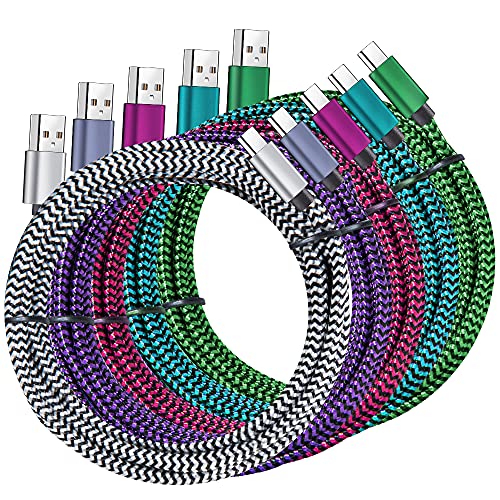
QQLIKE USB C Cable, 5 Pack (6FT) 3A Fast Charging Nylon Braided Type C Cord | Android USB C Charger Cable for Samsung Galaxy S9 S8 Note 8 9 10 20 S10 S20 S21 Plus
As an Amazon Associate we earn from qualifying purchases. Product prices and availability are accurate as of the date/time indicated.

Amazon Basics 5-Pack USB-A to USB-C Fast Charger Cable, USB 2.0, 480Mbps Speed, USB-IF Certified, Quick Charger for Apple iPhone 16/15, iPad, Samsung Galaxy, Tablets, Laptops, 3 Foot, Black
As an Amazon Associate we earn from qualifying purchases. Product prices and availability are accurate as of the date/time indicated.

INIU 240W USB C to USB C Cable, [6.6ft+6.6ft] Fast Charging Type C Cord | Nylon Braided, Fast Charging, LED Indicator, USB-C Data Transfer, for iPhone Duo 18 17 16 Pro, MacBook Pro, iPad, Samsung etc
As an Amazon Associate we earn from qualifying purchases. Product prices and availability are accurate as of the date/time indicated.
Note: Power figures are manufacturer listings, and a cable that lists 100W may only charge at 100W if your tablet and charger both support 100W, while a tablet that supports 45W will charge at 45W even with a 240W cable. Always use a charger that matches your tablet, check the cable rating before you buy, and do not use a damaged cable, because it can overheat. Prices can vary by retailer and sale, and some models listed at $15 to $20 may be available for less on sale, so check the current price before you buy.
Why Does Power Rating Matter for a USB-C Cable for Tablets?
Power rating matters for a USB-C cable for tablets for three reasons: charging speed, heat, and future-proofing. Charging speed matters because a cable rated at 100W, such as Anker PowerLine III Flow, can charge an iPad Pro or a Samsung Galaxy Tab S9 faster than a cable rated at 15W, while a cable rated at 60W can be enough for most tablets. Heat matters because a cable that is rated for higher power can handle more current without overheating, while a cable that is underrated can get warm.
Future-proofing matters because a cable rated at 140W or 240W can be used with a laptop as well as a tablet, while a cable rated at 60W may not charge a laptop quickly. A 100W cable is better than a 60W cable for most tablet users, because it offers a balance of speed and price, and it can be used with a tablet and a laptop.
Best USB C Cable for Tablets Reviewed
1. Anker PowerLine III Flow USB-C to USB-C, 100W, 6 ft – Best USB C Cable for Tablets Overall
The Anker PowerLine III Flow USB-C to USB-C, 100W, 6 ft, is our top pick because it offers a power rating of 100W, a data speed of 480 Mbps USB 2.0, a length of 6 feet, a silicone braided material, a USB-C to USB-C connector, and a price of $15 to $20. It has a reputation for Anker quality, a PowerLine III Flow design, and a popularity with tablet users who want a soft, flexible cable that does not tangle.
Anker designs the PowerLine III Flow with a focus on a soft silicone cable, with a 100W power rating, a 6 foot length, and a design that can be used to charge an iPad, a Samsung Tab, or a laptop. The PowerLine III Flow is a good choice if you want the best overall cable, you use a tablet, and you want an Anker brand. The main limitation is data speed, at 480 Mbps, which is slower than USB4, though it offers a soft cable that braided cables do not.
The Anker PowerLine III Flow USB-C to USB-C, 100W, 6 ft, typically costs $15 to $20. Choose it if you want the best overall cable, you use a tablet, and you want an Anker brand. It is the best choice for most tablet users.
2. UGREEN USB-C to USB-C Cable 100W Braided, 6.6 ft – Best USB C Cable for Tablets for UGREEN Use
The UGREEN USB-C to USB-C Cable 100W Braided, 6.6 ft, is a UGREEN cable with a power rating of 100W, a data speed of 480 Mbps USB 2.0, a length of 6.6 feet, a nylon braided material, a USB-C to USB-C connector, and a price of $10 to $15. It has a reputation for UGREEN quality, a braided design, and a popularity with tablet users who want a durable cable at a low price.
UGREEN designs the 100W Braided cable with a focus on a durable cable, with a nylon braid, a 100W power rating, and a design that can resist fraying at the connector. The UGREEN cable is a good choice if you want a UGREEN cable, you use a tablet, and you want a UGREEN brand. The main limitation is data speed, at 480 Mbps, though it offers a lower price than Anker.
The UGREEN USB-C to USB-C Cable 100W Braided, 6.6 ft, typically costs $10 to $15. Choose it if you want a UGREEN cable, you use a tablet, and you want a UGREEN brand. It is the best UGREEN choice in this guide.
3. Anker 765 USB-C to USB-C Cable 140W, 6 ft – Best USB C Cable for Tablets for Anker Fast Charging Use
The Anker 765 USB-C to USB-C Cable 140W, 6 ft, is an Anker cable with a power rating of 140W, a data speed of 480 Mbps USB 2.0, a length of 6 feet, a nylon braided material, a USB-C to USB-C connector, and a price of $20 to $25. It has a reputation for Anker quality, a 765 design, and a popularity with users who want a higher power cable for a MacBook Pro and a tablet.
Anker designs the 765 with a focus on a high power cable, with a 140W rating, a nylon braid, and a design that can charge a laptop and a tablet. The 765 is a good choice if you want an Anker cable, you want fast charging, and you want an Anker brand. The main limitation is price, at $20 to $25, which is higher than PowerLine III Flow, though it offers a higher power rating.
The Anker 765 USB-C to USB-C Cable 140W, 6 ft, typically costs $20 to $25. Choose it if you want an Anker cable, you want fast charging, and you want an Anker brand. It is the best Anker fast charging choice in this guide.
4. Apple USB-C Charge Cable 240W, 2 m – Best USB C Cable for Tablets for Apple iPad Use
The Apple USB-C Charge Cable 240W, 2 m, is an Apple cable with a power rating of 240W, a data speed of 480 Mbps USB 2.0, a length of 6.6 feet, a woven material, a USB-C to USB-C connector, and a price of $25 to $35. It has a reputation for Apple quality, a woven design, and a popularity with iPad users who want an official Apple cable for an iPad Pro or iPad Air.
Apple designs the USB-C Charge Cable with a focus on a woven cable, with a 240W power rating, a 2 metre length, and a design that can charge an iPad, a MacBook, and an iPhone 15. The Apple cable is a good choice if you want an Apple cable, you use an iPad, and you want an Apple brand. The main limitation is price, at $25 to $35, which is the highest in this guide, though it offers a woven material that is durable.
The Apple USB-C Charge Cable 240W, 2 m, typically costs $25 to $35. Choose it if you want an Apple cable, you use an iPad, and you want an Apple brand. It is the best Apple choice in this guide.
5. Belkin BoostCharge USB-C to USB-C Cable 60W, 6.6 ft – Best USB C Cable for Tablets for Belkin Use
The Belkin BoostCharge USB-C to USB-C Cable 60W, 6.6 ft, is a Belkin cable with a power rating of 60W, a data speed of 480 Mbps USB 2.0, a length of 6.6 feet, a PVC braided option material, a USB-C to USB-C connector, and a price of $15 to $20. It has a reputation for Belkin quality, a BoostCharge design, and a popularity with tablet users who want a simple 60W cable for an iPad or a Samsung Tab.
Belkin designs the BoostCharge with a focus on a simple cable, with a 60W power rating, a 6.6 foot length, and a design that can charge most tablets. The BoostCharge is a good choice if you want a Belkin cable, you use a tablet, and you want a Belkin brand. The main limitation is power, at 60W, which may be too low for a laptop, though it offers a price that is similar to Anker.
The Belkin BoostCharge USB-C to USB-C Cable 60W, 6.6 ft, typically costs $15 to $20. Choose it if you want a Belkin cable, you use a tablet, and you want a Belkin brand. It is the best Belkin choice in this guide.
6. Cable Matters USB4 Cable 240W, 3.3 ft – Best USB C Cable for Tablets for Budget Data Transfer Use
The Cable Matters USB4 Cable 240W, 3.3 ft, is a budget cable with a power rating of 240W, a data speed of 40 Gbps USB4, a length of 3.3 feet, a nylon braided material, a USB-C to USB-C connector, and a price of $20 to $30. It has a reputation for Cable Matters quality, a USB4 design, and a popularity with users who want fast data transfer for photos and video.
Cable Matters designs the USB4 cable with a focus on a fast data cable, with a 40 Gbps speed, a 240W power rating, and a design that can transfer large files from a tablet to a laptop quickly. The Cable Matters cable is a good choice if you want a budget cable, you transfer data, and you want a Cable Matters brand. The main limitation is length, at 3.3 feet, which is shorter than other cables, though it offers a data speed that other cables do not.
The Cable Matters USB4 Cable 240W, 3.3 ft, typically costs $20 to $30. Choose it if you want a budget cable, you transfer data, and you want a Cable Matters brand. It is the best budget data transfer choice in this guide.
Buying Guide: How to Choose the Best USB C Cable for Tablets
Before you buy, think about what tablet you have, whether it is an iPad Pro, an iPad Air, a Samsung Galaxy Tab S9, or a Lenovo Tab, what charger you use, whether it is 30W, 45W, or 100W, how you use the cable, whether it is for charging, data transfer, or both, and how much you want to spend. A cable that is perfect for an iPad may not work for a Samsung Tab if it needs a different power profile, and a cable that is perfect for charging may not work for data transfer. The six points below cover the decisions that matter most for a USB-C cable for tablets.
1. Power Rating, 60W vs 100W vs 240W, and Charging Speed
Power rating is the first decision. A cable with a power rating of 60W, such as Belkin BoostCharge, can charge most tablets, while a cable with a power rating of 100W, such as Anker PowerLine III Flow, can charge a tablet and a laptop, and a cable with a power rating of 240W, such as Apple or Cable Matters, can charge a high power laptop. A 100W cable is better for most tablet users, because it offers a balance of speed and price.
Choose a 100W cable if you use a tablet, you want fast charging, and you also charge a laptop. Choose a 60W cable only if you use a tablet, you have a 30W charger, and you want a low price. Choose a 240W cable only if you use a high power laptop, you want future-proofing, and you can accept a higher price. Check your tablet manual, so you know how much power it can accept, because a tablet that supports 45W will not charge faster with a 240W cable.
2. Data Speed, 480 Mbps vs 40 Gbps, and File Transfer
Data speed is the second decision. A cable with a data speed of 480 Mbps USB 2.0, such as Anker PowerLine III Flow, can transfer photos and documents, while a cable with a data speed of 40 Gbps USB4, such as Cable Matters, can transfer large video files quickly. A 480 Mbps cable is enough for most tablet users, because they mainly charge, while a 40 Gbps cable is better if you transfer large files.
Choose a 480 Mbps cable if you mainly charge, you transfer small files, and you want a low price. Choose a 40 Gbps cable if you transfer large video files, you use an iPad Pro with a USB4 port, and you want fast transfer. Check your tablet port, so you know whether it supports USB 2.0, USB 3.0, or USB4, because a USB4 cable will not transfer faster if your tablet only supports USB 2.0.
3. Length, 3.3 ft vs 6 ft vs 6.6 ft, and Desk vs Bed
Length is the third decision. A cable with a length of 3.3 feet, such as Cable Matters USB4, can be used at a desk, while a cable with a length of 6 feet, such as Anker PowerLine III Flow, can be used on a couch or a bed, and a cable with a length of 6.6 feet, such as UGREEN, can reach a charger that is far away. A 6 foot cable is better for most tablet users, because it offers a balance of reach and portability.
Choose a 6 foot cable if you use a tablet on a couch, in bed, or at a desk, and you want a versatile length. Choose a 3.3 foot cable only if you use a tablet at a desk, you want a short cable, and you do not need extra length. Choose a 10 foot cable only if you need a long reach, you have a charger far away, and you can accept a heavier cable. Test the length by measuring from your charger to your bed or desk, before you buy.
4. Material, Silicone vs Nylon Braided vs Woven, and Durability
Material is the fourth decision. A silicone cable, such as Anker PowerLine III Flow, can be soft, flexible, and tangle-free, while a nylon braided cable, such as UGREEN, can be durable and resist fraying, and a woven cable, such as Apple, can be strong and premium. A braided cable is better for most tablet users, because it offers durability for daily bending.
Choose a silicone cable if you want a soft cable, you carry it in a bag, and you do not want tangles. Choose a nylon braided cable if you want a durable cable, you bend it often, and you want it to last. Choose a woven cable if you want a premium feel, you use an iPad, and you do not mind a higher price. Check the connector strain relief, so you know whether it is reinforced, and test the cable by bending it, so you know whether it feels strong.
5. Connector, USB-C to USB-C vs USB-A to USB-C, and Charger Compatibility
Connector is the fifth decision. A USB-C to USB-C cable, such as all six in this guide, can be used with a modern USB-C charger, while a USB-A to USB-C cable needs an older USB-A charger and may charge slower. USB-C to USB-C is better for most tablet users, because it offers faster charging and a reversible connector.
Choose a USB-C to USB-C cable if you have a modern charger, you want fast charging, and you use an iPad or a Samsung Tab. Choose a USB-A to USB-C cable only if you have an older charger, you do not need fast charging, and you want a low price. Check your charger before you buy, so you know whether it has a USB-C port, and whether you need a USB-C to USB-C cable.
6. Price, Total Cost, and Choosing a USB-C Cable on a Budget
Price ranges in this guide run from about $10 to $35 for a USB-C cable for tablets, depending on brand, power, and data speed. A budget cable at $10 to $20, such as UGREEN or Anker PowerLine III Flow, is enough for most tablet users. A mid-price cable at $20 to $30, such as Anker 765 or Cable Matters USB4, offers a higher power or faster data. A premium cable at $25 to $35, such as Apple, offers a woven material and a 240W rating.
Consider total cost as well as price. A cable that costs $15 and needs no adapter may cost $15 in total, while a cable that costs $10 and needs a new charger for $20 may cost $30 in total. Budget for a cable, and if you need it, a charger, a case, and a cable organizer, not just a cable. Do not buy the cheapest cable if it frays after a month, and do not buy the most expensive cable if you only charge a tablet at 30W. A cable that has a power rating of 100W, a length of 6 feet, and a braided or silicone material will help you charge a tablet more reliably than a cable that is cheap but thin, or expensive but too short for your desk.
How to Use a USB-C Cable for Tablets Safely
Using a USB-C cable for tablets safely starts with checking the cable for damage, such as fraying, exposed wires, or a bent connector, before you use it, and replacing it if it is damaged, because a damaged cable can overheat or cause a short. Use a charger that matches your tablet, so you do not overcharge, and do not use a cable that is rated for less power than your charger, because it can get warm.
Do not bend the cable sharply at the connector, because it can break the wires inside, and do not pull the cable by the cord, because it can damage the connector. Store the cable loosely coiled, not tightly wrapped, so it does not kink, and keep it away from heat, so the material does not melt. Always use a cable that is certified, such as USB-IF, so you know whether it meets safety standards.
Which Best USB C Cable for Tablets Should You Buy?
If you want the best usb c cable for tablets, buy the Anker PowerLine III Flow USB-C to USB-C, 100W, 6 ft. It costs $15 to $20, it offers a power rating of 100W, a length of 6 feet, and a soft silicone material, which is the best balance for most tablet users.
If you want a UGREEN cable, buy the UGREEN USB-C to USB-C Cable 100W Braided, 6.6 ft. If you want an Anker fast charging cable, buy the Anker 765 USB-C to USB-C Cable 140W, 6 ft. If you want an Apple cable, buy the Apple USB-C Charge Cable 240W, 2 m. If you want a Belkin cable, buy the Belkin BoostCharge USB-C to USB-C Cable 60W, 6.6 ft. If you want a fast data cable, buy the Cable Matters USB4 Cable 240W, 3.3 ft.
All six cables in this guide are currently sold, designed for tablets, and suitable for a user who wants a reliable cable for an iPad, a Samsung Galaxy Tab S9, a Lenovo Tab, or a similar tablet. Pick the one that matches what tablet you have, what charger you use, how you use the cable, and your budget, and always check the cable for damage before you use it, and replace it if it is frayed or bent.
Disclosure: techcats.net may earn a commission from purchases made through links on this page, at no extra cost to you. Prices listed are typical ranges and can vary by retailer and sale. Power, data, and length figures are manufacturer claims and can vary by model. Always use a charger that matches your tablet, check the cable rating before you buy, and do not use a damaged cable, because it can overheat.
Frequently Asked Questions About the Best USB C Cable for Tablets
What is the best usb c cable for tablets?
What is the best usb c cable for tablets? In most cases, the Anker PowerLine III Flow USB-C to USB-C, 100W, 6 ft, is best overall, because it costs $15 to $20, it offers a power rating of 100W, a length of 6 feet, and a soft silicone material. The UGREEN 100W Braided is best for a low price, while the Apple 240W is best for iPad, and the Cable Matters USB4 is best for fast data transfer.
Do I need a 100W cable for a tablet?
Do you need a 100W cable for a tablet? In most cases, you do not need a 100W cable for a tablet, though it can be useful, because most tablets charge at 30W to 45W, so a 60W cable can be enough. A 100W cable is better if you also charge a laptop, you want future-proofing, and you do not want to buy a second cable. Choose a 100W cable if you want a versatile cable, and a 60W cable if you only charge a tablet.
Can I use any USB-C cable for an iPad?
Can you use any USB-C cable for an iPad? In most cases, yes, you can use any USB-C to USB-C cable for an iPad with a USB-C port, such as iPad Pro, iPad Air, or iPad 10th generation, though a cable that is rated for 60W or higher will charge faster than a cable rated for 15W. An iPad with a Lightning port needs a Lightning cable, not a USB-C cable. Check your iPad port before you buy, so you know whether it is USB-C or Lightning.
How long should a USB-C cable for a tablet be?
How long should a USB-C cable for a tablet be? In most cases, a USB-C cable for a tablet should be 6 feet long, because it can reach a charger on a desk, a couch, or a bed, without being too long to carry. A 3.3 foot cable can be good for a desk, while a 6.6 foot cable can be good for a bed. Choose a 6 foot cable if you want a versatile length, and a shorter cable only if you use a tablet at a desk.
Related guides
- Best Switch for Student NAS Storage: 6 Network Switches for Student NAS in 2026
- Best Cheap Baby Monitor for Parents in 2026: 7 Monitors That Offer Clear Video, Reliable Audio, and Peace of Mind for Parents
- Best Headphones vs Soundbar for Gaming in 2026: Positional Audio, Voice Chat, and Living-Room Freedom Compared for Competitive and Cinematic Players
- Best Drone for Student Videography in 2026: 7 Drones That Offer 4K Video, Stable Flight, and Reliable Use for Student Videography
More from Amazon
Programs that pair well with the guide above. Offers and eligibility are set by Amazon and may change.
Set up recurring deliveries of everyday items on eligible products. Terms and savings are set by Amazon.
Explore Subscribe & SaveFree shipping on eligible items, Prime Video and more. Eligible new members can start with a free trial.
Start a Prime free trialAudiobooks and podcasts to listen to on the go. Eligible new members can start with a free trial.
Try Audible freeRead from a large library of eBooks and audiobooks on any device. Check Amazon for current plans.
Explore Kindle UnlimitedAs an Amazon Associate we earn from qualifying purchases.

Write Your Review
No reviews yet. Be the first to share your experience!